
1. הקדמה
This manual provides detailed instructions for the operation and maintenance of your LFF DAB+/FM Digital Radio, Model YT81107. Please read this manual thoroughly before using the device to ensure proper function and to maximize your listening experience.

בילד 1: פראָנט view of the LFF DAB+/FM Digital Radio, Model YT81107, featuring its speaker grille, color LCD display, and telescopic antenna.
2. פּעקל אינהאַלט
ביטע טשעק די פּאַקעט פֿאַר די פאלגענדע זאכן:
- 1 x LFF DAB Digital Radio (Model YT81107)
- 1 רענטגענ אַק מאַכט אַדאַפּטער
- 1 x שנעל אָנהייב גייד (די מאַנואַל)
אויב קיין זאכן זענען פעלנדיק אָדער דאַמידזשד, ביטע קאָנטאַקט קונה שטיצן מיד.
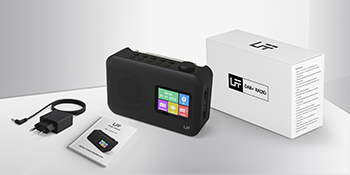
Image 2: The LFF DAB+/FM Digital Radio, AC power adapter, and quick start guide as included in the package.
3. פּראָדוקט פֿעיִקייטן
The LFF DAB+/FM Digital Radio YT81107 offers a range of features designed for versatile listening:
- DAB+ and FM Digital Radio: Supports ultra-wide signals in DAB+ (174.928 - 239.2 MHz) and FM (87.5 - 108 MHz) bands.
- סטאַנציע פּרעסעץ: Store up to 30 FM and 30 DAB+ stations for quick access.
- קלאָר לקד ווייַז: Large color LCD screen displays station information and time.
- פלעקסאַבאַל מאַכט אָפּציעס: Operates with the included AC adapter or 4 x 1.5V (LR6, AA) batteries (not included).
- פֿאַרבעסערטע אָפּנאַם: Features a 39 cm extendable antenna for improved signal strength.
- שלאָפן טימער: Programmable sleep timer (15/30/45/60/90/120 minutes).
- צווייענדיק וועקער זייגער: שטעלן צוויי פרייַ אַלאַרמס.
- בלועטאָאָטה קאַנעקטיוויטי: Functions as a Bluetooth speaker for streaming audio from compatible devices.
- כעדפאָון דזשאַק: 3.5 מ״מ דזשעק פֿאַר פּריוואַט צוהערן.

בילד 3: איבערview of the radio's functions, including DAB+ radio, 60 presets, FM radio, sleep timer, headphone jack, Bluetooth, full-color screen, and dual alarm.

Image 4: Close-up of the radio's full-color LCD display, showing time and date.
4. סעטאַפּ
4.1 מאַכט די מיטל
Your radio can be powered by either the AC adapter or batteries.
- AC מאַכט: Connect the included AC adapter to the DC 5V input port on the radio and plug the other end into a standard wall outlet.
- באַטאַרייע מאַכט: Open the battery compartment on the back of the radio. Insert 4 x 1.5V AA (LR6) batteries, ensuring correct polarity. Close the compartment securely. (Batteries are not included.)
4.2 אַנטענע אַדזשאַסטמענט
Extend the telescopic antenna fully and adjust its angle for optimal reception. For DAB+ and FM radio, a fully extended antenna generally provides the best signal.

Image 5: Illustration of the radio's dimensions (16.1 x 10.9 x 5.6 cm), battery requirements (4 x 1.5V AA), AC adapter (5V/1000mA), and the 360° adjustable antenna.
4.3 Initial Scan for Stations
Upon first power-on, the radio will typically perform an automatic scan for available DAB+ and FM stations. This process may take a few minutes. Once complete, the radio will store the found stations.
5. אַפּערייטינג ינסטרוקטיאָנס
5.1 טורנינג אויף / אַוועק
דרוק די מאַכט button (usually located on the top or front panel) to turn the radio on or off.
5.2 מאָדע סעלעקציע
דרוק די מאָדע button to cycle through available modes: DAB+ Radio, FM Radio, and Bluetooth.
5.3 Tuning Radio Stations (DAB+/FM)
There are three primary ways to find and select radio stations:
- אויטאָמאַטישער סקען: In DAB+ or FM mode, initiate an auto-scan. The radio will search for and list all available stations.
- מאַנואַל זוכן: Use the tuning knob or navigation buttons to manually adjust the frequency.
- פּרעסעץ: Store your favorite stations to preset numbers (1-30 for FM, 1-30 for DAB+). To save a station, tune to it, then press and hold a preset number button until the display confirms storage. To recall a station, simply press the corresponding preset number button.

Image 6: Visual representation of the three methods for selecting radio stations: Automatic Scan, Manual Search, and using Presets.
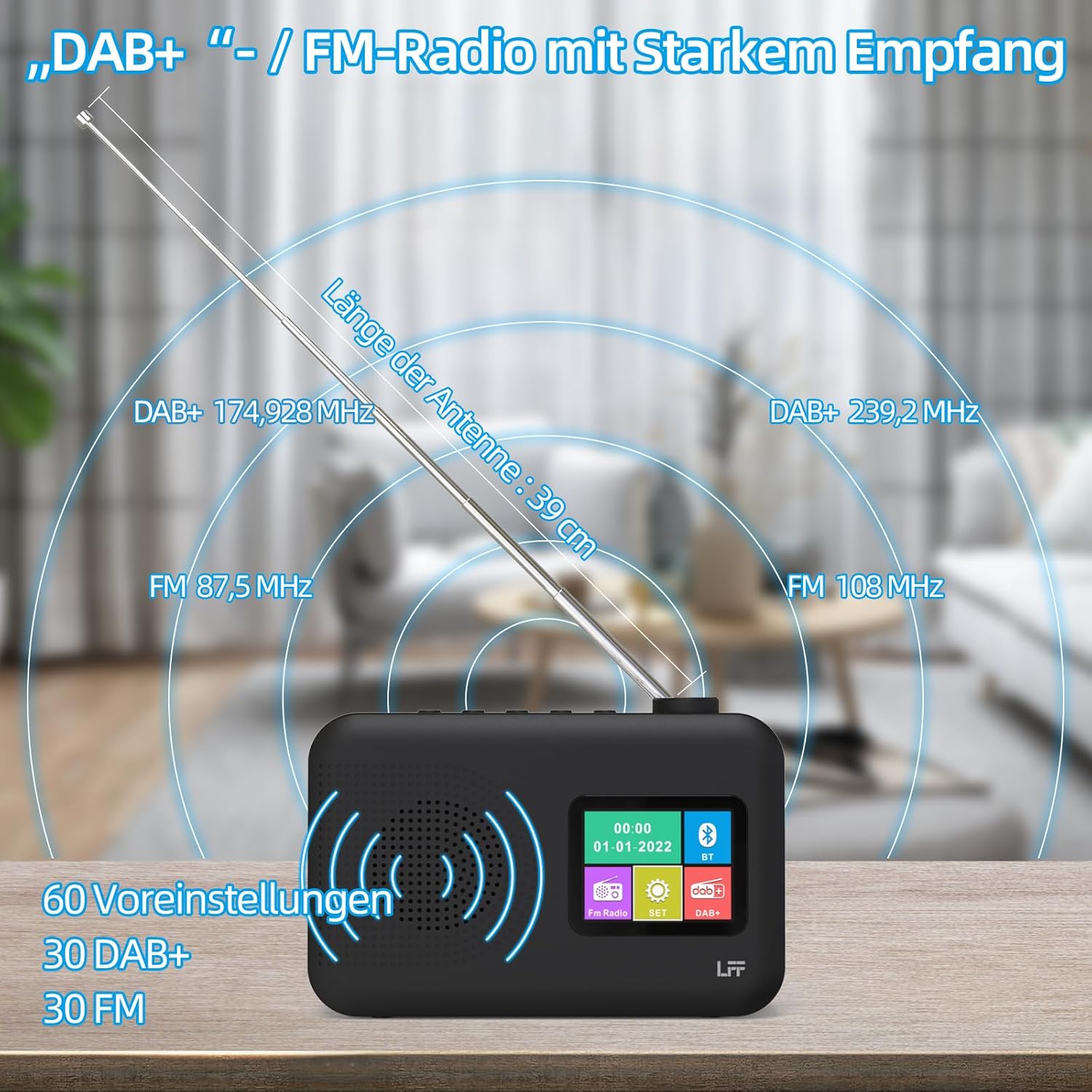
Image 7: Diagram showing the radio's reception capabilities for DAB+ (174.928 - 239.2 MHz) and FM (87.5 - 108 MHz) bands, highlighting the 39 cm antenna and 60 total presets.
5.4 באַנד קאָנטראָל
Adjust the volume using the dedicated volume knob or buttons, typically located on the top or side of the radio. The radio features 16 adjustable volume levels.
5.5 שלאָפן טיימער
To activate the sleep timer:
- דרוק די שלאָף טיימער קנעפּל.
- Cycle through the available durations: 15, 30, 45, 60, 90, or 120 minutes.
- דער ראַדיאָ וועט זיך אויטאָמאַטיש אויסלעשן נאָך דער אויסגעקליבענער צייט.

Image 8: Visual guide to setting the sleep timer, showing options for 15, 30, 45, 60, 90, and 120 minutes.
5.6 צווייענדיק שרעק זייגער
צו שטעלן די אַלאַרמס:
- דרוק די שרעק button to access alarm settings.
- אויסקלייַבן שרעק 1 אָדער שרעק 2.
- Set the desired alarm time, alarm source (e.g., buzzer, DAB+, FM), and volume.
- באַשטעטיקן דיין סעטטינגס.

Image 9: Depiction of the dual alarm clock feature, allowing for two separate alarm settings (Alarm 1 and Alarm 2).
5.7 בלועטוט קאָנעקטיוויטי
צו פאַרבינדן דיין מיטל דורך בלועטאָאָטה:
- Switch the radio to בלועטאָאָטה mode. The display will indicate it is searching for devices.
- On your smartphone or other Bluetooth-enabled device, search for available Bluetooth devices.
- Select "LFF YT81107" (or similar name) from the list to pair.
- Once connected, you can stream audio from your device to the radio.
Note: This radio acts as a Bluetooth receiver. It cannot connect to Bluetooth headphones.

Image 10: The radio's display showing a successful Bluetooth connection, indicating the paired device name.
5.8 נוצן פון כעדפאָונז
Plug standard 3.5mm wired headphones into the headphone jack on the side of the radio for private listening. The internal speaker will automatically mute when headphones are connected.

Image 11: Close-up of the 3.5mm headphone jack located on the side of the radio.
6. וישאַלט
To ensure the longevity and optimal performance of your radio, follow these maintenance guidelines:
- רייניקונג: ניצט אַ ווייכע, טרוקענע שטאָף צו רייניקן די אויסערלעכע זייט פון ראַדיאָ. ניצט נישט קיין שרײַבנדיקע רייניגער, וואַקסן, אדער סאָלווענטן.
- סטאָרידזש: When not in use for extended periods, remove batteries and store the radio in a cool, dry place.
- סוויווע: Avoid exposing the radio to extreme temperatures, direct sunlight, high humidity, or dusty environments.
- וואַסער ויסשטעלן: This radio is not waterproof. Keep it away from water and liquids.
7. טראָובלעשאָאָטינג
אויב איר טרעפט פּראָבלעמען מיט אייער ראַדיאָ, זעט די פאלגענדע געוויינטלעכע פּראָבלעמען און לייזונגען:
| פּראָבלעם | מעגלעך סיבה | לייזונג |
|---|---|---|
| קיין מאַכט | AC adapter not connected, batteries depleted or incorrectly inserted. | זיכער מאַכן אַז דער AC אַדאַפּטער איז זיכער אַרײַנגעשטעקט. פֿאַרבײַטן די באַטעריעס אָדער קאָנטראָלירן די פּאָלאַריטעט. |
| נעבעך ראַדיאָ אָפּטראָג | Antenna not extended, weak signal area, interference. | Fully extend and adjust the antenna. Move the radio to a different location. Avoid placing near other electronic devices. |
| בלועטאָאָטה איז נישט קאַנעקטינג | Radio not in Bluetooth mode, device not discoverable, already paired with another device. | Ensure radio is in Bluetooth mode. Make sure your device's Bluetooth is on and discoverable. Disconnect from other Bluetooth devices. |
| דער שרעק קלינגט נישט | Alarm not activated, volume too low, incorrect time setting. | Verify alarm is set and enabled. Increase alarm volume. Check alarm time. |
| קיין געזונט פון רעדנער | Volume too low, headphones connected. | פֿאַרגרעסערן די קול. אָפּשטעקן די כעדפאָונז. |
If the problem persists after trying these solutions, please contact LFF customer support.
8. ספּעסאַפאַקיישאַנז
| שטריך | דעטאַל |
|---|---|
| סאָרט | לפף |
| מאָדעל נומער | YT81107 |
| קאָליר | שוואַרץ |
| דימענסיעס (L X W X H) | 16.1 X 5.9 X 10.9 סענטימעטער |
| טונינג טעכנאָלאָגיע | DAB+ |
| געשטיצטע ראַדיאָ באַנדס | DAB+ (174.928 - 239.2 MHz), FM (87.5 - 108 MHz) |
| קאַנעקטיוויטי | Bluetooth, 3.5mm Headphone Jack |
| מאַכט מקור | AC Adapter (5V/1000mA), 4 x 1.5V AA (LR6) Batteries |
| ספּעציעלע פֿעיִקייטן | Color LCD Display, Sleep Timer, Dual Alarm Clock, 60 Presets (30 DAB+, 30 FM) |
| קאַמפּאַטאַבאַל דעוויסעס | Smartphones (for Bluetooth audio), Wired Headphones |
9. וואָראַנטי און שטיצן
LFF is committed to providing quality products. If you experience any quality issues or require assistance with your LFF DAB+/FM Digital Radio, please contact our customer support directly. Refer to the contact information provided in your purchase documentation or on the official LFF webפּלאַץ.