
1. פּראָדוקט איבערview
The Point Wired Mini Keyboard Pt-350 is a compact and versatile keyboard designed for both gaming and general typing. It features a high-quality build and a modern design, adhering to industry standards for reliable performance. This keyboard is an ideal choice for users seeking a durable and efficient input device.
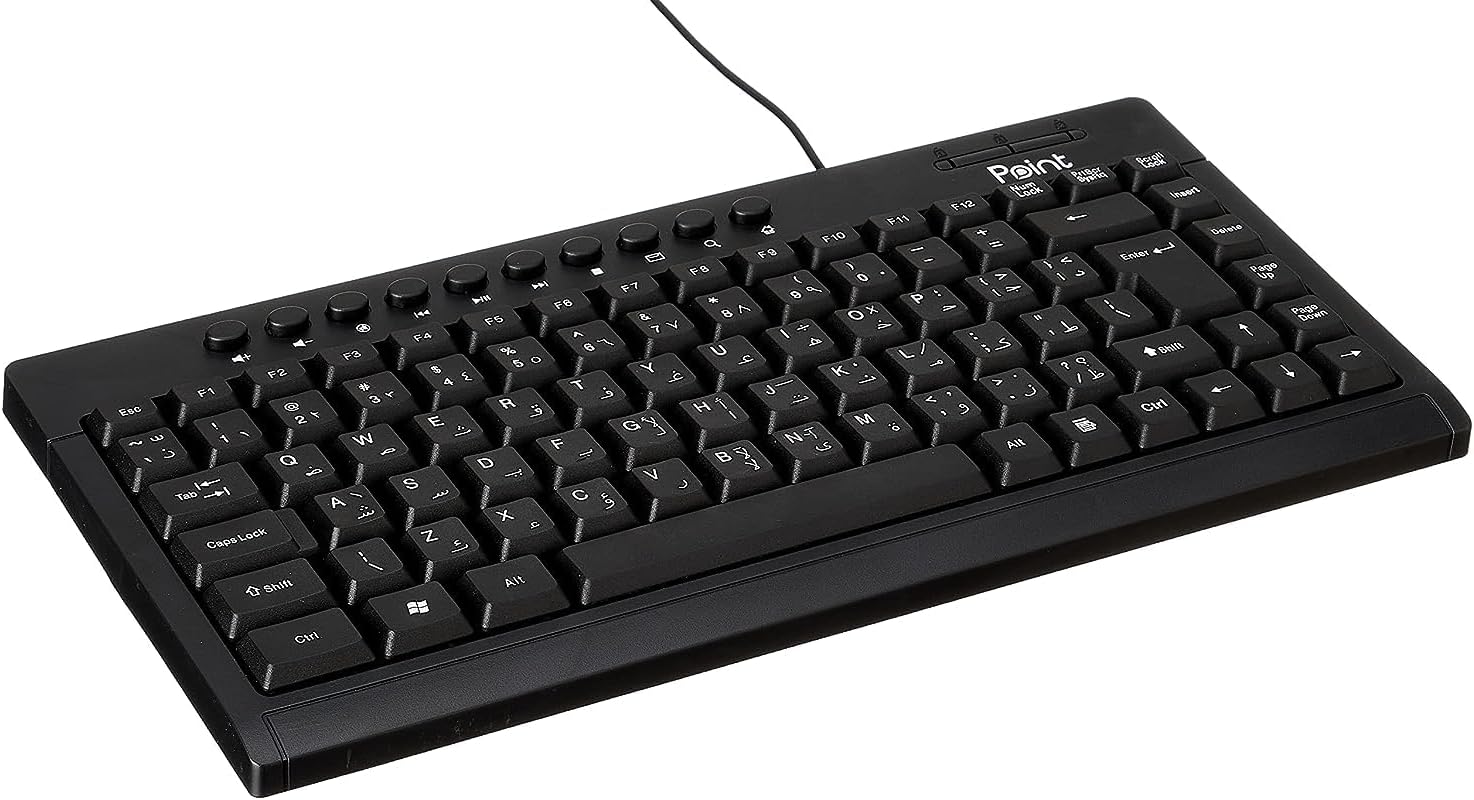
פיגור 1.1: ווינקלדיק view of the Point Wired Mini Keyboard Pt-350, showcasing its compact design and key layout.
שליסל פֿעיִקייטן:
- Wired connectivity for stable performance.
- Compact design suitable for various setups.
- Durable construction from high-quality plastic materials.
- Designed for both gaming and typing applications.
2. פּעקל אינהאַלט
ביטע קאָנטראָלירט דעם פּעקל קערפֿול צו זיכער מאַכן אַז אַלע זאַכן זענען דאָרט:
- Point Wired Mini Keyboard Pt-350
- באַניצער מאַנואַל (דעם דאָקומענט)
3. סעטאַפּ
Follow these steps to set up your Point Wired Mini Keyboard Pt-350:
- ופשליסן די קלאַוויאַטור: נעמט פֿאָרזיכטיק אַרויס די קלאַוויאַטור פֿון איר פּאַקעט.
- אידענטיפיצירן דעם USB קאַנעקטאָר: The keyboard comes with an integrated USB cable.
- פאַרבינדן צו דיין קאָמפּיוטער: Locate an available USB port on your computer (desktop PC, laptop, etc.). Insert the keyboard's USB connector firmly into the USB port.
- דרייווער אינסטאַלאַציע (פּלאַג און פּליי): The keyboard is plug-and-play compatible. Your operating system (Windows, macOS, Linux) should automatically detect and install the necessary drivers. This process usually takes a few seconds.
- באַשטעטיקן פאַנגקשאַנאַליטי: Once connected, open a text editor or any application that accepts text input and test the keys to ensure proper operation.

פיגור 3.1: פון אויבן אַראָפּ view of the keyboard, illustrating the key layout and integrated cable for connection.
4. אַפּערייטינג ינסטרוקטיאָנס
The Point Wired Mini Keyboard Pt-350 operates like a standard computer keyboard. Below are general instructions and tips for use:
גרונטלעכע טייפּינג:
- Simply press the desired keys to input characters, numbers, and symbols into your active application.
- ניצן די שיפט key for uppercase letters and alternative symbols on keys.
- די קאַפּס לאַק key toggles permanent uppercase typing.
- די Backspace key deletes characters to the left of the cursor.
- די אַרייַן key confirms input or moves to the next line.
פונקציע קנעפּלעך (F1-F12):
The function keys (F1 through F12) perform various tasks depending on the active program or operating system. Some common uses include:
- פ1: Often opens help for the active program.
- פ2: Renames a selected item.
- פ5: דערפרישן א web page or document.
- פ11: Toggles full-screen mode in many browsers.
מולטימעדיאַ שליסלען:
The keyboard may include dedicated multimedia keys or secondary functions on the F-keys (accessed via the Fn key, if present). These typically control:
- Volume control (Mute, Volume Up, Volume Down)
- Media playback (Play/Pause, Stop, Previous Track, Next Track)
5. וישאַלט
געהעריגע אויפהאלטונג גאראנטירט די לאנגעוויטי און אפטימאלע פערפארמאנס פון אייער קלאַוויאַטור:
- רייניקונג: Regularly clean the keyboard to prevent dust and debris buildup. Use a soft, lint-free cloth slightly dampגעוואשן מיט וואַסער אָדער אַ מילדער רייניקונג לייזונג. פֿאַרמייַדן שטרענגע כעמיקאַלן אָדער אַברייסיוו מאַטעריאַלן.
- באַזייַטיקונג פון שטויב: Use compressed air to blow out dust and crumbs from between the keys.
- ויסמיידן ספּילז: Keep liquids away from the keyboard to prevent damage to internal components. In case of a spill, immediately disconnect the keyboard and allow it to dry completely before reconnecting.
- סטאָרידזש: ווען נישט אין באַנוץ, האַלט די קלאַוויאַטור אין אַ ריינער, טרוקענער סביבה אַוועק פון עקסטרעמע טעמפּעראַטורן.
6. טראָובלעשאָאָטינג
If you encounter issues with your Point Wired Mini Keyboard Pt-350, refer to the following common problems and solutions:
קלאַוויאַטור ניט ריספּאַנדינג:
- קוק די USB קאַנעקשאַן: זיכער מאַכן אַז דער USB קאַבל איז זיכער אַרײַנגעשטעקט אין אַ פֿונקציאָנירנדיקן USB פּאָרט אויף אײַער קאָמפּיוטער. פּרוּווט אַן אַנדערן USB פּאָרט.
- ריסטאַרט קאָמפּיוטער: א פשוטע ריסטאַרט קען אָפט סאָלווען קאַנעקטיוויטי פּראָבלעמען.
- פּרובירן אויף אן אנדער קאָמפּיוטער: Connect the keyboard to another computer to determine if the issue is with the keyboard or your computer's setup.
- קוק אויף דיווייס מענעדזשער (ווינדאָוס): In Windows, go to Device Manager and check if the keyboard is listed under 'Keyboards' and if there are any error symbols. You might need to update or reinstall the driver.
Keys Not Working or Sticky:
- ריינע שליסלען: Dust, crumbs, or liquid residue can cause keys to stick or malfunction. Refer to the Maintenance section for cleaning instructions.
- גשמיות שעדיקן: Inspect the keys for any visible physical damage.
אומרעכטע אותיות אויסגאבע:
- טשעק שפּראַך סעטטינגס: Ensure your operating system's keyboard language settings match the physical layout of your keyboard.
- Driver Issue: Reinstalling the keyboard driver might resolve this.
אויב די פראבלעם בלייבט נאך פרובירן די שריט, ביטע קאנטאקטירט קאסטומער סופארט.
7. ספּעסאַפאַקיישאַנז
Technical specifications for the Point Wired Mini Keyboard Pt-350:

פיגורע 7.1: זייַט view of the keyboard, highlighting its profile and compact form factor.
| שטריך | דעטאַל |
|---|---|
| סאָרט נאָמען | פונט |
| מאָדעל | פּט-350 |
| קאַנעקטיוויטי טעכנאָלאָגיע | ווייערד |
| קאַמפּאַטאַבאַל דעוויסעס | קאָמפּיוטער |
| קלאַוויאַטור באַשרייַבונג | מולטיפונקטיאָנאַל |
| רעקאָממענדעד ניצט | פּיסי גיימינג |
| ספּעציעלע פֿעיִקייטן | גיימינג |
| קאָליר | שוואַרץ |
| סטייל | מאָדערן |
| מאַטעריאַל | פּלאַסטיק |
| שיפּינג דימענשאַנז | 34.5 X 26.4 X 3 סענטימעטער |
| וואָג | 800 גראַמז |
| ערשטער בנימצא טאָג | 4 סעפטעמבער 2022 |
| ASIN | B0BD2DM9ZJ |
8. וואָראַנטי און שטיצן
This product is covered by a standard manufacturer's warranty. Please refer to the warranty card included with your purchase for specific terms and conditions, including the warranty period and coverage details.
For technical support, troubleshooting assistance, or warranty claims, please contact Point customer service through the contact information provided on the product packaging or the official Point website. When contacting support, please have your product model (Pt-350) and purchase details ready.