
1. הקדמה
The LARIAU TS58 is a digital insulation resistance tester designed for measuring insulation resistance in various electrical equipment and insulating materials. This includes transformers, motors, cables, switches, and other electrical appliances. It is suitable for maintenance, repair, and testing applications.
This instrument features automatic voltage release, high stability, and reliability. It offers a maximum display count of 2000, 100 groups of data storage, and an insulation resistance measurement range of 0.1 MΩ to 10 GΩ. It also includes AC/DC voltage measurement capabilities and advanced DAR (Dielectric Absorption Ratio) and PI (Polarization Index) measurements for more accurate insulation assessment.

פיגורע 1: פראָנט view of the LARIAU TS58 Digital Insulation Resistance Tester.
2. זיכערקייַט אינפֿאָרמאַציע
Please read this manual carefully before using the instrument. Adhere to all safety warnings and operating instructions to prevent electric shock, injury, or damage to the instrument.
- שטענדיק זיכער מאַכן אַז דער אינסטרומענט איז אין גוטן אַרבעטס צושטאַנד איידער נוצן.
- Observe the high voltage indication on the display, which reminds you of safe operation during measurements.
- Do not operate the instrument in wet environments or with wet hands.
- Replace batteries promptly when the low battery indication appears to ensure accurate readings and safe operation.
- דו זאלסט נישט פּרווון צו מעסטן וואָלtages or resistances beyond the specified ranges.
- Ensure proper connection of test leads before initiating any measurement.
3. פּראָדוקט איבערview
The TS58 features a clear LCD backlit screen for easy reading, a robust dustproof and moisture-proof shell, a foldable bracket for convenient positioning, and comes with a zipper carry bag for portability.
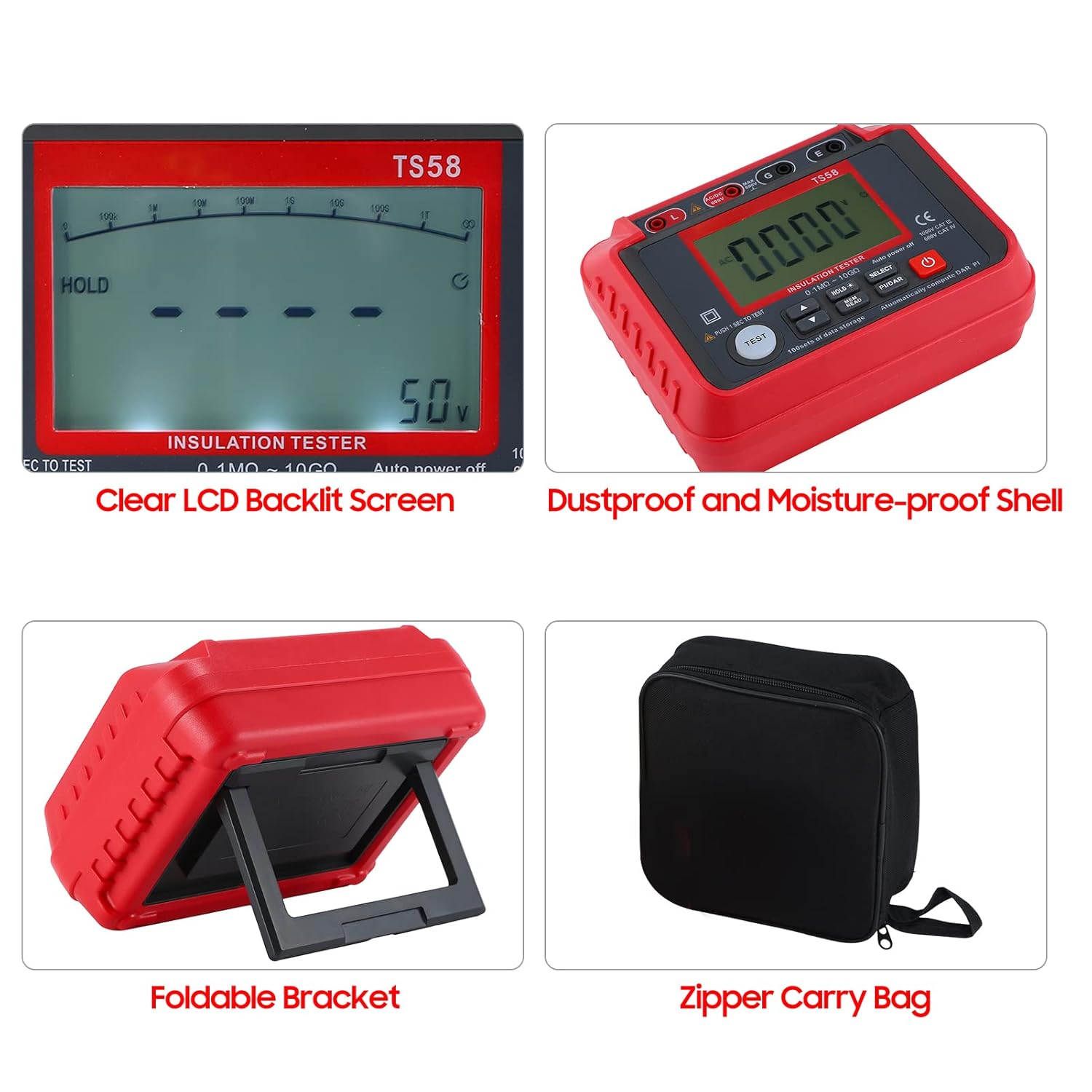
Figure 2: Key features of the TS58, including the LCD screen, protective casing, and accessories.
3.1 קאָנטראָלן און אַרויסווייַזונג
The device includes a large digital LCD display, function buttons for selecting measurement modes, adjusting output voltage, and initiating tests. It also has input terminals for test leads.

פיגורע 3: איבערview of the TS58's main functions and display elements.
4. סעטאַפּ
4.1 באַטאַרייע ייַנמאָנטירונג
The TS58 is powered by 8 x 1.5V AA/LR6 batteries (not supplied). To install or replace batteries:
- געפינען די באַטאַרייע אָפּטייל אויף די צוריק פון די קיילע.
- עפענען די באַטאַרייע אָפּטייל דעקן.
- Insert 8 AA/LR6 batteries, ensuring correct polarity (+/-).
- פאַרמאַכן די באַטאַרייע אָפּטייל דעקן סיקיורלי.
A low battery indication will appear on the display when batteries need replacement.
5. אַפּערייטינג ינסטרוקטיאָנס
The TS58 is designed for measuring insulation resistance and AC/DC voltage. Always ensure the test leads are securely connected to the instrument and the circuit under test.

Figure 4: The TS58 tester with test leads, ready for use.
5.1 ינסאַליישאַן קעגנשטעל מעזשערמאַנט
- Connect the test leads to the appropriate terminals on the TS58 and to the equipment under test.
- קער אויף די קיילע.
- Use the 'SELECT' button to choose the insulation resistance measurement mode.
- סטרויערן די רעזולטאַט וואָלtage (50V/100V/250V/500V/1000V) using the up/down buttons as required for your test.
- Press the 'TEST' button to initiate the measurement. The high voltagE גראדן וועט ילומיניט.
- Read the insulation resistance value on the LCD screen.
- After the test, the instrument automatically discharges the circuit.
5.2 AC/DC VoltagE מעזשערמאַנט
- Connect the test leads to the appropriate terminals on the TS58 and to the voltagE מקור.
- קער אויף די קיילע.
- Use the 'SELECT' button to choose the AC or DC voltagE מעזשערמאַנט מאָדע.
- לייענען דעם חלקtage value on the LCD screen. The measurement range is 10V-600V.
5.3 DAR and PI Index Measurement
The DAR (Dielectric Absorption Ratio) and PI (Polarization Index) measurements help assess the quality and aging status of insulation, mitigating the effects of temperature, humidity, and interference currents.
- Perform an insulation resistance test as described in section 5.1.
- Press the 'PI/DAR' button. The instrument will automatically compute and display the DAR and PI values.
- Refer to industry standards for interpreting DAR and PI values to evaluate insulation condition.
5.4 דאַטן סטאָרידזש און צוריקרופן
The TS58 can store up to 100 groups of measurement data.
- To save data: After a measurement, press the 'HOLD*' button to hold the current reading, then press 'MEM READ' to save it. (Note: The exact sequence might vary; refer to the full manual for precise steps if available).
- To recall data: Press the 'MEM READ' button and use the up/down arrows to navigate through stored data groups.

Figure 5: The TS58 in practical application scenarios.
6. וישאַלט
6.1 רייניקונג
Wipe the instrument's exterior with a soft, damp שטאָף. ניצט נישט קיין שרײַבנדיקע רייניגערס אדער סאָלווענטן. זאָרגט אַז קיין פֿײַכטקייט זאָל נישט אַרײַנגיין אין דעם אַפּאַראַט.
6.2 סטאָרידזש
When not in use for extended periods, remove the batteries to prevent leakage. Store the instrument in its zipper carry bag in a dry environment, away from direct sunlight and extreme temperatures. The recommended storage environment is -10~50℃, <75%RH.
7. טראָובלעשאָאָטינג
- דער אינסטרומענט גייט נישט אן: קאָנטראָלירט די אינסטאַלאַציע פון די באַטעריעס און זיכערט זיך אַז זיי זענען נישט אויסגעשעפּט. טוישט אויס אויב נייטיק.
- נישט פּינקטלעכע לייענונגען:
- זיכער מאַכן אַז די טעסט דראָטן זענען ריכטיק פֿאַרבונדן און נישט געשעדיגט.
- Verify the correct measurement mode and output voltagע זענען אויסגעקליבן.
- Consider environmental factors like temperature and humidity, especially for insulation resistance measurements.
- הויך וואָלtage warning persists after test: The instrument has an automatic voltage release function. If the warning persists, ensure the circuit under test is fully discharged before handling.
8. ספּעסאַפאַקיישאַנז
The following table details the technical specifications of the LARIAU TS58 Digital Insulation Resistance Tester.

Figure 6: Detailed technical parameters of the TS58.
| פּאַראַמעטער | ווערט |
|---|---|
| קאָליר | רויט + גרוי |
| מאַטעריאַל | אַבס + סיליקאָנע |
| סקרין | לקד באַקלייט פאַרשטעלן |
| מאַקסימום נומער | 2000 |
| רעזולטאַט חלקtage | 50V/100V/250V/500V/1000V |
| Resistance Measuring Range | 0.1 MΩ ~ 10 GΩ |
| אַק/דק חלקtagE מעאַסורינג קייט | 10 V-600 V. |
| AC Voltage אָפטקייַט | 40-70 הז |
| דאַטאַ סטאָרידזש | 100 גרופּעס |
| קורץ-קרייַז קראַנט | <1.8 מאַ |
| מאַכט צושטעלן | 8 * 1.5 V AA/LR6 (not supplied) |
| אַרבעט סוויווע | 0 ~35℃, <75%RH, <2000m |
| סטאָרידזש סוויווע | -10~50℃, <75%RH |
| נומער גרייס | 180 * 140 * 70 מם / 7.09 * 5.51 * 2.76 ין |
| וואָג פון דעם פּראָדוקט (אָן באַטאַרייע) | 623 ג / 1.37 לב |
9. וואָראַנטי און שטיצן
Information regarding product warranty and customer support is typically provided with the product packaging or on the manufacturer's official website. Please refer to those resources for details on warranty coverage, technical assistance, and service inquiries.
For further assistance, please contact LARIAU customer support through their official channels.