
הקדמה
This manual provides detailed instructions for the installation, operation, and maintenance of your UNITOPSCI Android 13 Car Stereo Radio. Designed specifically for Honda Odyssey models from 2005 to 2010, this 10.1-inch touch screen unit integrates advanced features such as Bluetooth, GPS navigation, Mirror Link, and backup camera support to enhance your driving experience. Please read this manual thoroughly before use to ensure proper functionality and safety.

Figure 1: UNITOPSCI Android 13 Car Stereo Radio with accessories.
זיכערקייַט אינפֿאָרמאַציע
- פאַכמאַן ינסטאַלירונג רעקאַמענדיד: Due to the complexity of vehicle electrical systems, professional installation is highly recommended to prevent damage to the unit or your vehicle.
- מאַכט צושטעלן: Ensure the unit is connected to a 12V DC power supply with a negative ground. Incorrect voltage קען שאַטן.
- וויירינג: Do not modify or cut the wiring harness. Refer to the wiring diagram for correct connections.
- אַפּערייטינג טעמפּעראַטור: The unit is designed to operate within a temperature range of -40℃ to 80℃.
- דרייווינג זיכערקייַט: דו זאלסט נישט אַרבעטן די אַפּאַראַט אָדער view ווידעאָס וואָס קענען אייך אָפּלײַטן בשעתן פֿאָרן. שטענדיק זאָלט איר האָבן אַ פּריאָריטעט אויף וועג-זיכערקייט.
- ווענטילאַטיאָן: זיכער מאַכן גענוג ווענטילאַציע אַרום דעם אַפּאַראַט צו פאַרמייַדן איבערהיצונג.
פּעקל אינהאַלט
באַשטעטיקט אַז אַלע זאכן וואָס זענען אויסגערעכנט אונטן זענען אַרייַנגערעכנט אין אייער פּעקל:
- 1 x Android Car Stereo (pre-installed with trim)
- 1 x באַקקופּ אַפּאַראַט
- 1 x מאַכט קאַבלע
- 1 רענטגענ גפּס אַנטענע
- 1 x קאַמעראַ אַרייַנשרייַב קאַבל
- 1 x RCA אַרייַנגאַנג און אַרויסגאַנג קאַבל
- 2 רענטגענ וסב קאַבלעס
- 1 x ינסטרוקטיאָן מאַנואַל
- 1 x Installation Tool Set
- 1 רענטגענ פונדרויסנדיק מיקראָפאָן
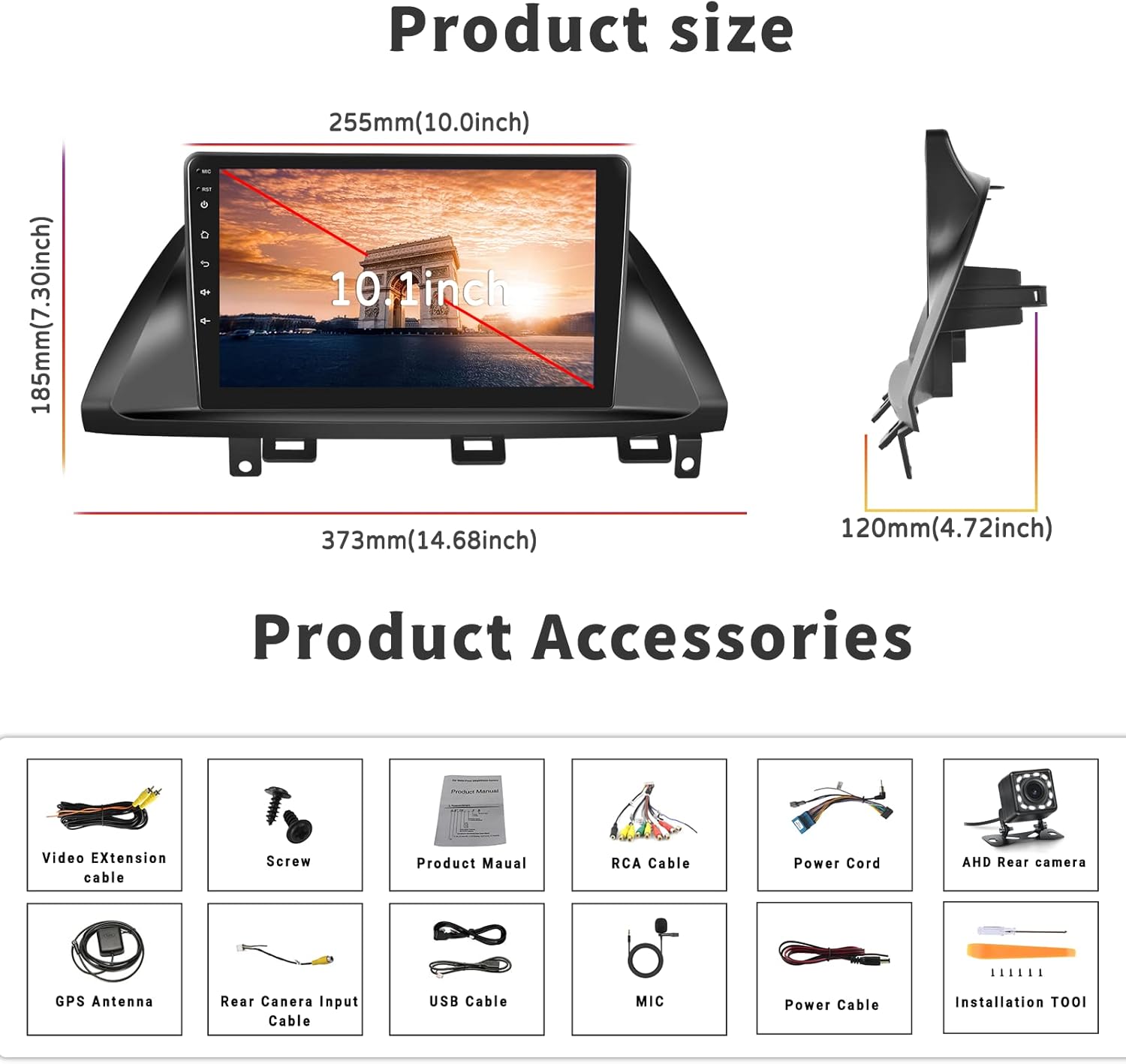
פיגור 2: פּראָדוקט דימענסיעס און אַרייַנגערעכנטע אַקסעסאָריעס.
סעטאַפּ און ינסטאַלירונג
קאַמפּאַטאַבילאַטי
This car stereo is designed for Honda Odyssey models from 2005 to 2010. It is compatible with vehicles that have an original car radio with a DVD player. It is ניט קאַמפּאַטאַבאַל with original car radios that have a factory screen or GPS. In such cases, an additional wire harness may be required. Please verify your car's center console size and wire harness details before installation.

Figure 3: Car compatibility and wiring harness details.
Wiring Diagram for Backup Camera
Proper connection of the backup camera is crucial for its automatic activation. Follow these steps:
- מאַכט קאַבלע קאַנעקשאַן: Connect the red wire of the backup camera's power cable to the positive reversing light, and the black wire to the negative reversing light.
- RCA Cable Connection: Insert the yellow RCA cable from the camera into the 'CAM-IN' (yellow) port on the back of the radio unit.
- Reverse Trigger Wire: Ensure the 'reverse (+)' wire connection (typically a pink wire on the power wire harness labeled 'back') is securely connected to the positive wire of the reversing light. This enables the unit to automatically display the rear view image when the vehicle is in reverse.
באַמערקונג 1: The short red wires next to the RCA port do not require connection in this wiring setup.
באַמערקונג 2: When the device is in parking mode (displaying the rear view), other functions will temporarily pause.

פיגורע 4: דערציען view camera wiring diagram.
אַלגעמיינע ינסטאַללאַטיאָן סטעפּס
While specific steps may vary by vehicle, the general installation process involves:
- דיסקאַנעקט באַטערי: איידער איר הייבט אן, דארפט איר אפשטעלן דעם נעגאטיוון באטעריע-טערמינאל פונעם אויטא כדי צו פארמיידן עלעקטרישע קורצע צוזאמענברוכן.
- אַראָפּנעמען אַלטע אַפּאַראַט: Carefully remove the existing car stereo and trim.
- פאַרבינדן וויירינג: Connect the new stereo's power harness, speaker wires, antenna, and other necessary cables according to the provided wiring diagram.
- Install GPS Antenna: מאָנטירט די דזשי-פּי-עס אַנטענע אין אַ אָרט מיט אַ קלאָרן view פון הימל, טיפּיש אויף די דאַשבאָרד אָדער אונטער די ווינטשויב.
- אינסטאַלירן באַקאַפּ קאַמעראַ: Route the backup camera cable from the rear of the vehicle to the head unit, connecting it as described in the wiring section.
- פּרובירן קאַנעקשאַנז: Before fully securing the unit, reconnect the battery and perform a quick test of all functions (power, audio, radio, GPS, camera, etc.).
- זיכערע איינהייט: Once tested, carefully slide the new stereo into the dash opening and secure it with screws. Reinstall the trim.
- לעצט טשעק: Perform a comprehensive test of all features to ensure proper operation.
אַפּערייטינג ינסטראַקשאַנז
Bluetooth & FM/RDS Radio Function
The unit features built-in Bluetooth 4.2 and an FM/RDS radio. The integrated microphone supports hands-free calling, Bluetooth music streaming, and automatic phone book download. The FM radio includes 18 preset stations for news, music, and weather broadcasts. You can also adjust sound settings with the EQ balance function and connect to a subwoofer.

Figure 5: Bluetooth and FM Radio interface.
GPS Navigation & WiFi
The head unit comes with preloaded offline maps and supports both online and offline navigation. With a WiFi connection, you can access online maps and download additional maps as needed. To download maps, connect to WiFi, open the 'Here We Go' app, click the 'folder' icon, select 'download maps', and choose the appropriate region. WiFi connectivity also allows you to surf the internet and download various applications.

Figure 6: GPS Navigation and WiFi features.
Mirror Link for Android and iOS Phones
The unit supports mirror link functionality for both Android and iOS mobile phones. For iOS devices, it supports one-way projection via WiFi. For Android phones, it supports two-way connection via WiFi or the original USB phone cable, allowing you to control your phone's apps directly from the 10.1-inch screen. This feature is convenient for displaying videos or navigation maps from your phone. Note: Not compatible with Samsung phones for two-way control.

פיגור 7: שפּיגל לינק פאַנגקשאַנאַליטי.
באַקקופּ קאַמעראַ אַרייַנשרייַב
A backup camera is included with the unit. When the vehicle is shifted into reverse gear, the screen will automatically switch to display the reversing image, providing a clear view of the area behind your car. The camera features waterproof design, night vision, and a 170° wide-angle view פֿאַר ימפּרוווד זיכערקייַט.

Figure 8: Backup Camera Input display.
Video Output & Split Screen
The unit supports video output, allowing you to share entertainment with a backseat monitor. Additionally, the split-screen function enables you to display two applications side-by-side simultaneously, such as navigation and music playback, for improved multitasking.

Figure 9: Video Output and Split Screen functionality.
שטיר-ראָד קאָנטראָל (SWC)
The unit supports steering wheel control functions, allowing you to manage various features directly from your vehicle's steering wheel buttons. Please note that a steering wheel controller may need to be ordered separately if your vehicle does not have compatible controls or if the existing system works with a CANbus (this unit does not support CANbus). Refer to the unit's settings to map your steering wheel buttons.
וישאַלט
- רייניקונג די פאַרשטעלן: ניצט אַ ווייכן, לינט-פֿרייע שטאָף צו פֿאָרזיכטיק ווישן דעם ריר-עקראַן. פֿאַר שווערע פֿלעקן, אַ ביסל ווישןampen the cloth with water or a screen cleaner designed for electronics. Avoid harsh chemicals or abrasive materials.
- אַלגעמיינע רייניקונג: Keep the unit and surrounding area free from dust and debris. Use a soft brush or compressed air to clean vents and ports.
- ווייכווארג דערהייַנטיקונגען: Periodically check for software updates from the manufacturer's official channels to ensure optimal performance and access to new features.
- ויסמיידן עקסטרעם טעמפּעראַטורעס: While the unit is designed for a wide temperature range, prolonged exposure to extreme heat or cold can affect its lifespan.
טראָובלעשאָאָטינג
די סעקציע באהאנדלט אלגעמיינע פראבלעמען וואס איר קענט באגעגענען. אויב די פראבלעם בלייבט, ביטע קאנטאקטירט קאסטומער סופארט.
| פּראָבלעם | מעגלעך סיבה | לייזונג |
|---|---|---|
| דער אַפּאַראַט טוט נישט מאַכט אויף. | אומריכטיקע וויירינג; דורכגעבלאָזן פיוז; לויזע פֿאַרבינדונג. | Check power cable connections (red and yellow wires); Inspect vehicle's fuse box; Ensure all harnesses are securely plugged in. |
| קיין געזונט פון ספּיקערז. | רעדנער דראָטן נישט ריכטיק פארבונדן; באַנד צו נידעריק; שטום פונקציע אַקטיוו. | Verify speaker wire connections; Increase volume; Check if unit is muted. |
| דזשי-פי-עס סיגנאַל שוואַך אָדער נישט פֿאַראַן. | דזשי-פי-עס אַנטענע נישט ריכטיק אינסטאַלירט אָדער פֿאַרשטאָפּט. | Ensure GPS antenna is mounted in a clear, unobstructed location; Check antenna connection to the unit. |
| בעקאַפּ קאַמעראַ ווײַזט זיך נישט. | Incorrect camera wiring; 'Reverse' trigger wire not connected. | Review the 'Wiring Diagram for Backup Camera' section; Ensure the camera's power and RCA cables are correctly connected, and the 'reverse' trigger wire is properly linked to the vehicle's reversing light positive. If the camera has an LED light, check if it illuminates when reverse is engaged. |
| Mirror Link not connecting. | Incorrect connection method; Incompatible phone model; App issues. | For iOS, use WiFi only. For Android, try both WiFi and USB (original phone cable). Ensure your phone is not a Samsung model (known compatibility issue). Restart both phone and head unit. |
| Unit lags or freezes. | Too many apps running; Low memory. | Close unnecessary applications; Restart the unit. |
ספּעסאַפאַקיישאַנז
| שטריך | באַשרייַבונג |
|---|---|
| סיסטעם | אַנדרויד 13.0 |
| טשיפּסעט | 8227ל-דעמאָ |
| פאַרשטעלן גרייס | 10.1 אינטשעס |
| פאַרשטעלן האַכלאָטע | 1024 X 600 |
| זכּרון (באַראַן + ראַם) | 1 גיגאבייט באַראַן + 32 גיגאבייט ראַם |
| שפּיגל לינק | Android/iOS (Android two-way, iOS one-way) |
| Video Output/WiFi | געשטיצט |
| ראַדיאָ באַנד | FM |
| ראַדיאָ טשיפּ | NXP6851 |
| מאַכט Ampליפיער טשיפּ | AC7315 |
| מאַכט רעזולטאַט | 4 * 45 וו |
| אַרבעט טעמפּעראַטור | -40 ℃ צו 80 ℃ |
| סטירינג וויל קאָנטראָל | Supported (controller may be separate) |
| בלועטאָאָטה ווערסיע | 4.2 |
| מאַפּס | געבויט-אין אָפפלינע מאַפּס |
| וסב צובינד | טאָפּל וסב |
| סופּפּאָרט פֿאַר אַודיאָ פֿאָרמאַט | APE/FLAC/WAV/MP3/WMA etc. |
| ווידעא פֿאָרמאַטירונג שטיצן | MKV/RMVB/AVI/MP4/MDV etc. |
| בילד פֿאָרמאַט סופּפּאָרט | PNG/JPEG/JPG/GIF/WBMP/BNP etc. |
| פּראָדוקט דימענשאַנז | 0.39 X 0.39 X 0.39 אינטשעס |
| פּונקט וואָג | 3.27 פונט |
וואָראַנטי און שטיצן
UNITOPSCI is committed to providing high-quality products and satisfactory services. We offer the following support:
- Replacement Availability: Replacements are available within 24 months of purchase.
- שנעל ענטפער: Expect a response to inquiries within 16 hours.
- לעבן נאָך סאַלעס שטיצן: We provide lifetime after-sales consultation and technical support.
- צוריקקער פּאָליטיק: הנאה האָבן פון אַ 60-טאָגיקע זאָרגלאָזע צוריקקער-פּעריאָדע.
For any questions, technical assistance, or warranty claims, please contact us directly via email:
בליצפּאָסט: UNITOPSCI@126.com

Figure 10: UNITOPSCI Customer Support Information.