
1. הקדמה
This manual provides instructions for the Generic RC-799M infrared replacement remote control. This remote is designed to operate various Onkyo A/V receivers and components. It offers a straightforward, ready-to-use solution without complex programming.
וויכטיק באַמערקונג: This is a replacement remote and may not offer all functions of your original Onkyo remote. Please review the compatibility section carefully.
2. קאַמפּאַטאַבילאַטי
The Generic RC-799M remote control is compatible with a range of Onkyo A/V receivers. Please ensure your specific model is listed below before use. If your model is not listed, this remote may not be compatible.
Compatible Onkyo Models include:
- RC-717M
- RC-763M
- טקס-נר 906
- טקס-נר 626
- הט-ר 520
- RC-687M
- RC-690M
- RC-649M
- RC-807M
- טקס-נר 1008
- TX-SR502
- TX-SR706
- הט-ס5600
- TX-SR502S
- TX-SR706S
This remote is designed to control Onkyo and INTEGRA components only. It cannot be programmed to control other brands of televisions or devices.
3. סעטאַפּ
The Generic RC-799M remote control requires two AA batteries (not included) for operation. No programming is required; simply insert the batteries, and the remote will be ready to use with compatible Onkyo A/V receivers.
3.1. ינסטאָלינג באַטעריז
- געפֿינען די דעקן פון די באַטאַרייע אָפּטייל אויף די צוריק פון די ווייַט קאָנטראָל.
- שלעפּט דעם דעקל אַראָפּ אָדער דריק דעם לאַטש צו עס עפֿענען.
- Insert two new AA batteries, ensuring the positive (+) and negative (-) terminals align correctly with the markings inside the compartment.
- לייגט צוריק דעם דעקל פונעם באַטעריע־אָפּטייל דורך עס צוריקצורוקן אין פּלאַץ ביז עס קליקט זיכער.

בילד 1: צוריק view פון דער ווײַטקאָנטראָל, אילוסטרירנדיק דעם באַטעריע אָפּטייל.
Once batteries are installed, the remote is ready for immediate use with your compatible Onkyo A/V receiver.
4. אַפּערייטינג די רימאָוט קאָנטראָל
This remote control operates using infrared (IR) technology. Point the remote directly at your Onkyo A/V receiver and ensure there are no obstructions between the remote and the receiver's IR sensor.
4.1. יקערדיק פאַנגקשאַנז
The remote features standard buttons for common A/V receiver functions. While the exact layout may vary slightly from your original remote, the functions are generally intuitive.
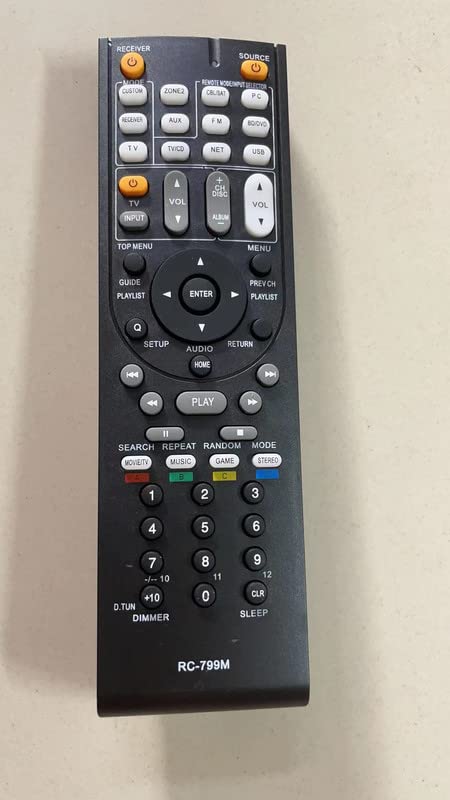
בילד 2: פראָנט view of the remote control, displaying its button layout.
- מאַכט: טורנס די ופנעמער אויף אָדער אַוועק.
- באַנד אַרויף / אַראָפּ: אַדזשאַסץ די אַודיאָ באַנד.
- איינגאבע סעלעקטאר: Cycles through available audio/video inputs.
- נאַוויגאַציע קנעפּלעך: For menu navigation (if supported by your receiver).
- פּלייבאַק קאָנטראָלס: Play, Pause, Stop, Fast Forward, Rewind (for connected media devices, if supported).
Refer to your Onkyo A/V receiver's original manual for specific button functions and their corresponding operations.
5. וישאַלט
To ensure optimal performance and longevity of your remote control, follow these simple maintenance guidelines:
- רייניקונג: ווישט אָפּ די ווײַטקאָנטראָל מיט אַ ווייכן, טרוקענעם שטאָף. ניצט נישט קיין פֿליסיקע רייניגער, סאָלווענטן, אָדער אַברייסיוו מאַטעריאַלן, ווײַל די קענען שאַטן די ייבערפֿלאַך אָדער אינעווייניקסטע קאָמפּאָנענטן.
- באַטערי פאַרבייַט: Replace batteries when the remote's response becomes sluggish or stops working. Always replace both batteries at the same time with new AA batteries. Do not mix old and new batteries, or different types of batteries.
- סטאָרידזש: If the remote will not be used for an extended period, remove the batteries to prevent leakage, which can damage the remote. Store the remote in a cool, dry place away from direct sunlight and extreme temperatures.
- ויסמיידן טראפנס: באַשיצט דעם ווײַטקאָנטראָל פֿון פֿאַלן און קלאַפּן, וואָס קענען שאַטן די אינעווייניקסטע קרייזן.
6. טראָובלעשאָאָטינג
אויב איר האָט פּראָבלעמען מיט אייער ווײַטקאָנטראָל, פּרוּווט די פֿאָלגנדיקע טריט פֿאַר פּראָבלעם־לייזונג:
- ווייַט ניט ריספּאַנדינג:
- Ensure the remote has fresh AA batteries installed correctly.
- Check for any obstructions between the remote and the A/V receiver's IR sensor.
- Make sure you are pointing the remote directly at the receiver.
- Verify that your Onkyo A/V receiver model is listed in the compatibility section of this manual.
- עטלעכע פונקציעס אַרבעטן נישט:
- As a replacement remote, it may not support all advanced or specific functions of your original Onkyo remote. This is normal.
- Confirm that the function you are trying to use is supported by your specific Onkyo A/V receiver model.
- Remote controls other devices unintentionally:
- This remote is designed for Onkyo and INTEGRA components only. It cannot be programmed for other brands. Ensure you are not attempting to control non-compatible devices.
7. ספּעסאַפאַקיישאַנז
| שטריך | דעטאַל |
|---|---|
| מאָדעל נאָמען | RC-799M |
| סאָרט | גענעריק |
| קאַנעקטיוויטי טעכנאָלאָגיע | ינפרערעד (IR) |
| קאַמפּאַטאַבאַל דעוויסעס | Various Onkyo A/V Receivers (see Compatibility section) |
| מאַכט מקור | 2 קס אַאַ באַטעריז (ניט אַרייַנגערעכנט) |
| נומער פון קנעפּלעך | 10 |
| ספּעציעלע פֿעיִקייטן | Cannot be programmed; controls Onkyo & INTEGRA components only; no mute button. |
8. וואָראַנטי אינפֿאָרמאַציע
דער פּראָדוקט קומט מיט אַ 90-טאָג וואָראַנטי from the date of purchase. This warranty covers manufacturing defects. It does not cover damage caused by misuse, accidents, unauthorized modifications, or battery leakage. Please retain your proof of purchase for warranty claims.
9. שטיצן
For further assistance or inquiries regarding this product, please contact the seller directly through the platform where the purchase was made. Provide your order number and a detailed description of the issue for prompt support.