
1. הקדמה און איבערview
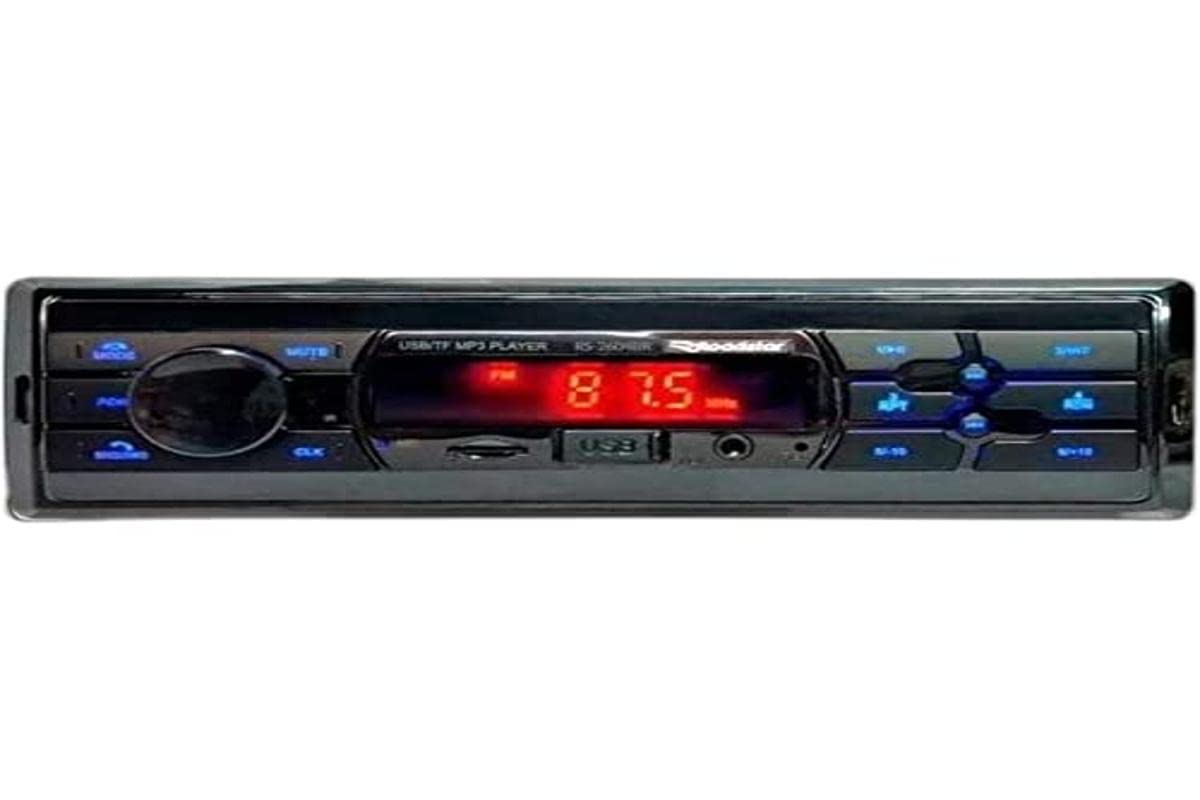
The Roadstar RS-2604BR USB/Bluetooth Car Radio is a versatile audio device designed to enhance your in-vehicle entertainment and communication. This unit features Bluetooth connectivity for wireless audio streaming and hands-free calling, a USB port for media playback, and an SD card slot. It also includes an auxiliary input for connecting other audio sources and an FM radio tuner. This manual provides essential information for the safe installation, operation, and maintenance of your new car radio.
2. זיכערקייַט אינפֿאָרמאַציע
- פאַכמאַן ינסטאַלירונג רעקאַמענדיד: For optimal performance and safety, it is highly recommended that this product be installed by a qualified professional.
- מאַכט מקור: פֿאַרבינדט דעם אַפּאַראַט נאָר צו אַ 12V DC מאַכט צושטעל מיט אַ נעגאַטיוון גראַונד.
- ויסמיידן דיסטראַקשאַנז: דו זאלסט נישט אַרבעטן די אַפּאַראַט אָדער view videos while driving, as this can lead to accidents.
- וויירינג: Ensure all wiring is correctly connected according to the wiring diagram to prevent damage to the unit or vehicle. Incorrect wiring can cause fire or electric shock.
- באַנד קאָנטראָל: האַלט די קול אויף אַ מדרגה וואו איר קענט נאָך הערן די קלאַנגען פון דרויסן.
- נעץ: Do not expose the unit to moisture or water to prevent electric shock.
3. פּעקל אינהאַלט
ביטע טשעק די פּאַקעט פֿאַר די פאלגענדע זאכן:
- Roadstar RS-2604BR Car Radio Unit
- ווייַט קאָנטראָל
- וויירינג כאַרניס
- Mounting Hardware (Screws, Brackets)
- באַניצער מאַנואַל (דעם דאָקומענט)
4. פּראָדוקט פֿעיִקייטן
The Roadstar RS-2604BR offers a range of features for a comprehensive audio experience:
- רעזולטאַט מאַכט: 4 channels of 30 Watts RMS (Total 120W RMS).
- ווייַז: Clear Red LED display.
- בלועטאָאָטה קאַנעקטיוויטי: פֿאַר וויירלעס אַודיאָ סטרימינג און הענט-פֿרײַ רופן.
- קייפל אַרייַנשרייַב: Micro SD card slot, Auxiliary input, and 1 USB port.
- אַודיאָ אַוטפּוץ: 4 RCA outputs for external ampליפערז.
- ISO קאַנעקטאָר: Yes, for easy installation.
- ווייַט קאָנטראָל: Physical remote control included, with potential for app control.
- געזונט קאָנטראָלס: Adjustable Bass, Treble, and Channel Balance.
- איקוואַלייזער פּרעסעטס: Predefined equalization settings for various music genres.
- קוסטאָמיזאַבלע יללומינאַטיאָן: 7-color illumination options to match your vehicle's interior.
פּראָדוקט בילד
5. ינסטאַללאַטיאָן גייד
Proper installation is crucial for the performance and longevity of your car radio. If you are unsure about any steps, consult a professional installer.
יקערדיק ינסטאַלירונג סטעפּס:
- דיסקאַנעקט באַטערי: איידער איר הייבט אן, דיסקאנעקטירט דעם נעגאטיוון טערמינאל פון אייער אויטא'ס באטעריע כדי צו פארמיידן עלעקטרישע קורצע צוזאמענברוכן.
- אַראָפּנעמען אַלטע אַפּאַראַט: Carefully remove your existing car radio from the dashboard.
- פאַרבינדן וויירינג: Connect the wiring harness of the RS-2604BR to your vehicle's wiring. Ensure all connections (power, ground, speaker, antenna, accessory) are secure and correctly matched. The ISO connector simplifies this process.
- Mount Unit: Slide the RS-2604BR into the dashboard opening and secure it using the provided mounting hardware.
- פאַרבינדן אַנטענע: Plug in your vehicle's radio antenna cable.
- רעקאָננעקט באַטערי: פֿאַרבינדט ווידער דעם נעגאַטיוון וואָקזאַל פֿון אייער פֿאָרמיטל'ס באַטעריע.
- טעסט פאַנגקשאַנאַליטי: Turn on the unit and test all functions (radio, USB, Bluetooth, sound controls) to ensure proper operation.
6. אַפּערייטינג ינסטרוקטיאָנס
6.1 יקערדיק קאָנטראָלס
- מאַכט אויף / אַוועק: דריק דעם מאַכט קנעפּל (געווענליך דעם באַנד קנעפּל) צו דרייען דעם אַפּאַראַט אָן אָדער אויס.
- באַנד קאָנטראָל: דריי דעם באַנד קנעפּל צו סטרויערן דעם אַודיאָ לעוועל.
- מאָדע סעלעקציע: Press the MODE button to cycle through available sources (FM, Bluetooth, USB, SD, AUX).
- Seek/Tune: Use the seek buttons (◀◀ / ▶▶) to change radio stations or skip tracks.
6.2 Radio Operation (FM)
- Select FM mode using the MODE button.
- Press and hold the seek buttons (◀◀ / ▶▶) for automatic station scanning.
- Briefly press the seek buttons to manually tune to the next available station.
- To save a station, tune to the desired frequency, then press and hold one of the preset number buttons (1-6) until you hear a beep.
6.3 בלועטאָאָטה פּערינג
- Ensure the car radio is in Bluetooth mode. The display will show "BT" or a Bluetooth icon.
- אויף אייער מאָביל טעלעפאָן, אַקטיוויזירט בלועטוט און זוכט פֿאַר פֿאַראַן דעוויסעס.
- Select "ROADSTAR" or a similar name from the list of devices.
- If prompted, enter the pairing code (usually "0000").
- Once paired, the unit will confirm the connection, and you can stream audio or make calls.
6.4 USB/SD שפּיל
- Insert a USB drive into the USB port or an SD card into the SD card slot.
- The unit will automatically switch to USB/SD mode and begin playing compatible audio files.
- Use the seek buttons (◀◀ / ▶▶) to skip tracks.
- Use the Play/Pause button to pause or resume playback.
6.5 אַגזיליערי ינפּוט
Connect an external audio device (e.g., MP3 player, smartphone) to the AUX input jack using a 3.5mm audio cable. Select AUX mode using the MODE button to play audio from the connected device.
6.6 Sound Settings and Illumination
- עקוואַליזער: Press the EQ button (or similar) to cycle through predefined equalizer settings (e.g., POP, ROCK, JAZZ, CLASSIC, USER).
- Bass/Treble/Balance: Press the AUDIO button repeatedly to access settings like BASS, TREBLE, FADER (front/rear balance), and BALANCE (left/right balance). Use the volume knob to adjust these values.
- באלויכטונג: The unit features 7-color illumination. Refer to the specific button on your unit (often labeled 'CLR' or similar) or the remote control to cycle through the available colors and select your preferred display color.
פּראָדוקט ווידעא דעמאַנסטראַציע
7. טראָובלעשאָאָטינג
If you encounter issues with your Roadstar RS-2604BR, refer to the following common problems and solutions:
| פּראָבלעם | מעגלעך סיבה | לייזונג |
|---|---|---|
| קיין מאַכט | אויפגעבראכענע פיוז, אומריכטיגע דראטן, פרייע עלעקטרישע פארבינדונג. | Check vehicle's fuse box and the unit's fuse. Verify all power and ground wires are securely connected. |
| קיין געזונט | Muted, incorrect source selected, loose speaker wires, damaged speakers. | Check if the unit is muted. Ensure the correct audio source is selected. Verify speaker wire connections. Test with different speakers if possible. |
| בלועטאָאָטה איז נישט קאַנעקטינג | Unit not in pairing mode, phone's Bluetooth off, interference. | Ensure the unit is in Bluetooth mode. Turn your phone's Bluetooth off and on again. Delete previous pairings and try re-pairing. |
| USB/SD not reading | ינקאַמפּאַטאַבאַל file format, corrupted media, incorrect insertion. | פאַרזיכערן files are in a compatible format (e.g., MP3, WMA). Try a different USB drive or SD card. Ensure media is inserted correctly. |
| ווייַט קאָנטראָל נישט ארבעטן | טויטע באַטעריע, שטערונג, אַרויס פון דערגרייכונג. | Replace the remote control battery. Ensure no obstructions between the remote and the unit's IR sensor. |
8. ספּעסאַפאַקיישאַנז
| שטריך | באַשרייַבונג |
|---|---|
| סאָרט | ראָאַדסטאַר |
| מאָדעל נומער | RS-2604BR (78650) |
| קאַנעקטיוויטי טעכנאָלאָגיע | וסב, בלועטאָאָטה |
| קאַמפּאַטאַבאַל דעוויסעס | Smartphone, Speakers |
| קאַנעקטער טיפּ | USB, Auxiliary, RCA |
| אַודיאָ רעזולטאַט מאָדע | סטערעאָ |
| רעזולטאַט מאַכט | 30 Watts per channel (RMS) |
| נומער פון טשאַנאַלז | 4 |
| קאָנטראָל מעטאָד | ווייַט |
| ווירעלעסס קאָמוניקאַציע טעכנאָלאָגיע | בלועטאָאָטה |
| פּונקט וואָג | 300 גראַמז |
| אַרייַנגערעכנט קאַמפּאָונאַנץ | ראַדיאָ, ווײַטקאָנטראָל |
| קאָליר | White (Note: Product image shows black/blue unit, color may vary by specific variant) |
9. וישאַלט
To ensure the longevity and optimal performance of your Roadstar RS-2604BR car radio, follow these maintenance guidelines:
- רייניקונג: Use a soft, dry cloth to clean the unit's exterior. Do not use abrasive cleaners, solvents, or chemical sprays, as they can damage the finish or internal components.
- ויסמיידן ליקווידס: Keep the unit away from water and other liquids. If liquid enters the unit, immediately disconnect power and have it inspected by a qualified technician.
- טעמפּעראַטור: פֿאַרמײַדט אויסשטעלן דעם אַפּאַראַט צו עקסטרעמע טעמפּעראַטורן, דירעקטע זונשײַן פֿאַר פֿאַרלענגערטע פּעריאָדן, אָדער הויכע פֿײַכטקייט.
- USB/SD Port Care: When inserting or removing USB drives or SD cards, do so gently to avoid damaging the ports.
10. וואָראַנטי און שטיצן
וואָראַנטי אינפֿאָרמאַציע
This Roadstar RS-2604BR car radio comes with a 12-חודש וואָראַנטי from the date of purchase. This warranty covers manufacturing defects under normal use. It does not cover damage caused by improper installation, misuse, accidents, unauthorized repairs, or normal wear and tear.
קונה שטיצן
For technical assistance, warranty claims, or further inquiries, please contact Roadstar customer support through their official website or the retailer where the product was purchased. Please have your proof of purchase and product model number ready when contacting support.


