
Amazon Basics DP-882
Amazon Basics 88-Key Semi-Weighted Digital Piano User Manual
מאָדעל: DP-882
הקדמה
This manual provides detailed instructions for the setup, operation, maintenance, and troubleshooting of your Amazon Basics 88-Key Semi-Weighted Digital Piano. Designed for performance, this digital piano offers a realistic playing experience with its semi-weighted keys and a wide array of features to enhance your musical journey.
שליסל פֿעיִקייטן אַרייַננעמען:
- Realistic semi-weighted 88-key keyboard for authentic piano touch.
- Versatile 1/4" audio output for ampליפערס און ספּיקערז.
- Expansive music library with 140 tones, 200 rhythms, and 16 demonstration songs.
- Educational features like automatic chords, beginner split keyboard function, and dual timbre functions.
- User-friendly USB MIDI and USB-A ports for smart device connectivity and recording.
סעטאַפּ
אויספּאַקן און קאָמפּאָנענט אידענטיפֿיקאַציע
נעמט פֿאָרזיכטיק אַרויס אַלע קאָמפּאָנענטן פֿון דער פּאַקעט. מאַכט זיכער אַז אַלע טיילן זענען פֿאַראַן:
- Amazon Basics 88-Key Digital Piano
- ונטערהאַלטן פּעדאַל
- מאַכט סופּפּלי אַדאַפּטער
- וסב קאַבלעס
- מוזיק שטיין

Image: All components included with the Amazon Basics 88-Key Digital Piano.
Secure and Easy Setup
The piano is packaged securely with styrofoam. The power adapter is attached within the styrofoam for quick access.

Image: Digital piano secured in packaging with power adapter.
Connecting the Sustain Pedal and Power Supply
Locate the sustain pedal port on the rear of the piano. Ensure the piano is powered off before connecting or disconnecting the sustain pedal. Connect the power supply adapter to the DC IN port and plug it into a wall outlet.

בילד: הינטערשטע view of the piano showing connectivity ports.
אַטאַטשינג די מוזיק שטיין
שטעל אַרײַן דעם מוזיק־שטאַנד אין די באַשטימטע סלאָטן אויף דער אויבערשטער פּאַנעל פֿון פּיאַנע.
אַפּערייטינג ינסטראַקשאַנז
מאַכט אויף / אַוועק און באַנד קאָנטראָל
To power on the piano, press the 'ON/OFF Power' button. Adjust the master volume using the 'MIN/MAX Master Volume' knob to your desired level.

Image: Control panel with master volume and function buttons.
Selecting Tones and Rhythms
The piano offers 140 tones and 200 rhythms. Use the dedicated buttons on the control panel to select different instrument sounds (e.g., Piano, Electronic Church Organ, Guitar, Bass, Strings) and rhythms. The clear LED display will show your current selection.
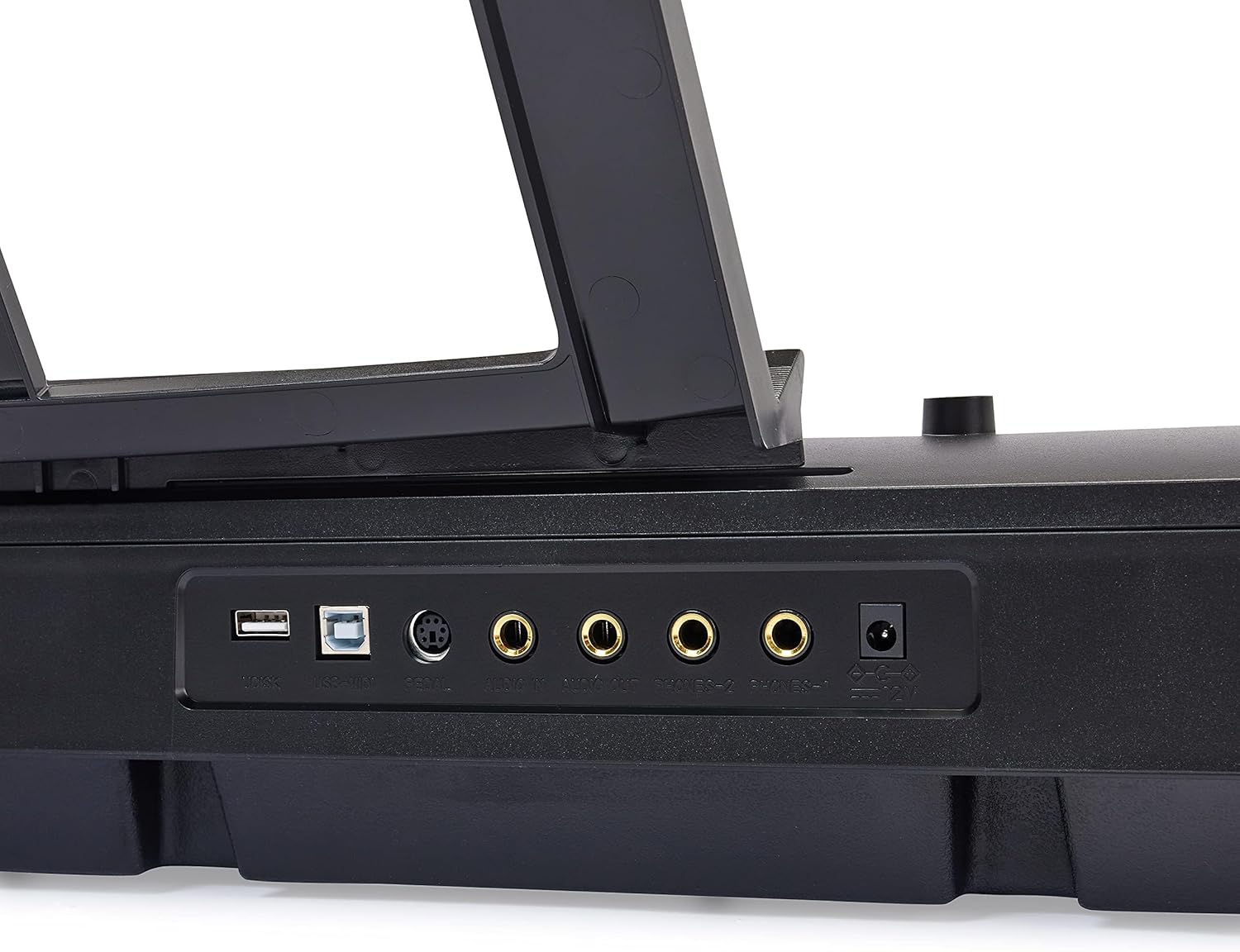
Image: Hand interacting with the piano keys and control panel.
בילדונגקרייז פֿעיִקייטן
Enhance your learning with features such as:
- לעקציע מאָדע: Utilize the beginner split keyboard function for guided practice.
- Automatic Chords: Simplify chord playing for beginners.
- Dual Timbre: Layer two different instrument sounds simultaneously for richer tones.
- מעטראָנאָמע: Use the built-in metronome for rhythm training.

בילד: איבערview of learning tools and features.
וסב קאַנעקטיוויטי
The piano features USB MIDI and USB-A ports, allowing for simple integration with smart devices. You can connect to compatible software for recording your music or expanding your creative possibilities.
וישאַלט
רייניקונג
To clean the piano, use a soft, dry cloth. Do not use abrasive cleaners, waxes, or solvents as they may damage the finish. For stubborn marks, a slightly damp א שטאָף קען גענוצט ווערן, און גלייך דערנאָך מיט א טרוקענעם שטאָף.
סטאָרידזש
האַלט די פּיאַנע אין אַ קיל, טרוקן אָרט אַוועק פון דירעקט זונשייַן, עקסטרעמע טעמפּעראַטורן און הויכע הומידיטי. פֿאַרמייַדט צו שטעלן שווערע זאַכן אויף דער קלאַוויאַטור.
טראָובלעשאָאָטינג
קיין געזונט
- Ensure the piano is powered on and the power adapter is securely connected to both the piano and a working electrical outlet.
- Check the Master Volume knob and ensure it is turned up.
- If external speakers or headphones are connected, ensure they are properly plugged in and their volume is adjusted.
סוסטאַין פּעדאַל איז נישט ארבעטן
- Verify that the sustain pedal is fully inserted into its designated port on the back of the piano.
- Always ensure the piano is powered OFF before connecting or disconnecting the sustain pedal to prevent potential issues.
Keys Not Responding or Incorrect Sound
- Try selecting a different instrument tone to see if the issue persists across all sounds.
- Power off the piano, wait a few seconds, and then power it back on to reset the system.
ספּעסאַפאַקיישאַנז
| שטריך | דעטאַל |
|---|---|
| מאָדעל נומער | דפּ-882 |
| נומער פון קיז | 88 |
| שליסל טיפּ | Semi-Weighted |
| דימענשאַנז (די רענטגענ וו x ה) | 11.22"ד רענטגענ 51.1"וו רענטגענ 4.06"ה |
| פּונקט וואָג | 14.77 פונט |
| מאַכט מקור | קאָרדעד עלעקטריק |
| קאַנעקטיוויטי טעכנאָלאָגיע | USB (USB MIDI, USB-A) |
| קאָליר | שוואַרץ |
| בקיעס מדרגה | אַלע |
| ספּעציעלע שטריך | פּאָרטאַטיוו |
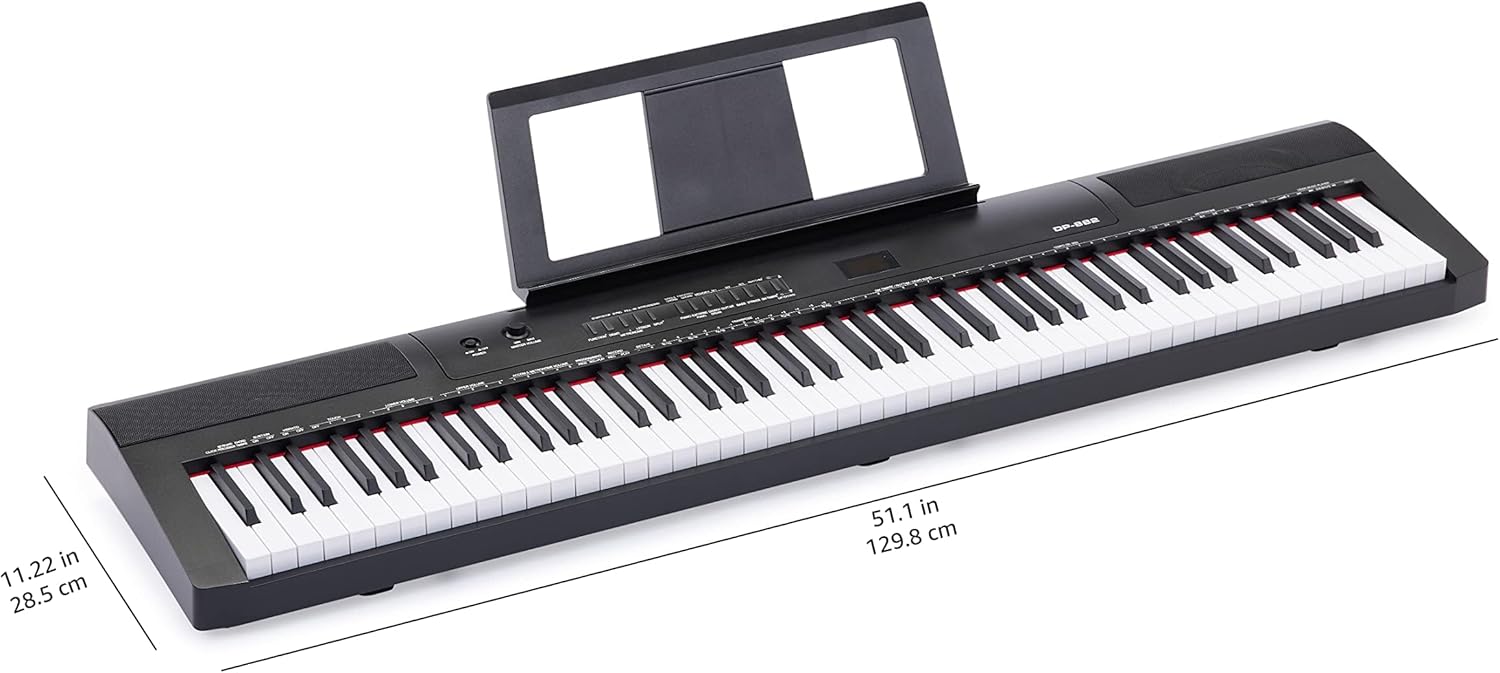
Image: Digital piano with key dimensions.
וואָראַנטי און שטיצן
באַניצער מאַנואַל און וואָראַנטי אינפֿאָרמאַציע
For additional details and comprehensive warranty information, please refer to the official PDF documents:
שוץ פּלאַנז
Extended protection plans may be available for your product. Please check the product listing or your purchase documentation for details on available plans, such as 3-Year or 4-Year Protection Plans.
קונה שטיצן
פֿאַר ווייטערדיקע הילף, טעכנישע שטיצע, אדער סערוויס אָנפֿראַגעס, ביטע באַזוכט די אַמאַזאָן באַסיקס סטאָר or contact Amazon customer service directly.
Ask a question about this manual
Ask about setup, troubleshooting, compatibility, parts, safety, or missing instructions. Manuals+ will review the question and use this page’s manual context to help answer it.