
הקדמה
The Docooler Bone Conduction Speaker is a compact, portable audio device designed to transform various surfaces into sound-producing diaphragms. Utilizing bone conduction technology, it offers a unique audio experience with enhanced bass and volume depending on the surface it is placed upon. This manual provides essential information for the safe and effective use of your speaker.
זיכערקייַט אינפֿאָרמאַציע
ביטע ליינט און פאלגט די זיכערהייט גיידליינז צו פארמיידן שאדן צום אפאראט אדער פערזענליכע שאדן:
- Do not expose the speaker to extreme temperatures or direct sunlight.
- ויסמיידן דראַפּינג אָדער אונטערטעניק די מיטל צו שטאַרק ימפּאַקץ.
- Keep the speaker away from water and liquids, as it is not waterproof.
- Do not attempt to disassemble, repair, or modify the device. This will void the warranty.
- ניצט נאָר דעם צוגעשטעלטן טשאַרדזשינג קאַבל און אַ קאָמפּאַטיבלע מאַכט אַדאַפּטער.
- פֿאַרמײַדט פֿאַרלענגערט הערן בײַ הויכע וואָלומען כּדי צו פֿאַרמײַדן שאָדן צו דער הערן.
פּעקל אינהאַלט
באַשטעטיקן אַז אַלע זאכן זענען פאַראַן אין דיין פּעקל:
- Docooler Bone Conduction Speaker (1 unit)
- יו-עס-בי טיפ-סי טשאַרדזשינג קאַבל (1 איינהייט)
- באַניצער מאַנואַל (דעם דאָקומענט)
- Adhesive Pads / Suction Cup (for mounting)
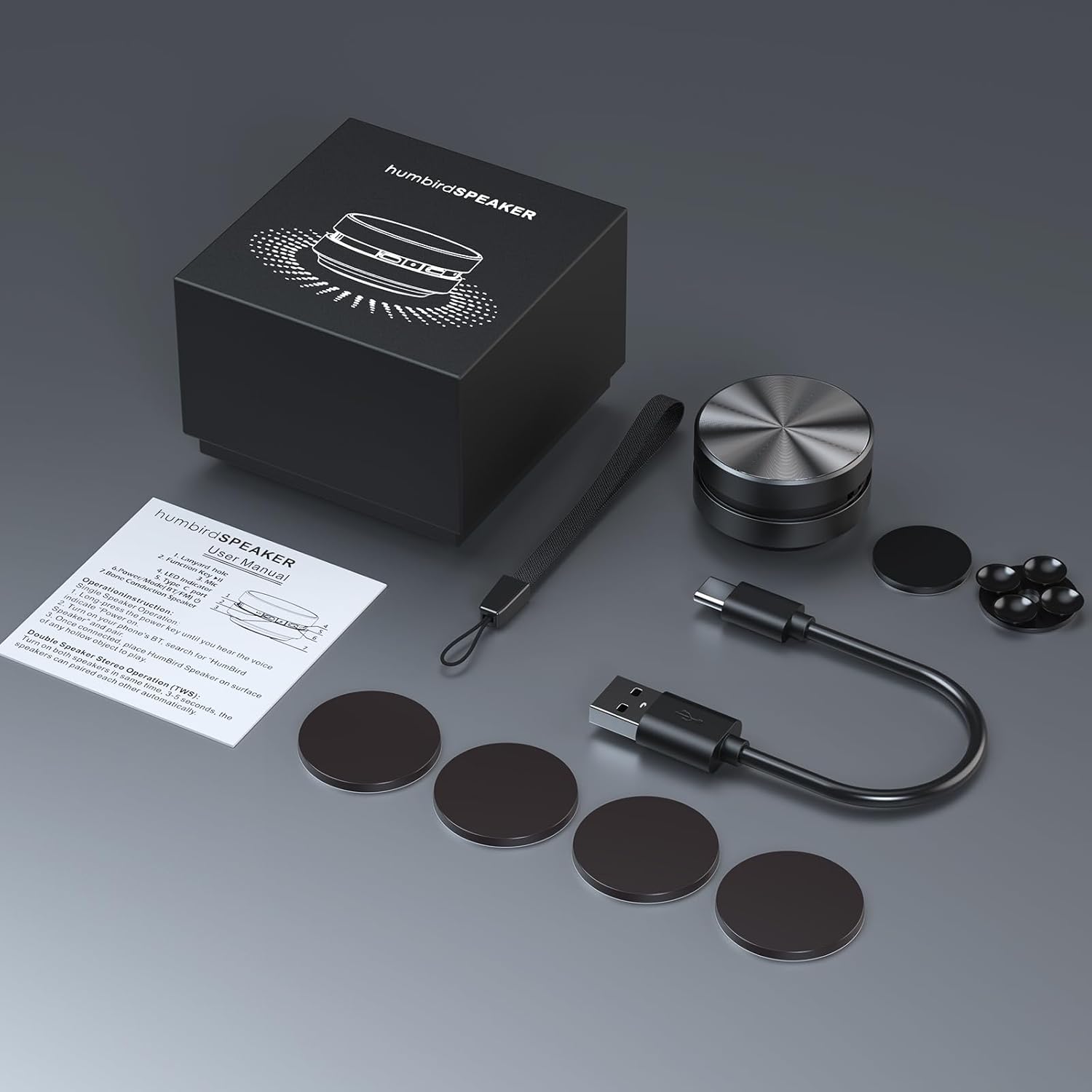
Image: Contents of the Docooler Bone Conduction Speaker package, showing the speaker, charging cable, and various adhesive pads for mounting.
פּראָדוקט איבערview
The Docooler Bone Conduction Speaker is a compact device with a minimalist design. It features a durable aluminum alloy casing and a Type-C charging port. The speaker utilizes Bluetooth 5.0 for wireless connectivity and supports True Wireless Stereo (TWS) pairing for an enhanced audio experience.

בילד: פראָנט view of the Docooler Bone Conduction Speaker, highlighting its key features such as Bone Conduction technology, Bluetooth 5.0, TWS, Type-C Charging Port, Fast Charge, and Aviation Aluminum Alloy construction.
סעטאַפּ
1. טשאַרדזשינג די ספּיקער
- פֿאַרבינדט דעם צוגעשטעלטן USB טיפּ-C קאַבל צום רעדנער'ס טשאַרדזשינג פּאָרט.
- שטעקט אריין דעם אנדערן עק פונעם קאבל אין א קאמפאטיבלן USB שטראָם מקור (למשל, וואנט אדאפטער, קאמפיוטער USB פארט).
- די אינדיקאַטאָר ליכט וועט ווייַזן טשאַרדזשינג סטאַטוס (זעט די LED אינדיקאַטאָר אָפּטיילונג פֿאַר פרטים).
- א פולע אויפלאדונג נעמט געווענליך בערך 1-2 שעה.
2. בלועטוט פארבינדונג (איין רעדנער)
- Press and hold the power button on the speaker until the indicator light flashes, indicating pairing mode.
- אויף אייער סמאַרטפאָון אָדער אַנדער בלוטוט-ענייבאַלד מיטל, אַקטיוויזירט בלוטוט און זוכט פֿאַר בנימצא דעוויסעס.
- Select "Humbird Speaker" (or similar name) from the list of devices.
- Once connected, the indicator light will remain solid, and you will hear a confirmation tone.
3. אמתע ווירעלעס סטערעאָ (TWS) פּאָרינג (צוויי רעדנערס)
For a stereo sound experience, you can pair two Docooler Bone Conduction Speakers together:
- זיכער מאַכן אַז ביידע רעדנערס זענען גאָר אויפגעלאָדן און אויסגעלאָשן.
- Power on both speakers simultaneously. They will automatically attempt to pair with each other within 3-5 seconds.
- Once successfully paired, one speaker will act as the master (left channel) and the other as the slave (right channel). The indicator lights will reflect their connected status.
- Now, connect your smartphone or Bluetooth device to the master speaker as described in the "Bluetooth Pairing (Single Speaker)" section.

Image: Two Docooler Bone Conduction Speakers positioned for True Wireless Stereo (TWS) pairing, demonstrating their ability to create a wider soundstage.
אַפּערייטינג ינסטראַקשאַנז
1. מאַכט אויף / אויסגעלאשן
- מאַכט אויף: דריקן און האַלטן די מאַכט קנעפּל פֿאַר בעערעך 3 סעקונדעס.
- מאַכט אַוועק: דריקן און האַלטן די מאַכט קנעפּל פֿאַר בעערעך 3 סעקונדעס.
2. שפּיל קאָנטראָל
- שפּיל / פּויזע: קורץ דריקן די מאַכט קנעפּל אַמאָל.
- ווייַטער שפּור: Double-press the power button.
- פֿריִערדיקע שפּור: Triple-press the power button.
3. באַנד אַדזשאַסטמאַנט
Volume is primarily controlled via your connected Bluetooth device (smartphone, tablet, etc.). The speaker itself does not have dedicated volume buttons.
4. Using with Different Surfaces
The unique feature of this bone conduction speaker is its ability to use various surfaces as sound amplifiers. Experiment with different materials to discover unique sound profiles:
- Hollow Objects: Cardboard boxes, plastic containers, or hollow wooden surfaces often produce a fuller sound with enhanced bass.
- גלאז סורפאַסעס: Windows or glass tables can create a clear, crisp sound.
- האָלצערנע ייבערפלאַכן: Desks, guitars, or wooden panels can offer a warm, resonant tone.
- Car Dashboards: Can provide an immersive in-car audio experience.
Use the included adhesive pads or suction cup to securely attach the speaker to your chosen surface. The sound quality will vary significantly based on the material, size, and hollowness of the surface.

Image: The bone conduction speaker demonstrated on different surfaces, including a guitar, a kitchen countertop, a mirror, and a car dashboard, illustrating its versatility in sound production.
וישאַלט
To ensure the longevity and optimal performance of your Docooler Bone Conduction Speaker, follow these maintenance tips:
- רייניקונג: Wipe the speaker with a soft, dry cloth. Do not use abrasive cleaners, alcohol, or solvents.
- סטאָרידזש: האַלט דעם רעדנער אין אַ קיל, טרוקן אָרט אַוועק פון דירעקט זונשייַן און עקסטרעמע טעמפּעראַטורן ווען נישט אין באַנוץ.
- באַטערי זאָרגן: For best battery life, avoid fully discharging the speaker frequently. Charge it regularly, even if not used for extended periods.
טראָובלעשאָאָטינג
| פּראָבלעם | מעגלעך לייזונג |
|---|---|
| דער רעדנער גייט נישט אן. | זיכער מאַכן אַז דער רעדנער איז גאָר אויפגעלאָדן. פֿאַרבינדט עס צו אַ מאַכט מקור און פּרוּווט ווידער. |
| קען נישט פארבינדן דורך בלוטוט. | Make sure the speaker is in pairing mode (flashing indicator light). Turn off and on Bluetooth on your device. Ensure the speaker is within range (up to 10 meters). |
| קיין קלאַנג אָדער נידעריקע וואָלומען. | Increase the volume on your connected device. Ensure the speaker is placed on a suitable surface. Try a different surface. Check if the speaker is properly connected. |
| TWS פּאָרינג איז דורכגעפֿאַלן. | Ensure both speakers are powered off before attempting TWS pairing. Power them on simultaneously and wait for automatic pairing. Disconnect any existing Bluetooth connections before TWS pairing. |
| געזונט קוואַליטעט איז נעבעך. | Experiment with different surfaces. Hollow and resonant surfaces generally yield better results. Ensure the speaker is securely attached to the surface. |
ספּעסאַפאַקיישאַנז
| שטריך | דעטאַל |
|---|---|
| מאָדעל נאָמען | ביין קאַנדאַקשאַן רעדנער |
| מאָדעל נומער | RM |
| סאָרט | דאָקאָאָלער |
| מאַטעריאַל | אַלומינום |
| פּראָדוקט דימענשאַנז | 2.76"ד רענטגענ 2.76"וו רענטגענ 1.97"ה |
| פּונקט וואָג | 4.6 אונס (0.13 קילאָגראַמס) |
| קאַנעקטיוויטי טעכנאָלאָגיע | בלועטאָאָטה |
| בלועטאָאָטה קייט | 10 מעטער |
| אַודיאָ רעזולטאַט מאָדע | סטערעאָ (מיט TWS פּערינג) |
| רעדנער מאַקסימום רעזולטאַט מאַכט | 3 וואטס |
| אָפטקייַט ענטפער | 20 KHz |
| סיגנאַל-צו-נויז ראַטיאָ | 70 דב |
| מאַכט מקור | באַטאַרייע פּאַוערד |
| באַטאַרייע קאַפּאַציטעט | 400 מיליamp שעהן |
| קאָנטראָל מעטאָד | App (implied by product data, but primary control is physical buttons) |
| איז וואָטערפּרוף | פאַלש |
וואָראַנטי און שטיצן
The Docooler Bone Conduction Speaker comes with a limited warranty. For specific warranty details, please refer to the documentation included with your purchase or contact Docooler customer service.
If you encounter any issues or have questions not covered in this manual, please contact Docooler customer support through their official channels. Contact information can typically be found on the product packaging or the official Docooler webפּלאַץ.