
1. פּראָדוקט איבערview
The Hikity 9 Inch Quad Split Screen Backup Camera Monitor is designed to provide enhanced visibility for various vehicles, including cars, SUVs, vans, trucks, and pickups. This monitor features a 9-inch TFT LCD display with 4-channel video input, allowing for multiple viewing modes. It supports a wide power input range of 9-36V, making it versatile for different vehicle types. The monitor can display up to four camera feeds simultaneously, aiding in driving and parking maneuvers.

Image 1.1: The Hikity 9 Inch Quad Split Screen Backup Camera Monitor.
ווידעא 1.1: אן איבערview of the Hikity 9-inch 4-channel backup camera monitor, highlighting its features and capabilities.
2. פּעקל אינהאַלט
באַשטעטיקט אַז אַלע זאכן וואָס זענען אויסגערעכנט אונטן זענען אַרייַנגערעכנט אין אייער פּעקל. אויב עפּעס פעלנדיק אָדער צעבראָכן, ביטע קאָנטאַקטירט קונה שטיצע.
- 1 x 9-inch Quad Split Monitor
- 1 x Headrest Shell
- 1 x Bracket Mount
- 1 x IR רימאָוט קאָנטראָללער
- 1 x Video & Power Cable

Image 2.1: All components included in the Hikity 9 Inch Backup Camera Monitor package.
Video 2.1: A detailed unboxing and display of the Hikity 9 Inch Backup Camera Monitor package contents.
3. ספּעסאַפאַקיישאַנז
| פאַרשטעלן גרייס | 9 אינטשעס |
| האַכלאָטע | HD (800x480 native) |
| אַספּעקט פאַרהעלטעניש | 16:9 |
| ווייַז טיפּ | טפט לקד |
| Viewינג אַנגלע | 170 דיגריז |
| Voltage אַרייַנשרייַב | 9-36 וואלטס |
| קאַנעקטיוויטי | RCA (4 Channels) |
| נאָך פֿעיִקייטן | Anti-Glare Screen, Quad Split Screen Display |
| קאַמפּאַטאַבאַל דעוויסעס | CCTV Camera, Car Camera, DVD/VCD, TV BOX |
4. סעטאַפּ און ייַנמאָנטירונג
The monitor offers two primary installation methods: stereoscopic (dashboard mount) and embedded (headrest shell). Choose the method that best suits your vehicle and preferences.
4.1 ינסטאַלירונג מעטהאָדס

Image 4.1: Visual representation of stereoscopic (dashboard) and embedded (headrest) installation options.
4.2 וויירינג דיאַגראַמע
Connect the power and video cables as shown in the diagram. Ensure correct polarity for power connections (+12-24V and GND). The camera control lines (Brown, Blue, Green, Gray) should be connected to the positive of the reverse gear or other trigger sources for automatic switching.
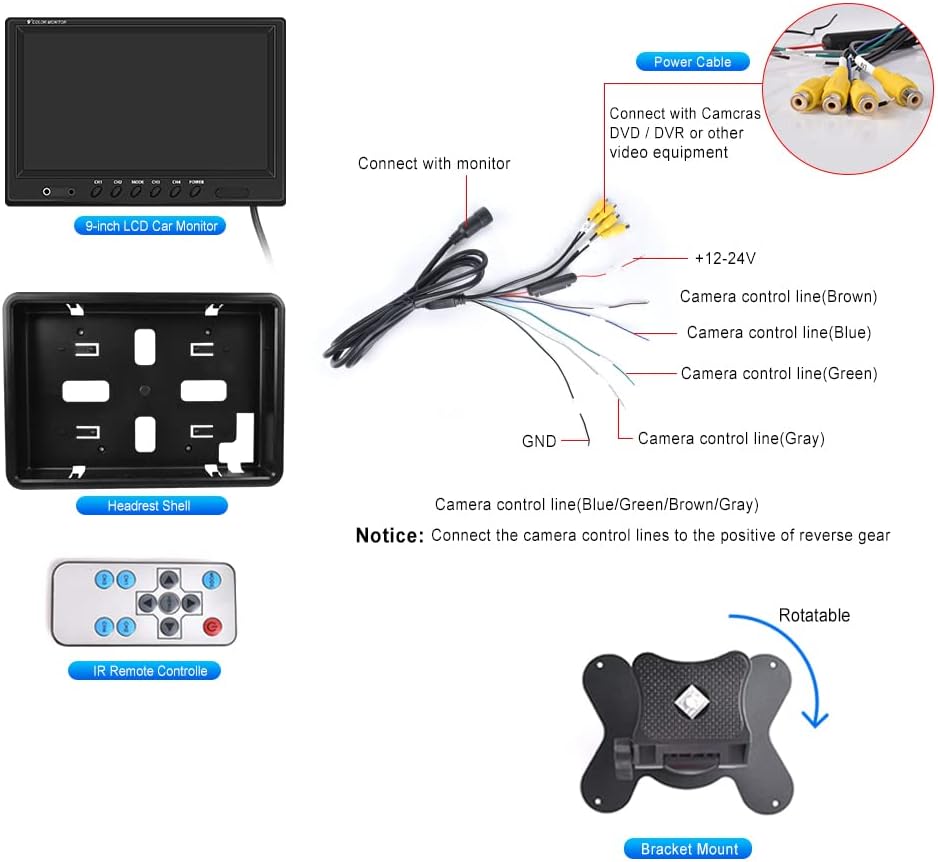
Image 4.2: Detailed wiring connections for the monitor, including power and four RCA video inputs.
ווידעא 4.1: א קורצע הקדמהview demonstrating an installation method for the monitor, focusing on placement and initial setup.
5. אַפּערייטינג ינסטרוקטיאָנס
The Hikity monitor offers various viewing modes and adjustable settings for optimal use.
5.1 Viewאין מאָדעס
The monitor supports 6 selectable viewing modes: Single Full View, Split Dual Video View, Split Tri Video View, and Quad Four View. These modes allow you to customize how camera feeds are displayed on the screen.

Image 5.1: Illustration of the quad split screen functionality, showing four camera feeds simultaneously.
5.2 אַדזשאַסטמאַנץ
Use the included IR remote controller or the buttons on the monitor to adjust settings such as brightness, contrast, and color. The monitor also supports rotating or mirroring the screen display for each channel.
5.3 Driving Assistance
Each of the four video input channels (CH1/CH2/CH3/CH4) has a dedicated signal wire for backup or turning triggers. Connecting these wires allows the monitor to automatically switch to the corresponding camera view when a trigger is activated (e.g., shifting into reverse).

Image 5.2: The 9-inch monitor displaying a quad-split view, showing multiple perspectives for driving assistance.
6. וישאַלט
To ensure the longevity and optimal performance of your Hikity monitor, follow these maintenance guidelines:
- רייניקונג: ניצט אַ ווייכע, טרוקענע שטאָף צו רייניקן דעם מאָניטאָר עקראַן אוןasinז. פֿאַר שווערע פֿלעקן, לײַכט ווײַסלעןampווישט דעם שטאָף מיט וואַסער אָדער אַ פאַרשטעלן-זיכער רייניגער. פֿאַרמייַדט אַברייסיוו מאַטעריאַלן אָדער שטרענגע כעמיקאַלן.
- ינווייראַנמענאַל טנאָים: פֿאַרמײַדט אויסשטעלן דעם מאָניטאָר צו עקסטרעמע טעמפּעראַטורן, דירעקטע זונשײַן פֿאַר פֿאַרלענגערטע פּעריאָדן, אָדער איבערגעטריבענע פֿײַכטקייט.
- קאַבלע פאַרוואַלטונג: Ensure all cables are securely connected and not pinched or strained, which can lead to damage or intermittent signal loss.
- סטאָרידזש: אויב איר לייגט אפ דעם מאָניטאָר פאר א לענגערע צייט, זאָלט איר עס אָפּשטעקן פון עלעקטריציטעט און עס אַוועקלייגן אין א קילן, טרוקענעם אָרט.
7. טראָובלעשאָאָטינג
If you encounter issues with your Hikity monitor, refer to the following common problems and solutions:
- קיין מאַכט:
- קאָנטראָלירט אַלע מאַכט קאַנעקשאַנז צו זיכער מאַכן אַז זיי זענען זיכער.
- Verify that the power source (9-36V) is functioning correctly.
- דורכקוקן די מאַכט קאַבלע פֿאַר קיין קענטיק שעדיקן.
- קיין ווידעא סיגנאַל:
- Ensure all RCA video cables are firmly connected to both the cameras and the monitor.
- Confirm that the cameras are powered on and functioning.
- Check the selected input channel on the monitor matches the connected camera.
- If using trigger wires, ensure they are correctly connected and receiving a signal.
- נעבעך בילד קוואַליטעט:
- Adjust the brightness, contrast, and color settings using the remote control or monitor buttons.
- Ensure camera lenses are clean and free from obstructions.
- Verify that the video cables are not damaged or experiencing interference.
- רימאָוט קאָנטראָל נישט ארבעטן:
- קאָנטראָלירט און פאַרבייט די באַטאַרייע אין דער ווײַטקאָנטראָל.
- Ensure there are no obstructions between the remote and the monitor's IR receiver.
If these steps do not resolve the issue, please contact Hikity customer support for further assistance.
8. וואָראַנטי און שטיצן
Hikity provides comprehensive support for its products:
- געלט-צוריק גאַראַנטירן: 30-Days Money-Back policy.
- פאַרבייַט וואָראַנטי: 2-Years Replacement warranty.
- טעכניש שטיצן: Life-Time Technical Support is available.
For installation or usage issues, please contact Hikity Flagship Store via the product page on Amazon. Support inquiries are typically responded to within 24 hours.