
1. הקדמה
This manual provides detailed instructions for the proper use and maintenance of your CAMMHD D1 Body Camera. Please read this manual thoroughly before operating the device to ensure correct functionality and to prevent damage.
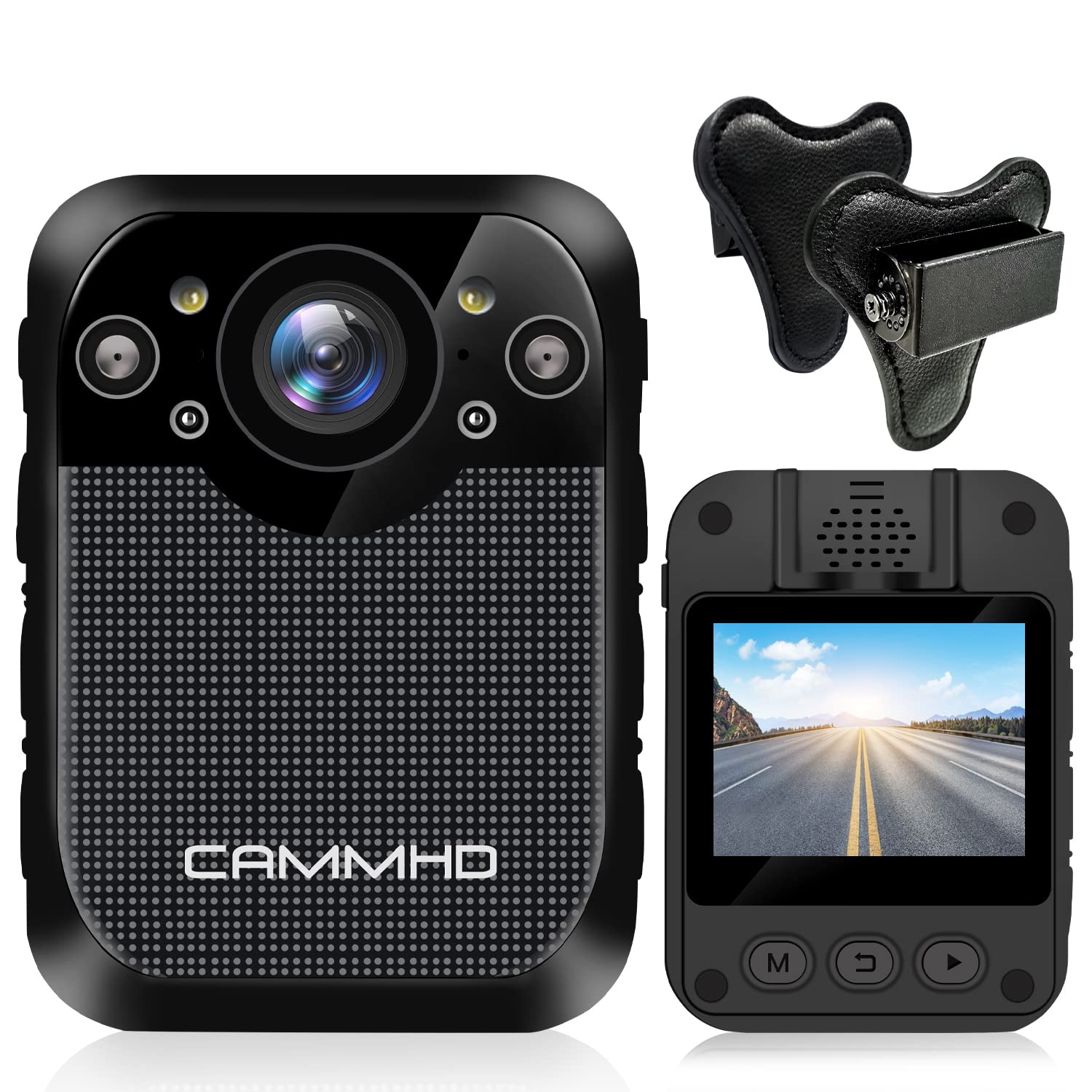
בילד: פראָנט view of the CAMMHD D1 Body Camera.
2. פּעקל אינהאַלט
באַשטעטיקט אַז אַלע זאכן וואָס זענען אויסגערעכנט אונטן זענען אַרייַנגערעכנט אין אייער פּעקל. אויב עפּעס פעלנדיק אָדער צעבראָכן, ביטע קאָנטאַקטירט קונה שטיצע.
- CAMMHD D1 Body Camera
- Magnet Mount
- וסב טשאַרדזשער
- וסב קאַבלע
- 360° Rotating Shoulder Clip
- באַניצער מאַנואַל

Image: All components included in the CAMMHD D1 Body Camera package.
3. פּראָדוקט איבערview
Familiarize yourself with the camera's buttons and ports.

Image: Labeled diagram of the CAMMHD D1 Body Camera's external features and controls.
- שרעק קנעפּל
- רויט און בלוי פלאַש
- ווידעא קנעפּל
- Night Vision Indicator
- געפירט ליכט
- וסב צובינד
- פאָטאָ קנעפּל
- אַודיאָ קנעפּל
- מאַכט אויף / אַוועק קנעפּל
4. סעטאַפּ
4.1 טשאַרדזשינג די באַטאַרייע
Before first use, fully charge the camera's built-in 3000mAh lithium battery. Connect the camera to the USB charger using the provided USB cable. A full charge typically takes approximately 3 hours. The camera can record for up to 8 hours (at 1080p resolution) on a full charge.

Image: Visual representation of the camera's 3000mAh battery, 8-hour recording capability, and 3-hour charging time.
4.2 מאָונטינג די אַפּאַראַט
The CAMMHD D1 Body Camera comes with a magnet mount and a 360° rotating shoulder clip for secure attachment.
Using the Magnet Mount:
The magnet mount allows for flexible positioning and angle adjustment.

Image: The adjustable 45-degree angle clips for the body camera mount.
Attaching with the Shoulder Clip:
Follow these steps to attach the camera using the shoulder clip:
- Separate the two parts of the clip.
- Insert the body camera into the 'outside' clip.
- Place the 'inside' clip under your clothing.
- Adjust the screw to set the desired recording angle.

Image: Step-by-step instructions for attaching the body camera with the shoulder clip.
5. אַפּערייטינג ינסטרוקטיאָנס
5.1 מאַכט אויף / אַוועק
- מאַכט אויף: Press and hold the Power On/Off button (9) until the screen illuminates.
- מאַכט אַוועק: Press and hold the Power On/Off button (9) until the device shuts down.
5.2 ווידעא רעקאָרדינג
The camera supports 1296P HD video resolution with a 160° wide-angle lens.
- אָנהייב רעקאָרדינג: Press the Video button (3) once to begin video recording. A red indicator light will typically flash.
- האַלטן רעקאָרדינג: Press the Video button (3) again to stop recording.

Image: The camera's display indicating 1296P Full HD video recording capability.
5.3 פאָטאָ כאַפּן
- נעמען פאָטאָ: Press the Photo button (7) once to capture a still image.
5.4 אַודיאָ רעקאָרדינג
- אָנהייבן אַודיאָ רעקאָרדינג: Press the Audio button (8) once to begin audio-only recording.
- אפשטעלן אודיא רעקארדירונג: Press the Audio button (8) again to stop audio recording.
5.5 נאַכט זעאונג
The camera features automatic infrared night vision with 4 infrared lamps, capable of capturing clear footage up to 10 meters (32 feet) in low-light conditions.
- אָטאַמאַטיק אַקטאַוויישאַן: Night vision activates automatically in low light.
- מאַנואַל אַקטאַוויישאַן: You can also press the Night Vision button (4) to manually toggle infrared night vision.

Image: Demonstration of the camera's automatic infrared night vision capability.
5.6 שלייף רעקאָרדינג
The camera includes 32GB of internal memory. When the memory capacity is reached, the camera automatically overwrites the oldest fileס צו פאָרזעצן רעקאָרדינג.

Image: Explanation of loop recording and the camera's 32GB internal storage.
5.7 ווידערשפּיל און File אַריבערפירן
- On-Device Playback: Use the camera's 2-inch display and navigation buttons to review רעקאָרדעד ווידיאס און פאָטאָס.
- Computer Playback/Transfer: Connect the camera to a computer using the USB cable. The camera will appear as a removable disk, allowing you to transfer files.
6. וישאַלט
- רייניקונג: Use a soft, dry cloth to clean the camera body. For the lens, use a specialized lens cleaning cloth. Do not use harsh chemicals or abrasive materials.
- סטאָרידזש: האַלט די קאַמעראַ אין אַ קיל, טרוקן אָרט אַוועק פון דירעקט זונשייַן און עקסטרעמע טעמפּעראַטורן.
- באַטערי זאָרגן: כדי צו פארלענגערן די לעבן פון די באַטעריע, זאָלט איר נישט אָפט אויסלאָדן די באַטעריע. לאָדט די קאַמעראַ רעגולער אויף, אפילו אויב זי ווערט נישט גענוצט פאר לענגערע צייטן.
7. טראָובלעשאָאָטינג
| פּראָבלעם | מעגלעך סיבה | לייזונג |
|---|---|---|
| די קאַמעראַ גייט נישט אָן. | Low battery or faulty battery. | Charge the camera for at least 3 hours. If the issue persists, contact support. |
| Cannot record video/photo. | Memory full or recording error. | Ensure loop recording is enabled or transfer files to free up space. Restart the camera. |
| שלעכטע ווידעא קוואַליטעט ביינאכט. | Night vision not active or insufficient ambient light for IR. | Ensure night vision is enabled (auto or manual). Ensure no obstructions block the IR lamps. |
| די אַפּאַראַט איז נישט ריספּאַנדינג. | ווייכווארג פראבלעם. | דריק און האלט דעם מאַכט אויף/אויס קנעפּל פֿאַר 10-15 סעקונדעס צו צווינגען אַ ריסטאַרט. |
8. ספּעסאַפאַקיישאַנז
| שטריך | דעטאַל |
|---|---|
| מאָדעל | D1 |
| ווידעא קאַפּטורע רעסאָלוטיאָן | 1296 פּ, 1080 פּ, 720 פּ |
| פאָטאָ פּיקסעל | קסנומקס מיליאַן פּיקסעלס |
| ברייט ווינקל לענס | 160° |
| באַטאַרייע קאַפּאַציטעט | 3000 מאַה ליטהיום באַטערי |
| רעקאָרדינג צייט | Up to 8 hours (1080p) |
| טשאַרדזשינג צייט | בעערעך. 3 שעה |
| אינערלעכער זכּרון | 32GB (Built-in) |
| נאַכט וויזשאַן ראַנגע | אַרויף צו 10 עם (32 פט) |
| פאַרשטעלן גרייס | 2 אינטשעס |
| וואַסער קעגנשטעל מדרגה | וואָטערפּרוף |
| ספּעציעלע פֿעיִקייטן | Motion Detection, Night Vision, Portable |
| קאַנעקטיוויטי טעכנאָלאָגיע | ווירעלעסס |
| בילד סטאַביליזאַטיאָן | דינאַמיש |
| פאָקוס טיפּ | מאַנואַל פאָקוס |
9. וואָראַנטי און שטיצן
For warranty information or technical support, please refer to the contact details provided with your purchase documentation or visit the official CAMMHD webזייטל. ביטע באַהאַלטן אייער קויפן באַווייַז פֿאַר וואָראַנטי קליימז.