
Shot Navi Crest
Shot Navi Crest Golf GPS Watch User Manual
Model: Crest
1. הקדמה
This manual provides detailed instructions for the setup, operation, and maintenance of your Shot Navi Crest Golf GPS Watch. Please read this manual thoroughly before using the device to ensure proper functionality and to maximize your golfing experience.

Image 1.1: The Shot Navi Crest Golf GPS Watch, showing a golf course layout with distances to the green and hazards.
The Shot Navi Crest is a wristwatch-type GPS golf navigation device designed to assist golfers with accurate distance measurements and comprehensive course information. It features a durable plastic construction and a clear 1.2-inch display.
2. פּעקל אינהאַלט
באַשטעטיקן אַז אַלע זאכן זענען פאַראַן אין פּעקל:
- Shot Navi Crest Main Unit
- טשאַרדזשינג קאַבלע
- Instruction Manual (this document) and Warranty Card
3. סעטאַפּ
3.1 ערשט טשאַרדזשינג
Before first use, fully charge the device. Connect the charging cable to the Shot Navi Crest and a USB power source. The device has a built-in battery with an approximate life of 8 hours during active use.
3.2 מאַכט אויף / אַוועק
To power on, press and hold the main button (typically the central button on the right side) until the screen illuminates. To power off, press and hold the same button until a power-off prompt appears, then confirm.
3.3 Course Data Download (for Overseas Courses)
The device supports 59,315 courses across 122 countries and regions. Domestic course layouts are typically pre-loaded. For overseas courses, data download and updates may be required. Refer to the Shot Navi official website for instructions on downloading and updating course data via Bluetooth connectivity.
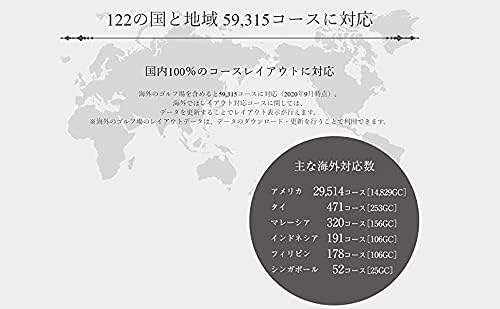
Image 3.1: Illustration of Shot Navi's extensive course coverage across various countries and regions.
Major overseas course support includes:
- America: 29,514 courses
- Thailand: 471 courses
- Malaysia: 320 courses
- Indonesia: 191 courses
- Philippines: 178 courses
- Singapore: 52 courses
4. אַפּערייטינג ינסטרוקטיאָנס
4.1 Quick Start Golf Navigation
From the watch screen, press and hold the main button (right-center button) to automatically search for golf courses and initiate golf navigation. This allows for one-button navigation startup.

Image 4.1: Demonstrates pressing the right-center button to quickly start golf navigation.
If you need to select a specific mode or perform a manual search, use the button operations as prompted on the screen.
4.2 Auto Measure Function
The Shot Navi Crest features an "Auto Measure" function that automatically detects your swing and measures shot distances. This function automatically records the distance of your shots.
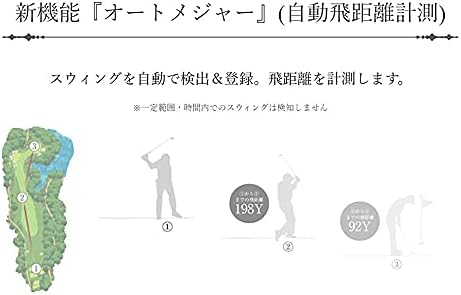
Image 4.2: Visual representation of the Auto Measure function, showing automatic detection of swing and calculation of shot distance.
Note: Swings within a certain range or time period may not be detected.
4.3 Displaying Elevation Difference Maps
On the FW (Fairway) navigation screen or during play information flyover, you can view elevation difference maps. These maps show the elevation from your current position to the green and to the center of the fairway, as well as from the fairway center to the green.

בילד 4.3: עקס.amples of elevation difference maps, showing current position to green and fairway center to green views.
4.4 Screen Visibility in Sunlight
The Shot Navi Crest utilizes an MIP (Memory-in-Pixel) color reflective LCD, which provides high visibility outdoors, even in direct sunlight. Unlike backlit or organic EL displays, it reflects ambient light to produce a clear and vibrant display.

Image 4.4: The Shot Navi Crest displaying clear course information under bright sunlight conditions.
5. וישאַלט
- רייניקונג: Wipe the device with a soft, dry cloth. For stubborn dirt, use a slightly damp שטאָף און דערנאָך טרוקן גוט אויס. פֿאַרמייַדן ניצן אַברייסיוו רייניגער אָדער סאָלווענטן.
- וואַסער קעגנשטעל: The device is waterproof. However, avoid prolonged submersion or exposure to high-pressure water jets. Ensure the charging port is dry before charging.
- סטאָרידזש: האַלט דעם אַפּאַראַט אין אַ קיל, טרוקן אָרט אַוועק פון דירעקט זונשייַן און עקסטרעמע טעמפּעראַטורן.
- באַטערי זאָרגן: כדי צו פארלענגערן די לעבן פון די באַטעריע, זאָלט איר נישט אָפט אויסלאָדן די באַטעריע. לאָדט דאָס אַפּאַראַט רעגולער אויף, אפילו אויב עס ווערט נישט גענוצט פֿאַר לענגערע צייטן.
6. טראָובלעשאָאָטינג
| פּראָבלעם | מעגלעך סיבה | לייזונג |
|---|---|---|
| די מיטל טוט נישט מאַכט אויף. | נידעריק באַטאַרייע. | טשאַרדזש די מיטל גאָר. |
| דזשי-פי-עס סיגנאַל נישט באַקומען. | פארמאכט view פון הימל; אַפּאַראַט אינעווייניק. | אריבערגיין צו אן אפענע דרויסנדיקע פלאץ מיט א קלארע view of the sky. Wait a few minutes for signal acquisition. |
| Incorrect distances displayed. | Outdated course data; GPS inaccuracy. | Ensure course data is updated. Allow the device to acquire a strong GPS signal. |
| Auto Measure not detecting swings. | Swing too short or within a short time frame; sensor obstruction. | Ensure full swings are made. Check for any obstructions around the device. |
| Screen difficult to read in bright conditions. | Not applicable for MIP display, but ensure screen is clean. | The MIP display is designed for high visibility in sunlight. Ensure the screen is clean and free from smudges. |
7. ספּעסאַפאַקיישאַנז
| מאָדעל נאָמען: | קרעסט |
| פּראָדוקט טיפּ: | Wristwatch-type GPS Golf Navigation Device |
| מאַטעריאַל: | פּלאַסטיק |
| קאָליר: | Black x Silver |
| פאַרשטעלן גרייס: | 1.2 אינטשעס |
| ווייַז טיפּ: | MIP Color Reflective LCD |
| קאַנעקטיוויטי: | בלועטאָאָטה |
| וואַסער קעגנשטעל: | יא |
| Battery Life (GPS mode): | בעערעך. 8 שעה |
| דימענסיעס: | 11.9 x 9.1 x 8.2 cm (package); 64 g (device weight) |
| Course Coverage: | 59,315 courses in 122 countries/regions (as of Sept 2020) |
| אַרייַנגערעכנט קאַמפּאָונאַנץ: | Main unit, charging cable, instruction manual/warranty card |
8. וואָראַנטי און שטיצן
This product comes with a manufacturer's warranty. Please refer to the included warranty card for details regarding warranty period, terms, and conditions. Keep your proof of purchase for warranty claims.
For technical support, product inquiries, or service requests, please contact Shot Navi customer service. Contact information can be found on the official Shot Navi webזייטל אדער אויף דער וואָראַנטי קאַרטל.
וויכטיק: The charging cable is a critical component. Handle it with care to prevent damage, as issues with the charging cable have been noted in user feedback. Replacement charging cables may be available for purchase from authorized retailers or the Shot Navi webפּלאַץ.
Ask a question about this manual
Ask about setup, troubleshooting, compatibility, parts, safety, or missing instructions. Manuals+ will review the question and use this page’s manual context to help answer it.