
1. הקדמה
This manual provides detailed instructions for the installation, operation, and maintenance of your Fractal Design Define 7 Nano Black Solid Mini ITX PC Case. Please read this manual thoroughly before beginning assembly to ensure proper installation and to maximize the performance and longevity of your system.
The Define 7 Nano is a compact Mini ITX case designed for silent operation and flexible component support, offering a balance of size and functionality for small form factor builds.

פיגור 1: פראָנט-זייט view of the Fractal Design Define 7 Nano Black Solid Mini ITX PC Case.
2. זיכערקייַט אינפֿאָרמאַציע
אָבסערווירן די פאלגענדע זיכערהייט מיטלען בעת ינסטאַלירונג און אָפּעראַציע:
- שטענדיק אָפּשטעקן די מאַכט צושטעל פון די וואַנט אַוטלעט איידער איר ינסטאַלירן אָדער אַראָפּנעמען קיין קאָמפּאָנענטן.
- טראָגט אַן אַנטי-סטאַטישן האַנטגעלענק-רימען צו פאַרמייַדן עלעקטראָסטאַטישן אָפּלאָד (ESD) שאָדן צו סענסיטיווע קאָמפּאָנענטן.
- האַנדלט מיט קאָמפּאָנענטן פֿאָרזיכטיק צו פֿאַרמייַדן פֿיזישע שעדיקן.
- זאָרגט פֿאַר געהעריקע ווענטילאַציע אַרום דעם פּיסי קעסטל כּדי צו פֿאַרמייַדן איבערהיצונג.
- האַלט דעם קעסטל אַוועק פון פליסיקייטן און איבערגעטריבענער הומידיטי.
- Do not attempt to modify the case structure, as this may void your warranty and pose safety risks.
3. פּעקל אינהאַלט
באַשטעטיקן אַז אַלע קאָמפּאָנענטן זענען פאַראַן אין דער פּאַקעט:
- Fractal Design Define 7 Nano PC Case
- Accessory Box (screws, zip ties, standoffs, cleaning cloth)
- באַניצער מאַנואַל (דעם דאָקומענט)
- Pre-installed fans (Dynamic X2 GP-12/GP-14, quantity may vary)

פיגורע 2: עקספּלאָדעד view showing the various removable components of the Define 7 Nano case.
4. סעטאַפּ און קאָמפּאָנענט אינסטאַלאַציע
4.1. צוגרייטונג
- אויספּאַקן דעם קעסטל: נעמט פֿאָרזיכטיק אַרויס דעם קעסטל פֿון זײַן פֿאַרפּאַקונג.
- אַראָפּנעמען זייַט פּאַנאַלז: The side panels are secured with captive thumbscrews. Loosen the thumbscrews and slide the panels backward to remove them.
- Remove Top Panel (Optional): The top panel can be removed for easier access during installation or for enhanced airflow. Press the release button at the rear of the top panel and lift it off.
- Remove Front Panel (Optional): The front panel can be carefully pulled off from the bottom for access to front fan mounts and dust filters.
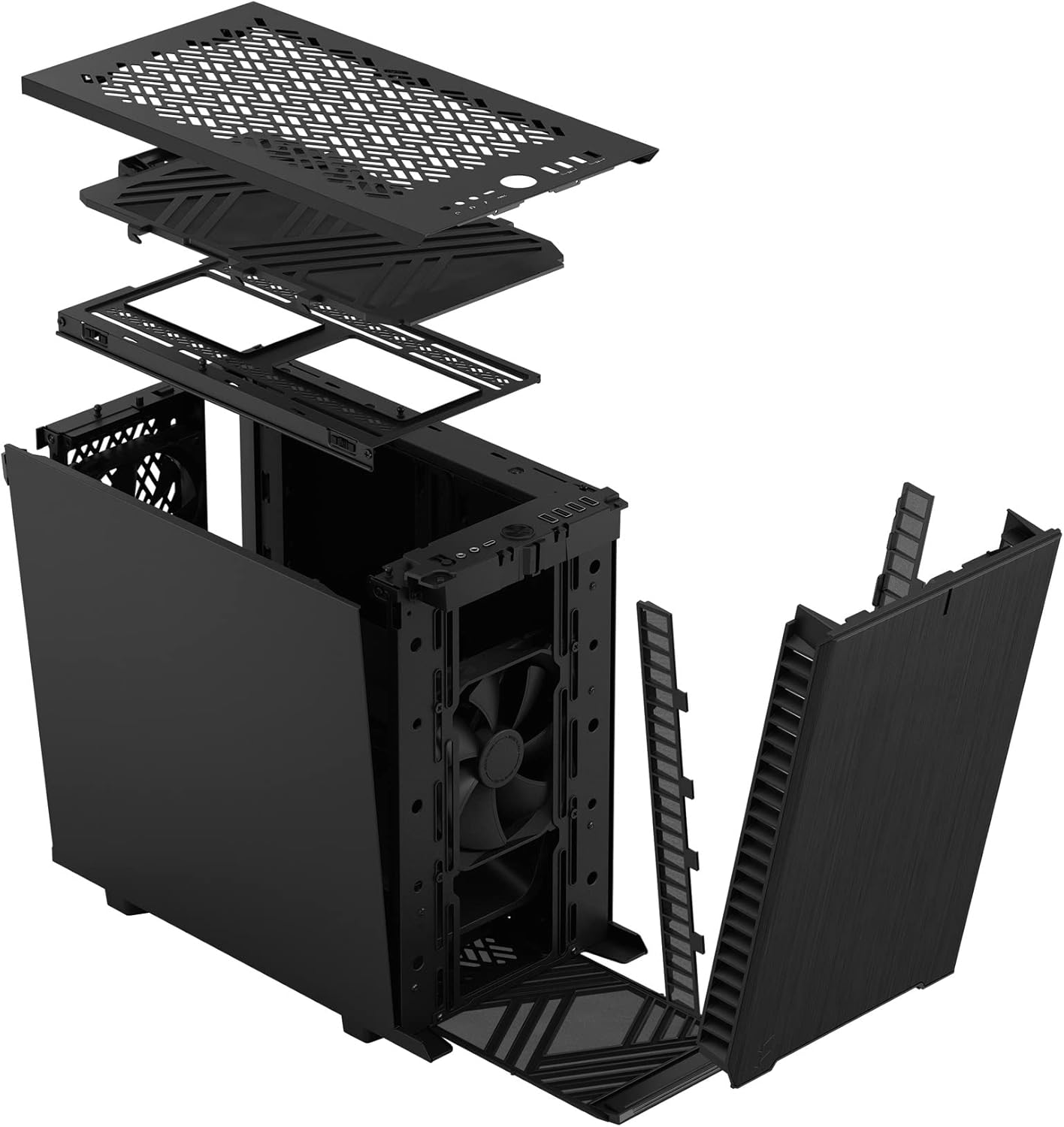
פיגורע 3: עקספּלאָדעד view illustrating the removal process for the front and top panels.
4.2. מאָטהערבאָאַרד ינסטאַללאַטיאָן
The Define 7 Nano supports Mini ITX motherboards.
- אינסטאַלירן I/O שילד: If your motherboard requires an I/O shield, install it into the rear opening of the case before mounting the motherboard.
- פאזיציע מוטערבאָרד: Align your Mini ITX motherboard with the pre-installed standoffs inside the case.
- זיכערע מוטערבאָרד: Use the provided screws from the accessory box to secure the motherboard to the standoffs.
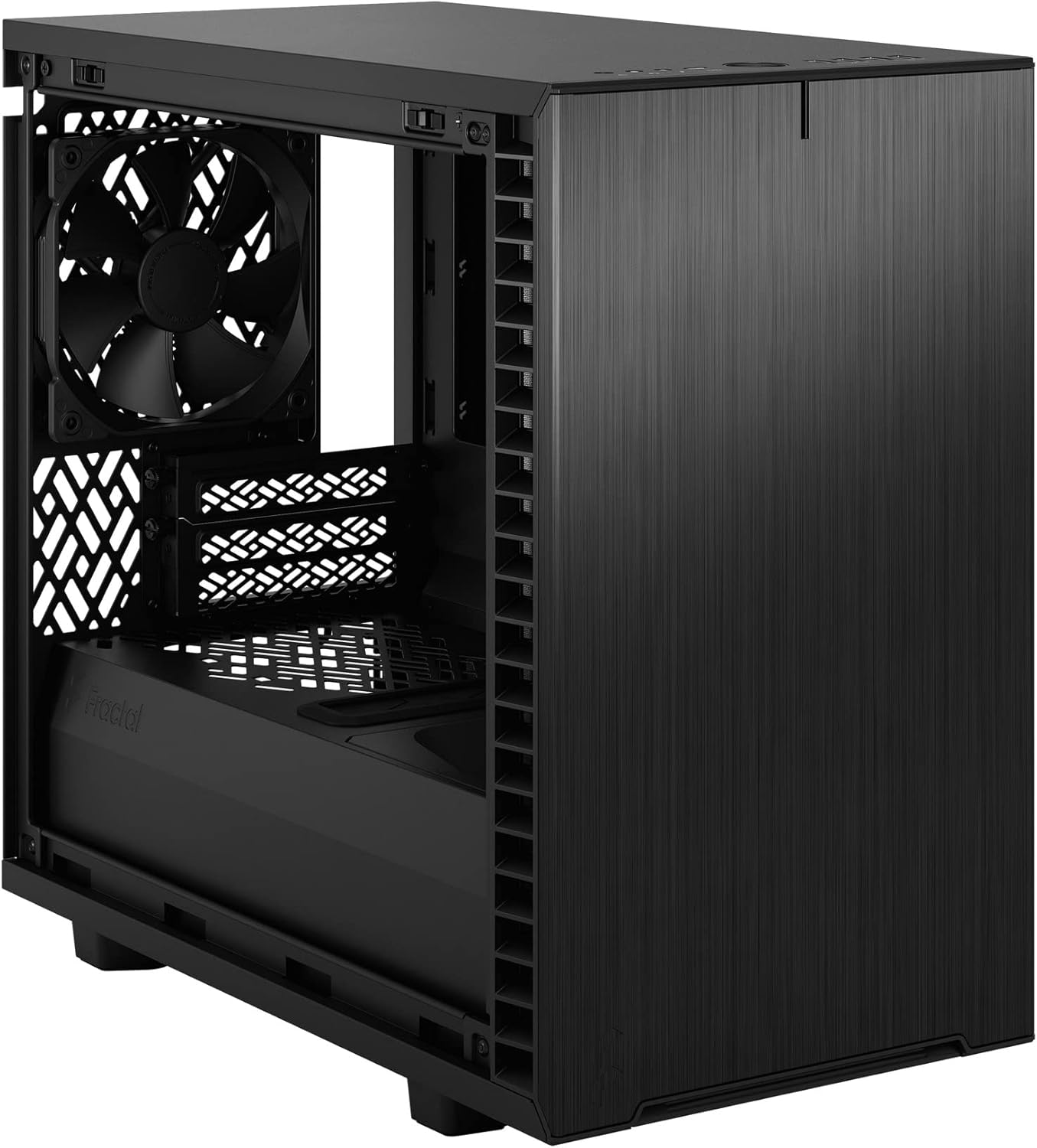
פיגורע 4: ינלענדיש view of the case, highlighting the motherboard mounting area and fan locations.
4.3. מאַכט צושטעלן אַפּאַראַט (PSU) ינסטאַלירונג
The Define 7 Nano supports ATX PSUs.
- Mount PSU Bracket: Attach the PSU mounting bracket to your power supply using the screws provided with the PSU.
- Slide PSU into Case: Slide the PSU with the attached bracket into the rear of the case.
- זיכערע PSU: Secure the PSU bracket to the case using the thumbscrews.
4.4. סטאָרידזש דרייוו אינסטאַלאַציע
The case supports 2.5" SSDs and 3.5" HDDs.
- 2.5" Drives: Mount 2.5" drives to the dedicated SSD brackets located behind the motherboard tray or on the PSU shroud. Secure with screws.
- 3.5" Drives: Install 3.5" drives into the drive cage located beneath the PSU shroud. Secure with screws.
4.5. גראַפיקס קאַרטל (GPU) ינסטאַלירונג
- Remove PCIe Slot Covers: אַראָפּנעמען די נייטיקע PCIe סלאָט דעקל פון די הינטערשטע טייל פון די קעסטל.
- אַרײַנשטעלן GPU: Carefully insert your graphics card into the primary PCIe slot on the motherboard.
- זיכערע GPU: Secure the graphics card to the case using the thumbscrews or standard screws.
4.6. קיל סיסטעם אינסטאַלאַציע (פענס/ראַדיאַטאָרן)
The Define 7 Nano offers flexible cooling options.
- פראָנט פאַנס: Up to two 120/140mm fans or a 240/280mm radiator can be installed at the front.
- בעסטער פאַנס: Up to two 120/140mm fans or a 240mm radiator can be installed at the top (requires removing the solid top panel and installing the ventilated top panel).
- דערציען פאן: One 120mm fan can be installed at the rear.
- Bottom Fan: One 120mm fan can be installed at the bottom.
Ensure fans are oriented correctly for optimal airflow (intake or exhaust).
4.7. קאַבלע מאַנאַגעמענט
The case features routing channels and Velcro straps behind the motherboard tray for organized cable management.
- רוט קאַבלעס: Pass power and data cables through the rubber grommets to the back of the motherboard tray.
- זיכער קאַבלעס: Use the pre-installed Velcro straps and included zip ties to bundle and secure cables.

פיגור 5: הינטערשטע אינעווייניק view demonstrating the cable management system with Velcro straps.
4.8. פראָנט פּאַנעל קאַנעקשאַנז
Connect the front panel cables to the corresponding headers on your motherboard:
- Power Button (PWR SW)
- Reset Button (RESET SW)
- Power LED (PWR LED)
- HDD Activity LED (HDD LED)
- וסב 3.0 כעדער
- USB Type-C Header (if applicable)
- הד אַודיאָ כעדער
Refer to your motherboard manual for exact header locations.
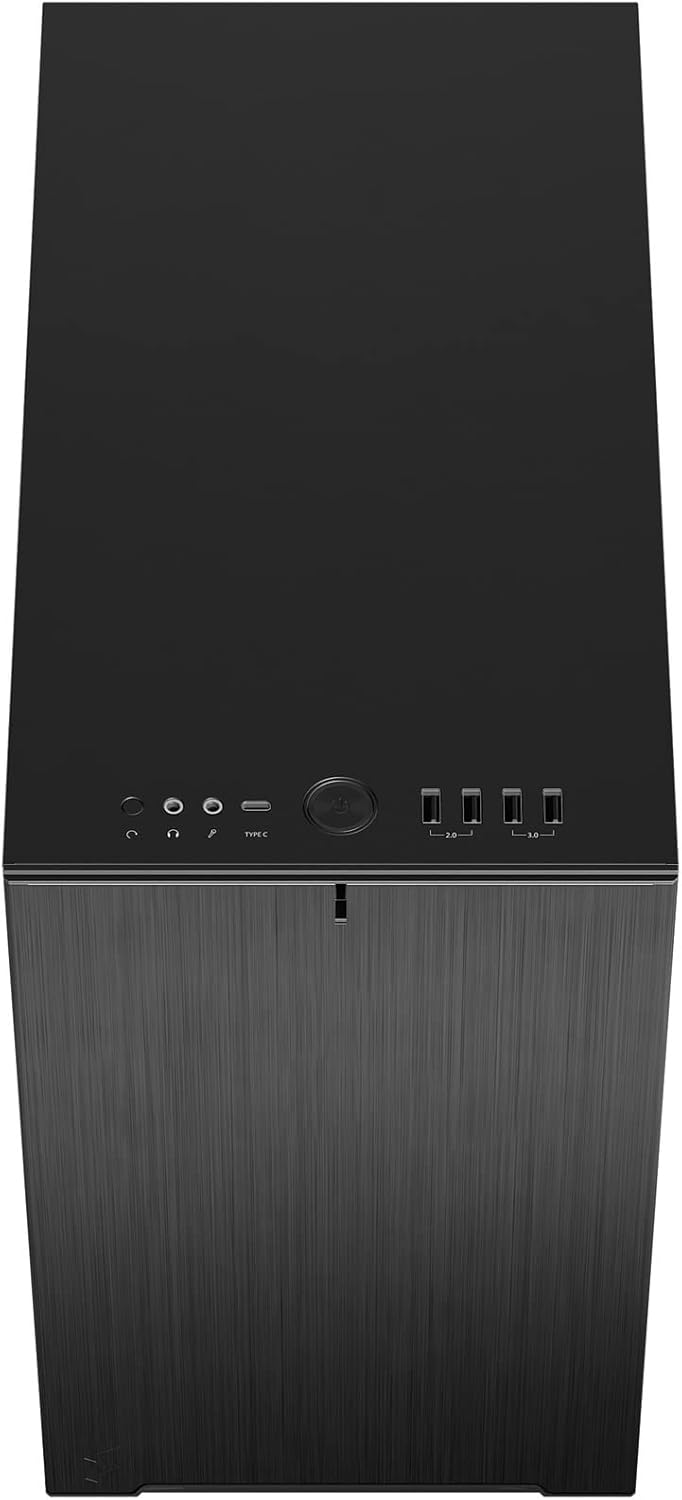
פיגור 6: אויבן-פראנט view displaying the front I/O panel with USB ports, audio jacks, and power button.
5. אַפּערייטינג ינסטרוקטיאָנס
5.1. פּאָווערינג אויף / אויסגעלאשן
- מאַכט אויף: Press the power button located on the front I/O panel.
- מאַכט אַוועק: Initiate a shutdown from your operating system. Alternatively, press and hold the power button for 5 seconds for a forced shutdown.
5.2. Using Front Panel Ports
די פראָנט I/O פּאַנעל גיט באַקוועמען צוטריט צו:
- וסב 3.0 פּאָרץ: פֿאַר הויך-גיכקייט דאַטן אַריבערפירן מיט קאָמפּאַטיבלע דעוויסעס.
- וסב טיפּ-C פּאָרט: For modern devices requiring a Type-C connection.
- אַודיאָ דזשעקס: פֿאַר פֿאַרבינדן כעדפאָונז און מיקראָפֿאָנען.
6. וישאַלט
רעגולערע אויפהאלטונג העלפט זיכער מאכן די בעסטע פאָרשטעלונג און לאַנגלעבעדיקייט פון אייערע פּיסי קאָמפּאָנענטן.
6.1. שטויב פילטער רייניקונג
The Define 7 Nano is equipped with easily removable dust filters to prevent dust buildup inside the case.
- פראָנט פילטער: Can be accessed by removing the front panel.
- שפּיץ פילטער: Located beneath the ventilated top panel (if installed).
- Bottom Filter: Slides out from the front of the case.
Clean filters regularly (e.g., monthly) by rinsing them with water and allowing them to dry completely, or by using a soft brush or compressed air.
6.2. אַלגעמיינע רייניקונג
- ניצן אַ ווייך, דamp cloth to wipe down the exterior surfaces of the case.
- ויסמיידן ניצן האַרב קעמיקאַלז אָדער אַברייסיוו מאַטעריאַלס וואָס קען שעדיקן די ענדיקן.
- For interior cleaning, use compressed air to remove dust from components. Ensure the system is powered off and unplugged.
7. טראָובלעשאָאָטינג
די סעקציע באהאנדלט אלגעמיינע פראבלעמען וואס איר קענט באגעגענען.
7.1. קיין מאַכט / סיסטעם הייבט זיך נישט אָן
- קוק די מאַכט קאַנעקשאַנז: Ensure the PSU is properly connected to the wall outlet and the power switch on the PSU is in the 'ON' position. Verify all internal power cables (24-pin ATX, 8-pin CPU, PCIe, SATA) are securely connected.
- פראָנט פּאַנעל כעדערז: Double-check that the power button header (PWR SW) is correctly connected to the motherboard.
- Motherboard/CPU: זייט זיכער אז די סי-פי-יו און ראם זענען ריכטיג אריינגעשטעלט.
7.2. איבערגעטריבענער ראַש
- פאָכער ראַש: Check if any fan cables are obstructing fan blades. Ensure fans are securely mounted. Consider adjusting fan speeds in your motherboard's BIOS/UEFI or operating system.
- ווייבריישאַן: Ensure all components (PSU, drives, GPU) are securely fastened to prevent rattling.
7.3. אָוווערכיטינג
- לופט לויפן: Verify that fans are oriented correctly (intake/exhaust) and that there is adequate airflow.
- שטויב פילטערס: Clean dust filters regularly to prevent restricted airflow.
- טערמישע פּאַסטע: Ensure CPU cooler has proper thermal paste application.
8. ספּעסאַפאַקיישאַנז
| שטריך | באַשרייַבונג |
|---|---|
| מאָדעל נאָמען | Define 7 Nano |
| מאָדעל נומער | FD-C-DEF7N-01 |
| טיפּ פון קאַסטן | מיני-טורעם |
| מאָטהערבאָאַרד קאַמפּאַטאַבילאַטי | מיני יטקס |
| דימענסיעס (L X W X H) | Approx. 18.74 x 11.38 x 17.91 inches (Package) |
| וואָג | בעערעך. 18.37 פונט |
| מאַטעריאַל | אַלומינום |
| קאָליר | שוואַרץ סאָליד |
| פראָנט איך / אָ פּאָרץ | 5x USB 3.0, Audio In/Out, Power Button |
| פאָר בייס | 2.5" SSD, 3.5" HDD (specific quantities vary by configuration) |
| קאָאָלינג אופֿן | לופט |
| פאַר-אינסטאַלירן פאַנס | Dynamic X2 GP-12 (rear), Dynamic X2 GP-14 (front) |
9. וואָראַנטי און שטיצן
Fractal Design products are manufactured to the highest quality standards and come with a limited warranty. For detailed warranty information, please refer to the official Fractal Design webוועבזייטל אדער די וואָראַנטי קאַרטל וואָס איז אַרייַנגערעכנט מיט דיין פּראָדוקט.
For technical support, troubleshooting assistance, or to inquire about replacement parts, please visit the official Fractal Design support page:
www.fractal-design.com/support/
Please have your product model number (FD-C-DEF7N-01) and proof of purchase ready when contacting support.