
XDeer CS100-42
XDeer Biometric Safe Box CS100-42 User Manual
מאָדעל: CS100-42
1. הקדמה
Thank you for choosing the XDeer Biometric Safe Box. This manual provides essential information for the proper setup, operation, and maintenance of your safe. Please read these instructions carefully before use to ensure optimal security and functionality.

Image: The XDeer Biometric Safe Box, open to reveal its interior with a shelf, money, and handgun storage. The safe features a biometric fingerprint scanner and keypad.
2. זיכערקייַט אינפֿאָרמאַציע
- Always keep emergency keys in a secure location away from the safe and out of reach of children.
- Do not store emergency keys inside the safe.
- זיכער מאַכן אַז דער זיכערער אָרט איז זיכער אינסטאַלירט צו פאַרמייַדן אַן אומאָטעריזירטע אַראָפּנעמונג.
- Regularly check battery levels to avoid lockout situations.
- Keep the fingerprint sensor clean for reliable operation.
- This safe is not water resistant. Protect it from moisture.
3. פּעקל אינהאַלט
- XDeer Biometric Safe Box (1)
- נויטפאַל שליסלען (2)
- Removable Pistol Bracket (1)
- Mounting Hardware (Bolts and Anchors)
- באַניצער מאַנואַל (דעם דאָקומענט)
- Fireproof Bag (Optional, if included with your model)
4. פּראָדוקט פֿעיִקייטן
- Quick-Access Biometric Fingerprint Sensor: Provides rapid access in approximately 0.5 seconds.
- דיגיטאַל קיפּאַד: Program a personal code for secure entry.
- Emergency Key Access: Backup key entry for manual override.
- סאָליד שטאָל קאַנסטראַקשאַן: Reinforced 8-gauge steel housing and pry-resistant 1/8" thick solid door.
- ינלענדיש געפירט ליכט: Illuminates the safe's interior for visibility.
- שטיל מאָדע: Option to disable sound for discreet operation.
- מאַכט ווייַז: ווײַזט אָן דעם איצטיקן באַטעריע־לעוועל.
- Emergency USB-C Port: Allows external power for temporary access if batteries are depleted.
- Removable Pistol Bracket: Adapted gun rack for organized storage of up to 4 handguns.
- פאַר-דריילד מאַונטינג האָלעס: פֿאַר זיכערער אינסטאַלאַציע צו אַ וואַנט אָדער שטאָק.

Image: Visual representation of key features including fingerprint access, USB interface, gun rack, and interior LED light.
5. סעטאַפּ
5.1 אויספּאַקן די קעסטל און ערשטע דורכקוק
- נעמט פֿאָרזיכטיק אַרויס דעם זיכערן פּאַקעט.
- Inspect the safe for any signs of damage. If damaged, contact customer support immediately.
- Locate the emergency keys, typically found in a small box within the packaging foam. Keep these keys in a safe, separate location.
5.2 באַטאַרייע ייַנמאָנטירונג
- Open the safe using one of the emergency keys. Insert the key into the hidden keyhole (usually behind the keypad cover or a removable panel) and turn.
- געפינט די באַטעריע אָפּטייל אויף דער אינעווייניק פון דער זיכער טיר.
- Insert four (4) AA batteries, ensuring correct polarity.
- Close the battery compartment. The safe should emit a beep, indicating successful battery installation.

Image: Detail of the hidden keyhole for emergency key access, located on the control panel.
5.3 אויפשטעלן דעם זיכערן
The safe features pre-drilled holes for secure mounting to a wall or floor. This is highly recommended to prevent unauthorized removal of the entire safe.
- קלייבט אויס א פאסיגע לאקאציע פארן זיכערן.
- מאַרקירט די בויער פונקטן דורך די פאַר-געבויערטע לעכער אויף דער צוריק אָדער דנאָ פון די זיכער.
- באָרט פּילאָט לעכער אין דער וואַנט אָדער שטאָק מיט אַ פּאַסיקן בויער ביט.
- Insert the expansion anchors into the drilled holes.
- Align the safe with the holes and secure it using the provided mounting bolts.

Image: A diagram illustrating the process of securely mounting the safe to a wall or floor using pre-drilled holes and anchors.
6. אַפּערייטינג ינסטרוקטיאָנס
6.1 קאָנטראָל פּאַנעל איבערview
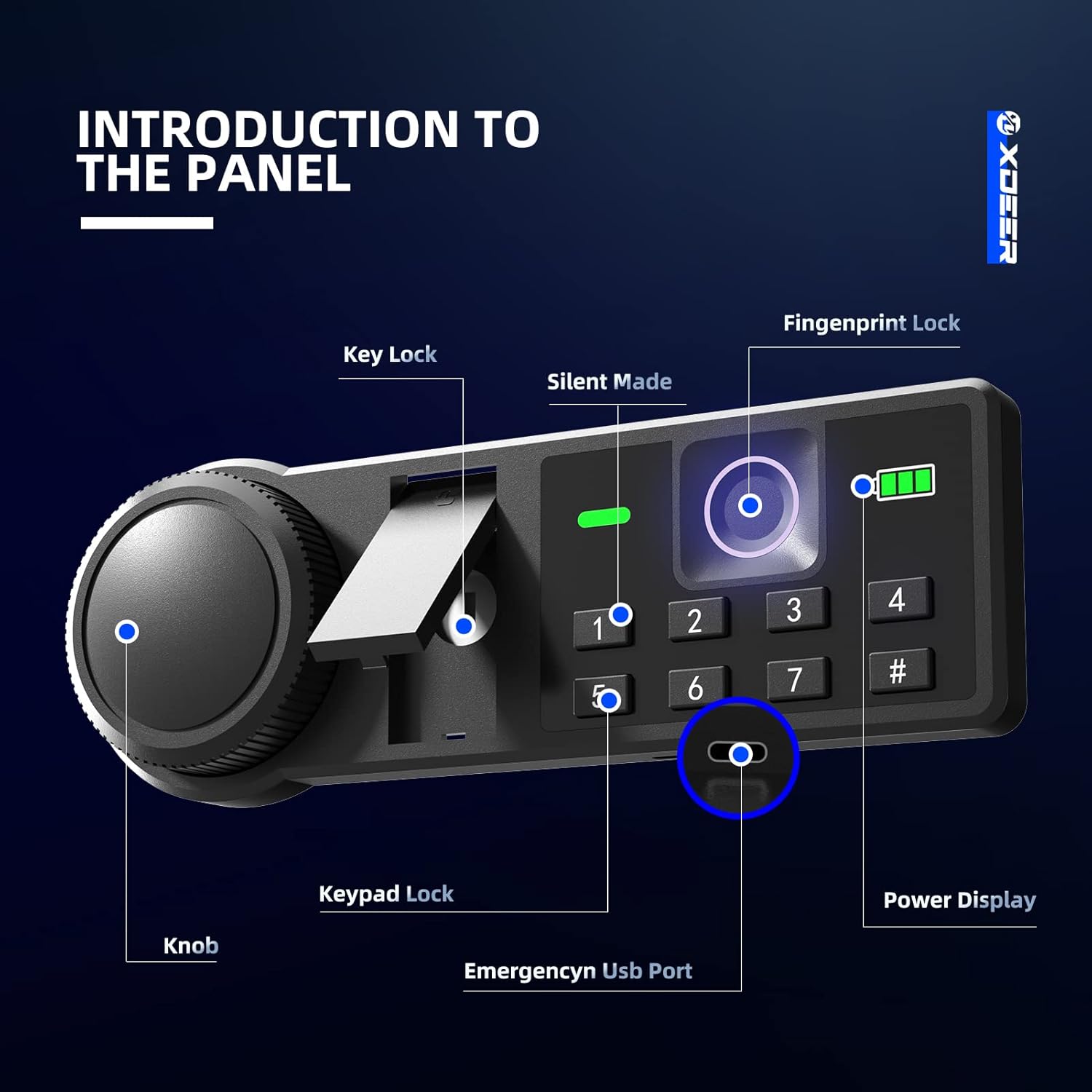
Image: A detailed diagram of the safe's control panel, highlighting the key lock, silent mode button, fingerprint sensor, numeric keypad, emergency USB port, and battery power display.
6.2 עפענען מיטן נויטפאַל שליסל
- Locate the hidden keyhole on the control panel (refer to Control Panel Overview).
- אַרייַנלייגן די נויטפאַל שליסל און קער עס קלאַקווייז.
- Rotate the knob on the safe door counter-clockwise to open the door.
6.3 Setting and Using the Digital Keypad Code
- With the safe door open, press the internal reset button (usually a small red button on the inside of the door). The keypad will light up.
- Enter your desired 3-8 digit code (using numbers 1-7 only, as 8, 9, 0 are not available on this keypad).
- Press the '#' button to confirm. The safe will beep to confirm the new code.
- To open: Enter your code, then press '#'. The safe will unlock. Rotate the knob counter-clockwise to open.
6.4 Setting and Using the Biometric Fingerprint
- With the safe door open, press the internal reset button. The fingerprint sensor will light up.
- Place your finger on the sensor. The light will flash. Lift and repeat placing your finger on the sensor multiple times (usually 5-8 times) from different angles until the safe confirms successful registration with a long beep.
- You can register multiple fingerprints by repeating the process.
- To open: Place your registered finger on the sensor. The safe will unlock. Rotate the knob counter-clockwise to open.

Image: The illuminated fingerprint sensor and battery level indicator on the safe's control panel.
6.5 שטיל מאָדע
To enable or disable silent mode (mute keypad and unlock sounds), press and hold the '1' key on the keypad. The safe will indicate the change with a visual cue on the display.

Image: A visual representation of the silent mode feature, indicating that audible feedback can be turned off.
6.6 מאַכט ווייַז
Press any key on the keypad to view the current battery level on the display. A low battery indicator will alert you when batteries need replacement.
6.7 Emergency USB-C Port
If the batteries are completely depleted, you can power the safe externally using a USB-C cable and a power bank. Locate the USB-C port on the underside of the control panel. Connect a power bank to temporarily power the safe and gain access using your code or fingerprint.

בילד: א נאָענטע בילד view of the emergency USB-C port, used for external power in case of battery depletion.
6.8 ינלענדיש געפירט ליכט
The safe is equipped with an interior LED light that automatically illuminates when the door is opened, providing clear visibility of contents.

Image: The interior LED light providing illumination inside the safe.
6.9 Removable Pistol Bracket
The safe includes a removable pistol bracket designed to securely store up to 4 handguns. This bracket can be installed or removed based on your storage needs.

Image: A diagram illustrating how to install the removable pistol bracket for handgun storage.
7. וישאַלט
7.1 באַטערי פאַרבייַט
Replace batteries when the low battery indicator appears on the display. Use four (4) new AA batteries. Ensure the safe is open during replacement to avoid accidental lockout.
7.2 רייניקונג
רייניקט די אויסערליכע זייט פון זיכער מיט א ווייכן, דamp cloth. Avoid abrasive cleaners or solvents. Keep the fingerprint sensor and keypad free from dust and debris for optimal performance.
8. טראָובלעשאָאָטינג
- זיכער עפֿנט זיך נישט מיטן קאָד/פֿינגער־אָפּדרוק: Check battery levels. If low, replace batteries or use the emergency USB-C port. Ensure correct code entry or proper finger placement on the sensor. Try using the emergency key.
- קלאַוויאַטור רעאַגירט נישט: Batteries may be dead. Use the emergency USB-C port or emergency key to open the safe and replace batteries.
- Fingerprint sensor not recognizing: Ensure your finger is clean and dry. Try re-registering your fingerprint. Ensure proper placement covering the entire sensor.
- די טיר שליסט זיך נישט ריכטיג: Check for any obstructions inside the safe or around the door frame. Ensure the locking bolts retract fully when the safe is open.
9. ספּעסאַפאַקיישאַנז
| שטריך | דעטאַל |
|---|---|
| סאָרט | XDeer |
| מאָדעל נומער | קסקסנומקס-קסנומקס |
| פּראָדוקט דימענשאַנז | 12.99"ד רענטגענ 13.62"וו רענטגענ 16.54"ה |
| קאַפּאַציטעט | 1.69 קוביק פֿיס |
| לאַק טיפּ | Electronic Combination Lock, Biometric Fingerprint, Key |
| מאַטעריאַל | אַללוי סטיל |
| פּונקט וואָג | 33.4 פונט |
| מאַונטינג טיפּ | אונטער קאַונטער מאָונט, וואַנט מאָונט, שטאָק מאָונט |
| וואַסער קעגנשטעל מדרגה | ניט וואַסער קעגנשטעליק |

Image: A diagram illustrating the external and internal dimensions of the safe box.
10. וואָראַנטי און שטיצן
XDeer provides a 1-year warranty service for all safe box series. If you have any questions or require assistance, please contact XDeer customer support. We are committed to providing satisfactory replies as soon as possible.
פֿאַר ווייטערדיקע שטיצע, ביטע באַזוכט די XDeer Store on Amazon.
11. פּראָדוקט ווידעאָס
XDeer Biometric Safe Box Overview
ווידעא: אן איבערview of the XDeer Biometric Safe Box, demonstrating its features and functionality. This video is provided by USA Safe Direct.
Quick-Access Security Safe Features
Video: A demonstration of the quick-access security features of the XDeer safe, including biometric and keypad entry. This video is provided by Homesteadhow.
Ask a question about this manual
Ask about setup, troubleshooting, compatibility, parts, safety, or missing instructions. Manuals+ will review the question and use this page’s manual context to help answer it.