
MICROWARE EZCAP-241
MICROWARE EZCAP241 MP3 Digital Music Digitizer User Manual
Model: EZCAP-241
1. הקדמה
The MICROWARE EZCAP241 MP3 Digital Music Digitizer is a standalone device designed to convert analog audio signals into digital MP3 files. This device allows you to record audio from various sources, such as vinyl record players, cassette players, CD players, DVD players, game consoles, and TV boxes, directly onto a USB flash drive or SD card without the need for a computer. It also features a playback function, enabling you to review recorded audio fileס גלייך אויף דעם מיטל.
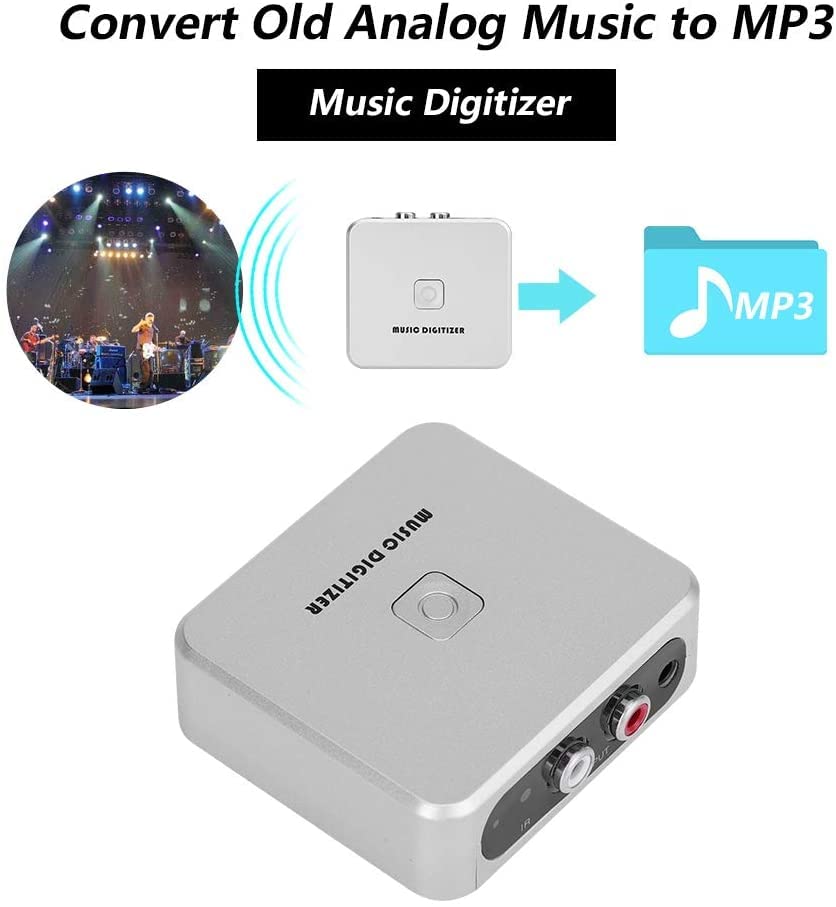
Image 1.1: The EZCAP241 Music Digitizer illustrating its function of converting analog music to MP3 format.
2. פּראָדוקט איבערview
The EZCAP241 features a compact design with clearly labeled ports and controls for ease of use.
2.1 אַפּאַראַט קאָמפּאָנענטן
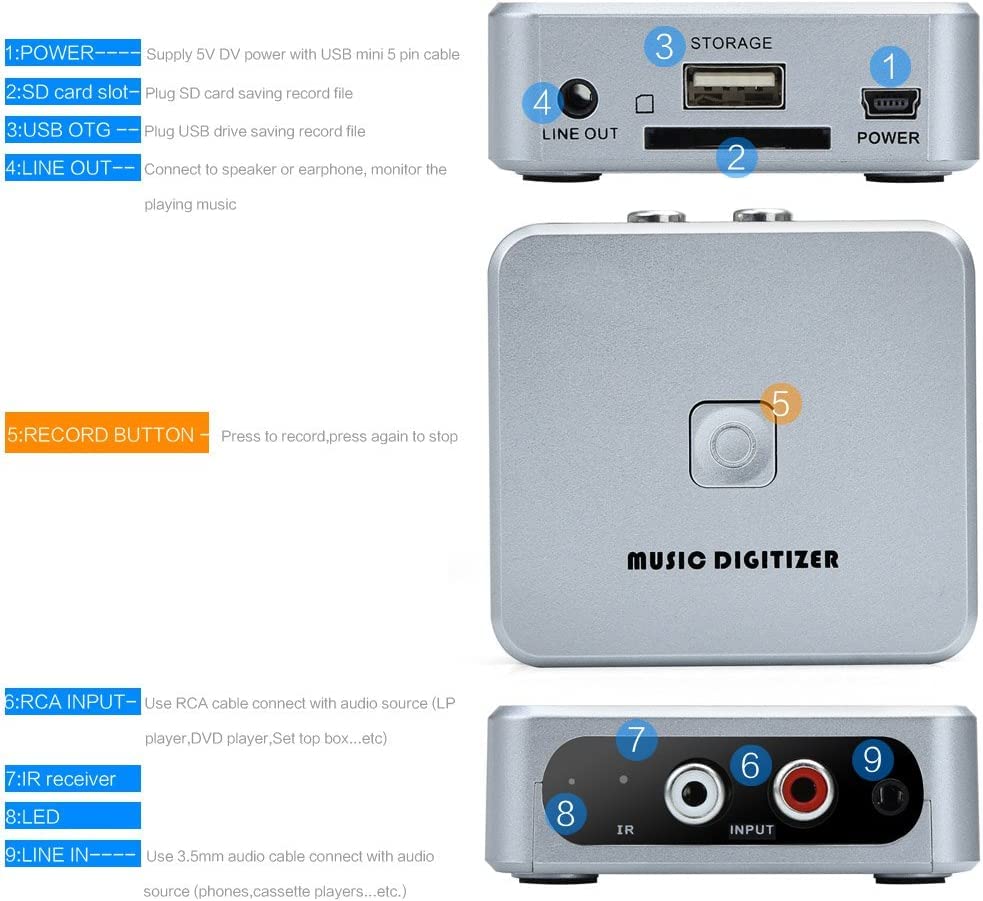
בילד 2.1: דעטאַלירט view of the EZCAP241 device, highlighting its various ports and controls.
- POWER (Mini USB): Connects to a 5V DC power supply using a USB mini 5-pin cable.
- SD Card Slot: Insert an SD card for saving recorded audio files.
- USB OTG Port: Connect a USB flash drive for saving recorded audio files.
- LINE OUT (3.5mm): Connect to headphones or speakers to monitor audio during recording or for playback.
- רעקאָרד קנעפּל: Press to start recording; press again to stop recording.
- RCA INPUT (Red/White): Connects to audio sources (e.g., LP player, DVD player, set-top box) using an RCA cable.
- IR ופנעמער: ריסיווז סיגנאַלז פון די ווייַט קאָנטראָל.
- LED ינדיקאַטאָר: Displays device status (Green LED for manual mode, standby, quick flash for recording, slow flash for playback).
- 3.5mm Audio IN: Connects to audio sources (e.g., phones, cassette players) using a 3.5mm audio cable.

בילד 2.2: נאָענט־אַרויף view of the EZCAP241's input and output ports with their respective labels.
3. סעטאַפּ
Follow these steps to set up your EZCAP241 for recording:
- מאַכט קשר: Connect the EZCAP241 to a 5V DC power source using the provided USB mini 5-pin cable. The power port is labeled 'POWER'.
- סטאָרידזש מיטל: Insert a USB flash drive into the 'USB OTG' port or an SD card into the 'SD card slot'. Ensure the storage device has sufficient free space for your recordings.
- אַודיאָ מקור קשר:
- For devices with RCA output (e.g., LP players, DVD players), connect them to the 'RCA INPUT' ports (red for right, white for left) on the EZCAP241 using an RCA cable.
- For devices with 3.5mm audio output (e.g., phones, cassette players), connect them to the '3.5mm Audio IN' port on the EZCAP241 using a 3.5mm audio cable.
- מאָניטאָרינג (אָפּציאָנעל): Connect headphones or speakers to the 'LINE OUT' (3.5mm) port to monitor the audio during recording or playback.

Image 3.1: Connection diagram illustrating how to connect the EZCAP241 to different audio sources and storage devices.
4. אַפּערייטינג ינסטרוקטיאָנס
4.1 רעקאָרדינג אַודיאָ
- Ensure the EZCAP241 is properly set up with power, a storage device, and an audio source as described in Section 3.
- Start playing the audio from your source device (e.g., cassette player, record player).
- Press the 'RECORD' button on the EZCAP241. The LED indicator will typically flash quickly to indicate recording is in progress.
- To stop recording, press the 'RECORD' button again. The LED indicator will change to reflect standby or playback mode.

Image 4.1: The 'RECORD' button on the EZCAP241, used to initiate and terminate audio recording.
4.2 ווידערשפּיל אַודיאָ
The EZCAP241 allows you to play back recorded MP3 files directly from the connected USB flash drive or SD card.
- Ensure headphones or speakers are connected to the 'LINE OUT' port.
- Use the remote control (if included) to navigate and select files for playback. Refer to the remote control's specific instructions for navigation.
- The LED indicator will typically flash slowly during playback.

Image 4.2: The EZCAP241 connected to earphones, demonstrating its playback capability.
5. וישאַלט
- האַלט דאָס אַפּאַראַט ריין דורך עס אָפּווישן מיט אַ ווייכן, טרוקענעם שטאָף. פֿאַרמייַדט ניצן פֿליסיקע רייניגער אָדער סאָלווענטן.
- האַלט דעם אַפּאַראַט אין אַ קיל, טרוקן אָרט אַוועק פון דירעקט זונשייַן און עקסטרעמע טעמפּעראַטורן.
- ויסמיידן דראַפּינג די מיטל אָדער אונטערטעניק צו שטאַרק ימפּאַקץ.
- Ensure all cables are connected securely but do not force them into ports.
6. טראָובלעשאָאָטינג
| פּראָבלעם | מעגלעך סיבה | לייזונג |
|---|---|---|
| די מיטל טוט נישט מאַכט אויף. | קיין מאַכט צושטעל אָדער דעפעקטיווע קאַבל. | Ensure the 5V DC power supply is connected correctly and functioning. Try a different USB cable or power adapter. |
| קיין אודיאָ נישט רעקאָרדירט. | Incorrect audio input connection, audio source not playing, or storage device issue. | Verify audio input cables are securely connected to the correct ports (RCA or 3.5mm). Ensure the audio source is playing. Check if the USB flash drive or SD card is properly inserted and has free space. |
| שלעכטע רעקאָרדינג קוואַליטעט. | Low input volume from source, interference, or dirty connections. | Increase the volume on your audio source device. Ensure cables are not near sources of electrical interference. Clean audio connectors if necessary. |
| Cannot play back recorded files. | No headphones/speakers connected, corrupted files, or incorrect remote operation. | Connect headphones or speakers to the 'LINE OUT' port. Ensure files are valid MP3 format. Refer to remote control instructions for proper playback navigation. |
7. ספּעסאַפאַקיישאַנז
| שטריך | דעטאַל |
|---|---|
| מאָדעל | EZCAP-241 |
| סאָרט | מיקראָוואַרע |
| צובינד טיפּ | RCA, וסב |
| אַרייַנשרייַבן אַודיאָ | RCA L/R, 3.5mm Audio In |
| רעזולטאַט אַודיאָ | 3.5 מם שורה אָוט |
| סטאָרידזש מידיאַ | USB Flash Drive, SD Card (FAT32 format recommended) |
| רעקאָרדינג פֿאָרמאַט | mp3 |
| מאַכט צושטעלן | 5V DC (via Mini USB) |
| פּונקט וואָג | 140 ג |
| פּעקל דימענשאַנז | 15 X 11.3 X 4.2 סענטימעטער |
| לאַנד פון אָריגין | כינע |
8. וואָראַנטי און שטיצן
For warranty information and technical support, please refer to the documentation provided at the time of purchase or contact MICROWARE customer service directly. Keep your proof of purchase for warranty claims.
Ask a question about this manual
Ask about setup, troubleshooting, compatibility, parts, safety, or missing instructions. Manuals+ will review the question and use this page’s manual context to help answer it.