
הקדמה
This manual provides detailed instructions for the setup, operation, and maintenance of your Amazon Basics Projection Alarm Clock. Please read this manual thoroughly before using the product to ensure proper function and to prevent damage.

Image: The Amazon Basics Projection Alarm Clock, showing its digital display and projection lens.
זיכערקייַט אינסטרוקציעס
- דו זאלסט נישט ויסשטעלן די אַפּאַראַט צו עקסטרעם טעמפּעראַטורעס, דירעקט זונשייַן, שטויב אָדער הומידיטי.
- זיכער מאַכן אַז דער מאַכט אַדאַפּטער איז קאָמפּאַטיבל מיט אייער לאָקאַלער מאַכט צושטעל.
- Keep the unit away from water or other liquids.
- פרובירט נישט צו צענעמען אדער מאדיפיצירן דעם איינהייט. דאס וועט בטל מאכן די גאראנטיע.
- Clean the unit only with a soft, dry cloth. Do not use liquid cleaners.
- אַוועקוואַרפן באַטעריז רעכט לויט די היגע רעגיאַליישאַנז.
פּעקל אינהאַלט
- Amazon Basics Projection Alarm Clock
- אַק מאַכט אַדאַפּטער
- באַניצער מאַנואַל
פּראָדוקט פֿעיִקייטן
- Projection of time onto a wall or ceiling.
- FM Radio with automatic/manual scan and up to 15 preset stations.
- USB port for charging mobile phones or tablets.
- 7-inch high-definition LED display with adjustable brightness.
- Dual alarms for separate wake-up times.
- Snooze function with adjustable duration (2 to 60 minutes).
- Sleep timer for automatic radio shut-off (5 to 90 minutes).
- DST button for Daylight Saving Time adjustment.
- Battery backup (requires 2 AAA batteries, not included) to maintain time settings during power outages.

בילד: איבערview of key features including sleep timer, radio presets, and snooze function.
קאָנטראָלס און ווייַז
Familiarize yourself with the buttons and ports on your alarm clock for optimal use.

בילד: זייט view illustrating the location of controls, USB charging port, and projection lens.
- Time Set Button: געוויינט צו שטעלן די קראַנט צייט.
- אַלאַרם 1/2 קנעפּלעך: Used to set and activate Alarm 1 and Alarm 2.
- Snooze/Dimmer Button: Activates snooze during an alarm; adjusts display brightness when not alarming.
- Radio/Sleep Button: Turns FM radio on/off; sets sleep timer.
- Volume/Tune Dial: Adjusts radio volume and tunes FM frequencies.
- Projection On/Off/Flip Button: Controls the projection feature and flips the projected time.
- Projection Focus Wheel: Adjusts the clarity of the projected time.
- Projection Angle Adjuster: Changes the angle of the projected time.
- וסב טשאַרדזשינג פּאָרט: פֿאַר טשאַרדזשינג עקסטערנע דעוויסעס.
- DST Button: Toggles Daylight Saving Time.
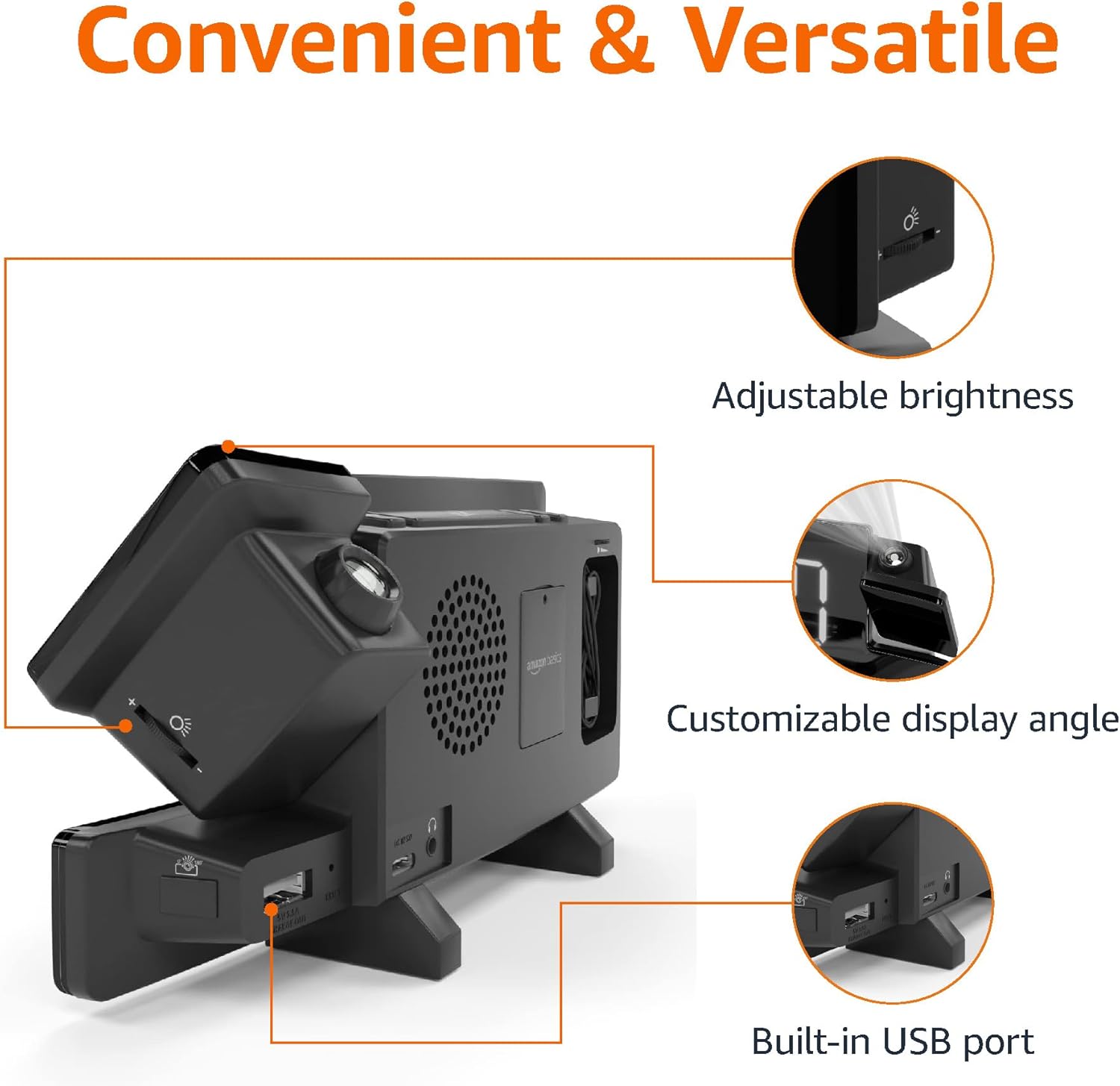
Image: Diagram highlighting the adjustable brightness, customizable projection angle, and USB charging port.
סעטאַפּ
1. מאַכט קאַנעקשאַן
Connect the AC power adapter to the DC IN port on the back of the alarm clock and plug it into a standard wall outlet. The display will light up.
2. באַטאַרייע באַקקופּ ינסטאַלירונג
For battery backup, open the battery compartment on the bottom of the unit. Insert 2 AAA batteries (not included), ensuring correct polarity (+/-). Close the compartment. The battery backup maintains time settings during power outages but does not power the display or alarm functions.
3. ערשטע צייט איינשטעלונג
- דריקן און האַלטן די צייט באַשטעטיקט קנעפּל. די שעה דידזשאַץ וועט בליץ.
- ניצן די Volume/Tune Dial צו סטרויערן די שעה. דרוק צייט באַשטעטיקט ווידער צו באַשטעטיקן.
- די מינוט ציפערן וועלן בלינקען. ניצט די Volume/Tune Dial צו סטרויערן די מינוט. דרוק צייט באַשטעטיקט ווידער צו באַשטעטיקן.
- The time format (12H/24H) will flash. Use the Volume/Tune Dial to select your preferred format. Press צייט באַשטעטיקט צו באַשטעטיקן און אַרויסגיין פון צייט-שטעל-מאָדוס.
4. טאָגליכט שפּאָרן צייט (דסט)
דרוק די DST button to toggle Daylight Saving Time on or off. The DST indicator will appear or disappear on the display.
אַפּערייטינג ינסטראַקשאַנז
1. שטעלן אַלאַרמס (אַלאַרם 1 און אַלאַרם 2)
- דריקן און האַלטן די שרעק 1 or שרעק 2 קנעפּל. די אַלאַרם שעה ציפערן וועלן בלינקען.
- ניצן די Volume/Tune Dial to adjust the alarm hour. Press the respective שרעק קנעפּל ווידער צו באַשטעטיקן.
- The alarm minute digits will flash. Use the Volume/Tune Dial to adjust the alarm minutes. Press the respective שרעק קנעפּל ווידער צו באַשטעטיקן.
- The alarm source (FM radio or buzzer) will flash. Use the Volume/Tune Dial to select your preference. Press the respective שרעק button to confirm and activate the alarm. An alarm icon will appear on the display.
- To deactivate an alarm, press the respective שרעק קנעפּל איין מאל. די אַלאַרם בילדל וועט פֿאַרשווינדן.
2. Using Snooze
ווען אַן אַלאַרם קלינגט, דריק די סנוז/דיממער button to temporarily silence the alarm. The alarm will sound again after the set snooze duration. The default snooze duration is 9 minutes. To adjust the snooze duration, press and hold the סנוז/דיממער ניצן די Volume/Tune Dial to select a duration between 2 and 60 minutes. Press סנוז/דיממער ווידער צו באַשטעטיקן.
3. עפעם ראַדיאָ אָפּעראַציע
- קער אויף / אַוועק: דרוק די Radio/Sleep קנעפּל צו דרייען די FM ראַדיאָ אויף אָדער אויס.
- שטעל סטאַנציעס: ניצן די Volume/Tune Dial to manually tune to a desired FM frequency.
- אַוטאָ סקאַן: דריקן און האַלטן די Radio/Sleep button to automatically scan and save available FM stations as presets.
- אויסקלייַבן פּריסעט: Once stations are saved, short press the Radio/Sleep button to cycle through the preset stations.
- סטרויערן באַנד: דרייען די Volume/Tune Dial to adjust the radio volume.
4. שלאָפן טימער
While the FM radio is playing, press the Radio/Sleep button repeatedly to set the sleep timer. Options typically range from 5 to 90 minutes. The radio will automatically turn off after the selected duration.
5. פּראָיעקציע פֿונקציע

Image: The alarm clock projecting the time onto a bedroom ceiling.
- אַקטאַווייט / דיאַקטיווייט: דרוק די Projection On/Off/Flip button to turn the time projection on or off.
- סטרויערן ווינקל: Manually adjust the projection arm to direct the time onto your desired surface (wall or ceiling).
- פאָקוס: דרייען די Projection Focus Wheel to achieve a clear image.
- איבערדרייען דיספּליי: דרוק די Projection On/Off/Flip button repeatedly to rotate the projected time 180 degrees, ensuring correct orientation.

Image: The alarm clock on a nightstand, projecting the time onto a wall, demonstrating its use in a bedroom setting.
6. וסב טשאַרדזשינג
Connect your mobile phone or tablet's USB charging cable to the וסב טשאַרדזשינג פּאָרט on the back of the alarm clock. The device will begin charging. This port is for charging only and does not support data transfer.
7. ווייַז ברייטנאַס אַדזשאַסטמאַנט
דרוק די סנוז/דיממער button (when no alarm is sounding) to cycle through different brightness levels for the main LED display.
וישאַלט
1. רייניקונג
Wipe the unit with a soft, dry, lint-free cloth. Do not use abrasive cleaners, waxes, or solvents as they may damage the surface.
2. באַטערי פאַרבייַט
If the battery backup is not functioning correctly (e.g., time resets after a power outage), replace the 2 AAA batteries in the battery compartment, ensuring correct polarity.
טראָובלעשאָאָטינג
| פּראָבלעם | מעגלעך סיבה | לייזונג |
|---|---|---|
| די אַרויסווייַזן איז ליידיק. | קיין מאַכט קשר. | Ensure the AC adapter is securely plugged into the unit and a working wall outlet. |
| דער אַלאַרם קלינגט נישט. | דער אַלאַרם איז נישט אַקטיוויזירט אָדער דער באַנד איז צו נידעריק. | Check if the alarm icon is visible on the display. Re-set the alarm if necessary. Increase radio volume if FM is selected as alarm source. |
| פּראָיעקטירטע צייט איז פֿאַרשוואָמען. | Projection focus is not adjusted. | דרייען די Projection Focus Wheel ביז די בילד איז קלאָר. |
| Projected time is not visible. | Projection is off or room is too bright. | דרוק די Projection On/Off/Flip button to activate. The projection is best viewed in a dark room. |
| ראַדיאָ אָפּטראָג איז נעבעך. | אַנטענע פּאָזיציע אָדער שטערונג. | Adjust the position of the FM antenna wire. Move the unit away from other electronic devices that may cause interference. |
| USB טשאַרדזשינג אַרבעט נישט. | קאַבל פּראָבלעם אָדער מיטל אינקאָמפּאַטאַביליטי. | Ensure the USB cable is functional and properly connected. Try a different cable or device. |
ספּעסאַפאַקיישאַנז
- מאָדעל: MET8831-US
- מאַכט אַרייַנשרייַב: AC אַדאַפּטער (אַרייַנגערעכנט)
- באַטאַרייע באַקאַפּ: 2 X AAA באַטעריז (ניט אַרייַנגערעכנט)
- ווייַז: 7-אינטש געפירט
- ראַדיאָ אָפטקייַט: FM
- USB רעזולטאַט: 5V, 1A (for charging)
- דימענשאַנז (L x W x H): 7.1 X 1.6 X 3.7 אינטשעס (18.03 X 4.06 X 9.4 סענטימעטער)
- וואָג: בעערעך 0.59 לבס (267.62 ג)

Image: Product dimensions for the Amazon Basics Projection Alarm Clock.
וואָראַנטי אינפֿאָרמאַציע
This product is covered by the Amazon Basics warranty. For detailed information regarding warranty terms and conditions, please refer to the official Amazon Basics webפּלאַץ אָדער קאָנטאַקט קונה שטיצן.
קונה שטיצן
For further assistance, troubleshooting, or product inquiries, please contact Amazon Basics customer support through the Amazon website or your purchase platform. Have your product model number (MET8831-US) and purchase details ready.