
פּראָדוקט איבערview
This document provides instructions for the ZdalaMit 0212-62622-00R replacement remote control. This remote is designed to function with various Polaroid TV/DVD Combo models, offering a direct replacement without requiring complex programming. Simply install batteries, and the remote is ready for use.

פראָנט view of the ZdalaMit 0212-62622-00R replacement remote control, showing all buttons and layout.
סעטאַפּ
1. ינסטאָלינג באַטעריז
The remote control requires two (2) 1.5V AAA Alkaline batteries (not included). Ensure correct polarity when inserting the batteries.
- געפֿינען די באַטאַרייע אָפּטייל אויף די צוריק פון די ווייַט קאָנטראָל.
- רוקט דעם דעקל פונעם באַטעריע־אָפּטייל אַראָפּ אָדער אין דער ריכטונג וואָס ווערט אָנגעוויזן דורך אַ פײַל צו עס עפֿענען.
- Insert two AAA batteries, matching the positive (+) and negative (-) terminals as shown inside the compartment.
- לייג צוריק דעם דעקל פונעם באַטעריע־אָפּטייל, און זאָרג אַז עס קליקט זיכער אַרײַן.
באַמערקונג: No programming is required for this replacement remote. Once batteries are installed, it is ready for use with compatible Polaroid TV/DVD Combo models.
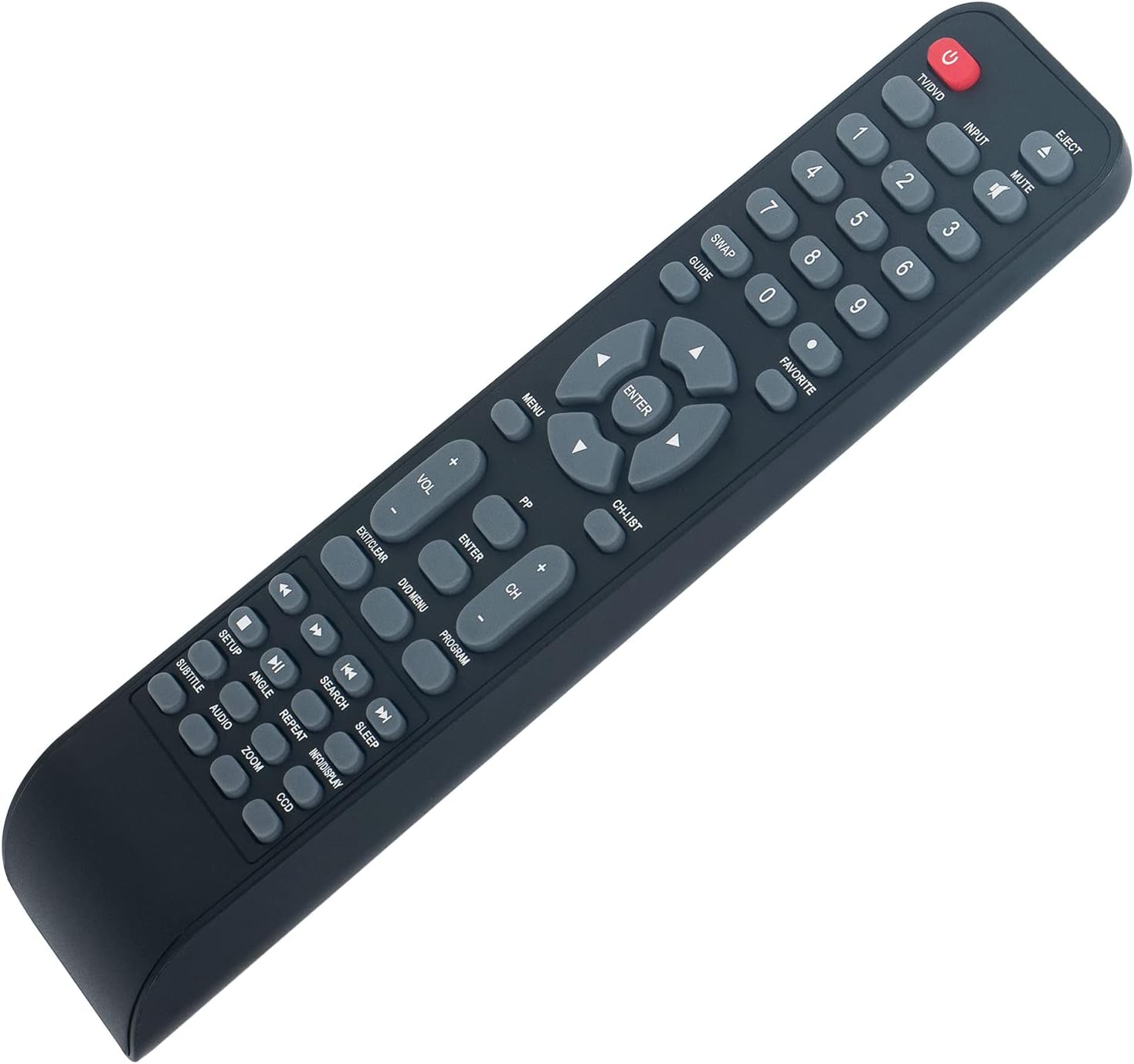
אַנגגאַלד view of the remote control, illustrating its ergonomic design and button layout for easy handling during battery installation.
אַפּערייטינג ינסטראַקשאַנז
Point the remote control directly at the infrared sensor on your Polaroid TV/DVD Combo unit for optimal performance. Ensure there are no obstructions between the remote and the unit.
יקערדיק פאַנגקשאַנז
- TV/DVD (Power): Press to turn the TV/DVD Combo unit on or off.
- איינגאבע: Selects the input source (e.g., TV, DVD, HDMI if applicable).
- שטיל: מאָט אָדער אַנמיוט די אַודיאָ.
- נומער קנעפּלעך (0-9): Used for direct channel selection or entering numerical values.
- VOL +/-: אַדזשאַסץ די באַנד מדרגה.
- CH +/-: טוישט דעם טעלעוויזיע קאַנאַל אַרויף אָדער אַראָפּ.
- מעניו: Accesses the main menu of the TV or DVD player.
- פײַל קנעפּלעך (אַרויף, אַראָפּ, לינקס, רעכטס): נאַוויגירט דורך מעניו אָפּציעס.
- אַרייַן: Confirms a selection in the menu.
- EXIT/CLEAR: Exits a menu or clears an entry.
DVD/Media Playback Functions
- אַרויסוואַרפן: Ejects the DVD from the player.
- DVD MENU: גייט אריין אין די DVD דיסק מעניו.
- שפּילן/פּויזע (►/❚❚): סטאַרץ אָדער פּאָזאַז פּלייבאַק.
- שטאָפּ (■): סטאַפּס פּלייבאַק.
- REWIND (◀◀): שפּולט צוריק די ווידערשפּיל.
- FAST FORWARD (►►): שנעל פאָרווערדז פּלייבאַק.
- PREVIOUS (◀❚): Skips to the beginning of the current track/chapter or the previous one.
- NEXT (❚►): שפּרינגט צום נעקסטן ליד/קאפיטל.
- איבערחזרן: Repeats a track, chapter, or entire disc.
- זוכן: Initiates a search function within media.
- סאַבטייטאַל: טוישט די אונטערטיטל ווייַזונג.
- אַודיאָ: ענדערט אַודיאָ טראַקס אָדער שפּראַכן.
- ווינקל: Changes camera angle on compatible DVDs.
- זאָאָם: Zooms in or out on the picture.
- INFO/DISPLAY: דיספּלייז אינפֿאָרמאַציע וועגן דעם קראַנט פּראָגראַם אָדער מידיאַ.
וישאַלט
- רייניקונג: To clean the remote control, wipe it with a soft, dry cloth. Do not use liquid cleaners or abrasive materials, as these can damage the surface or internal components.
- באַטערי פאַרבייַט: Replace batteries when the remote's response becomes sluggish or stops working. Always replace both batteries at the same time with new AAA Alkaline batteries. Do not mix old and new batteries, or different types of batteries.
- סטאָרידזש: If the remote control will not be used for an extended period, remove the batteries to prevent leakage, which can cause damage to the remote. Store the remote in a cool, dry place away from direct sunlight and extreme temperatures.
טראָובלעשאָאָטינג
| פּראָבלעם | מעגלעך סיבה | לייזונג |
|---|---|---|
| רימאָוט נישט ריספּאַנדינג | Dead or incorrectly installed batteries. Obstruction between remote and TV/DVD Combo. Remote is too far from the unit. | Replace batteries with new AAA Alkaline batteries, ensuring correct polarity. Remove any objects blocking the line of sight to the TV/DVD Combo's IR sensor. Move closer to the unit (within 33 feet). |
| עטלעכע פונקציעס ארבעטן נישט | The specific function may not be supported by your particular Polaroid TV/DVD Combo model. | This remote is a replacement designed for a range of Polaroid TV/DVD Combo models. While it offers broad compatibility, some advanced or model-specific functions may not be fully supported on all units. Refer to your original TV/DVD Combo manual for specific feature compatibility. |
| קנעפּלעך זענען קלעפּיק אָדער ניט ריספּאַנדאַבאַל | שמוץ אָדער דעבריס אונטער די קנעפּלעך. | Gently clean the remote control surface with a soft, dry cloth. Avoid pressing buttons excessively hard. |
ספּעסאַפאַקיישאַנז
- מאָדעל: 0212-62622-00R
- סאָרט: ZdalaMit
- קאַמפּאַטאַבילאַטי: Polaroid TV/DVD Combo models (TDAC-01933, TDAC-02212, TLAC-03212, 4641-TLXB, TDAC-03212B, TDAC-03212W, TLAC-02255, TDAC01933, TDAC02212, TLAC02255, TDAC03212B, TDAC03212W, TLAC03212, 4641TLXB)
- מאַכט צושטעלן: 2 x 1.5V AAA Alkaline Batteries (not included)
- קאַנעקטיוויטי טעכנאָלאָגיע: ינפרערעד (IR)
- מאַקסימום קייט: בעערעך 33 פֿיס (10 מעטער)
- Button Quantity: 18
- קאָליר: שוואַרץ
- דימענשאַנז (L x W x H): 8.34" x 1.99" x 0.55" (21.18 ס״מ x 5.05 ס״מ x 1.4 ס״מ)
- נומער וואָג: 40 גראַם (אָן באַטעריעס)
וואָראַנטי און שטיצן
This ZdalaMit remote control comes with a 1 יאָר וואָראַנטי פֿון דעם קויפֿדאַטום. די וואָראַנטי דעקט פֿאַבריקאַציע־דעפֿעקטן אונטער נאָרמאַלן באַנוץ. עס דעקט נישט קיין שאָדן פֿאַראורזאַכט דורך אומרעכטן באַנוץ, אומגליקן, נישט־אָטעריזירטע מאָדיפֿיקאַציעס, אָדער באַטעריע־ליקאַדזש.
For technical support, warranty claims, or any questions regarding your remote control, please contact the seller directly through the platform where the purchase was made. Please have your order number ready when contacting support.