
1. הקדמה
Welcome to the user manual for your new Avtex W195TS Smart TV. This television is specifically designed for mobile living, offering versatile power options (12V, 24V, and 240V) and a range of smart features, including Wi-Fi, Bluetooth, and an integrated Freesat satellite decoder. This manual provides essential information for setting up, operating, maintaining, and troubleshooting your device to ensure optimal performance and enjoyment.
2. זיכערקייַט אינפֿאָרמאַציע
ביטע ליינט אלע זיכערהייט אינסטרוקציעס קערפול איידער איר ניצט דעם טעלעוויזיע. האלט דעם מאנואל פאר שפעטערדיגע רעפערענץ.
- מאַכט צושטעלן: פאַרזיכערן די ריכטיק וואָלtage is used (12V, 24V DC or 240V AC). Do not overload power outlets.
- ווענטילאַטיאָן: בלאָקירט נישט די ווענטילאַציע עפענונגען. לאָזט גענוג פּלאַץ אַרום דעם טעלעוויזאָר פֿאַר געהעריקן לופטפלוס.
- וואַסער און נעץ: שטעלט נישט אויס דעם טעלעוויזאר צו רעגן אדער פייכטקייט. לייגט נישט קיין אביעקטן פול מיט פליסיקייטן אויפן טעלעוויזאר.
- רייניקונג: נעמט ארויס דעם טעלעוויזאר פון שטעקער איידער איר רייניגט. ניצט א ווייכן, טרוקענעם טוך. ניצט נישט קיין פליסיגע רייניגער אדער אייראזאל רייניגער.
- אָרט: Place the TV on a stable, flat surface or mount securely to a wall/bracket. Avoid direct sunlight or heat sources.
- סערוויס: דו זאלסט נישט פּרווון צו דינען דעם פּראָדוקט זיך. קאָנטאַקט אַלע קוואַלאַפייד סערוויס פּערסאַנעל.
3. פּעקל אינהאַלט
Before setup, please check that all items are present in the box:
- Avtex W195TS סמאַרט טעלעוויזיע
- ווייַט קאָנטראָל מיט באַטעריז
- 12 וו / 24 וו דק מאַכט קאַבלע
- 240V AC מאַכט אַדאַפּטער
- טיש שטאַנד (אויב אָנווענדלעך)
- באַניצער מאַנואַל (דעם דאָקומענט)
4. פּראָדוקט איבערview
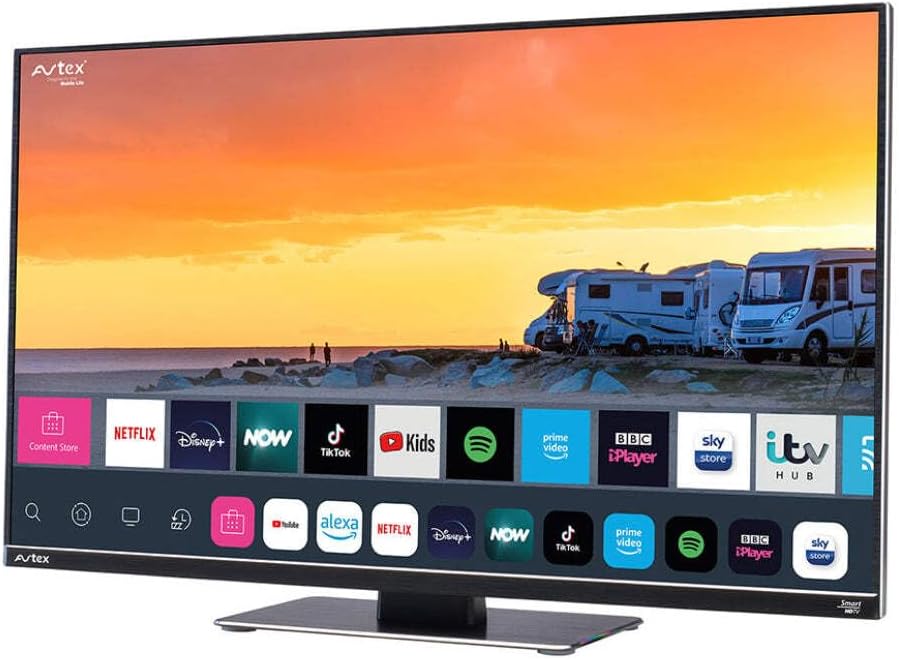
Figure 4.1: Avtex W195TS Smart TV Front View
This image shows the Avtex W195TS Smart TV from a slight angle, highlighting its slim design and the vibrant display. The screen shows a user interface with icons for popular streaming services like Netflix, Disney+, Now, TikTok, Kids, Spotify, Prime Video, BBC iPlayer, Sky Store, and ITV Hub. The background on the screen depicts a scenic view of motorhomes parked near a beach at sunset. The Avtex logo is visible on the top left and bottom left of the TV frame.
4.1. פּאָרטן און פֿאַרבינדונגען
- HDMI פּאָרץ: For connecting external devices like Blu-ray players, game consoles, or set-top boxes.
- וסב פּאָרץ (2): For media playback from USB drives or connecting USB accessories.
- אַנטענע אַרייַנשרייַב: For connecting a terrestrial TV antenna.
- סאַטעליט אַרייַנשרייַב: For connecting a satellite dish for Freesat or other satellite services.
- DC מאַכט אַרייַנשרייַב: For 12V/24V DC power connection.
- אַק מאַכט אַרייַנשרייַב: For 240V AC power connection via adapter.
- עטהערנעט פּאָרט: פֿאַר אַ דראָטיקער נעץ פֿאַרבינדונג.
- אַודיאָ רעזולטאַט: פֿאַר פֿאַרבינדן עקסטערנע אַודיאָ סיסטעמען אָדער כעדפאָונז.
5. סעטאַפּ
5.1. Installing the Stand (Optional)
- לייגט פֿאָרזיכטיק דעם טעלעוויזאָר מיטן פּנים אַראָפּ אויף אַ ווייכער, ריינער ייבערפֿלאַך כּדי צו פֿאַרמייַדן שאָדן צום עקראַן.
- גלייכט אויס דעם שטאַנד מיט די מאָנטירונג לעכער אויף דער אונטערשטער טייל פֿון דער טעלעוויזיע.
- באַוואָרענען די שטיין מיט די צוגעשטעלט סקרוז.
5.2. מאַכט קאַנעקשאַן
The Avtex W195TS supports multiple power inputs:
- 12V/24V גלייכשטראָם: Connect the supplied 12V/24V DC power cable to the DC input on the TV and to your vehicle's 12V or 24V power outlet.
- 240V AC: Connect the supplied 240V AC power adapter to the AC input on the TV, then plug the adapter into a standard 240V AC wall socket.
באַמערקונג: Do not connect both DC and AC power simultaneously.
5.3. Antenna/Satellite Connection
- Terrestrial TV: Connect your aerial cable to the 'ANTENNA IN' port.
- Satellite TV (Freesat): Connect your satellite dish cable to the 'SATELLITE IN' port.
5.4. ערשטע איינשטראָם און ערשטע אויפשטעל
- Connect the TV to power and press the power button on the remote control or TV.
- The First-Time Setup Wizard will appear. Follow the on-screen prompts to select your language, country, and time zone.
- Perform an automatic channel scan for both terrestrial and satellite channels.
- פֿאַרבינדט זיך צו אייער Wi-Fi נעץ דורך אויסקלייבן אייער נעץ נאָמען און אַרייַן די פּאַראָל.
6. אָפּערייטינג
6.1. רימאָוט קאָנטראָל פאַנגקשאַנז
Familiarize yourself with the remote control buttons for easy navigation and control of your TV's features.
- מאַכט קנעפּל: טורנס די טעלעוויזיע אויף / אַוועק.
- מקור קנעפּל: Selects input sources (HDMI, USB, TV, Satellite).
- באנד +/-: אַדזשאַסץ די באַנד מדרגה.
- קאַנאַל +/-: טוישט טעלעוויזיע קאַנאַלן.
- נאַוויגאַציע קנעפּלעך (אַרויף/אַראָפּ/לינקס/רעכטס/גוט): פֿאַר מעניו נאַוויגאַציע און סעלעקציע.
- Smart Hub/Home Button: צוטריט די סמאַרט טיווי צובינד.
- אַפּ קנעפּלעך: Dedicated buttons for popular streaming apps (if available).
6.2. סמאַרט טעלעוויזיע פֿעיִקייטן
Your Avtex W195TS is equipped with smart TV capabilities:
- אַפּ סטאָר: Download and install various applications for streaming, news, and entertainment.
- סטרימינג באַדינונגס: Access pre-installed or downloaded apps like Netflix, Disney+, Prime Video, BBC iPlayer, etc. (subscription may be required).
- Web בלעטערער: בלעטער דעם אינטערנעט גלייך אויף אייער טעלעוויזיע.
- סקרין שפּיגל: Connect your smartphone or tablet to display content on the TV screen (compatibility may vary).
6.3. בלועטאָאָטה קאַנעקטיוויטי
Pair Bluetooth devices such as headphones or external speakers for enhanced audio experience.
- גייט צום טעלעוויזיע'ס סעטינגס מעניו.
- Select 'Bluetooth' or 'Connected Devices'.
- Enable Bluetooth and put your device into pairing mode.
- אויסקלייבן אייער דעווייס פון דער ליסטע צו פארבינדן.
6.4. מעדיע פּלייבּעק דורך USB
Insert a USB drive into one of the USB ports to view פאָטאָס, שפּילן ווידיאס, אָדער הערן מוזיק.
- The TV will usually prompt you to open the media player.
- נאַוויגירן דורך דיין fileניצן די ווײַטקאָנטראָל.
7. וישאַלט
7.1. רייניקן דעם טעלעוויזאר
- פאַרשטעלן: ווישט אָפּ דעם עקראַן מיט אַ ווייכן, לינט-פֿרײַעם שטאָף. פֿאַר שווערע פֿלעקן, ווישט אַ ביסלampווישט דעם שטאָף מיט וואַסער אָדער אַ רייניקונג לייזונג ספּעציפֿיש פֿאַרן עקראַן (שפּריצט נישט גלייך אויפן עקראַן).
- Casing: ניצט אַ ווייכע, טרוקענע שטאָף צו ווישן דעם טעלעוויזאָרasinז. פֿאַרמײַדן אַברייסיוו רייניגער אָדער סאָלווענטן.
7.2. ווייכווארג דערהייַנטיקונגען
Periodically check for software updates to ensure your TV has the latest features and bug fixes. Updates can usually be found in the TV's settings menu under 'System' or 'Software Update'.
8. טראָובלעשאָאָטינג
If you encounter issues with your Avtex W195TS, refer to the following common problems and solutions:
| פּראָבלעם | מעגלעך סיבה | לייזונג |
|---|---|---|
| קיין מאַכט | שטראָם קאַבל נישט פארבונדן; קיין שטראָם פֿון דער ווענטיל. | Check power cable connection; test outlet with another device; ensure correct voltagE (12 וו/24 וו/240 וו). |
| קיין בילד נישט, אבער סאונד איז דא | אומרעכטע אינפוט מקור אויסגעקליבן; דעפעקטיווער קאַבל. | Press the 'Source' button on the remote to select the correct input; check HDMI/antenna cables. |
| קיין קלאַנג, אָבער בילד איז דאָ | די קול איז שטיל אדער צו נידעריג; פראבלעם מיט עקסטערנעם אודיא סיסטעם. | Unmute volume or increase level; check connections to external audio devices. |
| קען נישט פאַרבינדן צו Wi-Fi | אומרעכט פּאַראָל; ראַוטער פּראָבלעם; טעלעוויזיע צו ווייט פֿון ראַוטער. | Re-enter Wi-Fi password; restart router; move TV closer to router or use an extender. |
| ווייַט קאָנטראָל איז נישט ארבעטן | טויטע באַטעריעס; שטערונג; פּאָרינג פּראָבלעם. | Replace batteries; remove obstructions; re-pair remote if it's a Bluetooth remote. |
9. ספּעסאַפאַקיישאַנז
| שטריך | באַשרייַבונג |
|---|---|
| סאָרט | Avtex |
| מאָדעל נומער | AVTEX W195TS |
| פאַרשטעלן גרייס | 19.5 אינטשעס |
| האַכלאָטע | 1080p (פול HD) |
| אַספּעקט פאַרהעלטעניש | 16:9 |
| קאַנעקטיוויטי טעכנאָלאָגיע | בלועטוט, HDMI, Wi-Fi |
| גאַנץ וסב פּאָרץ | 2 |
| Voltage | 12 Volts, 24 Volts, 240 Volts |
| פּונקט וואָג | 2.5 קילאָגראַמס |
| מאָדעל יאָר | 2018 |
10. וואָראַנטי און שטיצן
Your Avtex W195TS Smart TV comes with a manufacturer's warranty. Please refer to the warranty card included in your product packaging for specific terms and conditions, including warranty period and coverage details. Keep your proof of purchase for warranty claims.
For technical support, troubleshooting assistance beyond this manual, or warranty inquiries, please contact Avtex customer service through their official website or the contact information provided with your product. When contacting support, please have your model number (AVTEX W195TS) and serial number ready.