
1. הקדמה
This manual provides essential information for the safe and efficient operation of your TechniSat DIGITRADIO 370 IR. Please read these instructions carefully before using the device and retain them for future reference.
2. זיכערקייַט אינסטרוקציעס
- שטעלט נישט אויס דעם אפאראט צו רעגן אדער פייכטקייט כדי צו פארמיידן פייער אדער עלעקטרישע שאק.
- בלאָקירט נישט די ווענטילאַציע עפענונגען. זאָרגט פֿאַר גענוג פּלאַץ אַרום דעם אַפּאַראַט פֿאַר געהעריקן לופֿטפֿלוס.
- ניצן בלויז די מאַכט אַדאַפּטער סאַפּלייד מיט די מיטל.
- פֿאַרמײַדט צו שטעלן דעם אַפּאַראַט לעבן היץ־קוואַלן ווי ראַדיאַטאָרן, היץ־רעגיסטערס, אויוון אָדער אַנדערע אַפּאַראַטן (אַרײַנגערעכנט ampליפיערס) וואָס פּראָדוצירן היץ.
- באַשיצן די מאַכט שנור פון גיין אויף אָדער פּינטשט, ספּעציעל אין די פּלאַגז, קאַנוויניאַנס רעסאַפּיז און די פונט ווו זיי אַרויסגיין פון די אַפּאַראַט.
- אָפּשטויסן דעם אַפּאַראַט בעשאַס בליץ סטאָרמז אָדער ווען אַניוזד פֿאַר לאַנג פּיריאַדז.
- אָפּשיקן אַלע סערוויסעס צו קוואַלאַפייד סערוויס פּערסאַנעל. סערוויס איז פארלאנגט ווען דער אַפּאַראַט איז דאַמידזשד אין קיין וועג, אַזאַ ווי מאַכט צושטעלן שנור אָדער צאַפּן איז דאַמידזשד, פליסיק איז ספּילד אָדער אַבדזשעקץ זענען געפאלן אין די אַפּאַראַט, דער אַפּאַראַט איז יקספּאָוזד צו רעגן אָדער נעץ, אַרבעט נישט נאָרמאַלי , אָדער האט שוין דראַפּט.
3. פּעקל אינהאַלט
באַשטעטיקן אַז אַלע זאכן זענען פאַראַן אין פּעקל:
- TechniSat DIGITRADIO 370 IR (Black)
- ווייַט קאָנטראָל
- מאַכט אַדאַפּטער
- באַניצער מאַנואַל (דעם דאָקומענט)
4. קאָנטראָלס און קאַנעקשאַנז

פיגור 4.1: פראָנט פּאַנעל איבערview
The image above displays the front panel of the DIGITRADIO 370 IR, featuring the central display, volume and tuning/OK rotary knobs, and various control buttons such as Power, Mode, Preset, Scan, and Back.
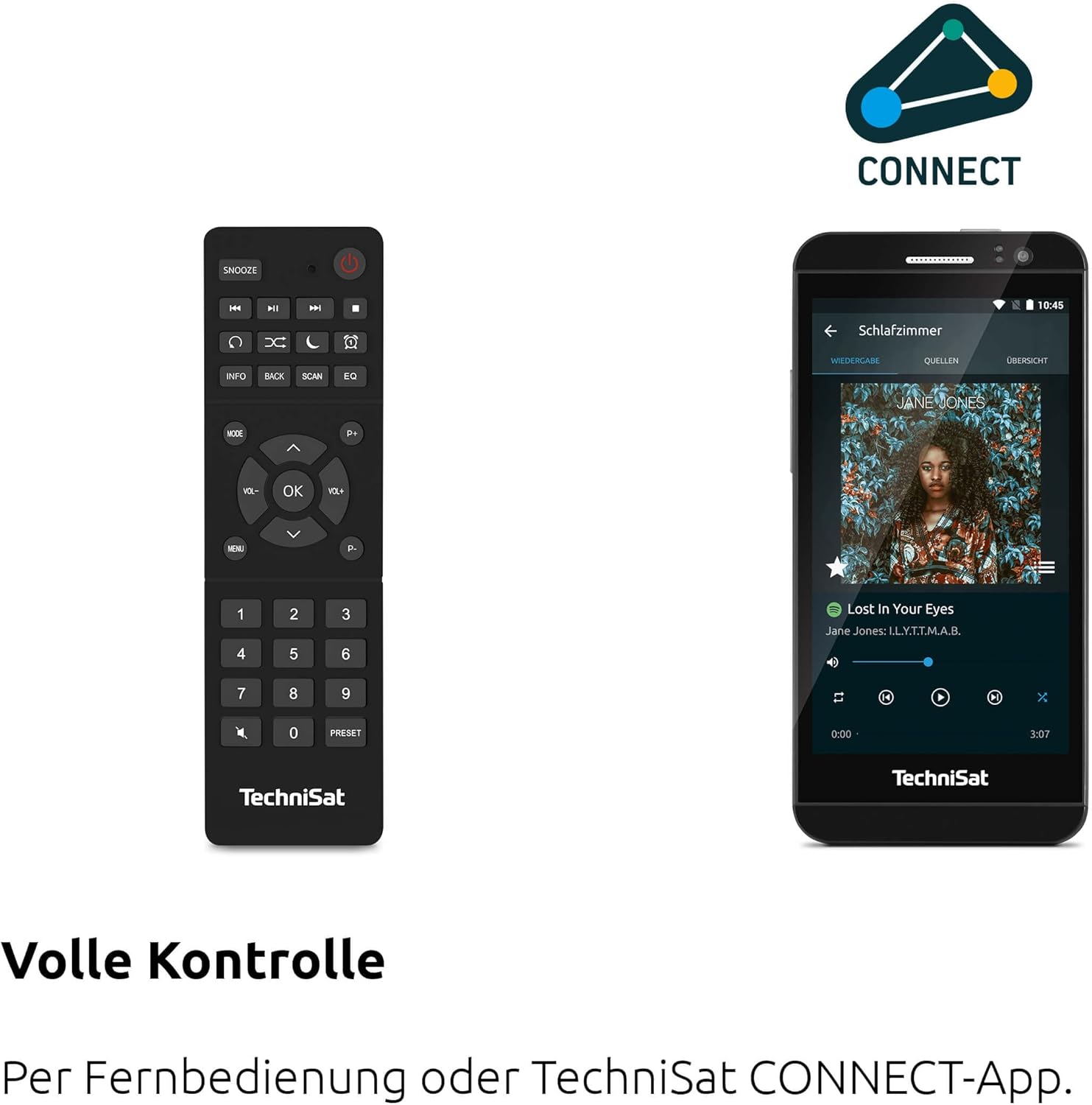
Figure 4.2: Remote Control and App Interface
This image shows the included remote control with buttons for power, snooze, mode, info, scan, EQ, preset numbers, volume, and navigation. It also illustrates the TechniSat CONNECT app interface on a smartphone, providing an alternative control method.
פראָנט פּאַנעל קאָנטראָלס:
- מאַכט קנעפּל: טורנס די מיטל אויף / אַוועק.
- מאָדע קנעפּל: Switches between DAB+, FM, Internet Radio, Bluetooth, AUX, and USB modes.
- פּריסעט קנעפּל: Accesses stored radio station presets.
- באַנד קנעפּל: אַדזשאַסץ די אַודיאָ רעזולטאַט מדרגה.
- Tuning/OK Knob: נאַוויגירט מעניוז און באַשטעטיקט סעלעקשאַנז.
- סקאַן קנעפּל: Initiates station scanning in radio modes.
- צוריק קנעפּל: קערט צו די פריערדיקע מעניו אָדער פאַרשטעלן.
- ווייַז: 2.4-inch TFT color display for information and menu navigation.
דערציען פּאַנעל קאַנעקשאַנז:
- מאַכט אַרייַנשרייַב: פאַרבינדן די סאַפּלייד מאַכט אַדאַפּטער.
- AUX-IN: 3.5 מ״מ דזשעק פֿאַר פֿאַרבינדן עקסטערנע אַודיאָ דעוויסעס.
- כעדפאָון דזשאַק: 3.5 מ״מ דזשעק פֿאַר פּריוואַט צוהערן.
- וסב פּאָרט: For MP3 playback from USB drives and charging external devices.
5. סעטאַפּ
5.1 ערשט מאַכט-אַרויף
- Place the DIGITRADIO 370 IR on a stable, flat surface.
- Extend the telescopic antenna for optimal DAB+ and FM reception.
- Connect the power adapter to the DC IN port on the rear of the radio and then to a wall outlet.
- Press the Power button on the front panel or remote control to turn on the device.
- פֿאָלגט די אינסטרוקציעס אויף דעם עקראַן פֿאַר דער ערשטער סעטאַפּ, אַרייַנגערעכנט שפּראַך אויסוואַל און נעץ קאָנפיגוראַציע.
5.2 Network Configuration (WLAN)
To access Internet Radio and app control, the device must be connected to a Wi-Fi network.
- Navigate to the 'Settings' menu using the Tuning/OK knob.
- אויסקלײַבן 'נעטוואָרק' און דערנאָך 'Wi-Fi סעטאַפּ'.
- The radio will scan for available networks. Select your desired network from the list.
- Enter the Wi-Fi password using the on-screen keyboard and the Tuning/OK knob.
- באַשטעטיקט די פֿאַרבינדונג. אַמאָל פֿאַרבונדן, וועט די Wi-Fi בילדל דערשייַנען אויף דער עקראַן.
6. אַפּערייטינג ינסטרוקטיאָנס

Figure 6.1: Radio Diversity
This image highlights the multiple radio reception options available: DAB+ Digital Radio, Internet Radio via WLAN, and UKW/FM analog radio.
6.1 DAB+ ראַדיאָ
- Press the 'Mode' button until 'DAB+' is selected.
- The radio will automatically scan for available DAB+ stations during the first use. To initiate a scan manually, press the 'Scan' button.
- Use the Tuning/OK knob to scroll through the list of available stations. Press the knob to select a station.
- To save a station as a preset, press and hold the 'Preset' button, then select a preset number and confirm.
6.2 עפעם ראַדיאָ
- Press the 'Mode' button until 'FM' is selected.
- Press the 'Scan' button to automatically search for and store FM stations.
- Alternatively, use the Tuning/OK knob to manually tune to a frequency.
- To save a station as a preset, press and hold the 'Preset' button, then select a preset number and confirm.
6.3 אינטערנעט ראַדיאָ
זיכער מאַכן אַז די ראַדיאָ איז פארבונדן צו אַ Wi-Fi נעץ (זען סעקציע 5.2).
- Press the 'Mode' button until 'Internet Radio' is selected.
- איר קענט בלעטערן סטאנציעס לויט לאקאציע, זשאנער, אדער זוכן פאר ספעציפישע סטאנציעס.
- Use the Tuning/OK knob to navigate and select stations.
- To save a station as a preset, press and hold the 'Preset' button, then select a preset number and confirm.
6.4 בלועטוט אודיאָ סטרימינג

פיגור 6.2: בלועטוט אודיאָ סטרימינג
This image demonstrates a smartphone wirelessly streaming music to the radio via Bluetooth, indicating the device's capability for wireless music enjoyment.
- Press the 'Mode' button until 'Bluetooth' is selected. The radio will enter pairing mode.
- אויף אייער סמאַרטפאָון אָדער אַנדער בלוטוט מיטל, אַקטיוויזירט בלוטוט און זוכט פֿאַר פֿאַראַן דעוויסעס.
- Select 'DIGITRADIO 370 IR' from the list to pair.
- אַמאָל פּערד, קענט איר שפּילן אַודיאָ פֿון אייער מיטל דורך די ראַדיאָ.
6.5 USB ווידערשפּיל און טשאַרדזשינג

Figure 6.3: USB Playback and Charging Function
This image illustrates the dual functionality of the USB port: connecting USB storage devices for MP3 playback and using the port to charge compatible devices like smartphones.
- אַרייַנלייגן אַ וסב בליץ פאָר מיט mp3 fileאַרײַן אין דעם USB פּאָרט אויף דער הינטערשטער זײַט פֿון ראַדיאָ.
- Press the 'Mode' button until 'USB' is selected.
- Use the Tuning/OK knob to navigate through folders and select tracks for playback.
- The USB port can also be used to charge compatible smartphones and other devices. Connect your device's charging cable to the USB port.
6.6 ווירעלעסס טשאַרדזשינג

Figure 6.4: Wireless Charging Function
This image shows a hand placing a smartphone on the top surface of the radio, demonstrating the wireless charging capability for compatible smartphones.
The DIGITRADIO 370 IR features a wireless charging surface on its top panel.
- Ensure your smartphone or device supports Qi wireless charging.
- Place your compatible device centrally on the designated wireless charging area on top of the radio.
- The device should indicate that charging has begun.
6.7 Alarm Clock, Sleep Timer, and Snooze
The radio includes an alarm clock, sleep timer, and snooze function.
- וועקער זייגער: Set up to two independent alarms with customizable sources (buzzer, DAB+, FM, Internet Radio) and volume. Access via the 'Settings' menu.
- שלאָפן טימער: Allows the radio to turn off automatically after a set period (e.g., 15, 30, 60 minutes). Access via the 'Settings' menu.
- סנוז: When an alarm sounds, press the 'Snooze' button on the remote control to temporarily pause the alarm.
6.8 App Control (UNDOK App)
The DIGITRADIO 370 IR can be controlled via the UNDOK app on your smartphone or tablet.
- Download the 'UNDOK' app from your device's app store.
- Ensure your smartphone/tablet and the radio are connected to the same Wi-Fi network.
- Open the UNDOK app; it should automatically detect your DIGITRADIO 370 IR.
- You can now control all major functions of the radio, including mode selection, station tuning, volume, and presets, directly from the app.
7. וישאַלט
7.1 רייניקונג
- שטענדיק אָפּשטעקן די מיטל פון די מאַכט ווענטיל איידער רייניקונג.
- ניצט אַ ווייכן, טרוקענעם שטאָף צו ווישן די אויסערלעכע ייבערפלאַכן.
- Do not use liquid cleaners, aerosol cleaners, or strong chemical solvents, as these may damage the finish.
7.2 סטאָרידזש
If storing the device for an extended period, unplug it from the power source and store it in a cool, dry place, away from direct sunlight and extreme temperatures.
8. טראָובלעשאָאָטינג
| פּראָבלעם | מעגלעך סיבה | לייזונג |
|---|---|---|
| קיין מאַכט | שטראָם קאַבל נישט פארבונדן; שטראָם אַוטלעט דעפעקט | קאָנטראָלירט די פֿאַרבינדונג פֿון דער עלעקטרישער קאַבל; פּרוּווט אַן אַנדער עלעקטרישער ווענטיל. |
| קיין געזונט | קול צו נידעריג; שטום אַקטיוויזירט; אומרעכטע מקור אויסגעקליבן | Increase volume; Check if mute is active; Select the correct input source (DAB+, FM, Internet, Bluetooth, USB, AUX). |
| שלעכטע ראַדיאָ אָפּנאַם (DAB+/FM) | Antenna not extended; Weak signal; Interference | Fully extend the telescopic antenna; Reposition the radio; Avoid placing near other electronic devices. |
| Internet Radio not working | No Wi-Fi connection; Incorrect Wi-Fi password; Router issue | Check Wi-Fi connection in settings; Re-enter Wi-Fi password; Restart your Wi-Fi router. |
| בלועטאָאָטה פּערינג ניט אַנדערש | Radio not in pairing mode; Device too far; Bluetooth off on source device | Ensure radio is in Bluetooth mode; Move devices closer; Enable Bluetooth on your source device. |
| ווירעלעסס טשאַרדזשינג איז נישט ארבעטן | Device not Qi-compatible; Device not placed correctly; Phone case too thick | Verify device supports Qi charging; Adjust device position on charging pad; Remove thick phone cases. |
9. ספּעסאַפאַקיישאַנז
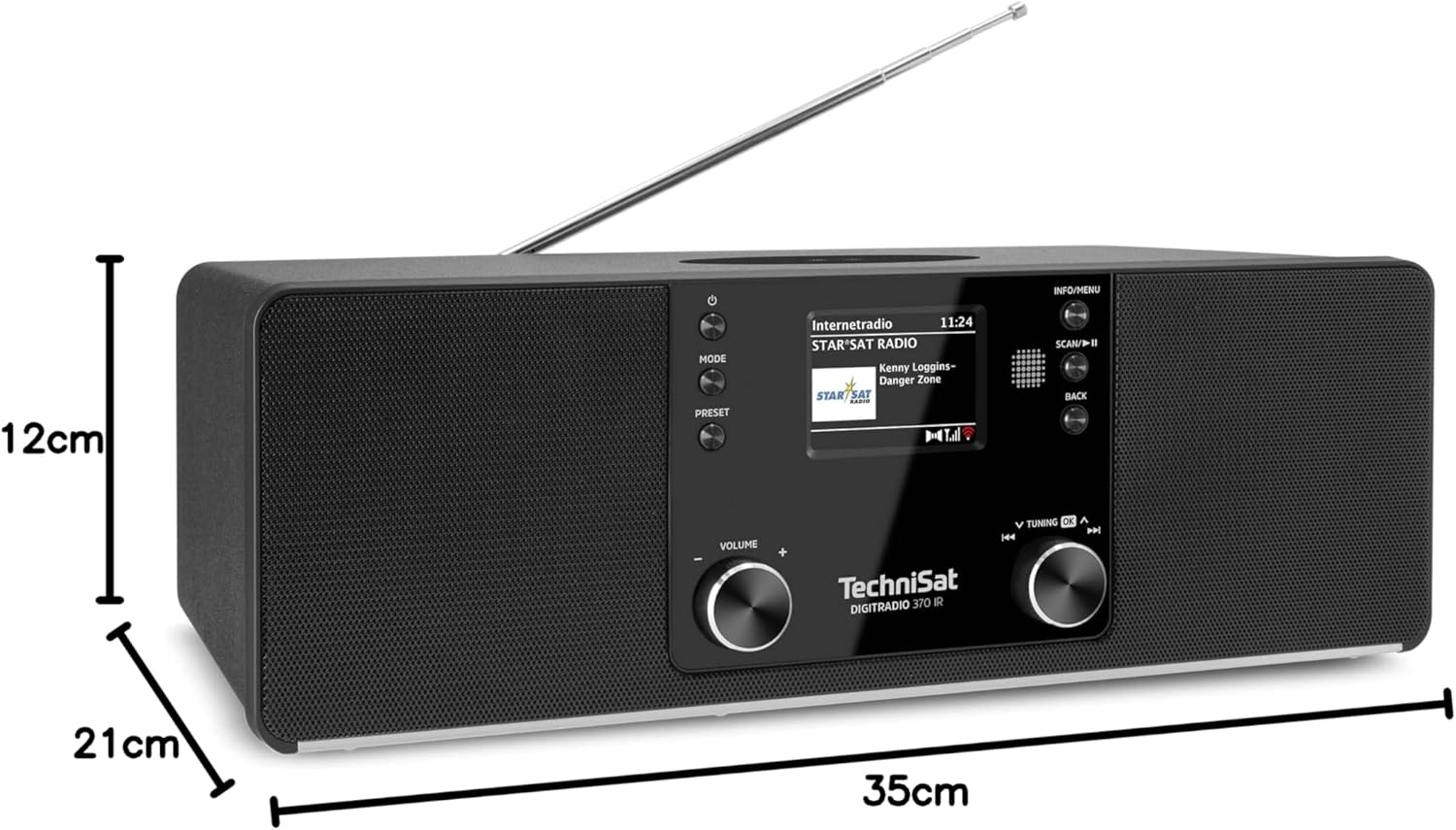
פיגור 9.1: פּראָדוקט דימענסיעס
This image provides a visual representation of the radio's dimensions: 35 cm (length), 12 cm (height), and 21 cm (depth).
| שטריך | דעטאַל |
|---|---|
| מאָדעל נומער | 0000/3971 |
| סאָרט | TechniSat |
| ראַדיאָ באַנדס געשטיצט | DAB+, FM, Internet Radio |
| קאַנעקטיוויטי טעכנאָלאָגיע | Bluetooth, USB, Wireless-Charging, WLAN (2.4 GHz & 5 GHz) |
| ספּעציעלע פֿעיִקייטן | Wireless Charging, Bluetooth Audio Streaming, USB Playback & Charging, Alarm Clock, Sleep Timer, Snooze, App Control (UNDOK) |
| אַודיאָ רעזולטאַט מאָדע | סטערעאָ |
| רעדנער רעזולטאַט מאַכט | 2 x 5 Watts RMS (10 Watts total) |
| ווייַז טיפּ | 2.4-אינטש טפט קאָליר לקד |
| מאַכט מקור | Electric Cord (230 Volts, 60 Hz) |
| דימענסיעס (L X W X H) | 35 X 21 X 12 סענטימעטער |
| וואָג | 2.7 קילאָגראַמס |
| האָוסינג מאַטעריאַל | האלץ |
| קאַמפּאַטאַבאַל דעוויסעס | Smartphone, MP3 player, tablet, laptop, headphones |
| ינטערפייסיז | 3.5 mm Audio (AUX-IN), USB 2.0, 3.5 mm Headphone |
10. וואָראַנטי און שטיצן
10.1 וואָראַנטי אינפֿאָרמאַציע
This product comes with a 2-year warranty (Gewährleistung) from the date of purchase. Please retain your proof of purchase for any warranty claims. The warranty covers manufacturing defects and malfunctions under normal use. It does not cover damage caused by misuse, accidents, unauthorized modifications, or normal wear and tear.
10.2 קונה שטיצן
For technical assistance, troubleshooting beyond this manual, or warranty inquiries, please contact TechniSat customer support. Refer to the TechniSat official webפּלאַץ פֿאַר קאָנטאַקט דעטאַילס ספּעציפיש צו דיין געגנט.
אָנליין רעסורסן: Visit the official TechniSat website for updated manuals, FAQs, and support information.