
הקדמה
The Autel PowerScan PS100 is a versatile diagnostic tool designed for testing electrical systems in 6 to 30 volt vehicles. It provides a comprehensive solution for various electrical tests, including voltage and polarity testing, continuity testing, signal circuit testing, component activation, and short circuit location. This manual provides instructions for the proper use and maintenance of your PowerScan PS100.
פּעקל אינהאַלט
Verify that all items are present in your PowerScan PS100 kit:
- Autel PowerScan PS100 Unit
- 20ft עקסטענסיאָן קאַבלע
- Battery Clip Set
- מאַשין מאַכט אַדאַפּטער
- באַניצער מאַנואַל
- פּראַטעקטיוו קאַסע

Image: Contents of the Autel PowerScan PS100 kit.
פּראָדוקט איבערview (קאָמפּאָנענטן)
Familiarize yourself with the main components of the PowerScan PS100:
- פּראָבע עצה: Used for making contact with circuits.
- Head Lights: באַלויכטן דעם אַרבעטס־געגנט.
- Red/Green Polarity Indicator: LEDs indicating positive (red) or negative (green) circuits.
- LCD ווייַז: ווייזט וולtage, resistance, and other test results.
- קרייַז ברעאַקער באַשטעטיק: Resets the internal circuit breaker after an overload.
- מאַכט סוויטש: Controls power to the probe tip for component activation.
- מאָדע קנעפּל: Cycles through different testing modes.
- רעדנער: Provides audible tones for certain test results.
- אַדאַפּטער: Connects the main unit to the power source.
- הילפס גראונד פירער: Provides an additional ground connection for testing.

Image: Labeled components of the PowerScan PS100.
זיכערקייַט אינפֿאָרמאַציע
Always observe the following safety precautions when using the PowerScan PS100:
- טראָגן צונעמען אויג שוץ.
- Do not use the tool if the cable or unit is damaged.
- Ensure proper ventilation when working on vehicles.
- ויסמיידן קאָנטאַקט מיט מאָווינג מאָטאָר פּאַרץ.
- Do not connect the tool to voltages exceeding 30 volts.
- The tool is equipped with a circuit breaker for overload protection. If the circuit breaker trips, reset it before continuing.
סעטאַפּ און קאַנעקשאַן
To begin using the PowerScan PS100:
- Connect the red battery clip to the positive (+) terminal of the vehicle's battery.
- Connect the black battery clip to the negative (-) terminal of the vehicle's battery or a good chassis ground.
- The tool will power on automatically once connected.
- Before testing any circuit or component, perform a quick self-check by flipping the power switch forward and backward. The LED lights and tone should respond, indicating proper operation.

Image: Performing a quick self-test on the PowerScan PS100.
אַפּערייטינג מאָדעס
The PowerScan PS100 features four primary operating modes, accessible by pressing the מאָדע קנעפּל:
- DC Voltage: ווייזט די DC באַנדtage with a resolution of 0.1 volts.
- AC Voltage: ווייזט די מאַקסימום וואָלtagE, מינימום וואָלtage, and duty cycle of an AC signal.
- קעגנשטעל: Measures the resistance between the probe tip and the auxiliary ground lead.
- Tone On/Off: Activates or deactivates an audible tone for test results. This is useful in dark environments.

Image: Display modes for DC VoltagE, AC Voltage, קעגנשטעל, און טאָן אויף/אויס.
Video: An introduction to the functions of the Autel PowerScan PS100 Circuit Tester, demonstrating various operating modes.
קאָמפּאָנענט אַקטאַוויישאַן
The PowerScan PS100 can activate components by supplying positive or negative voltage directly to them. This allows for testing components like lights, motors, wipers, radiator fans, and relays both on and off the vehicle.
- To activate a component, connect the probe tip to the component's terminal.
- דרוק די מאַכט סוויטש forward for positive voltage or backward for negative voltage.
- Observe the component's operation to determine its condition.
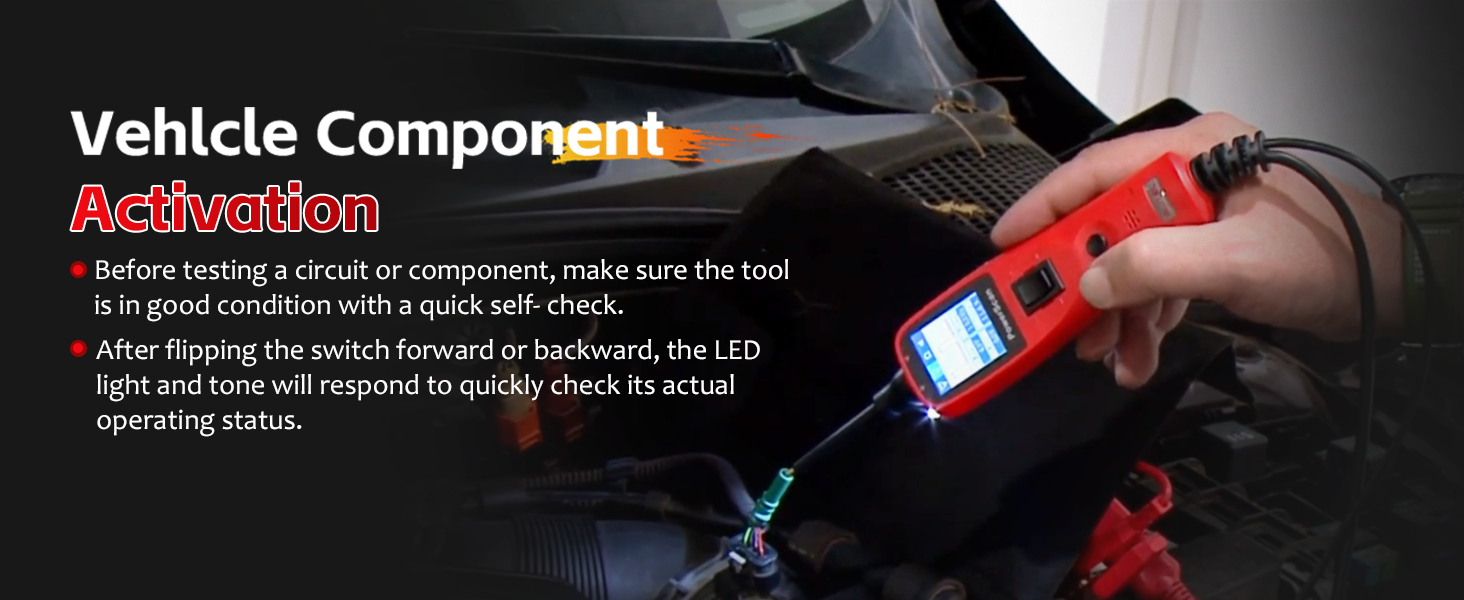
Image: Activating a vehicle component using the PowerScan PS100.
Polarity and Circuit Indication
The tool provides visual and audible indications for circuit polarity:
- When the probe tip contacts a positive circuit, די רויט געפירט illuminates, and a high-pitched tone sounds.
- When the probe tip contacts a negative circuit (ground), the גרין געפירט illuminates, and a low-pitched tone sounds.
- If the circuit is עפענען, neither LED will light.

Image: Red and Green Polarity LEDs indicating circuit status.
Short Circuit Detection and Protection
The PowerScan PS100 is designed to help locate short circuits and includes built-in protection:
- When a short circuit is detected, the tool's internal circuit breaker will trip to protect the device and the vehicle's electrical system.
- To reset the circuit breaker, press the קרייַז ברעאַקער באַשטעטיק קנעפּל.
- Use the tool to trace the short circuit by following the change in voltage readings or LED indications.
Video: Demonstrating the circuit breaker reset function on the Autel PowerScan PS100.
געשפּרייט קאַבלע
The included 20-foot (6-meter) extension cable provides extended reach, allowing you to test circuits across various parts of the vehicle without needing to reposition the power source connection.

Image: The 20-foot extension cable for enhanced accessibility.
אַפּפּליקאַטיאָנס
The Autel PowerScan PS100 is compatible with 6 to 30 volt electrical systems, making it suitable for a wide range of vehicles and applications, including:
- קאַרס
- סוווס
- מאָטאָרסיקלעס
- טראַקס
- בוסעס
- Steamships (with compatible voltagE סיסטעמען)

Image: Wide application range of the PowerScan PS100.
וישאַלט
To ensure the longevity and proper functioning of your PowerScan PS100:
- ריין די אַפּאַראַט מיט אַ ווייך, דamp שטאָף. דו זאלסט נישט נוצן אַברייסיוו קלינערז אָדער סאָלוואַנץ.
- האַלט דאָס געצייג אין זײַן שוץ־קעסטל ווען עס איז נישט אין באַנוץ, כּדי צו פֿאַרמײַדן שאָדן.
- Keep the probe tip clean and free from debris.
- ויסמיידן יקספּאָוזינג די געצייַג צו עקסטרעם טעמפּעראַטורעס אָדער נעץ.
טראָובלעשאָאָטינג
If you encounter issues with your PowerScan PS100, consider the following:
- קיין מאַכט: Ensure the battery clips are securely connected to the vehicle's battery terminals and that the battery has sufficient charge (6-30V).
- No Reading: Check that the probe tip is making good contact with the circuit. Verify the tool is in the correct operating mode.
- קרייז ברעיקער טריפּס אָפט: This indicates a short circuit or an overload. Identify and resolve the underlying electrical issue before continuing to test. Reset the circuit breaker after each trip.
- ומפּינקטלעך רידינגז: Ensure all connections are clean and secure. The vehicle's battery voltage should be stable.
ספּעסאַפאַקיישאַנז
| שטריך | באַשרייַבונג |
|---|---|
| סאָרט | Autel |
| מאָדעל | Autel PowerScan PS100 |
| מאַכט מקור | Battery Powered (from vehicle) |
| אַפּערייטינג וואָלtage | 6-30 וואלטס דק |
| מעזשערמאַנט טיפּ | וואלטמעטער |
| פּונקט וואָג | 1 פונט |
| מינימום אַפּערייטינג באַנדtage | 6 וואלטס |
| אויבערשטער טעמפּעראַטור רייטינג | 60 דיגריז סעלסיוס |
| קאַמפּאַטאַבאַל דעוויסעס | Vehicles with 6 to 30 volt electrical systems |
| נומער דימענשאַנז | 14 X 8 X 10 אינטשעס |
שטיצן און וואָראַנטי
For technical assistance, product inquiries, or warranty information, please refer to the official Autel website or contact Autel customer support directly. Details can typically be found on the product packaging or within the included documentation.