
1. הקדמה
Thank you for choosing the ASHATA 95 Keys Wired Mechanical Gaming Keyboard. This compact and versatile keyboard is designed for both gaming and office use, offering a comfortable typing experience with its durable mechanical switches and plug-and-play functionality. This manual provides essential information for setting up, operating, and maintaining your new keyboard.
2. פּראָדוקט פֿעיִקייטן
- 95-קנעפל אויסלייג: Compact design with a full set of essential keys, available with English and Arabic keycaps.
- ווייערד קאַנעקטיוויטי: Reliable USB-A connection for stable performance.
- מעטשאַניקאַל סוויטשיז: Provides tactile feedback and durability for an enhanced typing and gaming experience.
- צאַפּן און שפּיל: No complex driver installation required; simply connect and use.
- דוראַבאַל פּלאַן: Features legible, fade-resistant key printing for long-lasting use.
- באַקוועם טייפּינג: Ergonomically designed for extended use in office or home environments.
- אולטרא-קאָמפּאַקט פּלאַן: Approximately 60% size of a standard keyboard, saving desk space.
- הויך דוראַביליטי: Rated for over 10 million keystrokes life.
- דין און פּאָרטאַטיוו: With a thickness of approximately 1 cm, it is easy to transport.
- שטיל פּלאַן: Equipped with quality silicone keys for a quiet typing environment.
- Independent Multimedia Buttons: Dedicated buttons for quick access to media controls.

בילד: איבערview of the ASHATA Wired Keyboard highlighting its features.

בילד: נאָענט-אַרויף view of the comfortable 95-key layout.

בילד: זייט פּראָfile illustrating the thin and portable design.

Image: Detail of a keycap, demonstrating the silent design feature.
3. פּעקל אינהאַלט
זיכער מאַכן אַז אַלע זאכן זענען פאַראַן אין פּעקל:
- 1 x ווייערד קלאַוויאַטור
4. סעטאַפּ אינסטרוקציעס
The ASHATA 95 Keys Wired Mechanical Gaming Keyboard is designed for simple plug-and-play operation.
- ופשליסן די קלאַוויאַטור: נעמט פֿאָרזיכטיק אַרויס די קלאַוויאַטור פֿון איר פּאַקעט.
- פאַרבינדן צו דיין מיטל: Locate an available USB-A port on your computer (desktop, laptop, etc.). Insert the USB connector of the keyboard cable into the USB-A port.
- אָטאַמאַטיק דערקענונג: Your operating system (e.g., Windows) will automatically detect and install the necessary drivers. This process usually takes a few seconds.
- אָנהייבן נוצן: Once recognized, the keyboard is ready for immediate use.

Image: The keyboard with its integrated USB cable, approximately 1.5m long.

Image: USB interface for plug and play functionality, with cable length of 1.5m.

Image: Keyboard connected and ready for use with a desktop computer.
5. אַפּערייטינג ינסטרוקטיאָנס
This keyboard functions like a standard QWERTY keyboard with additional multimedia controls.
5.1 גרונטלעכע טייפּינג
Simply press the desired keys to input characters. The keyboard supports both English and Arabic characters, depending on the specific model and your operating system's language settings.
5.2 מולטימעדיאַ קיז
The keyboard features dedicated multimedia buttons located above the function keys (F1-F12) for quick access to media controls. These buttons allow you to:
- Adjust Volume (Volume Up, Volume Down, Mute)
- Control Media Playback (Play/Pause, Previous Track, Next Track)
- Open Default Media Player
- Open Default Web בלעטערער
- עפֿן Email קליענט
- זוכן פֿונקציע

Image: Detail of the independent multimedia buttons for quick access to functions.
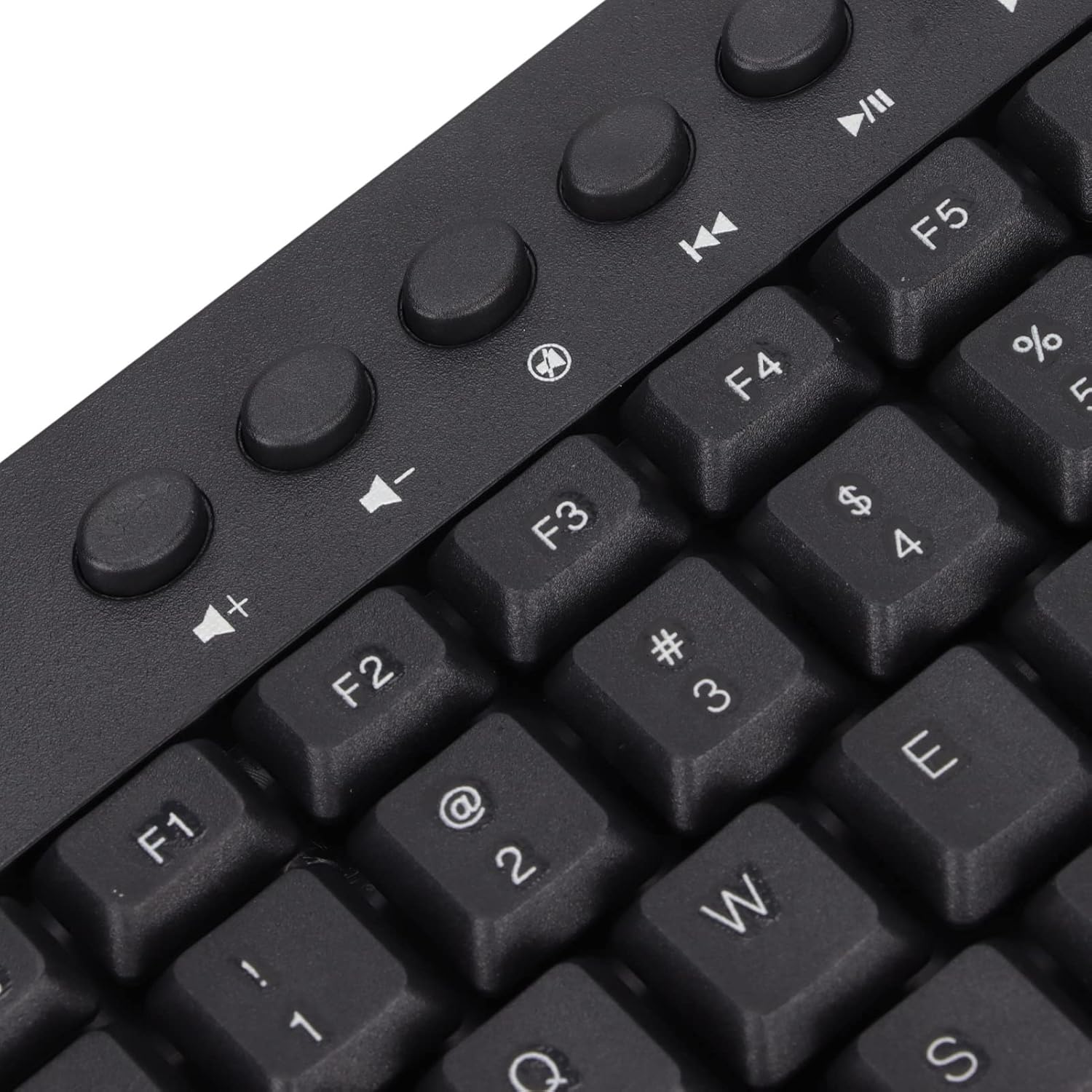
בילד: נאָענט-אַרויף view of the dedicated multimedia control keys.

Image: Detail of the right-side keys, including navigation and control keys.
6. וישאַלט
To ensure the longevity and optimal performance of your ASHATA keyboard, follow these maintenance guidelines:
- רייניקונג: Use a soft, dry cloth to wipe the surface of the keyboard. For deeper cleaning, you may use a slightly damp cloth with a mild cleaning solution, ensuring no liquid enters the key switches or internal components.
- באַזייַטיקונג פון שטויב: ניצט קאמפרעסט לופט צו באַזײַטיקן שטויב און שמוץ פון צווישן די קלאַוויאַטורן.
- ויסמיידן ליקווידס: גיס נישט קיין פליסיקייטן אויף דער קלאַוויאַטור. אויב עס גייט אויס א פליס, זאָלט איר גלייך אָפּשטעקן די קלאַוויאַטור פֿון אייער קאָמפּיוטער און לאָזן עס גאָר טרוקן ווערן איידער איר עס ווידער פֿאַרבינדט.
- סטאָרידזש: האַלט די קלאַוויאַטור אין אַ קיל, טרוקן אָרט אַוועק פון דירעקט זונשייַן און עקסטרעמע טעמפּעראַטורן.
7. טראָובלעשאָאָטינג
אויב איר טרעפט פּראָבלעמען מיט אייער קלאַוויאַטור, זעט די פאלגענדע געוויינטלעכע פּראָבלעמען און לייזונגען:
7.1 קלאַוויאַטור רעאַגירט נישט
- קוק די USB קאַנעקשאַן: Ensure the USB cable is securely plugged into a working USB-A port on your computer. Try a different USB port.
- ריסטאַרט קאָמפּיוטער: מאנchmal קען א פשוטע קאמפיוטער ריסטארט פאררעכטן קאנעקטיוויטי פראבלעמען.
- פּרובירן אויף אן אנדער מיטל: Connect the keyboard to another computer to determine if the issue is with the keyboard or your original device.
7.2 קנעפּלעך אַרבעטן נישט ריכטיק
- ריינע שליסלען: Check for any debris or foreign objects lodged under the non-functioning keys. Use compressed air to clear them.
- ווייכווארג קאנפליקט: זיכער מאַכן אַז קיין קאָנפליקטירנדיקע ווייכווארג אָדער דרייווערס זענען נישט אינסטאַלירט וואָס קענען שטערן די קלאַוויאַטור אַרייַנשרייַב.
7.3 Multimedia Keys Not Working
- Operating System Settings: Verify that your operating system's media key settings are configured correctly.
- אַפּליקאַציע קאָמפּאַטאַביליטי: Some applications may not fully support universal multimedia keys.
אויב די טריט לייזן נישט דעם פראבלעם, ביטע קאנטאקטירט קאסטומער סופארט פאר ווייטערדיגע הילף.
8. ספּעסאַפאַקיישאַנז
| שטריך | דעטאַל |
|---|---|
| סאָרט | ASHATA |
| מאָדעל נומער | ASHATA8x4ni917wp552-12 |
| קאַנעקטיוויטי טעכנאָלאָגיע | יו-עס-בי-א (ווייערד) |
| נומער פון קיז | 95 |
| באַשטימען טיפּ | מעטשאַניקאַל |
| מאַטעריאַל | פּלאַסטיק |
| קאָליר | Black (Arabic layout) |
| קאַמפּאַטאַבאַל דעוויסעס | PC (Desktop, Laptop) |
| קאָמפּאַטיבלע אָפּערייטינג סיסטעם משפּחה | Windows |
| קאַבלע לענג | Approx. 1.5m / 1.6yd |
| ספּעציעלע שטריך | פרייַ מולטימעדיאַ קנעפּלעך |

בילד: אונטן view of the keyboard, displaying regulatory information and adjustable feet.
9. וואָראַנטי און שטיצן
For warranty information and customer support, please refer to the documentation included with your purchase or contact the retailer/manufacturer directly. Keep your proof of purchase for any warranty claims.