
1. הקדמה
Thank you for choosing the Lucci Air Climate III Fan Light Kit. This kit is designed to seamlessly integrate with your Lucci Air Climate III ceiling fan (sold separately), providing efficient and dimmable LED illumination. This manual provides essential information for the safe installation, operation, and maintenance of your new light kit.

Figure 1: Lucci Air Climate III Fan Light Kit (Model 21064501)
The light kit features a replaceable 12-watt GX53 LED bulb, emitting a warm 3000 Kelvin temperature and 1100 lumens of light output. When combined with your Climate III ceiling fan, it offers dimmable functionality and an anti-burglary feature, allowing you to automate light activation via the remote control.
2. וויכטיק סאַפעטי אינסטרוקציעס
ביטע ליינט און פארשטייט אלע אינסטרוקציעס איידער איר הייבט אן די אינסטאלאציע. נישט נאכפאלגן די אינסטרוקציעס קען רעזולטירן אין עלעקטרישע שאק, פייער, אדער פערזענליכע שאדן.
- Always turn off power at the main circuit breaker or fuse box before attempting any installation, maintenance, or troubleshooting.
- זיכער מאַכן אַז אַלע עלעקטרישע פֿאַרבינדונגען זענען אין לויט מיט די לאָקאַלע קאָודן און אָרדאַנאַנסן, ווי אויך די נאַציאָנאַלע עלעקטרישע קאָוד (NEC).
- אויב איר זענט נישט זיכער וועגן וויירינג אדער אינסטאַלאַציע, קאָנסולטירט זיך מיט אַ קוואַליפֿיצירטן עלעקטריקער.
- Do not install this light kit in wet or damp לאָקאַציעס. עס איז דיזיינד בלויז פֿאַר נוצן אינעווייניק.
- Use only the specified GX53 LED bulb type.
- Do not attempt to modify the light kit or its components.
3. פּעקל אינהאַלט
Carefully unpack your light kit and ensure all items are present and undamaged. If any parts are missing or damaged, contact your retailer immediately.
- One (1) Lucci Air Climate III Fan Light Kit
- One (1) GX53 LED Bulb (pre-installed or separate)
4. ינסטאַלירונג אינסטרוקציעס
This light kit is designed for easy installation onto a compatible Lucci Air Climate III ceiling fan using a simple twist and lock mechanism. Ensure your ceiling fan is already securely installed and powered off before proceeding.
4.1 פּריפּערינג פֿאַר ינסטאַלירונג
- קער אַוועק מאַכט: Locate the circuit breaker or fuse that supplies power to the ceiling fan and turn it off. Verify that the power is off by attempting to operate the fan or any existing light.
- Access fan light housing: Refer to your Lucci Air Climate III ceiling fan manual for instructions on how to access the light housing area, typically at the bottom of the fan motor.
4.2 Attaching the Light Kit
- Carefully align the light kit with the designated mounting points on the bottom of the Climate III ceiling fan motor housing.
- Gently push the light kit upwards and twist it clockwise until it locks securely into place. You should feel or hear a click, indicating it is properly seated.
- Ensure all wiring connections are secure and not pinched during installation.
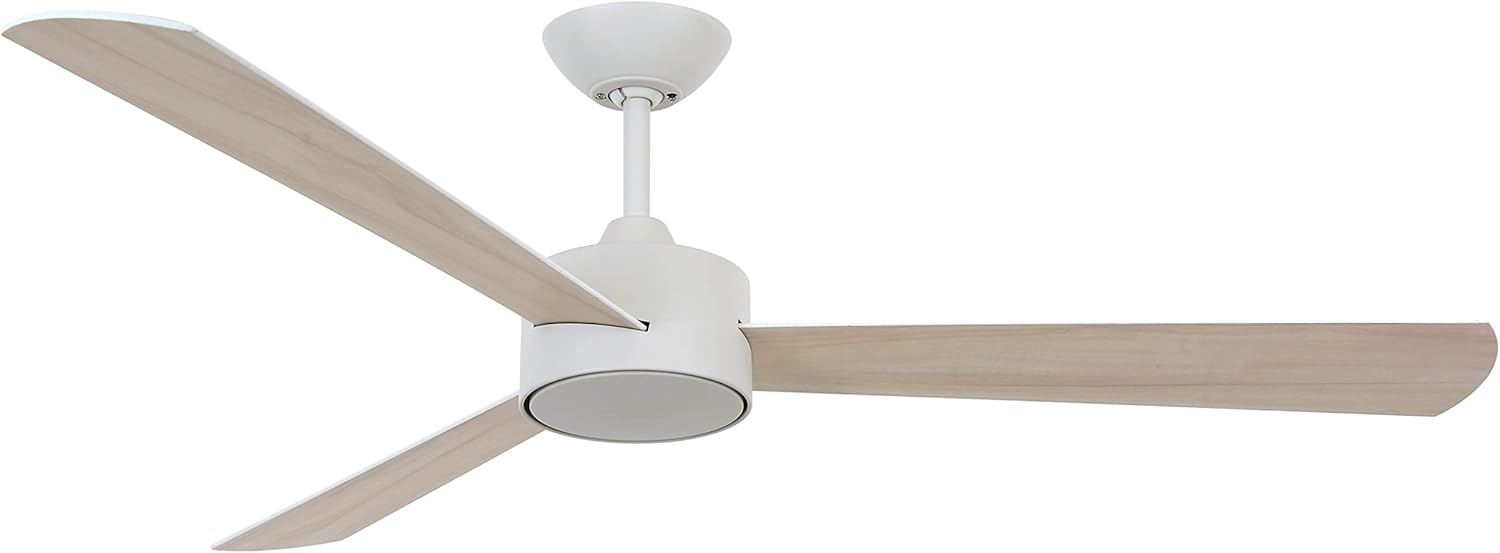
Figure 2: Lucci Air Climate III Ceiling Fan (Light Kit attaches to the bottom of the motor housing)
4.3 Bulb Installation/Replacement
The light kit comes with a replaceable GX53 LED bulb. If the bulb is not pre-installed or needs replacement:
- פאַרזיכערן די מאַכט איז אַוועק אין די קרייַז צוימען.
- Gently twist the GX53 bulb counter-clockwise to remove it from its socket.
- Insert the new GX53 LED bulb into the socket and twist clockwise until it is secure. Do not overtighten.
4.4 לעצטע טריט
- Once the light kit is securely installed and the bulb is in place, restore power at the main circuit breaker.
- Test the light kit using your Lucci Air Climate III ceiling fan remote control.
5. אַפּערייטינג ינסטרוקטיאָנס
The Lucci Air Climate III Fan Light Kit is controlled via the remote control provided with your Lucci Air Climate III ceiling fan.
5.1 Basic Light Control
- קערן אויף / אַוועק: Press the designated light button on your fan's remote control to turn the light kit on or off.
- דימינג: If your remote control has dimming functionality, press and hold the light button or use the dedicated dimming buttons to adjust the brightness of the LED light.
5.2 Anti-Burglary Functionality
The light kit, in conjunction with your Climate III ceiling fan and its remote, offers an anti-burglary feature. This function allows you to program the light to turn on and off automatically for 5-20 minutes every 2 hours, simulating occupancy. Refer to your Climate III ceiling fan remote control manual for specific instructions on activating and customizing this feature.
6. קער און וישאַלט
Regular cleaning and proper care will ensure the longevity and optimal performance of your light kit.
- רייניקונג: Always turn off power to the fan and light kit at the circuit breaker before cleaning. Use a soft, dry, or slightly damp cloth to wipe down the exterior surfaces. Do not use abrasive cleaners, solvents, or polishes, as these can damage the finish.
- באַלב פאַרבייַט: When replacing the GX53 LED bulb, ensure power is off. Allow the bulb to cool completely before handling.
- דורכקוק: Periodically check for any loose connections or signs of wear. If any issues are found, turn off power and consult a qualified technician.
7. טראָובלעשאָאָטינג
If you experience issues with your Lucci Air Climate III Fan Light Kit, refer to the following common problems and solutions:
| פּראָבלעם | מעגלעך סיבה | לייזונג |
|---|---|---|
| ליכט טוט נישט קער אויף. | קיין שטראָם צום ווענטילאַטאָר/ליכט קיט. די לאָמפּ איז פרייַ אָדער דעפעקטיוו. ווייַט קאָנטראָל באַטאַרייע איז טויט. | Check circuit breaker. Ensure fan is powered. Turn off power, check bulb connection, replace bulb if necessary. פאַרבייַטן ווייַט קאָנטראָל באַטעריז. |
| ליכט פליקערט אדער פארשוואכט אומגעריכט. | לויזע גלאָביר פֿאַרבינדונג. Incompatible dimmer (if not using fan remote). פאַולטי ציבעלע. | Turn off power, check bulb connection. Ensure you are using the fan's remote for dimming. פאַרבייַטן ציבעלע. |
| Anti-burglary function not working. | Feature not activated or incorrectly set. | Refer to your Climate III ceiling fan remote control manual for activation steps. |
If you continue to experience problems, please contact customer support.
8. ספּעסאַפאַקיישאַנז
Detailed technical specifications for the Lucci Air Climate III Fan Light Kit (Model 21064501):
- מאָדעל נאָמען: 21064501
- סאָרט: לוטשי עיר
- קאָליר: ווייַס
- מאַטעריאַל: מעטאַל, פּאָליקאַרבאָנאַטע
- ליכט מקור טיפּ: געפירט
- באַלבז באַזע: GX53
- וואָסtage: 12 וואטס
- ברייטקייט: 1100 לומענס
- ליכט קאָליר טעמפּעראַטור: 3000 קעלווין (וואַרעם ווייַס)
- Voltage: 120 וואלטס
- קאָנטראָל אופֿן: Remote Control (via Climate III fan remote)
- ספּעציעלע שטריך: Dimmable, Anti-Burglary Functionality
- דרינענדיק / דרויסנדיק באַניץ: דרינענדיק
- פּראָדוקט דימענשאַנז: 6.9 x 6.9 x 2.2 inches (Diameter x Height)
- נומער וואָג: 12 אונס (0.75 פונט)
- אַסעמבלי פארלאנגט: No (for the light kit itself, attaches to fan)
- וואַסער קעגנשטעל מדרגה: ניט וואַסער קעגנשטעליק
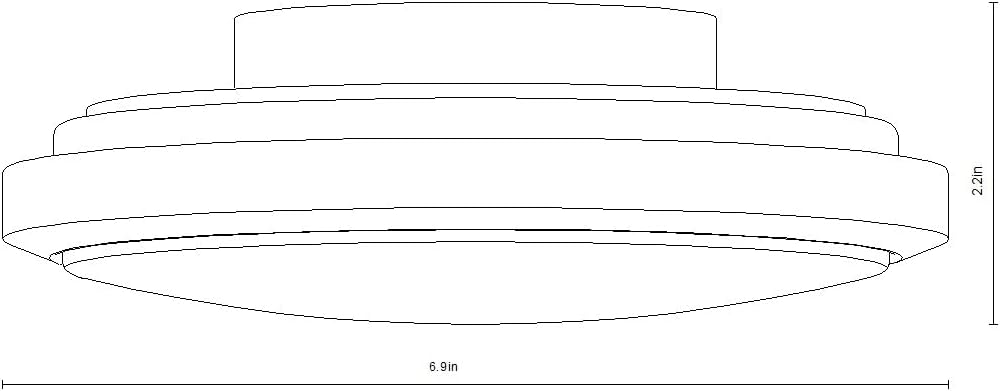
Figure 3: Light Kit Dimensions
9. וואָראַנטי אינפֿאָרמאַציע
The Lucci Air Climate III Fan Light Kit (Model 21064501) is covered by a 1-יאָר לימיטעד וואָראַנטי פֿון דעם קויפֿדאַטום. די וואָראַנטי דעקט חסרונות אין מאַטעריאַלן און אַרבעט אונטער נאָרמאַלן באַנוץ. עס דעקט נישט קיין שאָדן וואָס רעזולטירט פֿון אומריכטיקער אינסטאַלאַציע, אַקסידענט, אומרעכט באַנוץ, מיסברויך, אָדער נישט-אָטעריזירטע מאָדיפֿיקאַציעס.
ביטע האַלטן דיין דערווייַז פון קויפן פֿאַר וואָראַנטי קליימז.
10. קונה שטיצן
For technical assistance, warranty claims, or further inquiries regarding your Lucci Air Climate III Fan Light Kit, please contact your retailer or visit the official Lucci Air store: