
הקדמה
א דאנק פארן קויפןasing the Max Power MPD15EQ Portable Rechargeable PA Speaker. This manual provides important information regarding the setup, operation, and maintenance of your speaker. Please read it thoroughly before using the product to ensure proper function and to maximize its lifespan.
זיכערקייַט אינסטרוקציעס
- דו זאלסט נישט ויסשטעלן די אַפּאַראַט צו רעגן אָדער נעץ צו פאַרמייַדן פייַער אָדער קלאַפּ כאַזערדז.
- עפֿנט נישט דעם רעדנער קאַבינעט. עס זענען נישטאָ קיין טיילן וואָס דער באַניצער קען סערוויסן אינעווייניק. לאָזט איבער אַלע סערוויסינג צו קוואַליפֿיצירטע פּערסאָנעל.
- זיכער מאַכן אַז עס איז דאָ געהעריקע ווענטילאַציע. נישט פֿאַרשטאָפּן קיין ווענטילאַציע עפענונגען.
- ניצן בלויז די מאַכט אַדאַפּטער סאַפּלייד מיט די אַפּאַראַט.
- Keep the speaker away from heat sources, direct sunlight, and strong magnetic fields.
- ריין בלויז מיט אַ טרוקן שטאָף.
פּעקל אינהאַלט
- Max Power MPD15EQ PA Speaker
- ווייערד מיקראָפאָן
- ווייַט קאָנטראָל
- מאַכט אַדאַפּטער
- באַניצער מאַנואַל (דעם דאָקומענט)
פּראָדוקט איבערview
Familiarize yourself with the various parts of your MPD15EQ speaker.
פראָנט פּאַנעל
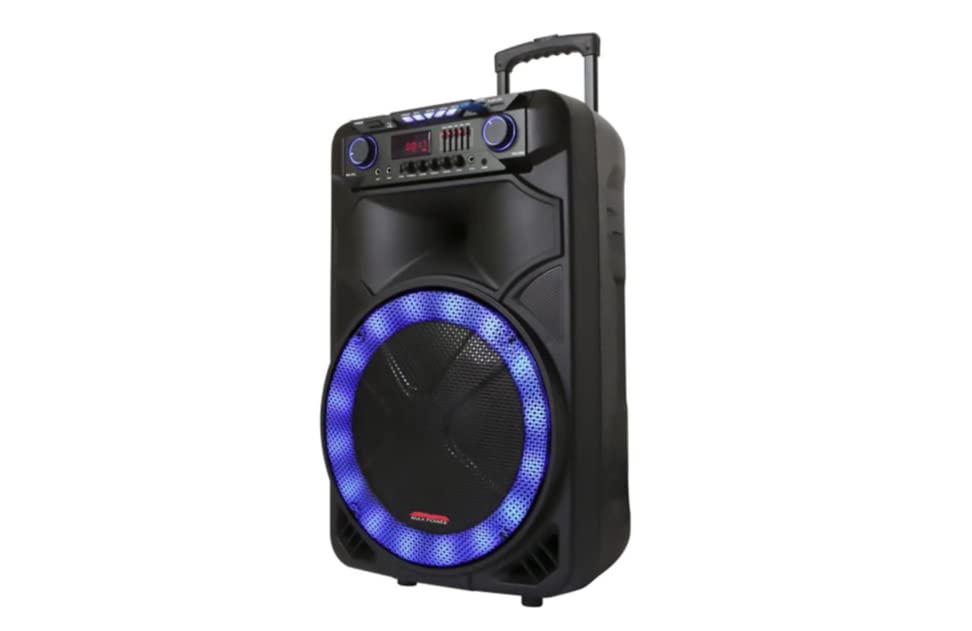
בילד באַשרייַבונג: This image displays the front of the Max Power MPD15EQ speaker. It features a large 15-inch woofer at the bottom, a 5-inch horn tweeter above it, and a control panel with an LED display screen. The speaker grille covers the woofer and tweeter, and the overall design is robust and portable.
- 15" וואָאָפער: Provides powerful bass frequencies.
- 5" Horn Tweeter: גיט קלאָרע הויכע פרעקווענצן.
- געפירט ווייַז פאַרשטעלן: ווײַזט איצטיקן מאָדע, טראַק אינפֿאָרמאַציע און סעטטינגס.
- קאָנטראָל פּאַנעל: Buttons and knobs for various functions (volume, EQ, mode, etc.).
- LED Light On/Off Switch: Controls the integrated LED lighting.
דערציען פּאַנעל (למשלample - specific details not provided in source)
The rear panel typically includes input/output ports and the power connection.
- מאַכט אַרייַנשרייַב: פֿאַר פֿאַרבינדן דעם מאַכט אַדאַפּטער צו לאָדן די באַטאַרייע אָדער אַפּערירן דעם אַפּאַראַט.
- וסב פּאָרט: פֿאַר שפּילן אַודיאָ פֿון USB דרייווז.
- SD Card Slot: פֿאַר שפּילן אַודיאָ פֿון SD קאַרדס.
- מיקראָפאָן אַרייַנשרייַב: For connecting the wired microphone.
- אַגזיליערי אַרייַנשרייַב: For connecting external audio devices via a 3.5mm or RCA cable.
סעטאַפּ
טשאַרדזשינג די באַטאַרייע
The MPD15EQ features a built-in rechargeable battery. Before first use, fully charge the speaker for approximately 6-8 hours.
- Connect the supplied power adapter to the speaker's power input port.
- צאַפּן די מאַכט אַדאַפּטער אין אַ נאָרמאַל וואַנט ווענטיל.
- The LED display or an indicator light will show the charging status.
- אַמאָל גאָר אָנגעלאָדן, אָפּשטעקן דעם מאַכט אַדאַפּטער.
ערשט מאַכט אויף
- Ensure the speaker is fully charged or connected to power.
- Locate the power switch (usually on the rear or control panel) and turn it to the "ON" position.
- The LED display will illuminate, indicating the speaker is ready for use.
אַפּערייטינג ינסטראַקשאַנז
בלועטאָאָטה קאַנעקשאַן
- Turn on the MPD15EQ speaker.
- Press the "MODE" button on the control panel until "BLUETOOTH" or "BT" appears on the LED display.
- אַקטיווירן בלועטוט אויף דיין סמאַרטפאָון, טאַבלעט, אָדער אַנדערע אַודיאָ מיטל.
- זוכן פֿאַר available devices and select "MPD15EQ" from the list.
- Once paired, you will hear a confirmation sound, and you can now play audio wirelessly.
ניצן די ווייערד מיקראָפאָן
- Connect the supplied wired microphone to the "MIC IN" port on the speaker.
- Adjust the microphone volume knob (if available) on the control panel to your desired level.
- רעדן אין די מיקראָפאָן.
וסב / סד קאָרט פּלייבאַק
- אַרײַנשטעלן אַ USB פֿלעש דרייוו אָדער SD קאַרטל (פֿאָראויסגעלאָדן מיט MP3 אַודיאָ fileס) אין דעם באטרעפנדיקן פארט.
- The speaker should automatically switch to USB/SD mode and begin playing. If not, press the "MODE" button.
- Use the playback controls (Play/Pause, Next, Previous) on the control panel or remote control.
5-Band Graphic EQ Adjustment
The MPD15EQ features a 5-band graphic equalizer to fine-tune your audio output.
- Locate the EQ sliders on the control panel.
- Each slider corresponds to a specific frequency band. Adjust them up or down to boost or cut those frequencies.
- Experiment with the settings to achieve your preferred sound profile.
געפירט ליגהץ
The speaker includes integrated LED lights. Use the "LED Light On/Off Switch" to activate or deactivate them.
רימאָוט קאָנטראָל באַניץ
The included remote control allows for convenient operation from a distance. It typically includes buttons for power, mode selection, volume, track control, and EQ presets.
וישאַלט
רייניקונג
- שטענדיק אויסלעשן און ארויסציען דעם רעדנער איידער איר רייניגט.
- ניצט אַ ווייכן, טרוקענעם שטאָף צו ווישן די אויסערלעכע ייבערפלאַכן.
- Do not use liquid cleaners, aerosols, or abrasive chemicals.
סטאָרידזש
- האַלט דעם רעדנער אין אַ קיל, טרוקן אָרט אַוועק פון דירעקט זונשייַן און עקסטרעמע טעמפּעראַטורן.
- If storing for extended periods, charge the battery periodically (e.g., every 3 months) to maintain battery health.
טראָובלעשאָאָטינג
| פּראָבלעם | מעגלעך סיבה | לייזונג |
|---|---|---|
| קיין מאַכט | באַטעריע אויסגעלאָדן; שטראָם קאַבל נישט פארבונדן; שטראָם אויסשליס. | Charge the battery; Check power cable connection; Turn power switch ON. |
| קיין געזונט | קול צו נידעריג; אומרעכטער אינפוט מאָדע; דעווייס נישט געפּאָרט (בלוטעט). | Increase master volume; Select correct input mode (Bluetooth, USB, AUX); Re-pair Bluetooth device. |
| מיקראָפאָן טוט נישט אַרבעטן | Microphone not connected; Microphone volume low; Microphone switch off. | Ensure microphone is securely plugged in; Increase microphone volume; Check microphone's ON/OFF switch. |
| בלועטאָאָטה קשר אַנסטייבאַל | Device too far; Interference; Low battery. | Move device closer to speaker; Avoid obstacles; Ensure speaker battery is charged. |
ספּעסאַפאַקיישאַנז
- וואָפער: Single 15"
- טוויטטער: Single 5" Horn
- אָפטקייַט ענטפער: 40Hz-20KHz
- ימפּעדאַנסע: 4 אָהמס
- סענסיטיוויטי: 93dB
- דימענשאַנז (ב x ד x ה): 19" x 16.75" x 32"
- וואָג: בעערעך 38 פונט
- באַטערי: געבויט-אין קריקאָנלאָדלעך
- קאַנעקטיוויטי: Bluetooth, USB, SD Card, Microphone Input, Auxiliary Input
- EQ: 5 באַנד גראַפיק עק
- ווייַז: געפירט ווייַז סקרין
- אַרייַנגערעכנט אַקסעסעריז: Wired Microphone, Remote Control
וואָראַנטי און שטיצן
Max Power products are designed for reliability and performance. For warranty information or technical support, please refer to the warranty card included with your purchase or visit the official Max Power webזייטל. האַלט דיין קויפן באַווייַז פֿאַר וואָראַנטי קליימז.
קאָנטאַקט אינפֿאָרמאַציע: Please refer to the packaging or official website for the most up-to-date contact details for customer service.
אפיציעלע פּראָדוקט ווידיאס
No official product videos from the seller were available for embedding at this time. If available, they would appear here with detailed descriptions.