
1. הקדמה
א דאנק פארן קויפןasing the WISCENT WTB-779 Micro Hi-Fi Stereo System. This manual provides essential information for the safe and efficient operation of your new audio system. Please read it thoroughly before use and retain it for future reference.
The WISCENT WTB-779 is a versatile audio system featuring a CD/DVD player, Bluetooth connectivity, FM radio, USB and SD card playback, AUX input, and a microphone port. It is designed to deliver clear audio in a compact form factor.
2. זיכערקייַט אינפֿאָרמאַציע
ביטע באַמערקן די פאלגענדע זיכערהייט מיטלען צו פאַרמייַדן עלעקטרישע קלאַפּ, פייַער אָדער שעדיקן צו די אַפּאַראַט:
- דו זאלסט נישט ויסשטעלן דעם אַפּפּליאַנסע צו רעגן אָדער נעץ.
- בלאָקירט נישט קיין ווענטילאַציע עפענונגען. זאָרגט פֿאַר גענוג פּלאַץ אַרום דעם אַפּאַראַט פֿאַר געהעריקן לופֿטפֿלוס.
- שטעלט נישט דעם אַפּאַראַט לעבן היץ־קוואַלן ווי ראַדיאַטאָרן, היץ־רעגיסטערס, אויוון, אדער אַנדערע אַפּאַראַטן (אַרייַנגערעכנט ampליפיערס) וואָס פּראָדוצירן היץ.
- באַשיצן די מאַכט שנור פון גיין אויף אָדער פּינטשט, ספּעציעל אין די פּלאַגז, קאַנוויניאַנס רעסאַפּיז און די פונט ווו זיי אַרויסגיין פון די אַפּאַראַט.
- נאָר נוצן אַטאַטשמאַנץ / אַקסעסעריז ספּעסיפיעד דורך דער פאַבריקאַנט.
- אָפּשטויסן דעם אַפּאַראַט בעשאַס בליץ סטאָרמז אָדער ווען אַניוזד פֿאַר לאַנג פּיריאַדז.
- אָפּשיקן אַלע סערוויסעס צו קוואַלאַפייד סערוויס פּערסאַנעל. סערוויס איז פארלאנגט ווען דער אַפּאַראַט איז דאַמידזשד אין קיין וועג, אַזאַ ווי מאַכט צושטעלן שנור אָדער צאַפּן איז דאַמידזשד, פליסיק איז ספּילד אָדער אַבדזשעקץ זענען געפאלן אין די אַפּאַראַט, דער אַפּאַראַט איז יקספּאָוזד צו רעגן אָדער נעץ, אַרבעט נישט נאָרמאַלי , אָדער האט שוין דראַפּט.
3. פּעקל אינהאַלט
Carefully unpack your WISCENT WTB-779 Micro Hi-Fi Stereo System and check that all items are present and in good condition. If any items are missing or damaged, please contact your retailer.
- 1 x WISCENT WTB-779 Compact Micro Hi-Fi System (Main Unit and Speakers)
- 1 x רימאָוט קאָנטראָל (באַטעריז ניט אַרייַנגערעכנט)
- 1 רענטגענ 3.5 מם AUX קאַבלע
- 1 קס RCA קאַבלע
- 1 x באַניצער מאַנואַל (דאָס דאָקומענט)

Figure 3.1: Package contents of the WISCENT WTB-779 Micro Hi-Fi Stereo System.
4. פּראָדוקט איבערview
4.1 פראָנט פּאַנעל קאָנטראָלס און קאַנעקשאַנז

Figure 4.1: Front panel layout and controls of the WISCENT WTB-779.
- מאַכט קנעפּל: טורנס די אַפּאַראַט אויף אָדער אַוועק.
- מאָדע קנעפּל: Cycles through input sources (CD/DVD, Bluetooth, FM, AUX, USB, SD).
- באַנד קנעפּל: אַדזשאַסטירט דעם הויפּט באַנד לעוועל.
- האַלטן קנעפּל: סטאַפּס פּלייבאַק.
- Previous/Channel- Button: Skips to the previous track/chapter or tunes down FM radio frequency.
- שטיל קנעפּל: מיוטעס אָדער אַנמיוט די אַודיאָ רעזולטאַט.
- שפּילן/פּויזע/זוכן קנעפּל: Plays or pauses playback; initiates search function in some modes.
- Next/Channel+ Button: Skips to the next track/chapter or tunes up FM radio frequency.
- עפֿענען/שליסן קנעפּל: אָפּענס אָדער קלאָוזיז די דיסק טאַץ.
- דיסק טאַץ: פֿאַר אַרײַנשטעלן סי-דיס אָדער די-ווי-דיס.
- מיקראָ ינפּוט: 3.5mm jack for connecting an external microphone.
- עאַרפאָנע דזשאַק: 3.5 מם דזשאַק פֿאַר קאַנעקטינג כעדפאָונז.
- וסב פּאָרט: פֿאַר פֿאַרבינדן USB פֿלאַש דרייווז פֿאַר מעדיע ווידערשפּיל.
- SD Card Slot: For inserting SD cards for media playback (located on the side or rear, not visible in this image).
4.2 דערציען פּאַנעל קאַנעקשאַנז
The rear panel typically includes connections for speakers, FM antenna, and RCA audio/video output for TV connection.
5. סעטאַפּ
5.1 פֿאַרבינדן די רעדנערס
Connect the speaker wires from the main unit to the corresponding speaker terminals on each speaker. Ensure correct polarity (positive to positive, negative to negative) for optimal sound quality.
5.2 קאַנעקטינג צו מאַכט
Plug the power cord into a standard AC power outlet. The unit is designed for wired electrical power.
5.3 Connecting to a TV (Optional)
צו view DVDs, connect the RCA cable (included) from the 'Video Out' and 'Audio Out' ports on the rear of the main unit to the corresponding 'Video In' and 'Audio In' ports on your television.
5.4 FM אַנטענע פֿאַרבינדונג
Extend the telescopic FM antenna for better radio reception. For improved signal, you may connect an external FM antenna to the designated port on the rear of the unit.

Figure 5.1: WISCENT WTB-779 main unit and speakers.
6. אַפּערייטינג ינסטרוקטיאָנס
6.1 מאַכט אויף / אַוועק
דרוק די מאַכט קנעפּל אויף דער פראָנט פּאַנעל אָדער ווייַט קאָנטראָל צו דרייען די אַפּאַראַט אויף אָדער אויס.
6.2 מאָדע סעלעקציע
דרוק די מאָדע button on the front panel or remote control to cycle through available input sources: CD/DVD, Bluetooth (BT), FM Radio, AUX, USB, and SD.
6.3 סי-די/די-ווי-די ווידערשפּיל
- דרוק די עפענען / נאָענט קנעפּל צו עפענען די דיסק טאַץ.
- Place a CD or DVD disc gently into the tray with the label side facing up.
- דרוק די עפענען / נאָענט קנעפּל ווידער צו פאַרמאַכן דעם טאַץ.
- The unit will automatically detect the disc and begin playback. If not, press the שפּיל / פּויזע קנעפּל.
- ניצן די PREVIOUS/CHANNEL- און NEXT/CHANNEL+ buttons to skip tracks/chapters.
- Supported disc formats include CD, CD-R, CD-RW, MP3-CD, WMA, DVD, SVCD, VCD, JPEG, and Kodak Picture CD. Blu-ray discs are not supported.
- The DVD player is region-free, compatible with zones 1, 2, 3, 4, 5, and 6.
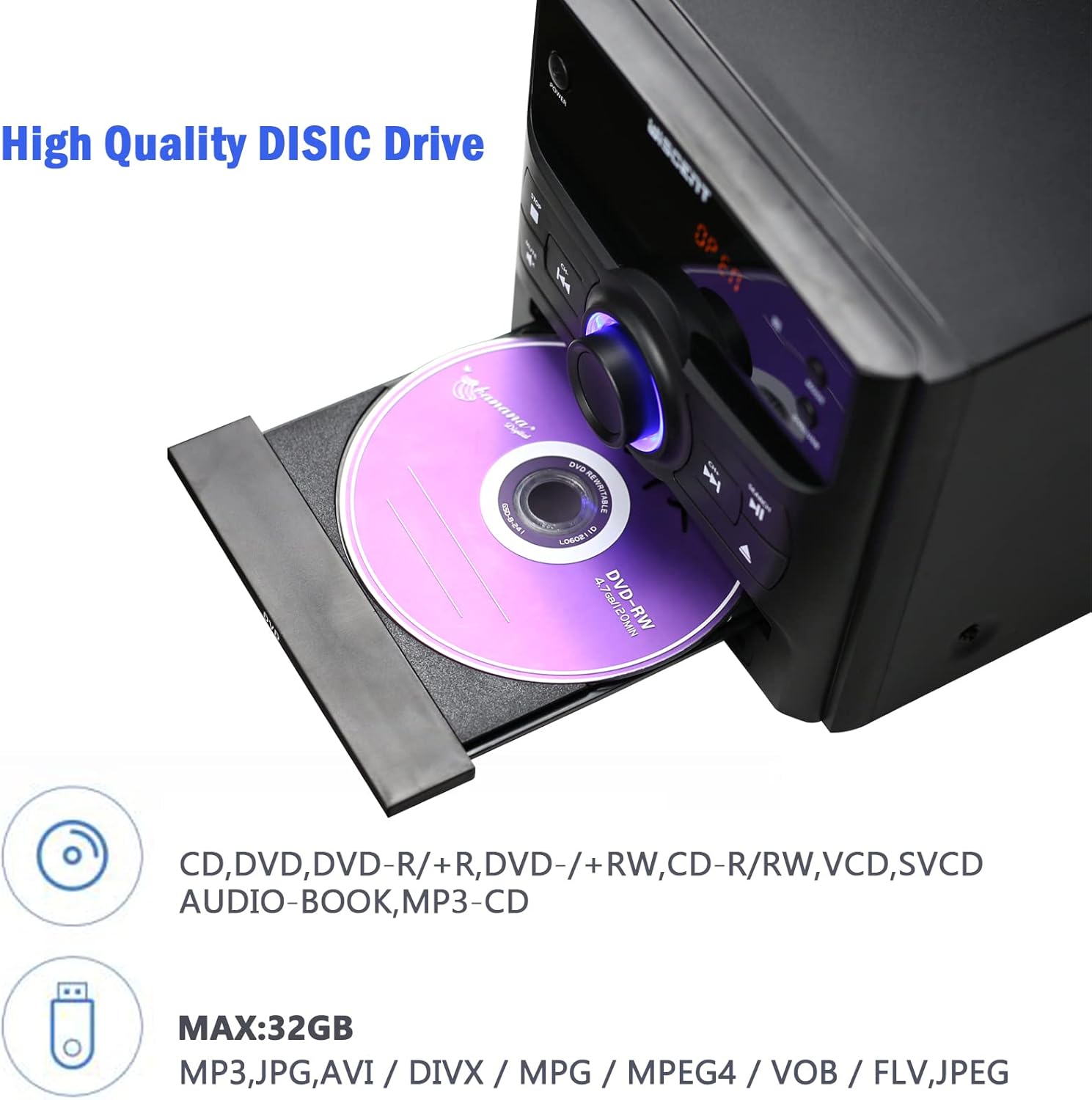
Figure 6.1: Inserting a disc into the WISCENT WTB-779.
6.4 בלועטאָאָטה אָפּעראַציע
- דרוק די מאָדע button until 'BT' or 'Bluetooth' appears on the display. The unit will enter pairing mode.
- אויף אייער בלוטוט-פארשטארקטע דעווייס (למשל, סמאַרטפאָון, טאַבלעט), אַקטיווירט בלוטוט און זוכט פֿאַר פאַראַן דעווייסעס.
- Select 'WISCENT WTB-779' (or similar name) from the list to pair.
- אַמאָל פּערד, קענט איר שפּילן אַודיאָ פֿון אייער מיטל דורך די סטערעאָ סיסטעם.
6.5 עפעם ראַדיאָ
- דרוק די מאָדע קנעפל ביז 'FM' דערשיינט אויפן דיספלעי.
- פֿאַרלענגערט די טעלעסקאָפּישע אַנטענע פֿאַר דער בעסטער אָפּנאַם.
- ניצן די PREVIOUS/CHANNEL- און NEXT/CHANNEL+ קנעפּלעך צו מאַנועל צושטעלן צו אַ סטאַנציע.
- To auto-scan and save stations, refer to the specific instructions in the full manual (if available) or experiment with holding down the play/pause button. The unit supports 20 programmable preset stations.
6.6 USB/SD שפּיל
- אַרײַנשטעלן אַ USB פלאַש דרייוו אין דעם USB פּאָרט אָדער אַן SD קאַרטל אין דעם SD קאַרטל שפּאַלט.
- דרוק די מאָדע button until 'USB' or 'SD' appears on the display.
- די איינהייט וועט אויטאמאטיש דעטעקטירן און אנהייבן שפילן קאמפאטיבלע אודיא fileס (MP3, WMA).
- געשטיצט file systems are FAT16/32, with a maximum capacity of 32GB.
6.7 AUX אַרייַנשרייַב
Connect an external audio device (e.g., smartphone, MP3 player) to the AUX IN jack using the provided 3.5mm AUX cable. Select 'AUX' mode to play audio from the connected device.
6.8 מיקראָפאָן אַרייַנשרייַב
Connect a microphone to the MIC input jack for karaoke or voice amplification. Adjust the microphone volume separately if available, or use the main volume control.
6.9 כעדפאָון רעזולטאַט
Plug headphones into the earphone jack for private listening. The main speakers will be muted automatically.
6.10 רימאָוט קאָנטראָל
The included remote control provides full functionality for operating the WISCENT WTB-779 from a distance. Insert two AAA batteries (not included) into the remote control before use. Point the remote control directly at the main unit's sensor.
7. וישאַלט
7.1 רייניקונג די אַפּאַראַט
Wipe the unit with a soft, dry cloth. Do not use abrasive cleaners, waxes, or solvents as they may damage the finish. Ensure the unit is unplugged before cleaning.
7.2 דיסק זאָרג
Handle discs by their edges. Keep discs clean and free of scratches. Store discs in their cases when not in use to prevent dust and damage.
8. טראָובלעשאָאָטינג
If you encounter issues with your WISCENT WTB-779, please refer to the following common problems and solutions:
| פּראָבלעם | מעגלעך סיבה | לייזונג |
|---|---|---|
| קיין מאַכט | עלעקטרישע שנור נישט פארבונדן; עלעקטרישע ווענטיל איז דעפעקטיוו. | זיכער מאַכן אַז דער עלעקטרישער שנור איז גוט איינגעשלאָסן. פּרוּווט אַן אַנדער עלעקטרישער אַוטלעט. |
| קיין געזונט | Volume too low; Mute activated; incorrect input mode; speakers not connected. | Increase volume. Deactivate Mute. Select correct input mode. Check speaker connections. |
| די דיסק איז נישט פּלייינג | Disc inserted incorrectly; disc dirty or scratched; unsupported disc format. | Re-insert disc correctly. Clean or replace disc. Ensure disc format is supported (not Blu-ray). |
| בלועטאָאָטה פּערינג דורכפאַל | Unit not in pairing mode; device too far; Bluetooth disabled on device. | Ensure unit is in BT mode. Move device closer. Enable Bluetooth on your device. |
| נעבעך עפעם אָפּטראָג | אַנטענע נישט אויסגעשטרעקט; שוואַך סיגנאַל. | Extend the telescopic antenna fully. Try repositioning the unit or connecting an external antenna. |
| ווייַט קאָנטראָל נישט ארבעטן | Batteries depleted or inserted incorrectly; obstruction between remote and unit. | Replace batteries. Ensure correct polarity. Remove any obstructions. Point remote directly at the unit. |
אויב די פראבלעם בלייבט נאך פרובירן די לייזונגען, ביטע קאנטאקטירט קאסטומער סופארט.
9. ספּעסאַפאַקיישאַנז
| שטריך | באַשרייַבונג |
|---|---|
| מאָדעל | ווטב-779 |
| סאָרט | וויסענט |
| רעזולטאַט וואָסtage | 30 וואטס |
| אַודיאָ רעזולטאַט מאָדע | סטערעאָ |
| קאַנעקטיוויטי טעכנאָלאָגיע | בלועטאָאָטה, וסב |
| שטיצט דיסק פֿאָרמאַטירונגען | CD, CD-R, CD-RW, MP3, WMA, DVD, SVCD, VCD, JPEG, Kodak Picture CD (No Blu-ray) |
| DVD Region Compatibility | Region-free (1, 2, 3, 4, 5, 6 zones) |
| USB/SD שטיצע | ביז 32 גיגאבייט, FAT16/32 file סיסטעם |
| עפעם ראַדיאָ פּרעסעץ | 20 סטאנציעס |
| מאַכט מקור | קאָרדעד עלעקטריק |
| פּונקט וואָג | 4.73 קילאָגראַמס |
| פּראָדוקט דימענשאַנז | 56 X 31.4 X 21.2 סענטימעטער |
10. וואָראַנטי און שטיצן
The WISCENT WTB-779 Micro Hi-Fi Stereo System comes with a 36-חודש וואָראַנטי from the date of purchase. This warranty covers manufacturing defects and ensures lifetime technical support.

Figure 10.1: Warranty information.
For warranty claims, technical assistance, or any product-related inquiries, please contact WISCENT customer support through your purchase platform or the official WISCENT webפּלאַץ.