
הקדמה
Thank you for choosing the BOBLOV W3 WiFi Body Camera. This manual provides detailed instructions for the proper setup, operation, and maintenance of your device. Please read this manual thoroughly before using the camera to ensure optimal performance and to prevent damage.
פּעקל אינהאַלט
באַשטעטיקט אַז אַלע זאכן וואָס זענען אויסגערעכנט אונטן זענען אַרייַנגערעכנט אין אייער פּעקל:
- 1x BOBLOV W3 Body Camera
- 1x 64GB Micro SD Card (pre-installed in camera)
- 1x USB-C טשאַרדזשינג קאַבלע
- 1x שרויפן־דרייווער
- 1x באַניצער מאַנואַל (דאָס דאָקומענט)
- 1x Back Magnets Clip
- 1x Brooch
פּראָדוקט איבערview
מאַכט זיך באַקאַנט מיט די קאַמעראַ'ס קאָמפּאָנענטן און קאָנטראָלס:

בילד: BOBLOV W3 Body Camera with labels indicating the Power/Video Button, Audio/WiFi Button, Microphone, Reset button, Brooch attachment point, Back Magnetic Clip, and USB-C Charging Interface. The image also shows the dimensions of the camera.
- Power/Video Button: Used to power on/off the device and start/stop video recording.
- Audio/WiFi Button: Used to start/stop audio recording and activate/deactivate WiFi function.
- מיק: מיקראָפאָן פֿאַר אַודיאָ כאַפּן.
- באַשטעטיק: Small button to reset the device (requires a pin).
- Brooch: Attachment point for the included brooch clip.
- Back Magnetic Clip: Removable clip for magnetic attachment.
- טשאַרדזשינג צובינד: USB-C פּאָרט פֿאַר טשאַרדזשינג און דאַטן אַריבערפירן.
סעטאַפּ
1. טשאַרדזשינג די קאַמעראַ
Before initial use, fully charge the camera. The built-in 1450mAh battery takes approximately 3 hours to fully charge.
- Connect the provided USB-C charging cable to the camera's charging interface.
- פֿאַרבינדט דעם אַנדערן עק פֿונעם קאַבל צו אַ USB מאַכט אַדאַפּטער (נישט אַרייַנגערעכנט) אָדער אַ קאָמפּיוטער'ס USB פּאָרט.
- די טשאַרדזשינג אינדיקאַטאָר ליכט וועט זיך אָנצינדן בעת טשאַרדזשינג און זיך אויסלעשן ווען עס איז גאָר אויפגעלאָדן.
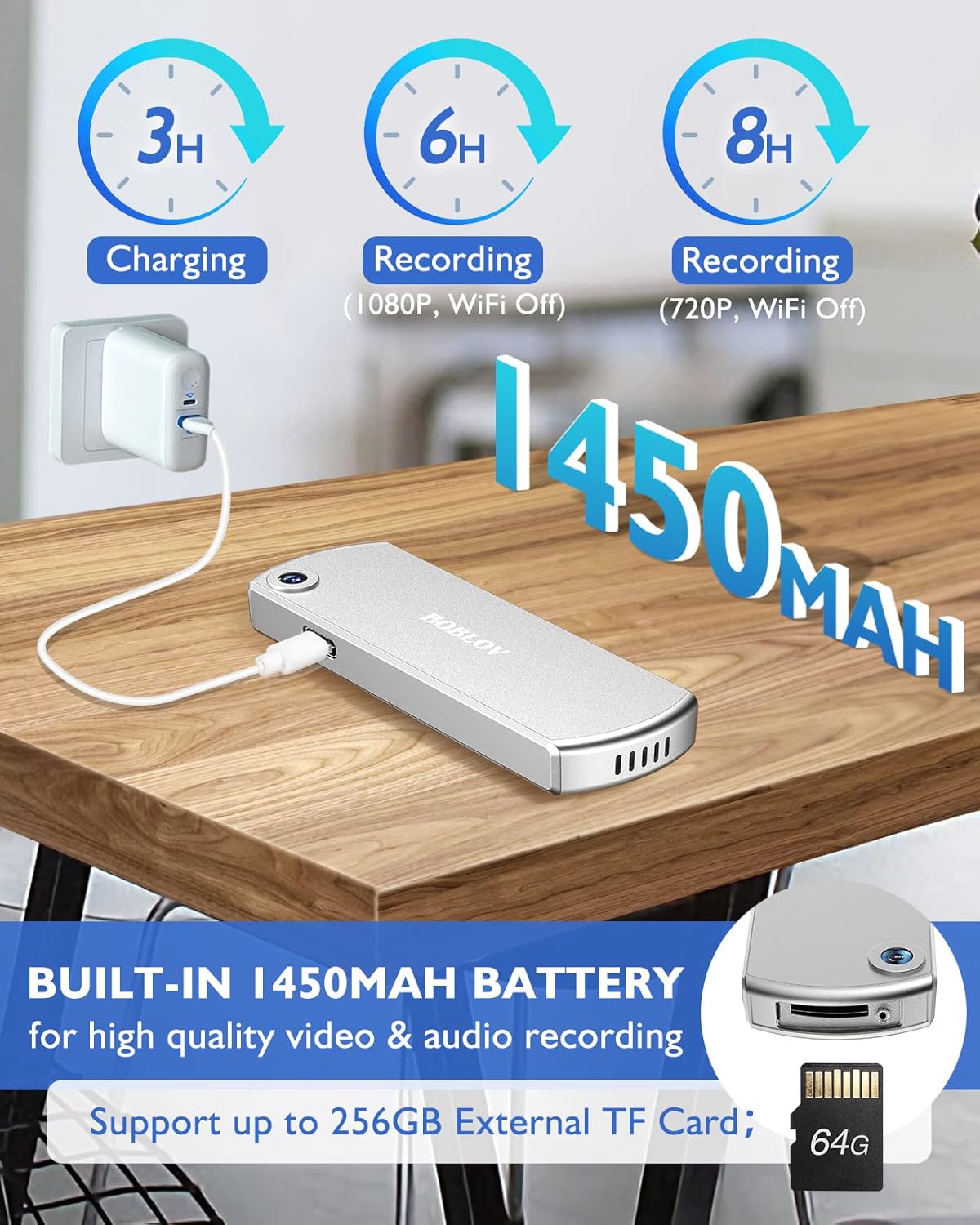
בילד: The BOBLOV W3 Body Camera being charged via a USB-C cable, highlighting the 1450mAh battery and charging times: 3 hours for full charge, 6 hours recording (1080P, WiFi Off), and 8 hours recording (720P, WiFi Off).
2. Inserting/Expanding Memory Card
The W3 Body Camera uses an external Micro SD card. A 64GB card is included and pre-installed.
- געפינען די זכּרון קאָרט שפּעלטל אויף די אַפּאַראַט.
- Use the included screwdriver to carefully unscrew the cover of the card slot.
- Insert or replace the Micro SD card (up to 256GB) into the slot with the contacts facing down.
- Securely fasten the card slot cover with the screwdriver.
3. אנשטעלן די קאַמעראַ
The camera offers two attachment options: a back magnetic clip and a brooch.
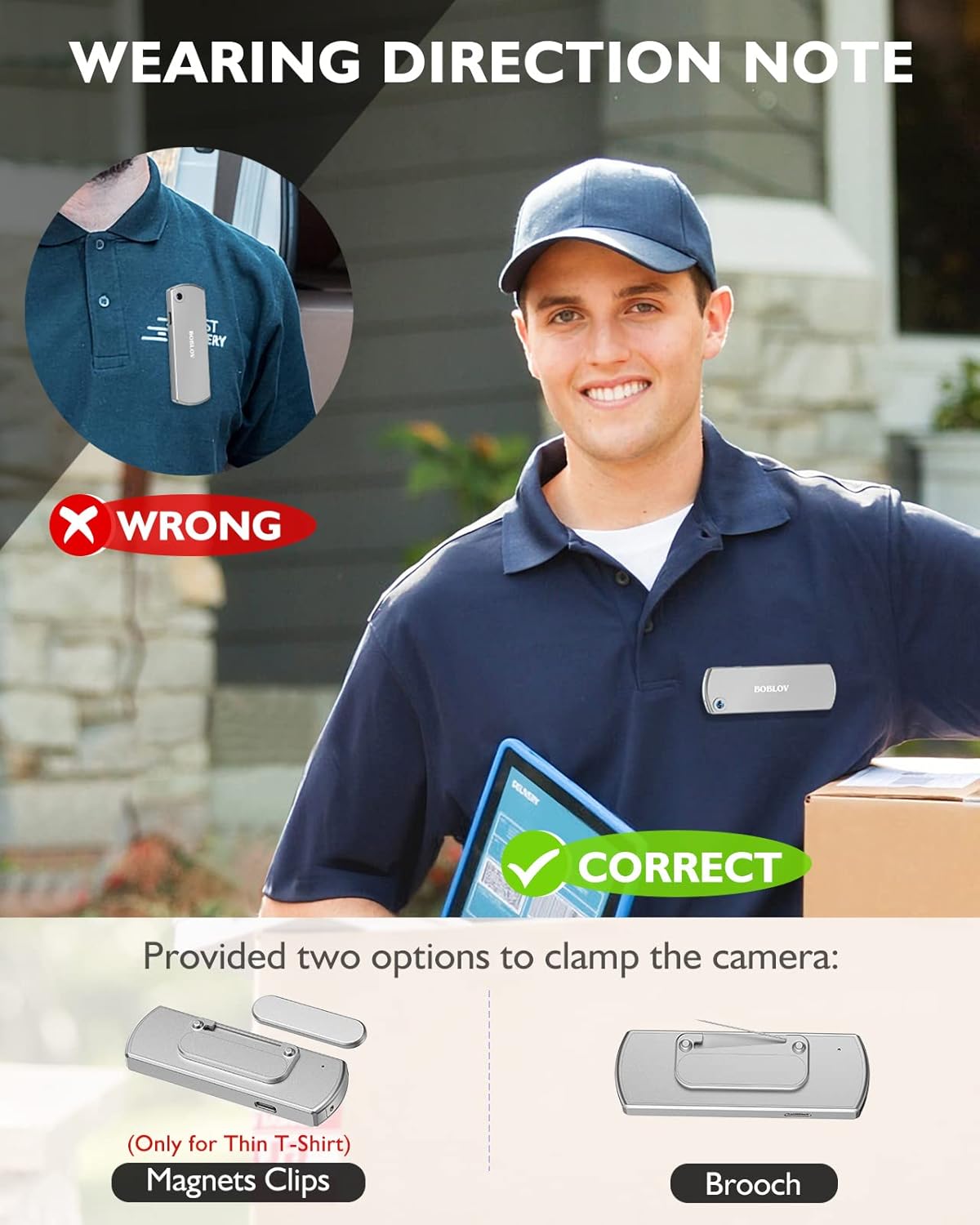
בילד: Illustration demonstrating correct and incorrect ways to wear the BOBLOV W3 Body Camera. It shows that magnetic clips are suitable for thin T-shirts, while a brooch provides a more secure attachment for other clothing types.
- מאַגנעטיש קליפּ: Attach the magnetic clip to the back of the camera. This is suitable for thin fabrics like T-shirts. Ensure the camera is securely held.
- Brooch: For more secure attachment or thicker clothing, use the provided brooch. Attach it to the camera's designated brooch point and then pin it to your clothing.
אַפּערייטינג ינסטראַקשאַנז
1. מאַכט אויף / אויסגעלאשן
- מאַכט אויף: דריקן און האַלטן די Power/Video Button for a few seconds until the indicator light illuminates.
- מאַכט אַוועק: דריקן און האַלטן די Power/Video Button again for a few seconds until the indicator light turns off.
2. ווידעא רעקאָרדינג
- While the camera is powered on, press the Power/Video Button once to start video recording. The indicator light will flash to indicate recording is in progress.
- דרוק די Power/Video Button again to stop video recording. The indicator light will return to a steady state.
- The camera supports 1080P and 720P video recording. With WiFi off, it can record for approximately 6 hours at 1080P or 8 hours at 720P on a full charge.
- Videos are saved in 5-minute fragments by default. The camera supports loop recording, overwriting older files ווען די זכּרון קאָרט איז פול.
3. אַודיאָ רעקאָרדינג
- While the camera is powered on, press the Audio/WiFi Button once to start audio recording.
- דרוק די Audio/WiFi Button ווידער צו האַלטן אַודיאָ רעקאָרדינג.
4. WiFi Function and App Connectivity
The BOBLOV W3 features WiFi connectivity, allowing you to manage files and change settings via a smartphone app.
- אַקטיווירן WiFi: דריקן און האַלטן די Audio/WiFi Button for a few seconds to turn on the WiFi function. The WiFi indicator light will flash.
- אראפקאפיע אַפּ:
- For Android devices, download the DHiHZ אַפּ.
- For iOS devices, download the Mini-XRcam אַפּ.
- פאַרבינדן צו קאַמעראַ: On your smartphone, go to WiFi settings and connect to the camera's WiFi network (usually named "BOBLOV_W3_XXXX"). The default password is typically "12345678".
- ניצן אַפּ: Open the downloaded app to view לעבן פאָאָtage, ווידערשפּיל רעקאָרדירונגען, דאַונלאָוד fileס, און סטרויערן קאַמעראַ סעטטינגס.
- דעאַקטיווירן WiFi: דריקן און האַלטן די Audio/WiFi Button ווידער צו קער אַוועק WiFi.

בילד: The BOBLOV W3 Body Camera wirelessly connected to a smartphone, illustrating the WiFi function for managing files, changing settings, and accessing features like video, audio, preview, playback, and download through the dedicated Android (DHiHZ) and iOS (Mini-XRcam) applications.
5. קאַנעקטינג צו אַ פּיסי
You can connect the camera to a computer to manage recorded files און טוישן סעטטינגס.
- Ensure the camera is powered ON before connecting to the PC.
- Connect the camera to your computer using the provided USB-C cable.
- The camera will appear as a removable disk drive on your computer.
- You can then access, copy, delete, or upload recorded files. Some settings may also be configurable via a configuration file on the camera's storage.

בילד: The BOBLOV W3 Body Camera connected to a laptop via a USB-C cable, demonstrating how to manage recorded files and change settings. Icons for Playback, Delete, Upload, and Settings are shown, with a note to ensure the camera is powered ON for connection.
וישאַלט
- רייניקונג: ניצט אַ ווייכע, טרוקענע שטאָף צו רייניקן די קאַמעראַ קערפּער. ניצט נישט פליסיקע רייניגערס אדער סאָלווענטן.
- סטאָרידזש: האַלט די קאַמעראַ אין אַ קיל, טרוקן אָרט אַוועק פון דירעקט זונשייַן און עקסטרעמע טעמפּעראַטורן.
- באַטערי זאָרגן: כדי צו פארלענגערן די לעבן פון די באַטעריע, זאָלט איר נישט אָפט אויסלאָדן די באַטעריע. לאָדט די קאַמעראַ רעגולער אויף, אפילו אויב זי ווערט נישט גענוצט פאר לענגערע צייטן.
- זכּרון קאָרט: Periodically back up important recordings from the Micro SD card to a computer. Format the Micro SD card regularly (e.g., once a month) to maintain optimal performance and prevent data corruption.
- וואַסער קעגנשטעל: The camera has an IP65 waterproof rating, meaning it is protected against dust and low-pressure water jets. It is not designed for submersion.
טראָובלעשאָאָטינג
| פּראָבלעם | מעגלעך סיבה / לייזונג |
|---|---|
| די קאַמעראַ גייט נישט אָן. | Battery may be depleted. Charge the camera for at least 3 hours. If the issue persists, try resetting the camera using a pin in the reset hole. |
| Camera gets hot when WiFi is on. | This is normal behavior for the camera when the WiFi function is active due to increased power consumption. |
| Cannot connect to WiFi via smartphone app. | Ensure WiFi is enabled on the camera. Check if you have downloaded the correct app (DHiHZ for Android, Mini-XRcam for iOS). Verify the WiFi password (default is "12345678"). Try restarting both the camera and your phone. |
| Camera stops recording unexpectedly. | The memory card may be full. The camera supports loop recording, but if the card is corrupted or too slow, it might cause issues. Try formatting the card or using a different high-speed Micro SD card. Battery may be low. |
| קענען ניט צוטריט files אויף פּיסי. | Ensure the camera is powered ON before connecting to the PC. Try a different USB-C cable or USB port. |
ספּעסאַפאַקיישאַנז
| שטריך | דעטאַל |
|---|---|
| סאָרט | באָבלאָוו |
| מאָדעל נאָמען | W3 |
| מאָדעל נומער | ב-W3 |
| קאַנעקטיוויטי טעכנאָלאָגיע | ווי-פי |
| ספּעציעלע פֿעיִקייטן | לייטווייט |
| קאַמפּאַטאַבאַל דעוויסעס | Android/iOS Phone |
| מאַכט מקור | באַטאַרייע פּאַוערד |
| ווידעא קאַפּטורע רעסאָלוטיאָן | 1080 פּ |
| קאָליר | זילבער |
| מאַונטינג טיפּ | ייבערפלאַך בארג |
| פאָרם פאַקטאָר | סאָליד |
| אָפּצוימונג מאַטעריאַל | מעטאַל |
| פלינק טיפּ | בלויז באַוועגונג |
| ליכט מקור | ינפרערעד |
| וואָטערפּרוף רייטינג | IP65 |
| קאָנטראָל מעטאָד | אַפּ |
| וואָסtage | 3.7 וואט-שעה |
| נאַכט זעאונג | נאַכט קאָליר |
| נומער דימענשאַנז | 9 X 3 X 1.5 סענטימעטער |
| באַטאַרייע קאַפּאַציטעט | 1450mAh (איינגעבויט) |
| Recording Time (1080P, WiFi Off) | בעערעך. 6 שעה |
| Recording Time (720P, WiFi Off) | בעערעך. 8 שעה |
| טשאַרדזשינג צייט | בעערעך. 3 שעה |
| פונדרויסנדיק זכּרון | Micro SD Card, up to 256GB (64GB included) |
| נעץ וואָג | 60 ג / 2 אַז |
וואָראַנטי און שטיצן
BOBLOV provides a two-year warranty for high-value products, including the W3 Body Camera. For any technical assistance, troubleshooting, or warranty claims, please contact BOBLOV customer service.
Please refer to the official BOBLOV website or your purchase documentation for the most up-to-date contact information and warranty details.