
הקדמה
Thank you for choosing the EverBrite Rechargeable Portable Magnetic LED Work Light. This manual provides essential information for the safe and effective use of your new work light. Please read it thoroughly before operation and retain it for future reference.
This versatile work light features a 1000 lumen output, a 2200mAh rechargeable lithium battery, and four distinct lighting modes. Its durable construction, magnetic base, and 180-degree rotatable stand make it suitable for various applications, from automotive repair to outdoor activities and emergency situations.

Image: The EverBrite Rechargeable Portable Magnetic LED Work Light, showcasing its compact design and included USB-C charging cable.
פּראָדוקט פֿעיִקייטן
- קריקאָנלאָדלעך באַטערי: Equipped with a 2200mAh lithium battery for extended use. Includes a USB-Type-C charging cable.
- פיר לייטינג מאָדעס: Offers Low Light (300 Lumen), High Light (1000 Lumen), High SOS, and Low SOS to suit different needs.
- דוראַבאַל קאַנסטראַקשאַן: Made from ABS hard rubber for compression, impact, and abrasion resistance.
- מאַגנעטיק באַזע: Strong magnet allows secure attachment to metal surfaces.
- פלעקסאַבאַל שטעלע: 180-degree rotatable angle for directing light precisely.
- טריפּאָד קאָמפּאַטאַביליטי: Features an M6 thread mount for use with most tripods.
- פּאָרטאַטיוו פּלאַן: Compact size (4.2" x 3.7" x 1.6") and lightweight (7.4 ounces) for easy handling and transport.
סעטאַפּ
ערשט טשאַרדזשינג
- Locate the USB-Type-C charging port on the work light.
- Connect the provided USB-Type-C cable to the work light and a compatible USB power source (e.g., power bank, computer USB socket, car USB socket, wall adapter).
- The power indicator lights will illuminate to show the charging status. A full charge is indicated when all lights are solid.
- באַמערקונג: Do not turn on the light while the work light is charging.

בילד: נאָענט-אַרויף view of the work light's rear, showing the USB-Type-C charging port and the power indicator lights.
אַפּערייטינג ינסטראַקשאַנז
מאַכט אויף / אַוועק און מאָדע סעלעקציע
- To turn on the light, press the power button located on the back of the unit.
- Each subsequent press of the power button will cycle through the four lighting modes:
- נידעריק ליכט: 300 lumens, suitable for general illumination and extended battery life.
- High Light: 1000 lumens, for maximum brightness.
- High SOS: A bright SOS signal for emergency situations.
- Low SOS: A lower intensity SOS signal.
- To turn off the light, continue pressing the power button until the light switches off, or press and hold the power button for approximately 2 seconds.

Image: Visual representation of the four lighting modes: Low Light, High Light, High SOS, and Low SOS.
מאַונטינג און פּאַזישאַנינג
- מאַגנעטיק אַטאַטשמאַנט: The strong magnetic base allows the work light to be securely attached to any ferrous metal surface. Ensure the surface is clean and stable before attachment.
- Tripod Mounting: For non-metallic surfaces or specific positioning needs, utilize the M6 thread mount located at the bottom of the unit. This is compatible with most standard tripods.
- אַדזשאַסטאַבאַל ווינקל: The integrated stand allows for a 180-degree rotation, enabling you to direct the light beam precisely where needed.

Image: The work light attached magnetically to a car hood, demonstrating its powerful magnetic base.

Image: Diagram illustrating the 180-degree rotation capability of the work light's stand.
וישאַלט
רייניקונג
To clean the work light, wipe it with a soft, damp cloth. Do not use abrasive cleaners or solvents, as these may damage the surface or internal components. Ensure the charging port cover is closed to prevent dust and moisture ingress.
באַטערי זאָרגן און סטאָרידזש
- פֿאַר אַן אָפּטימאַלן באַטאַרייע לעבן, זאָלט איר נישט אָפט גאָר אויסלאָדן די באַטאַרייע.
- לאָדט דאָס אַפּאַראַט רעגולער אויף, אפילו אויב עס איז נישט אין באַנוץ, כּדי צו האַלטן די באַטאַריע געזונט.
- Store the work light in a cool, dry place away from direct sunlight and extreme temperatures.
- If storing for an extended period, charge the battery to approximately 50% every 3-6 months.
טראָובלעשאָאָטינג
| פּראָבלעם | מעגלעך סיבה | לייזונג |
|---|---|---|
| ליכט טוט נישט קער אויף. | באַטערי איז דיפּליטיד. | Charge the work light using the provided USB-Type-C cable. |
| ליכט איז שוואַך אָדער פליקערט. | נידעריק באַטאַרייע מדרגה. | ריטשאַרדזש די באַטאַרייע. |
| Work light does not charge. | דעפעקטיווער קאַבל אָדער מאַכט מקור. | Try a different USB-Type-C cable or power adapter. Ensure connections are secure. |
| די מאַגנעטישע באַזע האַלט נישט זיכער. | Surface is not metallic or is uneven. | Ensure attachment to a clean, flat, ferrous metal surface. Consider using the M6 thread mount with a tripod if a suitable magnetic surface is unavailable. |
ספּעסאַפאַקיישאַנז
| מאָדעל: | B09YKLG56C |
| סאָרט: | EverBrite |
| ברייטקייט: | 1000 Lumens (High Light), 300 Lumens (Low Light) |
| באַטערי: | 2200mAh ליטהיום-יאָן (אריינגערעכנט) |
| טשאַרדזשינג פּאָרט: | וסב-טיפּ-C |
| Voltage: | 3.7 וואלטס |
| וואָסtage: | 10 וואטס |
| פּראָדוקט דימענשאַנז: | 4.2"ל x 3.7"בר x 1.6"ה |
| נומער וואָג: | 7.4 אונסעס |
| מאַטעריאַל: | ABS Hard Rubber, Metal |
| מאַונטינג טיפּ: | Magnetic Mount, M6 Thread Mount |
| פּראַל קעגנשטעל: | 1 Meter Drop Test (approximate) |
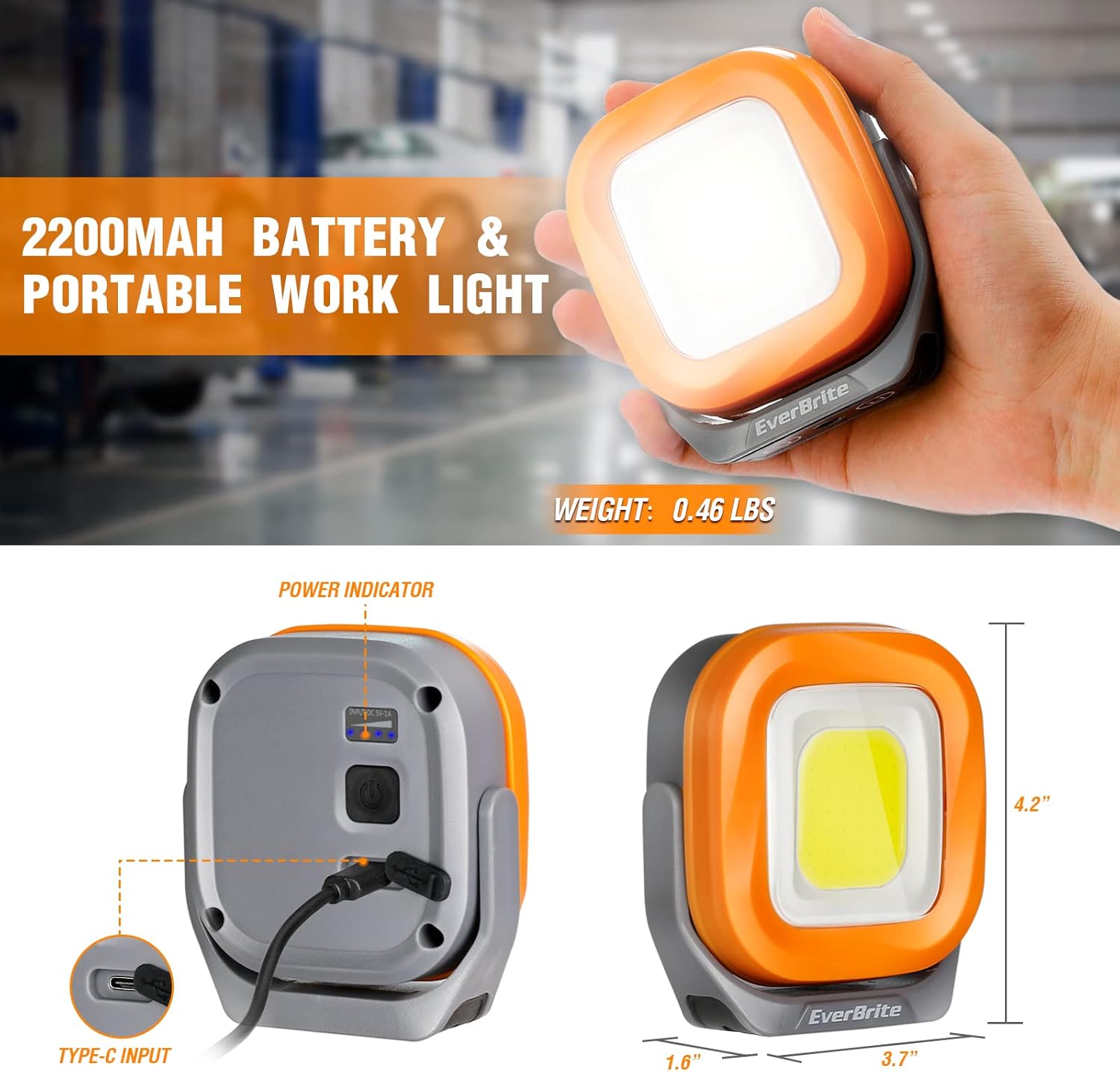
Image: The work light with its dimensions (4.2" x 3.7" x 1.6") and 2200mAh battery capacity highlighted.
וואָראַנטי און שטיצן
For warranty information or technical support, please contact EverBrite customer service. You may also visit the official EverBrite store for additional product information and support resources.