
FLEXISPOT EC5B-EU3+PR1206-Black
FLEXISPOT EC5 Standing Desk User Manual
Model: EC5B-EU3+PR1206-Black
הקדמה
This manual provides comprehensive instructions for the assembly, operation, maintenance, and troubleshooting of your FLEXISPOT EC5 Standing Desk. Please read this manual thoroughly before use to ensure proper setup and safe operation.

Figure 1: FLEXISPOT EC5 Standing Desk with a black tabletop and black frame, set up in an office environment.
The FLEXISPOT EC5 is an electric height-adjustable desk designed to promote a healthier work environment by allowing seamless transitions between sitting and standing positions. It features a robust dual-motor system, a smart control panel with memory presets, and a durable construction.
שליסל פֿעיִקייטן:
- Three-tier frame for height adjustment from 60.5cm to 125cm.
- Supports heavy loads up to 125kg (or 160kg with upgraded design).
- Smooth and quiet lifting speed of 38mm/second.
- Programmable digital memory with 3 preset options for customized heights.
- Collision protection system for enhanced safety.
- Durable MDF tabletop with scratch-resistant laminate.
סעטאַפּ און אַסעמבלי
The FLEXISPOT EC5 Standing Desk is designed for straightforward assembly. All necessary tools are included, and detailed instructions are provided to guide you through the process, typically taking 20-25 minutes.
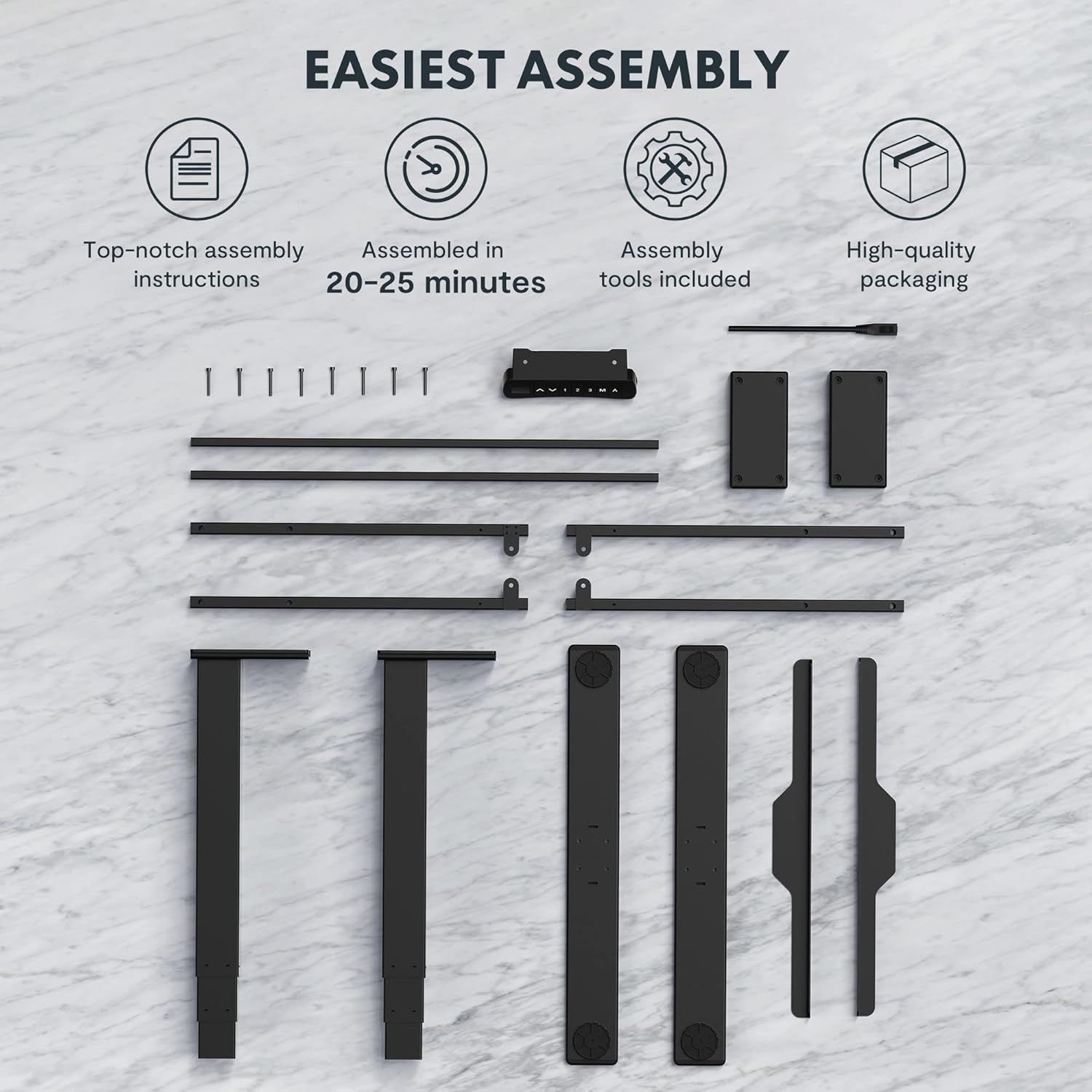
Figure 2: All components and tools required for assembling the FLEXISPOT EC5 Standing Desk.
פּעקל אינהאַלט:
- Desk Frame (legs, crossbars)
- Tabletop (if included in package)
- Control Panel with Cable
- מאַכט אַדאַפּטער און קאַבלע
- Assembly Hardware (screws, bolts)
- פֿאַרזאַמלונג מכשירים (למשל, אַלען שליסל)
- ינסטראַקשאַנז מאַנואַל
פֿאַרזאַמלונג טריט (אַלגעמיין איבערview):
- אויספּאַקן אַלע קאָמפּאָנענטן און קאָנטראָלירן קעגן דער טיילן־ליסטע.
- Assemble the desk legs to the crossbars, ensuring all connections are secure.
- Attach the assembled frame to the tabletop using the provided screws.
- Mount the control panel to the underside of the tabletop in an accessible location.
- Connect all cables (motor cables to control box, control panel cable to control box, power cable to control box).
- Ensure all cables are neatly managed and secured to prevent snagging.
- שטעלט דעם טיש אין זיין געוואונטשענעם אָרט, זיכער מאַכנדיק אַז עס איז אויף אַ גלייכער ייבערפלאַך.
For detailed, step-by-step assembly instructions, please refer to the separate assembly guide included in your product packaging.
אַפּערייטינג ינסטראַקשאַנז
The FLEXISPOT EC5 Standing Desk features an intuitive control panel for easy height adjustment and memory functions.

Figure 3: The EC5 control panel, featuring height display, up/down buttons, and memory presets.
יקערדיק אָפּעראַציע:
- אַדזשאַסטינג הייך: ניצן די ▲ און ▼ arrows on the control panel to raise or lower the desk to your desired height. The current height will be displayed on the digital screen.
- הייך קייט: The desk can be adjusted from a minimum height of 60.5 cm (23.8 inches) to a maximum height of 125 cm (49.2 inches).
זכּרון פּרעסעץ:
The EC5 desk allows you to save up to three preferred height settings for quick adjustments.
- היט אַ פּריסעט:
- שטעל צו דעם טיש צו אייער געוואונטשענע הייך.
- דרוק די "מ" קנעפל. דער עקראַן וועט ווייַזן "S-".
- Within 3 seconds, press the desired number button ("1", "2", אָדער "3") צו ראַטעווען די איצטיקע הייך צו יענעם פּרעסעט. דער עקראַן וועט ווייַזן "S-1", "S-2", אָדער "S-3" צו באַשטעטיקן.
- צוריקרופן א פאָרסעט:
- פשוט דריקן דעם קאָרעספּאָנדירנדיקן נומער קנעפּל ("1", "2", אָדער "3"דער טיש וועט זיך אויטאָמאַטיש באַוועגן צו דער געראַטעוועטער הייך.
אַנטי-קאליזיע פֿונקציע:
The desk is equipped with an anti-collision system. If the desk encounters an obstacle while moving up or down, it will automatically stop and reverse slightly to prevent damage. Ensure the area around the desk is clear during operation.
וישאַלט
Regular maintenance ensures the longevity and optimal performance of your FLEXISPOT EC5 Standing Desk.
- רייניקונג: ווישט אָפּ די טיש־איבערפֿלאַך און ראַם מיט אַ ווייכן, דamp שטאָף. פֿאַרמײַדט שרײַבנדיקע רייניקונגס־מיטלען אָדער שאַרפֿע כעמיקאַלן וואָס קענען שאַטן דעם ענדיקונג.
- קאַבלע פאַרוואַלטונג: Periodically check that all cables are securely connected and neatly organized to prevent tangling or damage.
- פאַסטענערס: קאָנטראָלירט פון צייט צו צייט אַלע שרויפן און באָלטן צו זיכער מאַכן אַז זיי זענען פעסט. פֿעסט צוזאַמענציען אויב נייטיק, אָבער נישט צו שטאַרק.
- וואָג קאַפּאַציטעט: Do not exceed the maximum weight capacity of 125kg (or 160kg for upgraded models) to prevent damage to the motors and frame.
- סוויווע: Use the desk in a dry indoor environment. Avoid exposure to extreme temperatures or high humidity.
טראָובלעשאָאָטינג
If you encounter issues with your FLEXISPOT EC5 Standing Desk, refer to the following common problems and solutions:
| פּראָבלעם | מעגלעך סיבה | לייזונג |
|---|---|---|
| דער טיש רירט זיך נישט. | שטראָם קאַבל אָפּגעטיילט, מאָטאָר קאַבל לויז, איבערלאַסטונג. | Check all cable connections. Ensure power is supplied. Reduce weight on desk if overloaded. |
| דער טיש באוועגט זיך נישט גלייך אדער מאכט אומגעווענליכע גערוישן. | אומגלייכע לאסט, פרייע פארשטאפערס, שטערונג. | Distribute weight evenly. Check and tighten all fasteners. Clear any obstructions. |
| די דיגיטאַלע אַרויסווייַזונג ווייַזט אַ טעות קאָד. | סיסטעם דורכפאַל, סענסאָר פּראָבלעם. | Refer to the full troubleshooting guide in your product manual for specific error codes. Try unplugging the desk for 10 seconds and plugging it back in to reset. |
| Anti-collision feature is too sensitive or not working. | Sensor calibration needed, obstruction. | Ensure no constant obstructions. Consult the full manual for anti-collision sensitivity adjustment or reset procedures. |
אויב די פראבלעם בלייבט נאך פרובירן די לייזונגען, ביטע קאנטאקטירט FLEXISPOT קאסטומער סופארט.
פּראָדוקט ספּעסאַפאַקיישאַנז
Detailed technical specifications for the FLEXISPOT EC5 Standing Desk:
| שטריך | באַשרייַבונג |
|---|---|
| סאָרט | FLEXISPOT |
| מאָדעל נומער | EC5B-EU3+PR1206-Black |
| UPC | 810072812643 |
| הייך אַדדזשוסטמענט ראַנגע | 60.5 ס״מ - 125 ס״מ (23.8" - 49.2") |
| ליפטינג ספּיד | 38 מם / סעקונדע |
| מאַקסימום וואָג קאַפּאַציטעט | 125 ק"ג (275 פונט) - Upgraded models may support up to 160 kg |
| נומער פון מאָטאָרס | 2 |
| ראַם שtages | 3 |
| קאָנטראָל פּאַנעל | Digital display with 3 memory presets |
| Tabletop Dimensions (H x W x D) | 2.5 x 140 x 70 ס״מ (0.98"ד x 55.12"ברייט x 27.56"ה) |
| טאַבלעטאָפּ מאַטעריאַל | MDF with high pressure scratch resistant laminate |
| באַזע מאַטעריאַל | Engineered Wood (for tabletop), Metal (for frame) |
| קאָליר | שוואַרץ |
| אַסעמבלי פארלאנגט | יא |
| וואָראַנטי טיפּ | לימיטעד |

Figure 4: The EC5 desk frame is designed for stability and can support significant weight, with some models supporting up to 160KG.
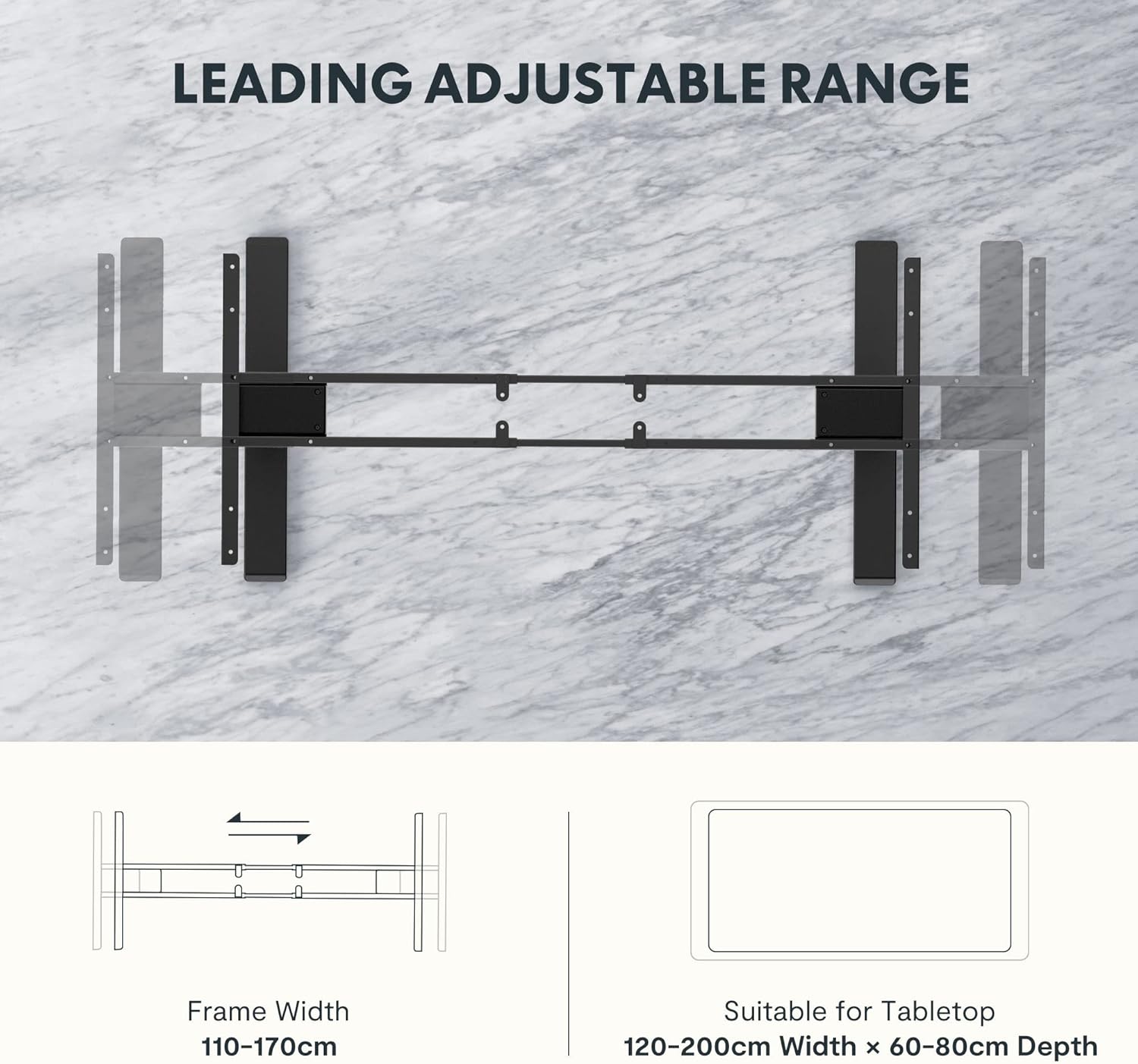
Figure 5: The adjustable frame accommodates various tabletop sizes, offering flexibility for different workspace needs.
וואָראַנטי און שטיצן
וואָראַנטי אינפֿאָרמאַציע:
The FLEXISPOT EC5 Standing Desk comes with a לימיטעד וואָראַנטי. Please refer to the warranty card included with your product for specific terms, conditions, and duration of coverage. This warranty typically covers manufacturing defects in materials and workmanship under normal use.
קונה שטיצן:
For technical assistance, warranty claims, or any questions regarding your FLEXISPOT EC5 Standing Desk, please contact FLEXISPOT customer support. You can typically find contact information on the FLEXISPOT official webוועבזייטל אדער אויף אייער פּראָדוקט פּאַקאַדזשינג.
When contacting support, please have your model number (EC5B-EU3+PR1206-Black) and proof of purchase readily available.
Ask a question about this manual
Ask about setup, troubleshooting, compatibility, parts, safety, or missing instructions. Manuals+ will review the question and use this page’s manual context to help answer it.