
הקדמה
The KAOLALI L3 OBD2 Head-Up Display is designed to project essential driving information directly into your line of sight, enhancing safety and convenience. This device connects to your vehicle's OBD2 port to display data such as speed, engine RPM, water temperature, and more, without requiring a film on the windshield. Its advanced 3D reflection technology ensures a clear and bright display in various lighting conditions.
פּעקל אינהאַלט
ביטע באַשטעטיקן אַז אַלע די פאלגענדע זאכן זענען אַרייַנגערעכנט אין דיין פּעקל:
- 1 x KAOLALI L3 OBD2 Head-Up Display Unit
- 1 x OBD2 קאַבלע
- 1 x Non-slip Mat
- 1 x Cable Spudger (Crowbar)
- 1 x באַניצער מאַנואַל
- 1 x Certification
Video: Unboxing and contents of the KAOLALI L3 OBD2 Head-Up Display package.
פּראָדוקט איבערview
The KAOLALI L3 OBD2 Head-Up Display features a compact design with an integrated display panel. Key components are:
- ווייַז טאַפליע: The main screen where information is projected.
- כוואַליע קנעפּל: געניצט פֿאַר נאַוויגירן מעניוז און אַדזשאַסטירן סעטטינגס.
- מאַכט אויף / אַוועק קנעפּל: קאָנטראָלירט די מאַכט פון די מיטל.
- OBD Interface: Port for connecting the OBD2 cable to your vehicle.
- Optical Transparent Reflector: Provides a clear, reflection-free display.
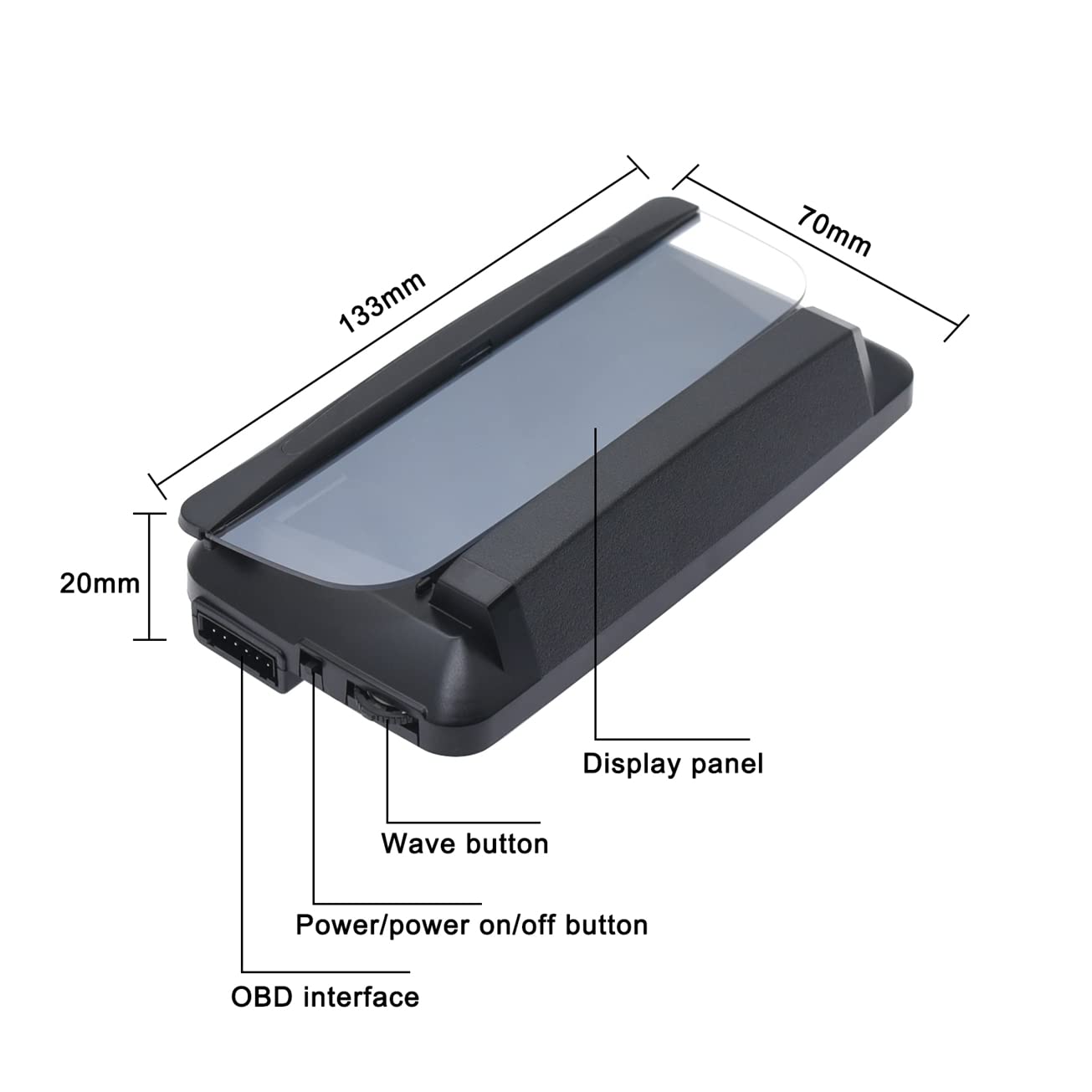
Image: Labeled diagram of the KAOLALI L3 OBD2 HUD unit, highlighting its physical components and dimensions.

בילד: דעטאַלירט views of the HUD's OBDII interface, wave button, power button, and optical transparent reflector.
סעטאַפּ
Follow these steps to install your KAOLALI L3 OBD2 Head-Up Display:
- Place the non-slip mat on your dashboard in a position that does not obstruct your view פון דעם וועג.
- Place the HUD unit on the non-slip mat.
- Connect the OBD2 cable to the HUD unit's OBD interface.
- Locate your vehicle's OBD2 port (typically under the dashboard on the driver's side) and connect the other end of the OBD2 cable.
- Start your vehicle. The HUD unit should power on automatically.
- Use the cable spudger to neatly tuck away the OBD2 cable for a clean installation.
קאָמפּאַטיביליטי באַמערקונג: This OBD2 HUD is generally suitable for cars produced after 2004 (American cars) and 2008 (European and Asian cars). It is not compatible with most hybrid electric cars, diesel cars, pickup trucks, RVs, or other special vehicles. Please confirm your vehicle's compatibility before installation.
אַפּערייטינג ינסטראַקשאַנז
The HUD offers various functions and display modes:
צובינד מאָדעס
The device provides 6 different interface modes to display various information. Use the wave button to cycle through these modes and select your preferred display:
- צובינד 1: Speed, RPM, Water Temperature, Voltage
- צובינד 2: Speed, Time
- צובינד 3: Speed, Single Driving Distance
- צובינד 4: Speed, Water Temperature
- צובינד 5: גיכקייַט, רפּם
- צובינד 6: Speed, Fuel Consumption

Image: Six multi-functional display interfaces available on the HUD.
אַפּאַראַט סוויטטשינג
Speed units can be switched between Kilometers per Hour (KM/H) and Miles per Hour (MPH). When MPH is selected, related units like water temperature, one-way driving distance, and fuel consumption will automatically switch to Fahrenheit (°F), Miles, and Miles Per Gallon (MPG) respectively.
שרעק פאַנגקשאַנז
The device includes several alarms to enhance driving safety:
- גיכקייַט שרעק: Flashes to alert when a preset speed limit is exceeded.
- מידקייַט דרייווינג שרעק: Reminds the driver to take a break after extended driving periods.
- Engine RPM Fault Alarm: Alerts to abnormal engine RPM.
- נידעריק וואָלtagE שרעק: Indicates when the battery voltagE טראפנס אונטער אַ באַשטימט ווערט.
- וואַסער טעמפּעראַטור אַלאַרם: Warns if the engine water temperature exceeds a safe limit.
Video: Demonstration of the KAOLALI L3 OBD2 HUD in operation while driving, showing speed and other data.
פֿעיִקייטן
The KAOLALI L3 OBD2 Head-Up Display incorporates several key features for an optimal user experience:
- אויטאָמאַטישע ברייטקייט אַדזשאַסטמענט: The display automatically adjusts its brightness based on ambient light conditions, ensuring clear visibility during both day and night driving without manual intervention.
- 3D Reflection Technology: This technology projects information onto a transparent display board, providing a clear, reflection-free view and eliminating double images often associated with traditional HUDs. The brightness is increased by 20% to maintain clarity even in direct sunlight.

Image: Automatic light adjustment feature of the HUD, showing clear display in different lighting.
וישאַלט
To ensure optimal performance and longevity of your HUD, follow these simple maintenance guidelines:
- רייניקונג: Keep the display panel clean and free from dust. Use a soft, dry, lint-free cloth for cleaning. Avoid using harsh chemicals, abrasive materials, or excessive moisture, as these can damage the display surface.
- סטאָרידזש: When not in use for extended periods, store the HUD in a cool, dry place away from direct sunlight and extreme temperatures.
טראָובלעשאָאָטינג
If you encounter issues with your KAOLALI L3 OBD2 Head-Up Display, please refer to the following common problems and solutions:
- דיספּליי טוט זיך נישט אן:
Ensure the OBD2 cable is securely connected to both the HUD unit and your vehicle's OBD2 port. Verify that your vehicle's ignition is in the 'ON' position or the engine is running. - Inaccurate Speed Reading:
The HUD's speed reading may slightly differ from your vehicle's speedometer due to various factors, including tire size variations or vehicle manufacturer settings. Most HUDs allow for a speed calibration adjustment. Please refer to the detailed user manual (physical copy) for specific calibration instructions if available, or contact customer support for guidance. - Double Image or Blurry Display:
Ensure the transparent reflector on the HUD unit is clean and free from smudges or dust. Adjust the viewing angle of the HUD unit on your dashboard. While the 3D reflection technology is designed to minimize this, extreme lighting conditions or improper placement can sometimes affect clarity. - HUD Powers Off While Driving:
Check the OBD2 cable connection for looseness. Ensure your vehicle's OBD2 port is functioning correctly. This could also indicate a low voltage condition in your vehicle's electrical system, triggering the low voltage שרעק.
ספּעסאַפאַקיישאַנז
| שטריך | דעטאַל |
|---|---|
| מאָדעל | OBD2 Connection |
| אַמביאַנט טעמפּעראַטור | -30 ℃ צו 85 ℃ |
| מאַכט צושטעלן וואָלtage | 12-36וו |
| דימענשאַנז | 135 X 68 X 30 מם |
| מאַטעריאַל | גומע |
| טייל נומער | SD-1 |
וואָראַנטי און שטיצן
וואָראַנטי: The KAOLALI L3 OBD2 Head-Up Display comes with a half-year warranty from the date of purchase. This warranty covers manufacturing defects under normal use.
שטיצן: For technical assistance, troubleshooting, or warranty claims, please refer to the contact information provided in your product packaging or visit the official KAOLALI support webפּלאַץ פֿאַר ווייַטער הילף.