
ProForm 325 CSX
פּראָפאָרם 325 CSX געניטונג בייק באַניצער מאַנואַל
Model: 325 CSX
הקדמה
This manual provides essential information for the safe and effective use, assembly, operation, and maintenance of your ProForm 325 CSX Exercise Bike. Please read this manual thoroughly before using the equipment and retain it for future reference.

Image: The ProForm 325 CSX Exercise Bike, showcasing its full design including the console, seat, and pedals.
סעטאַפּ און אַסעמבלי
Before assembly, ensure all parts are present and undamaged. Assembly typically requires two people. Refer to the included assembly guide for detailed, step-by-step instructions and diagrams.
אַנפּאַק און פּלייסמאַנט:
- קערפאַלי באַזייַטיקן אַלע קאַמפּאָונאַנץ פון די פּאַקקאַגינג.
- Place the exercise bike on a level surface with adequate clearance around it for safe operation and maintenance.
- Ensure the area is free from obstructions and has proper ventilation.
ערשטע פֿאַרזאַמלונג טריט:
- Attach the front and rear stabilizers to the main frame.
- Secure the seat post and seat assembly.
- Install the console mast and handlebars.
- Attach the pedals, ensuring they are tightened securely (left pedal is reverse-threaded).
- Connect any necessary wiring for the console.
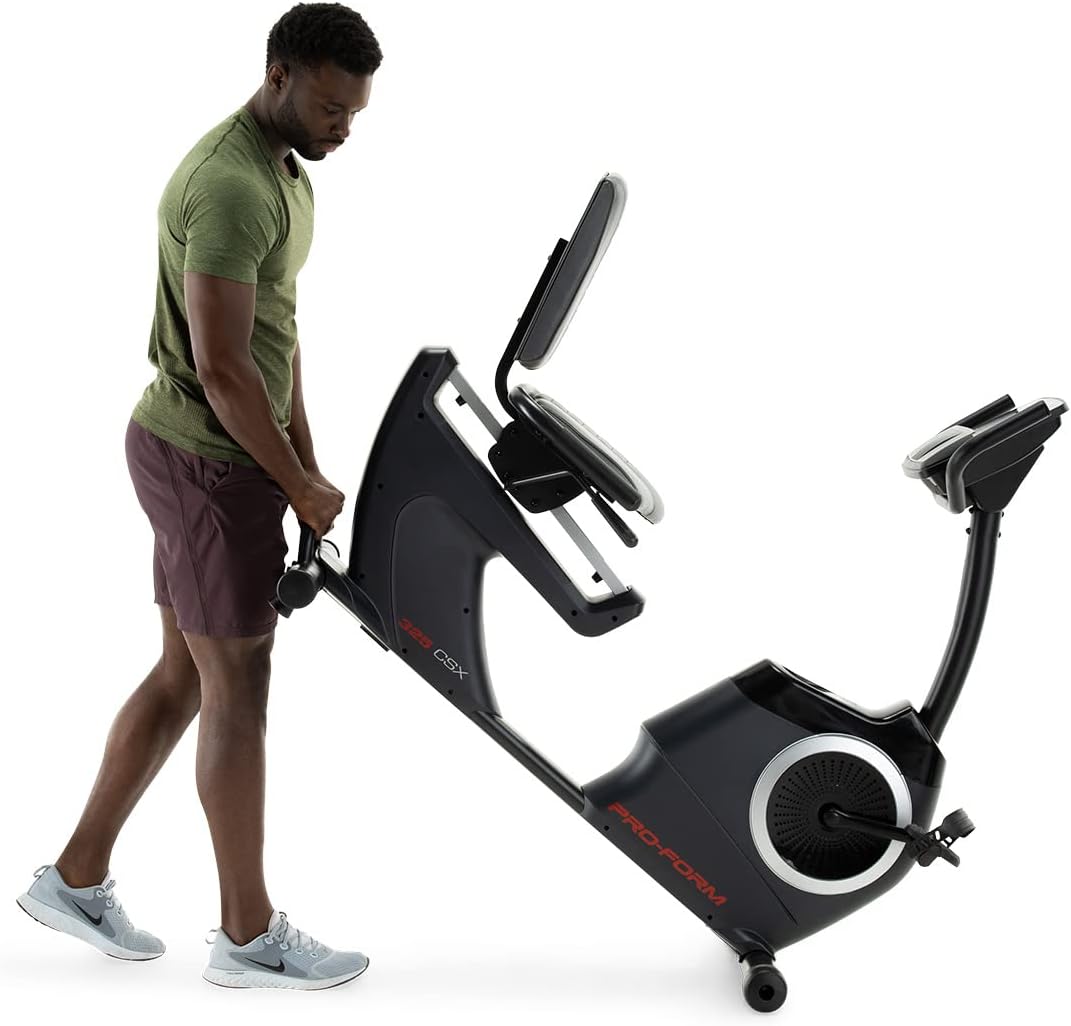
Image: Moving the exercise bike. The bike features transport wheels for easier relocation after assembly.
אַפּערייטינג ינסטראַקשאַנז
אַדזשאַסטינג די זיצפּלאַץ:
The cushioned seat is adjustable to accommodate various user heights. To adjust, locate the adjustment lever beneath the seat. Pull the lever, slide the seat to the desired position, and release the lever to lock it in place. Ensure the seat is securely locked before use.

Image: A user demonstrating the correct riding position on the ProForm 325 CSX Exercise Bike, highlighting the adjustable seat.
Console Features and iFIT Connectivity:
The 5-inch high-contrast display provides real-time workout statistics. The bike features 22 digital resistance levels, allowing for precise intensity control. The console also supports iFIT connectivity for interactive workouts.
- מאַכט אויף: Press any button on the console or begin pedaling to activate the display.
- קעגנשטעל אַדזשאַסטמאַנט: Use the '+' and '-' buttons on the console to increase or decrease resistance. Quick resistance buttons (2, 4, 6, etc.) are also available.
- וואָרקאָוט מגילה: Select from 24 built-in workout programs. Refer to the console manual for navigation.
- iFIT Connection: Connect your own device (tablet/smartphone) via Bluetooth to access iFIT's global outdoor workouts and hands-free intensity adjustments. A 30-day iFIT membership is typically included with purchase.

בילד: דעטאַלירט view of the console, showing the digital display, resistance controls, and integrated fan.

Image: A user engaging with the iFIT application on a tablet, demonstrating the bike's connectivity features.

Image: An illustration of the iFIT connection, highlighting how a personal device can enhance the workout experience.
וישאַלט
רעגולערע אויפהאלטונג גאראנטירט די לאנגעוויטי און אפטימאלע פאָרשטעלונג פון אייער געניטונג בייק.
- רייניקונג: ווישט אָפּ דעם וועלאָסיפּעד נאָך יעדן באַניץ מיט אַדamp שטאָף צו באַזייַטיקן שווייס און שטויב. פֿאַרמייַדן אַברייסיוו רייניגער.
- דורכקוקן: Periodically check all bolts and nuts for tightness. Retighten as necessary.
- פּעדאַלז: זיכער מאַכן אַז די פּעדאַלן זענען זיכער באַפעסטיקט און דרייען זיך פריי.
- שמירן: The internal magnetic resistance system and belt drive are generally maintenance-free and do not require lubrication.
טראָובלעשאָאָטינג
| פּראָבלעם | מעגלעך סיבה | לייזונג |
|---|---|---|
| די קאנסאל ווייזט נישט קיין דאטן. | Loose wire connection; batteries low/dead (if applicable). | Check all console wire connections. Replace console batteries if battery-powered. |
| קעגנשטאנד טוישט זיך נישט. | Loose connection to resistance motor; console malfunction. | Ensure all connections are secure. If using iFIT, ensure the app is properly connected and controlling the bike. |
| ומגעוויינטלעך ראַש בעשאַס אָפּעראַציע. | Loose hardware; component friction. | Inspect all bolts and nuts and tighten any loose ones. Ensure no parts are rubbing. |
| Pedals feel loose or wobbly. | פּעדאַלן נישט גענוג צוגעצויגן. | Retighten pedals. Remember the left pedal is reverse-threaded. |
ספּעסאַפאַקיישאַנז
| שטריך | דעטאַל |
|---|---|
| מאָדעל נאָמען | 325 CSX |
| סאָרט | פּראָפאָרם |
| קאָליר | שוואַרץ |
| קעגנשטעל מעקאַניזאַם | מאַגנעטיק |
| נומער פון קעגנשטעל לעוועלס | 22 דיגיטאַלע לעוועלס |
| דרייוו סיסטעם | גאַרטל |
| מאַקסימום באַניצער וואָג | 300 פונט (אומגעפער 136 ק"ג) |
| פּונקט וואָג | 50.8 קילאָגראַמס (בעערעך 112 לבס) |
| מאַטעריאַל | אַללוי סטיל |
| מאַכט מקור | Pedal-powered (non-electric for main operation, console may use batteries) |
| רעקאַמענדיד נוצן | דרינענדיק |
| קאַנסאָול ווייַז | 5-inch High-Contrast Display |
| קאַנעקטיוויטי | iFIT (Bluetooth compatible) |
| UPC | 043619106961 |
| פאַבריקאַנט | iFIT געזונט און פיטנעסס |
וואָראַנטי און שטיצן
ProForm products are manufactured with high-quality materials and craftsmanship. For specific warranty details, please refer to the warranty card included with your product or visit the official ProForm website. Warranty coverage typically includes the frame, parts, and labor for a specified period from the date of purchase.
For technical assistance, replacement parts, or customer service inquiries, please contact ProForm customer support. Have your model number (325 CSX) and serial number ready when contacting support.
איר קענט אויך געפֿינען נוצלעכע רעסורסן און אָפֿט געשטעלטע פֿראַגעס אויף די פּראָפאָרם קראָם אויף אַמאַזאָן אדער דעם פאַבריקאַנט'ס באַאַמטער webפּלאַץ.
Ask a question about this manual
Ask about setup, troubleshooting, compatibility, parts, safety, or missing instructions. Manuals+ will review the question and use this page’s manual context to help answer it.