
CHESONA CHESONA-001
CHESONA Wireless/Wired Dual-Mode Keyboard User Manual
Model: CHESONA-001
1. פּראָדוקט איבערview
The CHESONA Wireless/Wired Dual-Mode Keyboard is designed for seamless integration with Apple devices, offering both Bluetooth 5.1 wireless and USB-C wired connectivity. It features a full-size layout with a number pad and customizable function keys, optimized for MacOS, iPadOS, and iOS. The ultra-slim design incorporates quiet scissor-switch keys and includes a waterproof silicone membrane for protection.
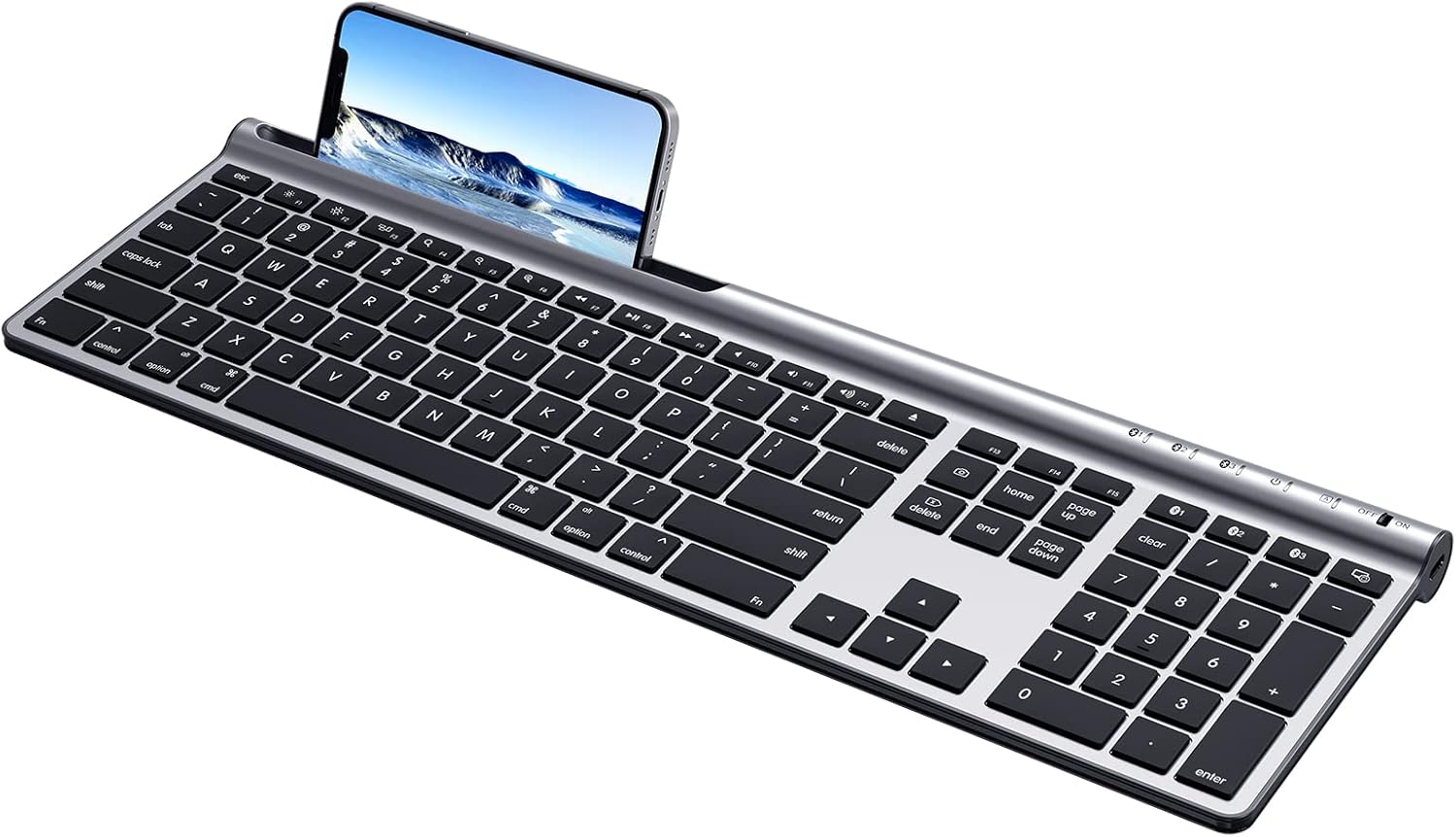
Image: The CHESONA Wireless Keyboard, showcasing its full-size layout and integrated slot for a smartphone or tablet.
2. פּעקל אינהאַלט
ביטע באַשטעטיקן אַז אַלע זאכן זענען פאַראַן אין דעם פּעקל:
- 1 × CHESONA Full-Size Keyboard for Mac OS
- 1 × USB-A צו USB-C טשאַרדזשינג קאַבל
- 1 × Silicone Keyboard Cover
- 1 × באַניצער מאַנואַל (דאָס דאָקומענט)

Image: The CHESONA keyboard, USB-A to USB-C charging cable, and user manual as included in the package.
3. פֿעיִקייטן
- צוויי-מאָד קאַנעקטיוויטי: Supports Bluetooth 5.1 wireless connection and USB-A to USB-C wired connection.
- Multi-Device פּערינג: Connects to up to three Bluetooth devices simultaneously, allowing quick switching.
- Mac OS/iOS Compatibility: Optimized for Mac OS 10.0 and above, and iOS 9.2 and above.
- קריקאָנלאָדלעך באַטערי: Built-in 280 mAh lithium battery, rechargeable via USB-C.
- גאַנץ גרייס אויסלייג: Includes a dedicated number pad for efficient data entry.
- Customizable Function Keys: Fn 13, Fn 14, and Fn 15 keys can be customized via operating system settings.
- Responsive Scissor-Switch Keys: Provides a quiet and tactile typing experience.
- הינטער-שלאַנק פּלאַן: Constructed from ABS, silicone, and galvanized sheet for durability and portability.
- וואָטערפּרוף מעמבראַנע: Includes a silicone cover to protect against accidental liquid spills.
4. סעטאַפּ
4.1 אויפלאָדן די קלאַוויאַטור
The keyboard is equipped with a 280 mAh lithium battery. Before first use, or when the battery indicator is low, charge the keyboard using the provided USB-A to USB-C charging cable.
- Connect the USB-C end of the cable to the Type-C charging port on the keyboard (located on the right side).
- פֿאַרבינדט דעם USB-A עק פֿונעם קאַבל צו אַ מאַכט מקור (למשל, קאָמפּיוטער USB פּאָרט, USB וואַנט אַדאַפּטער).
- A full charge typically takes less than 2 hours and provides up to 110 hours of continuous use.

Image: The Type-C charging port on the side of the keyboard, with the charging cable inserted.
4.2 Wireless (Bluetooth) Connection
The keyboard can connect to up to three devices wirelessly via Bluetooth 5.1.
- Turn on the keyboard using the ON/OFF switch located on the right side.
- Press and hold one of the Bluetooth channel keys (BT1, BT2, or BT3) for 3-5 seconds until its indicator light flashes rapidly. This indicates pairing mode.
- On your device (Mac, iPad, iPhone), go to Bluetooth settings and select "CHESONA Keyboard" from the list of available devices.
- Once paired, the indicator light for the selected channel will stop flashing and remain solid for a few seconds before turning off.
- Repeat these steps for up to two additional devices using the other BT channel keys.

Image: Illustration of the keyboard's multi-device Bluetooth connectivity, showing connections to an iMac, MacBook, and iPad.
4.3 ווייערד קאַנעקשאַן
The keyboard can also be used with a wired connection.
- Connect the USB-C end of the provided cable to the Type-C port on the keyboard.
- פאַרבינדן די וסב-א סוף פון די קאַבלע צו אַ וסב-א פּאָרט אויף דיין קאָמפּיוטער.
- The keyboard will be recognized automatically by your device.

Image: The keyboard connected to a device via its USB-C port, illustrating the wired connection capability.
5. אַפּערייטינג ינסטרוקטיאָנס
5.1 וועקסלען צווישן דעוויסעס
If you have paired the keyboard with multiple devices via Bluetooth, you can switch between them by pressing the corresponding Bluetooth channel key:
- דרוק BT1 to connect to the first paired device.
- דרוק BT2 to connect to the second paired device.
- דרוק BT3 to connect to the third paired device.

Image: The keyboard shown connected to a laptop, monitor, and smartphone, illustrating the multi-device switching function using BT1, BT2, and BT3 keys.
5.2 פונקציע קנעפּלעך (Fn)
The keyboard features a full row of Fn-function keys designed for Mac OS. These keys provide quick access to various system functions.
- Standard Fn Keys: F1-F12 perform their designated Mac OS functions (e.g., volume control, media playback).
- קוסטאָמיזאַבלע שליסלען: Fn 13, Fn 14, and Fn 15 can be assigned custom functions through your Mac OS or iOS settings to enhance workflow.
- באַמערקונג: On Mac mini/Studio/Pro, the brightness adjustment functions (F1/F2) may not be supported. Other Fn keys will function normally.

Image: A visual representation of the keyboard's function key layout, indicating the standard and customizable Fn keys.
5.3 אָטאַמאַטיק שלאָפן מאָדע
To conserve battery life, the keyboard will enter sleep mode if not used for more than 30 minutes. To wake it up, simply press any key.
6. וישאַלט
6.1 רייניקונג און שוץ
The keyboard comes with a waterproof silicone membrane to protect against spills and dust.
- קעסיידער ריין די קלאַוויאַטור ייבערפלאַך מיט אַ ווייך, טרוקן שטאָף.
- For spills, ensure the silicone cover is properly placed over the keys. If liquid gets under the cover, remove the cover, gently wipe the keys and surface with a damp cloth, and allow to dry completely before reattaching the cover or using the keyboard.
- ויסמיידן ניצן האַרב קעמיקאַלז אָדער אַברייסיוו מאַטעריאַלס פֿאַר רייניקונג.

Image: The CHESONA keyboard with its transparent silicone waterproof cover in place, demonstrating protection against liquid spills.
7. טראָובלעשאָאָטינג
- קלאַוויאַטור פֿאַרבינדט זיך נישט דורך בלועטוט:
- זיכער מאַכן אַז די קלאַוויאַטור איז אנגעצינדן און גאָר אויפגעלאָדן.
- Make sure the correct BT channel key (BT1, BT2, or BT3) is selected and flashing, indicating pairing mode.
- Check that Bluetooth is enabled on your device and that the keyboard is within the 10-meter (33ft) range.
- פּרוּווט אָפּצופּאַרן און ווידער צופּאַרן די קלאַוויאַטור פֿון די בלועטוט סעטטינגס פֿון אייער דעווייס.
- קנעפּלעך רעאַגירן נישט:
- קאָנטראָלירט דעם באַטאַרייע לעוועל און לאָדט אויף די קלאַוויאַטור אויב נייטיק.
- Ensure the keyboard is properly connected (either via Bluetooth or wired USB-C).
- If using wired connection, try a different USB port on your computer.
- ריסטאַרט דיין מיטל.
- Brightness adjustment (F1/F2) not working on Mac mini/Studio/Pro:
- This is a known compatibility limitation for these specific Mac models. Other Fn keys should function as expected.
8. ספּעסאַפאַקיישאַנז
| מאָדעל נומער | CHESONA-001 |
| קאַנעקטיוויטי טעכנאָלאָגיע | בלועטוט 5.1, USB-C מיט ווייערס |
| קאַמפּאַטאַבאַל דעוויסעס | MacBook Air/Pro, iMac, Mac mini/Studio/Pro, iPad, iPhone, etc. |
| אַפּערייטינג סיסטעם שטיצן | Mac OS 10.0+, iOS 9.2+ |
| באַטערי טיפּ | ליטהיום פּאָלימער |
| באַטאַרייע קאַפּאַציטעט | 280 מאַה |
| טשאַרדזשינג פּאָרט | וסב-C |
| קעסיידערדיק אַרבעט צייט | ביז 110 שעה (אויף פולער אָפּצאָל) |
| פּראָדוקט דימענשאַנז | 12.01 X 9.88 X 1.28 אינטשעס (30.5 X 25.1 X 3.25 סענטימעטער) |
| פּונקט וואָג | 1.57 פונט (0.71 קג) |
| מאַטעריאַל | ABS, Silicone, Galvanized Sheet |
| ספּעציעלע פֿעיִקייטן | Rechargeable, Waterproof (with cover), Multi-Device Support |
| קאָליר | זילבער שווארצע |
9. וואָראַנטי און שטיצן
For warranty information and technical support, please refer to the official CHESONA website or contact their customer service directly. Details are typically provided on the product packaging or the manufacturer's webפּלאַץ.
איר קענען באַזוכן די CHESONA קראָם אויף עמעזאָן פֿאַר מער אינפֿאָרמאַציע.
Ask a question about this manual
Ask about setup, troubleshooting, compatibility, parts, safety, or missing instructions. Manuals+ will review the question and use this page’s manual context to help answer it.