
1. הקדמה
This manual provides detailed instructions for the safe installation, operation, and maintenance of your Lucci Air Peregrine 56-inch White Ceiling Fan with Remote, Model 21328001. The Peregrine fan features a modern design with three blades, energy-efficient direct current (DC) technology, six speeds, and high airflow. It is rated for both indoor and outdoor use in covered areas. The fan includes a 6-inch warm white GX53 light kit with 3-step dimming functionality and comes with a remote control and wall mount bracket.

בילד 1.1: פראָנט view of the Lucci Air Peregrine 56-inch White Ceiling Fan.
2. זיכערקייַט אינפֿאָרמאַציע
Please read all instructions carefully before beginning installation and retain this manual for future reference. Improper installation or use can lead to electric shock, fire, or personal injury.
- עלעקטריקאַל זיכערקייַט: Ensure the power supply is disconnected at the circuit breaker before installation or maintenance. All electrical wiring must be performed by a qualified electrician and comply with local codes and regulations.
- מאָונטינג: The ceiling fan must be mounted to a structurally sound ceiling joist or outlet box capable of supporting the fan's weight (15.92 lbs).
- בלייד קלירענס: Maintain a minimum clearance of 7 feet from the floor to the fan blades and 18 inches from the fan blades to any walls or obstructions.
- ליכט קיט: Use only the specified GX53 12W 3000K bulb. Do not exceed the maximum wattage.
- דרויסנדיק נוצן: This fan is rated for indoor and outdoor use in covered areas. Do not expose to direct water spray.
- ווייַט קאָנטראָל: האַלט די ווײַטקאָנטראָל ווײַט פֿון וואַסער און עקסטרעמע טעמפּעראַטורן. פֿאַרבײַט די באַטעריעס ווי נויטיק.
3. פּעקל אינהאַלט
באַשטעטיקט אַז אַלע קאָמפּאָנענטן זענען פאַראַן און נישט געשעדיגט איידער איר גייט ווייטער מיט דער אינסטאַלאַציע. אויב עס פעלט אָדער זענען געשעדיגט טיילן, קאָנטאַקטירט קונה שטיצע.
- Ceiling Fan Motor Housing with Downrod
- פאָכער בלאַדעס (3)
- ווייַט קאָנטראָל
- Wall Mount Bracket for Remote
- GX53 12W 3000K Light Kit (pre-installed or separate)
- Optional Metal Cap (for non-light use)
- מאַונטינג ייַזנוואַרג
- ינסטראַקשאַנז מאַנואַל

בילד 3.1: איבערview of the remote control and its features, including 6 fan speeds, reverse switch, light on/off/dimming, fan on/off, and wall mount holster. A CP2032 battery is included.
4. אויפשטעלן און אינסטאַלירן
Professional installation is recommended for this ceiling fan. Ensure all power is disconnected at the main circuit breaker before beginning installation.
- צוגרייטן די מאָנטירונג אָרט: Securely attach the mounting bracket to a suitable ceiling joist or fan-rated outlet box. Ensure the structure can support the fan's weight.
- צוזאמענשטעלן דאַונראַד און מאָטאָר: Attach the downrod to the fan motor housing. Carefully feed the electrical wires through the downrod.
- הענגען פאָכער פֿאַרזאַמלונג: Lift the fan assembly and hang it from the mounting bracket.
- עלעקטריקאַל קאַנעקשאַנז: Connect the fan's electrical wires to the household wiring according to the wiring diagram provided in the separate installation guide (not included in this manual). Ensure all connections are secure.
- צוטשעפּען בלעטער: Securely attach the three fan blades to the motor housing using the provided screws.
- Install Light Kit (Optional): If using the light, install the GX53 12W 3000K bulb into the light kit socket. Attach the light kit to the bottom of the fan motor housing. If not using the light, install the optional metal cap.
- זיכערע קאַנאָפּי: Slide the canopy up to the ceiling and secure it to the mounting bracket, covering all wiring.
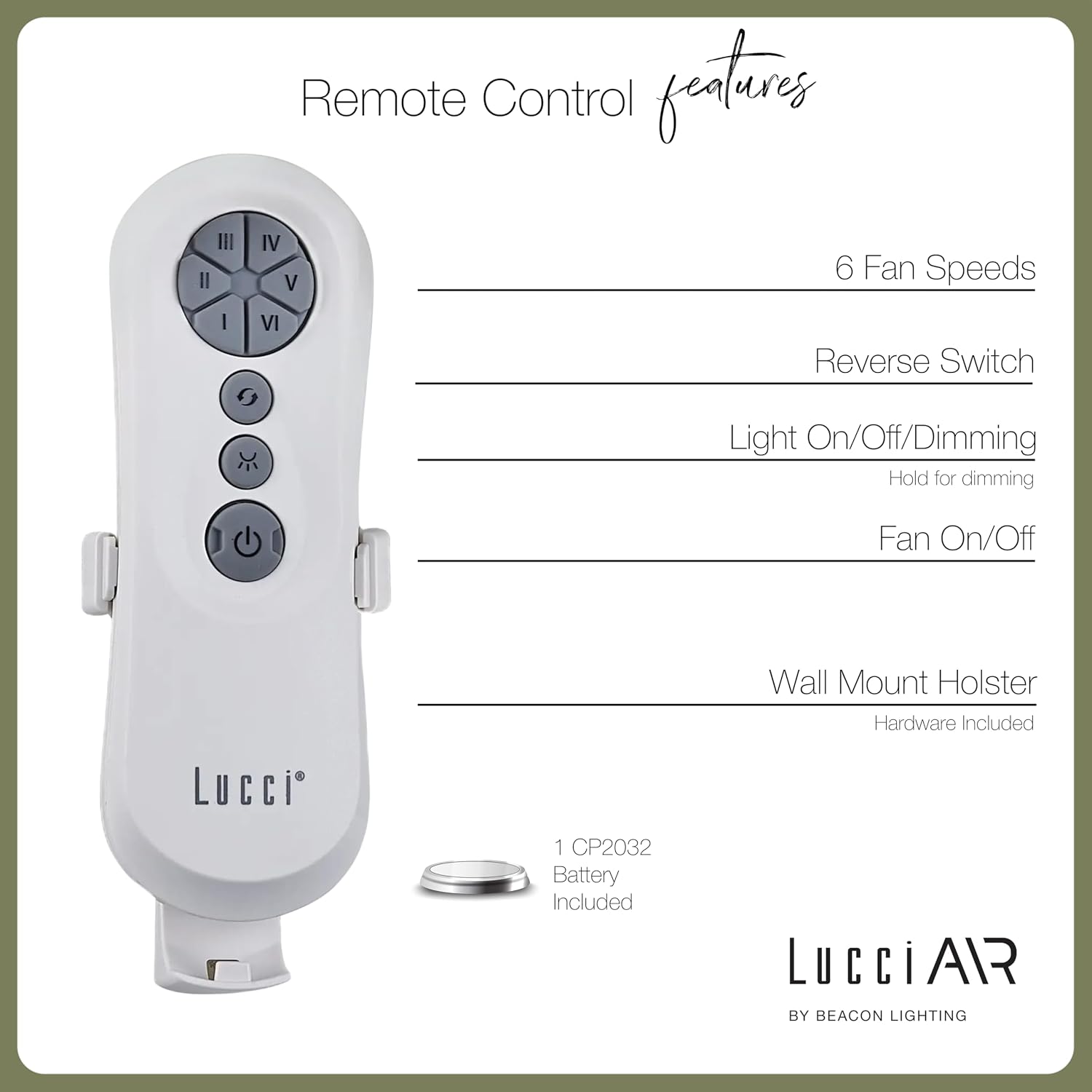
Image 4.1: Dimensional diagram of the Lucci Air Peregrine 56-inch Ceiling Fan, showing overall height, width, and blade length measurements.

בילד 4.2: אונטן view of the Lucci Air Peregrine fan, highlighting the integrated light kit.
5. אָפּעראַציע
The Lucci Air Peregrine fan is operated using the included remote control. Ensure the remote has a working CP2032 battery installed.
5.1 רימאָוט קאָנטראָל פאַנגקשאַנז
- פאָכער אויף/אַוועק: Press the power button (ⓘ) to turn the fan on or off.
- פאַן גיכקייַט: Use buttons I, II, III, IV, V, VI to select one of the six available fan speeds. I is the lowest speed, VI is the highest.
- פאַרקערט סוויטש: Press the reverse button (↻) to change the direction of the fan blades. This function is typically used to switch between summer (downward airflow) and winter (upward airflow) modes. Note: Some models may have a manual switch on the motor housing for this function.
- ליכט אויף / אַוועק / דימינג: Press the light button (☀) to turn the light on or off. Hold the light button to dim or brighten the light through its 3-step dimming range.
5.2 Winter/Summer Mode
The fan features a manual switch on the motor housing to change between winter and summer modes. For summer operation, the blades should rotate counter-clockwise to push air downwards, creating a cooling breeze. For winter operation, the blades should rotate clockwise to draw cool air up, circulating warm air trapped near the ceiling. Adjust the switch accordingly.
6. וישאַלט
רעגולערע אויפהאלטונג גאראנטירט אפטימאלע פאָרשטעלונג און פארלענגערט די לעבן פון אייער סופיט ווענטילאַטאָר.
- רייניקונג: שטויב אָפּ די ווענטילאַטאָר בלעטער און מאָטאָר הויזינג פּעריִאָדיש מיט אַ ווייכן, דamp שטאָף. ניצט נישט קיין שרײַבנדיקע רייניגער אָדער סאָלווענטן, ווײַל די קענען שאַטן די ענדיקונג.
- בלייד טייטנאַס: Check all blade screws annually to ensure they are tight. Loose blades can cause wobbling and noise.
- ליכט באַלב פאַרבייַט: Disconnect power before replacing the GX53 light bulb. Allow the bulb to cool completely before handling.
- ווייַט באַטערי: Replace the CP2032 battery in the remote control when its range decreases or it stops responding.
7. טראָובלעשאָאָטינג
זעט די פאלגנדע טאבעלע פאר אלגעמיינע פראבלעמען און זייערע לייזונגען.
| פּראָבלעם | מעגלעך סיבה | לייזונג |
|---|---|---|
| פאָכער טוט נישט אָנהייבן | קיין מאַכט צו די פאָכער לוס דראָט קאַנעקשאַנז באַטעריע פון דער ווײַטקאָנטראָל איז טויט | קוק קרייַז צוימען באַשטעטיקן אַז אַלע דראָט קאַנעקשאַנז זענען זיכער (אויסשליסן) פאַרבייַטן ווייַט קאָנטראָל באַטאַרייע |
| פאן װאבלט זיך | לויזע בלייד שרויפן אַנבאַלאַנסט בלאַדעס לוס מאַונטינג קלאַמער | פאַרשטייַפן אַלע בלייד סקרוז Ensure blades are installed correctly and balanced Verify mounting bracket is securely fastened |
| ליכט טוט נישט אַרבעטן | Light bulb faulty Loose wire connection to light kit | פאַרבייַטן די ציבעלע Check light kit wiring (power off) |
| ווייַט קאָנטראָל נישט ארבעטן | טויט באַטאַרייע ווײַטקאָנטראָל נישט געפּאָרט (אויב אָנווענדלעך) | פאַרבייַטן באַטאַרייע Refer to separate remote pairing instructions (if provided with fan) |
8. ספּעסאַפאַקיישאַנז
Key technical details for the Lucci Air Peregrine 56-inch White Ceiling Fan (Model 21328001).
| שטריך | דעטאַל |
|---|---|
| מאָדעל נאָמען | Peregrine |
| מאָדעל נומער | 21328001 |
| סאָרט | לוטשי עיר |
| קאָליר | ווייַס |
| פאָכער פּלאַן | Ceiling Fan |
| מאַכט מקור | דק (דירעקט קראַנט) |
| פּראָדוקט דימענשאַנז | 56"ד רענטגענ 56"וו רענטגענ 15"ה |
| נומער פון בלאַדעס | 3 |
| בלייד לענג | 31.1 אינטשעס |
| לופט פלאָו קאַפּאַסיטי | 6363 קוביק פֿיס פּער מינוט (CFM) |
| נומער פון ספּידז | 6 |
| מאַכט קאַנסאַמשאַן (דורכשניטלעך) | 38 וו |
| Voltage | 120 וואַק, 60 הז |
| ליכט קיט אַרייַנגערעכנט | 1x GX53 12W 3000K bulb, 1100 Lumens, 3-step dimmable |
| קאָנטראָל מעטאָד | ווייַט קאָנטראָל |
| דרינענדיק / דרויסנדיק באַניץ | Indoor, Outdoor (covered areas) |
| פּונקט וואָג | 15.92 פונט |
| UPC | 811769032344 |
9. וואָראַנטי & שטיצן
The Lucci Air Peregrine 56-inch White Ceiling Fan comes with a לימיטעד לעבן וואָראַנטי. For warranty claims, technical support, or replacement parts, please contact Lucci Air customer service. Keep your proof of purchase for warranty validation.
פֿאַר ווייטערדיקע הילף, ביטע באַזוכט די Lucci Air Store on Amazon אדער קאָנטאַקט אייער הענדלער.