
1. הקדמה
The Sunshine DT-17N Digital Multimeter is a versatile and reliable tool designed for accurate electrical measurements. It is particularly suitable for phone repair technicians and general electronics work, capable of measuring various electrical parameters including voltage, current, resistance, capacitance, and temperature. Its compact design and user-friendly features make it an essential tool for diagnosing and repairing electronic devices.

Figure 1: The Sunshine DT-17N Digital Multimeter, demonstrating its compact size for portability.
2. זיכערקייַט אינפֿאָרמאַציע
To ensure safe operation and prevent damage to the meter, please read and follow all safety instructions carefully. This multimeter features double insulation protection for enhanced user safety.
- Always ensure the test leads are in good condition and properly connected before taking measurements.
- דו זאלסט נישט צולייגן וואָלtage or current that exceeds the maximum rated values for each range.
- Never use the multimeter if it appears damaged or if the test leads are frayed.
- זייט פארזיכטיג ווען איר ארבעט מיט וואָלtagהעכער 30V AC RMS, 42V שפּיץ, אדער 60V DC, ווייל די שטעלן פאר א שאָק געפאַר.
- שטענדיק אָפּשטעקן די מאַכט פֿון דער קרייז און אָפּלאָדן הויך-וואָלוומעtage capacitors before measuring resistance, continuity, or diodes.
- טוישט די באַטעריע גלייך ווען דער נידעריק באַטעריע אינדיקאַטאָר דערשיינט צו ענשור גענויע מעסטונגען.
3. פּראָדוקט איבערview
3.1. Multimeter Components

פיגורע 2: פראָנט view of the DT-17N Multimeter, highlighting its main display and controls.
3.2. ווייַז פֿעיִקייטן
The DT-17N features a large LCD display with a backlight, ensuring clear readability in various lighting conditions.

Figure 3: The multimeter's LCD display with its backlight feature, improving visibility in low-light environments.
- גרויס לקד ווייַז: Provides clear numerical readings.
- באַקלייט: Improves visibility in dark or low-light conditions. Activated by pressing and holding the HOLD button.
- מעזשערמאַנט אַפּאַראַט: Displays the appropriate unit (e.g., V, A, Ω, °C/°F).
- באַטערי סטאַטוס: ינדיקייץ די קראַנט באַטאַרייע מדרגה.
- Automatic Polarity Display: Shows positive or negative polarity automatically.
3.3. Controls and Input Ports
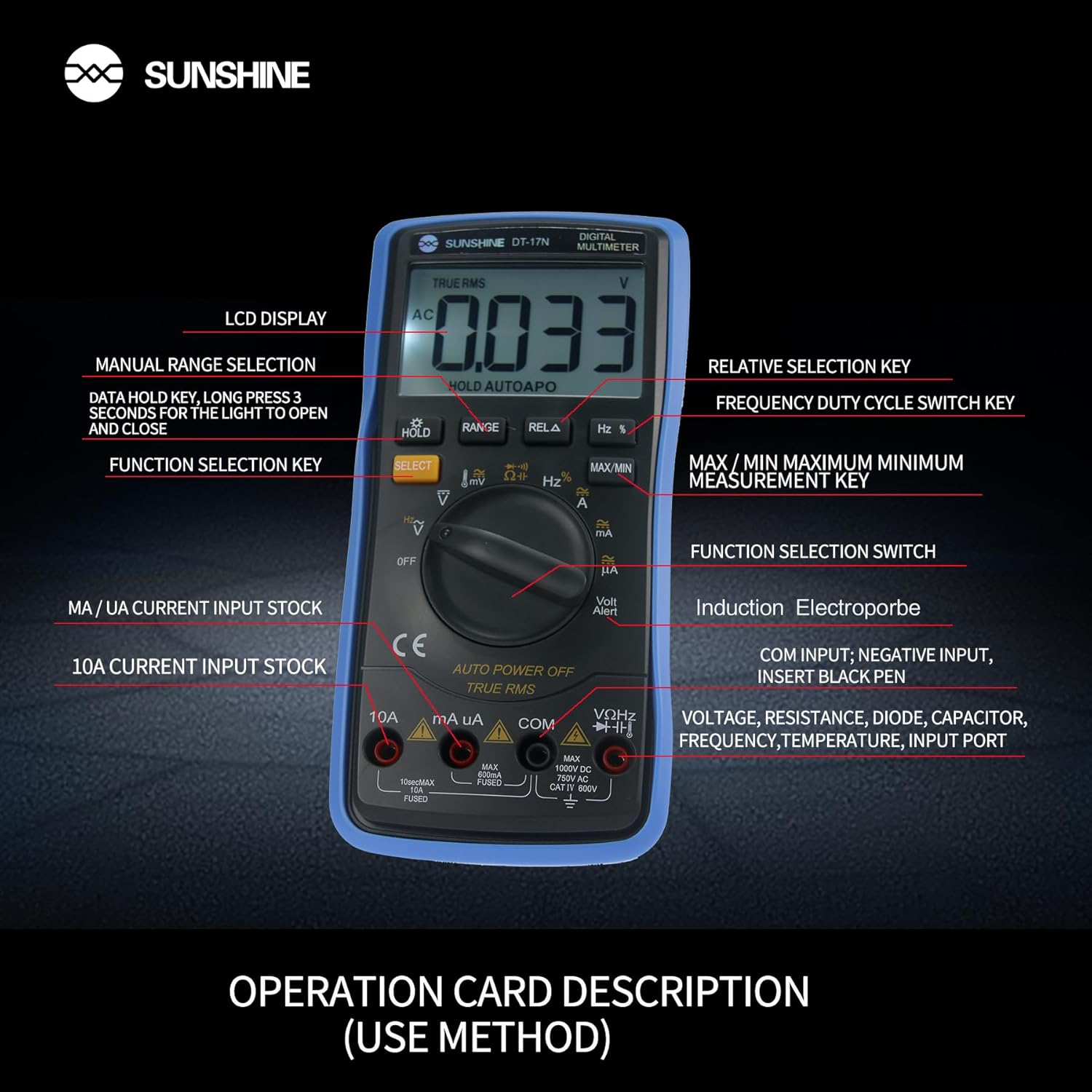
פיגורע 4: דעטאַילעד view of the multimeter's controls and input ports with their respective functions.
- ראָטאַרי פונקציע סוויטש: Used to select the desired measurement function (e.g., Voltage, Current, Resistance, Temperature).
- SELECT קנעפּל: טוישט צווישן פארשידענע מעסטונג מאָדעס אין איין דריי-קנעפל פאזיציע (למשל, AC/DC וואַלואַציע)tagע., דיאָד/קאָנטינעואַטי).
- האַלטן קנעפּל: Freezes the current reading on the display. Press and hold to activate/deactivate the backlight.
- RANGE קנעפּל: Allows manual selection of measurement ranges, overriding the automatic ranging feature.
- RELA Button (Relative Selection Key): מעסט דעם חילוק צווישן א געהיטענע רעפערענץ ווערט און די איצטיקע לייענונג.
- Hz % Button (Frequency Duty Cycle Switch Key): טוישט צווישן אָפטקייט און דוטי ציקל מעסטונגען.
- MAX/MIN קנעפּל: Displays the maximum or minimum measured value during a measurement session.
- VΩHz Input Port: Connect the red test lead for voltage, resistance, frequency, capacitance, diode, and temperature measurements.
- COM Input Port: Connect the black test lead (common ground) for all measurements.
- mA/uA Input Port: Connect the red test lead for measuring small currents (milliamperes and microampערעס).
- 10A Input Port: Connect the red test lead for measuring large currents (up to 10 Ampערעס).
- Volt Alert (NCV): נאַן-קאָנטאַקט חלקtagE דיטעקשאַן פֿונקציע.
4. סעטאַפּ
4.1. באַטאַרייע ייַנמאָנטירונג
The DT-17N is battery-powered. To install or replace the battery:
- זיכער מאַכן אַז דער מולטימעטער איז אויסגעלאָשן.
- געפינט דעם דעקל פונעם באַטעריע־אָפּטייל אויף דער הינטערשטער זייט פונעם אַפּאַראַט.
- שרויפט ארויס די שרויף(ן) און נעמט אראפ דעם דעקל.
- Insert the new battery, observing correct polarity (+ and -).
- לייג צוריק דעם דעקל פונעם באַטעריע־אָפּטייל און פֿאַרזיכער עס מיט די שרויף(ן).
4.2. פֿאַרבינדן טעסט דראָטן
Always connect the black test lead to the COM input jack. Connect the red test lead to the appropriate input jack based on the measurement you intend to perform:
- פֿאַר וואָלtage, Resistance, Capacitance, Frequency, Diode, and Temperature measurements: Connect the red test lead to the VΩHz דזשאַק.
- For Current measurements (mA/uA): Connect the red test lead to the mA/uA דזשאַק.
- For High Current measurements (10A): Connect the red test lead to the 10 א דזשאַק.
5. אַפּערייטינג ינסטרוקטיאָנס
The Sunshine DT-17N features automatic identification for most ranges, simplifying operation. Use the rotary switch to select the primary function and the SELECT button to toggle sub-functions.
5.1. מעסטן באַנדtagE (AC/DC)
- קער די דריי - באַשטימען צו די V שטעלע.
- אויב נייטיק, דריקן די אויסקלייַבן button to toggle between AC (~) and DC (—) voltage.
- פאַרבינדן די שוואַרץ פּרובירן פירן צו די COM דזשעק און די רויטע טעסט פירט צו די VΩHz דזשאַק.
- פֿאַרבינדט די טעסט פּראָובז פּאַראַלעל צום קרייַז אָדער קאָמפּאָנענט וואָס איר ווילט מעסטן.
- לייענען דעם חלקtagE ווערט אויף די אַרויסווייַזן.

Figure 5: The multimeter showing a DC millivolt measurement on its display.
5.2. מעסטן קראַנט (AC/DC)
וואָרענען: Never connect the multimeter in parallel when measuring current, as this can damage the meter and the circuit. Always connect in series.
- קער די דריי - באַשטימען צו די mA/uA or 10 א position, depending on the expected current.
- אויב נייטיק, דריקן די אויסקלייַבן button to toggle between AC (~) and DC (—) current.
- פאַרבינדן די שוואַרץ פּרובירן פירן צו די COM jack. Connect the red test lead to the mA/uA or 10 א jack accordingly.
- Open the circuit and connect the test probes in series with the load.
- לייענט דעם איצטיקן ווערט אויפן דיספלעי.
5.3. מעאַסורינג קעגנשטעל
- קער די דריי - באַשטימען צו די Ω שטעלע.
- פאַרבינדן די שוואַרץ פּרובירן פירן צו די COM דזשעק און די רויטע טעסט פירט צו די VΩHz דזשאַק.
- Ensure the circuit is de-energized and all capacitors are discharged.
- פֿאַרבינדט די טעסט פּראָובז אַריבער דעם קאָמפּאָנענט צו מעסטן זײַן קעגנשטעל.
- לייענען די קעגנשטעל ווערט אויף די אַרויסווייַזן.
5.4. מעסטן קאַפּאַסיטאַנס
- קער די דריי - באַשטימען צו די קאַפּאַסיטאַנס symbol (often shared with diode/continuity).
- דרוק די אויסקלייַבן button until the capacitance mode is active.
- פאַרבינדן די שוואַרץ פּרובירן פירן צו די COM דזשעק און די רויטע טעסט פירט צו די VΩHz דזשאַק.
- Ensure the capacitor is fully discharged before connecting the test probes.
- פאַרבינדן די פּראָבע פּראָבעס אַריבער די קאַפּאַסאַטער.
- לייענען די קאַפּאַסאַטאַנס ווערט אויף די אַרויסווייַזן.
5.5. Measuring Frequency / Duty Cycle
- קער די דריי - באַשטימען צו די הז % שטעלע.
- דרוק די הז % button to toggle between frequency (Hz) and duty cycle (%).
- פאַרבינדן די שוואַרץ פּרובירן פירן צו די COM דזשעק און די רויטע טעסט פירט צו די VΩHz דזשאַק.
- Connect the test probes in parallel to the signal source.
- לייענט די אָפטקייט אָדער דוטי ציקל ווערט אויף דעם דיספּליי.
5.6. טעמפּעראַטור מעזשערמאַנט
The DT-17N can measure temperature using a K-type thermocouple (not always included, check package contents).

פיגורע 6: עקסample of temperature measurement using the DT-17N Multimeter with a thermocouple.
- קער די דריי - באַשטימען צו די ° C / ° F שטעלע.
- אויב נייטיק, דריקן די אויסקלייַבן button to choose between Celsius or Fahrenheit.
- Connect the K-type thermocouple to the VΩHz און COM דזשאַקס, אַבזערווינג פּאָולעראַטי.
- Place the thermocouple tip on or in the object whose temperature you wish to measure.
- לייענט די טעמפּעראַטור ווערט אויף דעם עקראַן.
5.7. דיאָד טעסט און קאָנטינויִטעט
- קער די דריי - באַשטימען צו די דיאָד/קאָנטינויִטעט סימבאָל.
- דרוק די אויסקלייַבן קנעפּל צו טוישן צווישן דיאָד טעסט און קאָנטינויִיטעט טעסט.
- פאַרבינדן די שוואַרץ פּרובירן פירן צו די COM דזשעק און די רויטע טעסט פירט צו די VΩHz דזשאַק.
- For Diode Test: Connect the probes across the diode. The display will show the forward voltagא טראָפּן. דריי איבער די פּראָבעס צו קאָנטראָלירן צי עס איז דאָ אַן אָפענע קרייז.
- For Continuity Test: Connect the probes across the circuit or component. A beep indicates continuity (low resistance).
5.8. ניט-קאָנטאַקט וואָלtagE (NCV) דעטעקשאַן
The NCV function allows detection of AC voltagע אָן דירעקטן קאָנטאַקט מיט קאָנדוקטאָרן.
- קער די דריי - באַשטימען צו די NCV position (often indicated by a Volt Alert symbol).
- Move the top part of the multimeter near the conductor.
- The meter will beep and/or flash an indicator light if AC voltage איז דיטעקטאַד.
5.9. דאַטן האַלטן און באַקלייטונג
- דאַטן האַלטן: דרוק די האַלטן קנעפּל קורץ צו איינפֿרירן די איצטיקע לייענונג אויף דער אַרויסווייַזונג. דריק ווידער צו לאָזן.
- באַקלייט: דריקן און האַלטן די האַלטן button for approximately 3 seconds to turn the display backlight ON or OFF.
5.10. MAX/MIN Measurement
This function records the maximum and minimum values measured during a session.
- Select the desired measurement function (e.g., Voltagאון).
- דרוק די מאַקסימום / מין button. The display will show 'MAX' and the maximum value recorded.
- דרוק מאַקסימום / מין again to cycle to 'MIN' and view the minimum value.
- דריקן און האַלטן מאַקסימום / מין צו אַרויסגאַנג דעם מאָדע.
6. וישאַלט
געהעריגע אויפהאלטונג גאראנטירט די לאנגעוויטי און גענויקייט פון אייער מולטימעטער.
6.1. רייניקונג
ווישן די פאַל מיט אַדamp שטאָף און מילדן וואַשפּולווער. ניצט נישט קיין שוואַרצע מאַטעריאַלן אָדער סאָלווענטן. מאַכט זיכער אַז דער מעטער איז גאָר טרוקן איידער נוצן.
6.2. באַטערי פאַרבייַט
Refer to Section 4.1 for battery replacement instructions. Always use the specified battery type.
6.3. Holster Care
The multimeter is protected by a thick rubber shockproof holster, designed for durability and a non-slip grip. Keep the holster clean and free from debris.

Figure 7: The durable rubber holster provides protection and a comfortable grip for the multimeter.
7. טראָובלעשאָאָטינג
If you encounter issues with your DT-17N multimeter, refer to the table below for common problems and solutions.
| פּראָבלעם | מעגלעך סיבה | לייזונג |
|---|---|---|
| קיין דיספּלעי אָדער טונקעל דיספּלעי | Low or dead battery; Poor battery contact | Replace battery; Check battery contacts |
| פאַלש רידינגז | Wrong function selected; Improper test lead connection; Damaged test leads; Out of range | Select correct function; Ensure leads are in correct jacks; Replace leads; Select higher range or check specifications |
| קיין קאנטינעויטעט ביפּ | Circuit resistance too high; Continuity mode not selected | Ensure resistance is below threshold; Press SELECT to enter continuity mode |
| Fuse blown (for current measurements) | Overcurrent applied | Replace fuse with specified type and rating; Ensure correct current measurement procedure |
8. ספּעסאַפאַקיישאַנז
Technical specifications for the Sunshine DT-17N Digital Multimeter.
| שטריך | באַשרייַבונג |
|---|---|
| מאָדעל | DT-17N |
| מעזשערמאַנט טיפּ | מולטימעטער |
| ווייַז | 5999 (5 5/6) counts, Automatic Polarity Display, Backlit LCD |
| Sampלינג קורס | בעערעך 3 מאל פּער סעקונדע |
| מאַכט מקור | באַטאַרייע פּאַוערד |
| מינימום אַפּערייטינג באַנדtage | 3 וואלטס (דק) |
| טעמפּעראַטור מעאַסורעמענט ראַנגע | 0°C צו 1000°C (32°F צו 1832°F) |
| Induction Electroprobe Function | Yes (NCV) |
| טאָפּל ינטעגראַל A / D קאָנווערסיאָן | יא |
| נומער דימענשאַנז | 5.51 X 2.76 X 1.18 אינטשעס |
| פּונקט וואָג | 0.55 קילאָגראַמס |
| קאָליר | בלוי |
9. וואָראַנטי און שטיצן
9.1. וואָראַנטי אינפֿאָרמאַציע
This product comes with a warranty of 3 חדשים פון די טאָג פון קויפן. Please retain your proof of purchase for warranty claims. The warranty covers manufacturing defects under normal use.
9.2. קונה שטיצן
For technical assistance or inquiries regarding your Sunshine DT-17N Digital Multimeter, please contact your retailer or the manufacturer's customer service department. Refer to your purchase documentation for specific contact details.