
הקדמה
This manual provides detailed instructions for the installation, operation, and maintenance of the Turing TP-MFD4A4 Smart Series TwilightVision 4MP IR Dome IP Camera. This camera is designed for outdoor surveillance, featuring 4MP resolution, TwilightVision for low-light clarity, Smart IR up to 30m (98ft), and robust protection ratings (IP67, IK10).
שליסל פֿעיִקייטן
- Max. 4MP (2688x1520) resolution at 30/25fps.
- TwilightVision technology for optimal image clarity in low light conditions.
- Support for up to 256 GB microSD card for local storage.
- Advanced analytics including line crossing detection, enter area detection, motion detection (up to four areas), tampering alarm, and audio detection.
- Smart IR illumination up to 30 meters (98 feet).
- IP67 weather resistance and IK10 vandal resistance.
- שטיצע פֿאַר מאַכט איבער עטהערנעט (PoE) פֿאַר אַ פֿאַרפּשוטעטער אינסטאַלאַציע.
- Wide Dynamic Range (WDR) for clear images in varying light conditions.
וואָס איז אין די קעסטל
Upon unpacking, verify that all items are present and in good condition:
- Turing TP-MFD4A4 Smart Series TwilightVision 4MP IR Dome IP Camera
- מאַונטינג ייַזנוואַרג (סקרעווס, אַנגקערז)
- שנעלע אָנהייב גייד (נישט אַרייַנגערעכנט אין דעם מאַנואַל)
סעטאַפּ
1. גשמיות ייַנמאָנטירונג
The TP-MFD4A4 camera is designed for ceiling mount installation. Ensure the mounting surface is strong enough to support the camera's weight.
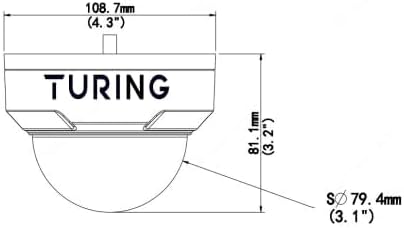
בילד: פראָנט view of the Turing TP-MFD4A4 Dome IP Camera, showing its compact design suitable for ceiling mounting.
- אויסקלייַבן אָרט: Choose a suitable outdoor location for optimal surveillance coverage, considering the 4mm fixed lens angle of view (H: 83.7°, V: 44.9°, D: 89.2°).
- מאָונטינג: Use the provided mounting template (if applicable) to drill pilot holes. Secure the camera base to the ceiling using the screws and anchors.
- סטרויערן ווינקל: Once mounted, adjust the camera's dome to achieve the desired viewינג ווינקל.
2. מאַכט און נעץ פֿאַרבינדונג
The camera supports Power over Ethernet (PoE) for simplified installation, allowing both power and data transmission over a single Ethernet cable. Alternatively, it can be powered via a DC 12V power adapter (not included).

Image: A standard Ethernet cable with an RJ45 connector, used for both power (PoE) and data connection to the camera.
- PoE קשר: Connect one end of an Ethernet cable to the camera's RJ45 port and the other end to a PoE-enabled switch or NVR.
- DC Power (Optional): If not using PoE, connect a 12V DC power adapter to the camera's power input and an Ethernet cable to a standard network switch or router.
- נעץ קאַנפיגיעריישאַן: The camera will obtain an IP address automatically via DHCP. For advanced network settings, refer to the Turing Vision software or NVR manual.
3. מיקראָסד קאַרטל אינסטאַלאַציע (אָפּציאָנעל)
The camera supports a microSD card up to 256 GB for onboard storage. This allows for local recording even if network connectivity is temporarily lost.
- צוטריט סלאָט: Carefully open the camera housing to locate the microSD card slot. Refer to the camera's physical diagram for exact location.
- אַרייַנלייגן קאָרט: Insert the microSD card into the slot with the contacts facing down until it clicks into place.
- פֿאָרמאַטירונג קאָרט: After installation, it is recommended to format the microSD card via the camera's web interface or connected NVR for optimal performance.
אַפּערייטינג די אַפּאַראַט
The Turing TP-MFD4A4 camera integrates with Turing Smart Series NVRs and the Turing Vision Cloud platform for comprehensive surveillance management.

Image: A tablet screen showing a multi-view display of live video feeds from several surveillance cameras, demonstrating remote monitoring capabilities.
1. צוטריט צו לייוו View and Recordings
- Turing Smart Series NVR: Connect the camera to a compatible Turing Smart Series NVR to view live feeds, manage recordings, and configure settings.
- Turing Vision Cloud: Utilize the Turing Vision Cloud platform for remote access, monitoring, and cloud storage features. This requires a compatible NVR, Bridge, and CORE AI license.
- Web צובינד: צוטריט צו די קאַמעראַ web interface directly via its IP address for detailed configuration and live view.
2. Understanding Key Technologies
- TwilightVision: This technology enhances image clarity in extremely low-light environments, providing color images where traditional cameras would switch to black and white.
- סמאַרט IR: The camera's Smart IR automatically adjusts the intensity of its infrared LEDs to prevent overexposure of objects closer to the camera, ensuring balanced night vision up to 30m (98ft).
- WDR (ברייט דינאַמיק ראַנגע): WDR technology balances areas of high contrast in a scene, ensuring details are visible in both very bright and very dark regions simultaneously.
3. Configuring Analytics
The TP-MFD4A4 camera offers advanced onboard analytics. These features must be used with Turing Smart Series NVRs for full functionality.
- ליניע קראָסינג דעטעקציע: Triggers an alert when an object crosses a predefined virtual line.
- Enter Area Detection: Generates an alert when an object enters a specified virtual area.
- באַוועגונג דעטעקשאַן: Detects movement within the camera's field of view. Up to four distinct motion detection areas can be configured.
- Tampערינג אַלאַרם: וואָרנט אויב די קאַמעראַ איז פאַרשטאָפּט, באַוועגט, אָדער מיט שפּריץ-פאַרב.
- אַודיאָ דעטעקשאַן: Triggers an alert based on detected sound levels.
Refer to your Turing NVR or Turing Vision Cloud documentation for detailed instructions on configuring these analytics.
וישאַלט
Regular maintenance ensures optimal performance and longevity of your Turing TP-MFD4A4 camera.
- רייניקונג: Periodically clean the camera lens and dome cover with a soft, damp שטאָף. פֿאַרמײַדט אַברייסיוו רייניגער וואָס קענען קראַצן די ייבערפֿלאַך.
- Firmware דערהייַנטיקונגען: Check the Turing website or your NVR/Cloud platform for available firmware updates. Keeping the firmware updated ensures the latest features and security patches.
- מיקראָסד קאָרט פאַרוואַלטונג: If using a microSD card for storage, regularly review און באַקאַפּן וויכטיקע פודtage. Consider setting up automatic overwriting for continuous recording.
- קאַבלע דורכקוק: Periodically inspect all cables (Ethernet, power) for any signs of wear or damage, especially in outdoor installations.
טראָובלעשאָאָטינג
This section addresses common issues you might encounter. For more complex problems, contact Turing technical support.
קיין ווידעא פיטער
- טשעק מאַכט: Ensure the camera is receiving power, either via PoE or a 12V DC adapter. Verify the PoE switch or injector is functioning.
- קוק נעץ קאַנעקשאַן: Confirm the Ethernet cable is securely connected at both ends and that the network switch/router is operational.
- IP אַדרעס קאָנפליקט: Ensure the camera has a unique IP address on your network. Check your router's DHCP client list.
- NVR/Software Connection: Verify the camera is properly added and configured within your Turing NVR or Turing Vision Cloud platform.
נעבעך בילד קוואַליטי
- ריין לענס: Ensure the camera lens and dome cover are clean and free from dirt, dust, or smudges.
- לייטינג טנאָים: While TwilightVision and WDR improve image quality, extreme lighting conditions can still affect performance. Adjust camera placement if possible.
- נעץ באַנדווידט: Insufficient network bandwidth can lead to pixelated or choppy video. Ensure your network can handle the 4MP video stream.
- פאָקוס אַדזשאַסטמאַנט: Although it has a fixed lens, ensure the camera is correctly positioned for the desired focal area.
רעקאָרדינג ישוז
- מיקראָסד קאָרט: Verify the microSD card is correctly inserted, formatted, and has sufficient free space. Check if it's corrupted.
- רעקאָרדינג פּלאַן: Ensure recording schedules are correctly configured on the NVR or through the camera's web צובינד.
- באַוועגונג דעטעקשאַן סעטטינגס: If recording is motion-triggered, check the sensitivity and area settings for motion detection.
ספּעסאַפאַקיישאַנז
Detailed technical specifications for the Turing TP-MFD4A4 Smart Series TwilightVision 4MP IR Dome IP Camera.
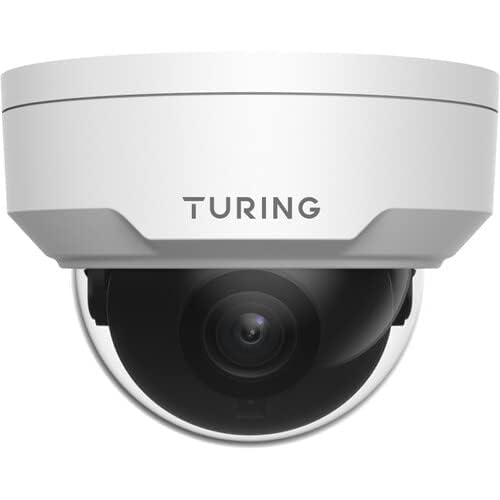
Image: Technical diagram showing the dimensions of the Turing TP-MFD4A4 Dome IP Camera, including height (81.1mm / 3.2") and diameter (108.7mm / 4.3").
| שטריך | באַשרייַבונג |
|---|---|
| מאָדעל | TP-MFD4A4 |
| סענסאָר | 1/3-inch 4MP 16:9 Progressive Scan CMOS |
| לענס | 4 מם פאַרפעסטיקט אָביעקטיוו |
| ווינקל פון View | ה: 83.7°; V: 44.9°; ד: 89.2° |
| מינימום יללומינאַטיאָן | Color: 0.002 Lux (F1.6, AGC on); 0 Lux with IR on |
| יר ראַנגע | Smart IR up to 30m (98ft) |
| ווידעא האַכלאָטע | Max. 4MP (2688x1520) at 30/25fps |
| ווידעא קאָדירונג | הינטער 265, ה.265, ה.264, מדזשפּעג |
| דיגיטאַל פּראַסעסינג | 120 dB WDR; 2D/3D DNR; Defog |
| אַודיאָ | G.711; 64 Kbps; 8 KHz; noise suppression |
| אַנבאָרד סטאָרידזש | microSD (not included), up to 256 GB |
| מאַכט | DC 12V+/-25% PoE (IEEE 802.3af); up to 4.5W |
| שוץ ראַטינגס | IP67, IK10, 4KV Surge Protection |
| דימענסיעס (ד x ה) | 4.3 X 3.2 אינטשעס (108.7 X 81.1 מם) |
| וואָג | 0.93 לבס (0.42 קג) |
| קאַמפּאַטאַבאַל דעוויסעס | Turing SMART Series NVRs, Turing Vision Cloud platform |
| NDAA געהאָרכיק | יא |
וואָראַנטי אינפֿאָרמאַציע
The Turing TP-MFD4A4 Smart Series TwilightVision 4MP IR Dome IP Camera comes with a 3 יאָר וואָראַנטי פֿון דעם קויפֿדאַטום. די וואָראַנטי דעקט חסרונות אין מאַטעריאַלן און אַרבעט אונטער נאָרמאַלן באַנוץ. ביטע באַהאַלטן אייער קויפֿבאַווייַז פֿאַר וואָראַנטי קלאַגעס.
For detailed warranty terms and conditions, please refer to the official Turing webפּלאַץ אָדער קאָנטאַקט קונה שטיצן.
שטיצן
For technical assistance, product inquiries, or warranty service, please contact Turing customer support through their official webזייטל אדער די קאָנטאַקט אינפֿאָרמאַציע וואָס איז צוגעשטעלט מיט אייער פּראָדוקט פּאַקאַדזשינג.
אָנליין רעסורסן: Visit the Turing official webזייטל פֿאַר אָפֿט געשטעלטע פֿראַגעס, ווייכווארג דאַונלאָודז, און נאָך דאָקומענטאַציע.