
הקדמה
This manual provides essential instructions for the safe and efficient use of your Juice Jumbo Marshmallow Portable Bluetooth Speaker. Please read this manual thoroughly before operating the device and retain it for future reference.
זיכערקייַט אינפֿאָרמאַציע
- שטעלט נישט אויס דעם רעדנער צו עקסטרעמע טעמפּעראַטורן, דירעקטע זונשייַן, אדער הויכע פֿײַכטקייט.
- ויסמיידן דראַפּינג אָדער ונטערטעניק די רעדנער צו שטאַרק ימפּאַקץ.
- Keep the speaker away from water and other liquids. If it gets wet, power it off immediately and allow it to dry completely before reuse.
- Do not attempt to disassemble, repair, or modify the speaker. This will void the warranty and may cause damage or injury.
- ניצט נאָר דעם צוגעשטעלטן טשאַרדזשינג קאַבל אָדער אַ סערטיפיצירטן עקוויוואַלענט.
- האַלטן אויס פון דערגרייכן פון קינדער.
- Dispose of the battery and speaker according to local regulations.
פּעקל אינהאַלט
באַשטעטיקן אַז אַלע זאכן זענען פאַראַן אין פּעקל:
- Juice Jumbo Marshmallow Portable Bluetooth Speaker
- וסב טשאַרדזשינג קאַבלע
- באַניצער מאַנואַל
פּראָדוקט איבערview
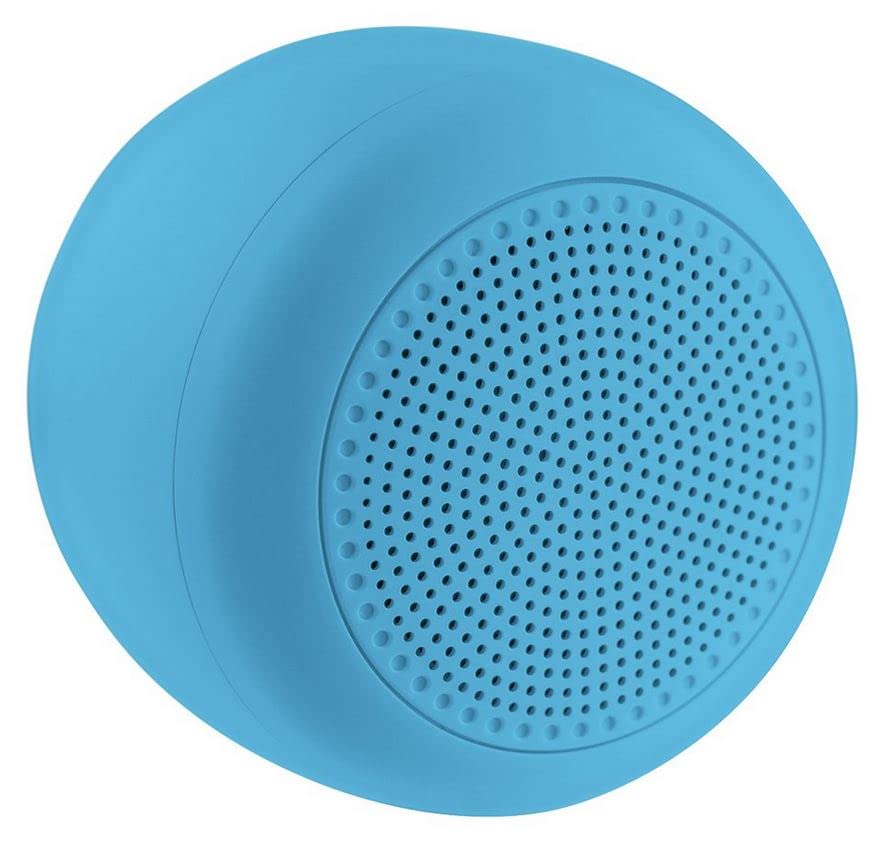
Image: The Juice Jumbo Marshmallow Portable Bluetooth Speaker. This image displays the speaker's compact, cylindrical design in blue, highlighting its fabric grille and the location of its control panel.
- מאַכט קנעפּל: גענוצט צו דרייען די רעדנער אויף אָדער אַוועק.
- באַנד אַרויף/נעקסטע ליד קנעפּל: פאַרגרעסערט די באַנד מיט אַ קורצן דריק, שפּרינגט צום נעקסטן ליד מיט אַ לאַנגן דריק.
- באַנד אַראָפּ/פֿריִערדיקע ליד קנעפּל: פֿאַרקלענערט דאָס וואָלומען מיט אַ קורצן דריק, גייט צום פֿריִערדיקן ליד מיט אַ לאַנגן דריק.
- שפּיל / פּויזע קנעפּל: קאָנטראָלירט אַודיאָ ווידערשפּיל.
- טשאַרדזשינג פּאָרט: פֿאַר פֿאַרבינדן דעם USB טשאַרדזשינג קאַבל.
- LED ינדיקאַטאָר: Displays charging status and Bluetooth connection status.
סעטאַפּ
1. טשאַרדזשינג די ספּיקער
- פֿאַרבינדט דעם קליינעם עק פֿונעם USB טשאַרדזשינג קאַבל צום טשאַרדזשינג פּאָרט אויפֿן רעדנער.
- פֿאַרבינדט דעם גרויסן עק פֿון דעם USB טשאַרדזשינג קאַבל צו אַ USB מאַכט אַדאַפּטער (נישט אַרייַנגערעכנט) אָדער אַ קאָמפּיוטער'ס USB פּאָרט.
- The LED indicator will illuminate to show charging status. It will typically turn off or change color when fully charged.
- א פול אָפּצאָל נעמט בעערעך 2-3 שעה.
2. בלועטאָאָטה פּערינג
- מאַכן זיכער אַז די רעדנער איז גאָר באפוילן.
- דריקן און האַלטן די מאַכט קנעפּל for a few seconds to turn on the speaker. The LED indicator will flash, indicating it is in pairing mode.
- אויף אייער סמאַרטפאָון אָדער טאַבלעט, נאַוויגירט צו די בלועטוט סעטטינגס.
- געבן בלועטאָאָטה און זוכן פֿאַר בנימצא דעוויסעס.
- Select "Juice Jumbo Marshmallow" from the list of devices.
- Once paired, the LED indicator will stop flashing and remain solid, and you may hear a confirmation tone.
- The speaker will automatically connect to the last paired device when powered on, if that device's Bluetooth is active and within range.
אַפּערייטינג ינסטראַקשאַנז
- מאַכט אויף / אַוועק: דריקן און האַלטן די מאַכט קנעפּל פֿאַר בעערעך 3 סעקונדעס.
- שפּיל / פּויזע: דרוק די שפּיל / פּויזע קנעפּל once to play or pause audio.
- באַנד קאָנטראָל:
- קורץ דריקן די באַנד אַרויף קנעפּל צו פאַרגרעסערן די באַנד.
- קורץ דריקן די באַנד אַראָפּ קנעפּל צו פאַרמינערן באַנד.
- שפּור קאָנטראָל:
- לאנג דריקן די באַנד אַרויף קנעפּל צו האָפּקען צו דער ווייַטער שפּור.
- לאנג דריקן די באַנד אַראָפּ קנעפּל צו גיין צו די פריערדיקע שפּור.
וישאַלט
- רייניקונג: Use a soft, dry cloth to wipe the speaker. Do not use abrasive cleaners or solvents.
- סטאָרידזש: האַלט דעם רעדנער אין אַ קיל, טרוקן אָרט אַוועק פון דירעקט זונשייַן און עקסטרעמע טעמפּעראַטורן ווען עס איז נישט אין באַנוץ פֿאַר לענגערע פּעריאָדן.
- באַטערי זאָרגן: To prolong battery life, avoid fully discharging the speaker frequently. Charge it regularly, even if not in use.
טראָובלעשאָאָטינג
| פּראָבלעם | מעגלעך סיבה | לייזונג |
|---|---|---|
| דער רעדנער לאָזט זיך נישט אָנ. | נידעריק באַטאַרייע. | לאָדט דעם רעדנער גאָר אויף. |
| קענען ניט פאַרבינדן מיט בלועטאָאָטה מיטל. | Bluetooth is off on the device; speaker is not in pairing mode; device is too far. | Ensure Bluetooth is enabled on your device. Turn the speaker off and on again to re-enter pairing mode. Move the device closer to the speaker (within 10 meters). |
| קיין קלאַנג אָדער נידעריקע וואָלומען. | די קול איז צו נידעריג אויף רעדנער אדער אפאראט; די רעדנער איז נישט פארבונדן. | פֿאַרגרעסערט דעם קול אויף ביידע דעם רעדנער און אייער פֿאַרבונדענעם מיטל. מאַכט זיכער אַז דער רעדנער איז געראָטן צוזאַמענגעפּאַרט. |
| געזונט דיסטאָרשאַן. | די קול איז צו הויך; די דעווייס איז צו ווייט פונעם רעדנער. | Reduce volume on both the speaker and your connected device. Move the device closer to the speaker. |
ספּעסאַפאַקיישאַנז
| מאָדעל נומער | JUI-SPKER-JMBMALOW |
| סאָרט | זאַפט |
| קאַנעקטיוויטי טעכנאָלאָגיע | בלועטאָאָטה |
| מאַקסימום רעדנער אַרויסגאַנג מאַכט | 6 וואטס |
| באַטערי טיפּ | 1 Lithium-ion (required) |
| פּונקט וואָג | 222.2 גראַמז |
| פּעקל דימענשאַנז | 13.8 X 8.2 X 6.5 סענטימעטער |
| רעקאַמענדיד נוצן | פֿאַר סמאַרטפאָון אָדער טאַבלעט |
וואָראַנטי און שטיצן
This product comes with a standard manufacturer's warranty. For detailed warranty information, please refer to the warranty card included in your package or visit the official Juice website. For technical support or customer service inquiries, please contact Juice customer support through their official channels.
באַמערקונג: וואָראַנטי טערמינען און באדינגונגען קענען זיין אַנדערש לויט געגנט.