
1. הקדמה
This manual provides detailed instructions for the PRYME BTH-900-MAX Wireless Dual-Muff Headset. This professional-grade headset is designed for reliable communication in demanding environments, offering dual-link capability for simultaneous connection to two-way radios, cellphones, and tablets.
שליסל פֿעיִקייטן:
- Noise-Reducing Condenser Boom Microphone: Equipped with a replaceable wind sock for clear audio transmission.
- Fully Integrated Wireless Technology: Provides a clean, professional, and wire-free communication experience.
- צווייענדיק לינק פיייקייט: Connects to both cellphones/tablets and two-way radios simultaneously.
- ברייטע ראַדיאָ קאָמפּאַטאַביליטי: Works with all PrymeBLU radio adapters (V2 series), and ICOM, Kenwood, EFJ, and BK radios with internal Bluetooth.
- Dedicated Control Buttons: Separate buttons for Push-To-Talk (PTT) radio functions and cellphone (Answer/Call) operations.
- וואַסער קעגנשטעליק פּלאַן: Ensures durability and reliable performance in various conditions.
- ראַש קאַנסאַליישאַן: פֿאַרבעסערט אַודיאָ קלאַרקייט דורך רעדוצירן אַמביאַנט ראַש.
- פאָלדאַבלע סטרוקטור: ערמעגליכט באַקוועמע סטאָרידזש און טראַנספּאָרט.

Figure 1: The PRYME BTH-900-MAX Wireless Dual-Muff Headset, showcasing its robust design and integrated boom microphone.
2. סעטאַפּ
2.1 אויפלאָדן דעם כעדסעט
Before initial use, fully charge the headset. The headset includes a Lithium Polymer battery. Use the provided USB charging cable and adapter.
- פֿאַרבינדט דעם קלענערן עק פֿונעם USB טשאַרדזשינג קאַבל צום טשאַרדזשינג פּאָרט אויף דעם כעדסעט.
- Connect the larger end of the USB cable to the power adapter.
- צאַפּן די מאַכט אַדאַפּטער אין אַ נאָרמאַל עלעקטריקאַל ווענטיל.
- The LED indicator on the headset will show charging status (e.g., red for charging, blue for fully charged).
- Allow approximately [X hours - information not provided, user should refer to product packaging or full manual] for a full charge. A full charge provides up to 50 hours of battery life.

Figure 2: USB charging cable and power adapter for the headset.
2.2 פּאַוערינג אויף / אַוועק
- צו מאַכט אויף: Press and hold the Power button (usually marked with a power symbol) until the LED indicator illuminates.
- צו מאַכט אַוועק: דריק און האַלט דעם פּאַוער קנעפּל ביז דער LED אינדיקאַטאָר וועט זיך אויסלעשן.
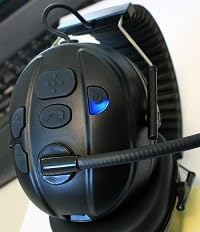
Figure 3: Headset controls showing the power button and a blue indicator light, typically indicating power on or pairing mode.

Figure 4: Headset controls showing the power button and a red indicator light, typically indicating low battery or charging status.
2.3 בלועטאָאָטה פּערינג
The BTH-900-MAX supports dual-link Bluetooth connectivity, allowing connection to two devices simultaneously (e.g., a radio adapter and a cellphone).
- אַרייַן די פּערינג מאָדע: With the headset off, press and hold the Power button for approximately 5-7 seconds until the LED indicator flashes rapidly (e.g., alternating red and blue).
- Pair with First Device: On your first device (e.g., PrymeBLU radio adapter, cellphone, or tablet), enable Bluetooth and search for available devices. Select "BTH-900-MAX" from the list.
- באַשטעטיקן קשר: Once paired, the LED indicator on the headset will change (e.g., slow blue flashes) to indicate a successful connection.
- Pair with Second Device (Dual Link): To connect a second device, repeat step 1 to enter pairing mode again. Then, on your second device, enable Bluetooth and select "BTH-900-MAX". The headset will attempt to connect to both devices.
- Ensure both devices show "BTH-900-MAX" as connected in their Bluetooth settings.
3. אָפּעראַציע
3.1 טראָגן די כעדסעט
The BTH-900-MAX features a behind-the-head racing style design for a secure and comfortable fit. Adjust the headband and earcups for optimal comfort and noise isolation.

Figure 5: The BTH-900-MAX headset positioned on a mannequin head, illustrating the behind-the-head wearing style.
3.2 קאָנטראָלס איבערview
The headset features dedicated control buttons for various functions. Familiarize yourself with their placement and operation.

פיגור 6: פון אויבן אַראָפּ view of the headset's control panel, showing the layout of buttons for various functions.

פיגור 7: א נאנטע בילד view of the side control buttons on the headset, including volume and call controls.
3.3 Radio Communication (PTT)
When connected to a compatible two-way radio via a PrymeBLU adapter or built-in Bluetooth:
- Press and hold the dedicated PTT button on the headset to transmit.
- מעלדונג די PTT קנעפּל צו הערן.
3.4 Cellphone/Tablet Communication
When connected to a cellphone or tablet:
- ענטפֿערן / סוף רופן: Press the dedicated Call button (usually marked with a phone icon) to answer an incoming call or end an active call.
- שטימע אַססיסטאַנט: Long press the Call button to activate your device's voice assistant (e.g., Siri, Google Assistant).
- באַנד קאָנטראָל: Use the Volume Up (+) and Volume Down (-) buttons to adjust audio levels.

פיגורע 8: אַן עקסample of a Push-to-Talk (PTT) application on a smartphone, demonstrating compatibility for mobile communication.
3.5 Microphone Adjustment
The boom microphone is flexible and can be adjusted for optimal voice pickup. Position it approximately 1-2 inches from your mouth.

פיגור 9: א דעטאלירטע view of the noise-reducing condenser boom microphone, including its protective wind sock.
4. וישאַלט
4.1 רייניקונג
- ווישט די כעדסעט ייבערפלאַכן מיט אַ ווייכן, דamp שטאָף. ויסמיידן ניצן האַרב קעמיקאַלז אָדער אַברייסיוו קלינערז.
- The ear cushions can be gently cleaned with a mild soap solution if necessary. Ensure they are completely dry before reattaching.
- The microphone wind sock can be removed and cleaned or replaced if it becomes worn or dirty.

Figure 10: A close-up of the padded earphone, highlighting the comfortable and replaceable ear cushions.
4.2 סטאָרידזש
ווען נישט אין באַנוץ, האַלט די כעדסעט אין אַ קיל, טרוקן אָרט. דער צוזאַמענפאַלטבאַרער פּלאַן ערמעגליכט קאָמפּאַקט סטאָרידזש.
- Fold the headset to minimize its footprint.
- Avoid exposing the headset to extreme temperatures or direct sunlight for prolonged periods.
5. טראָובלעשאָאָטינג
פּראָסט ישוז און סאַלושאַנז:
- קיין מאַכט:
- Ensure the headset is fully charged. Connect it to the charger and check the LED indicator.
- קען נישט צוזאמענשטעלן מיטן דעווייס:
- Ensure the headset is in pairing mode (rapidly flashing LED).
- Make sure Bluetooth is enabled on your device and it's within the 10-meter range.
- Try turning off and on both the headset and your device's Bluetooth.
- If previously paired, try "forgetting" the device on your phone/radio and re-pairing.
- Poor Audio Quality / No Sound:
- Check the volume levels on both the headset and the connected device.
- Ensure the microphone boom is correctly positioned and the wind sock is clean.
- Verify that the headset is properly connected via Bluetooth.
- Move closer to the connected device to ensure you are within the 10-meter Bluetooth range.
- Dual Link Issues:
- Ensure both devices are successfully paired and show as connected.
- Some devices may prioritize one connection over another. Test functionality with each device individually first.
6. ספּעסאַפאַקיישאַנז
| מאָדעל נאָמען: | BTH-900-MAX |
| קאַנעקטיוויטי טעכנאָלאָגיע: | ווירעלעסס (בלועטאָאָטה) |
| בלועטאָאָטה ראַנגע: | 10 מעטער |
| באַטאַרייע לעבן: | 50 שעה |
| באַטערי טיפּ: | 1 ליטהיום פּאָלימער (אַרייַנגערעכנט) |
| קאָנטראָל טיפּ: | Volume Control, Push Button (PTT) |
| ספּעציעלע פֿעיִקייטן: | Foldable, Lightweight, Noise Cancellation, Water Resistant, iOS Phone Control |
| אויער אָרט: | איבער אויער |
| פאָרם פאַקטאָר: | איבער אויער |
| ראַש קאָנטראָל: | אַקטיוו ראַש קאַנסאַליישאַן |
| נומער וואָג: | 14.4 אונס (0.9 פונט) |
| פּראָדוקט דימענשאַנז: | 9.45 X 6.3 X 9.06 אינטשעס |
| אַרייַנגערעכנט קאַמפּאָונאַנץ: | אויער קושאַנז |
| UPC: | 638615134348 |
7. וואָראַנטי אינפֿאָרמאַציע
Specific warranty details for the PRYME BTH-900-MAX Wireless Dual-Muff Headset are not provided in the product data. Please refer to the manufacturer's official website or the product packaging for comprehensive warranty terms and conditions.
8. קונה שטיצן
For technical assistance, troubleshooting beyond this manual, or inquiries regarding your PRYME BTH-900-MAX headset, please contact PRYME customer support. Contact information can typically be found on the official PRYME webזייטל אדער אין דער פּראָדוקט פּאַקאַדזשינג.
9. פּראָדוקט ווידעא גייד
Video 1: An official product video demonstrating the PRYME Wireless Dual-Muff Headset with Boom Mic, highlighting its key features and professional applications. (Duration: 1:29)