
1. הקדמה
Welcome to the user manual for your new Electro-Voice EVERSE 8 Loudspeaker. The EVERSE 8 is a state-of-the-art, battery-powered, 8-inch, two-way loudspeaker designed to deliver exceptional audio performance in a highly portable and weatherized package. It combines decades of Electro-Voice engineering expertise with the latest technological advancements to provide a truly wireless and versatile audio experience.
This manual provides essential information for setting up, operating, and maintaining your EVERSE 8 loudspeaker, ensuring you get the most out of its advanced features, including Bluetooth audio streaming and control, automatic feedback suppression, and music ducking.

Figure 1.1: The EVERSE 8, a weatherized battery-powered loudspeaker with Bluetooth audio and control.
2. סעטאַפּ
2.1 אויספּאַקן די קעסטל און ערשטע דורכקוק
נעמט פֿאָרזיכטיק אַרויס אַלע קאָמפּאָנענטן פֿון דער פּאַקעט. באַשטעטיקט אַז די פֿאָלגנדיקע זאַכן זענען אַרייַנגערעכנט:
- EVERSE 8 Loudspeaker
- מאַכט קאַבלע
- באַטערי פּאַק
- Weatherized Input Cover
- באַניצער מאַנואַל (דעם דאָקומענט)
Inspect the loudspeaker for any signs of damage during transit. If any damage is found, contact your dealer immediately.
2.2 טשאַרדזשינג די באַטאַרייע
The EVERSE 8 is powered by a custom-designed high-capacity Li-ion battery pack. For optimal performance and longevity, fully charge the battery before first use.
- זיכער מאַכן אַז דער מאַכט קנעפל אויף דער הינטערשטער פּאַנעל איז אין דער אויסגעלאָשן פּאָזיציע.
- Connect the supplied power cable to the MAINS IN port on the rear panel and then to a suitable AC power outlet.
- The battery charging indicator will illuminate. A full charge typically takes several hours. The battery provides up to 12 hours of run time depending on usage.
2.3 פּאַוערינג אויף / אַוועק
To power on the EVERSE 8, flip the power switch on the rear panel to the ON position. The QuickSmartDSP display will illuminate, indicating the unit is ready for operation. To power off, flip the switch back to the OFF position.

Figure 2.1: Rear panel of the EVERSE 8, showing power input and various audio connections.
2.4 פּלאַצירונג אָפּציעס
The EVERSE 8 offers flexible placement options to suit various applications:
- Tripod Mount: For a longer throw and wider coverage, mount the EVERSE 8 on a standard speaker tripod using the integrated pole mount socket on the bottom.
- Stage Wedge: Place the loudspeaker long-side down at a 55° monitor angle for use as a stagE מאָניטאָר.
- Kick-back Angle: Use the 30° kick-back angle when placing the unit upright on the floor to project sound upwards from the performance area.

פיגורע 2.2: דנאָ view of the EVERSE 8, highlighting the integrated pole mount for tripod use.

Figure 2.3: The EVERSE 8 can be positioned at a kick-back angle for upward sound projection.
2.5 פֿאַרבינדן אַודיאָ קוועלער
The EVERSE 8 features a versatile input panel:
- אַרייַנשרייַבן 1 און 2: Combo XLR/TRS jacks for microphones or line-level instruments. Input 1 offers 48V switchable phantom power for condenser microphones. Input 2 is Hi-Z compatible for direct instrument connection.
- Input 3/4: Stereo 3.5mm input for connecting external audio devices.
- בלועטאָאָטה: פֿאַר וויירלעס אַודיאָ סטרימינג פֿון קאָמפּאַטיבלע דעוויסעס.
2.6 בלועטאָאָטה פּערינג
To pair a Bluetooth device for audio streaming:
- Press and hold the Bluetooth pairing button on the Input 3/4 section of the rear panel until the Bluetooth indicator flashes.
- On your mobile device, search for "EVERSE 8" in the Bluetooth settings and select it to pair.
- Once paired, the indicator will glow solid blue.
For true wireless stereo (TWS) streaming with a second EVERSE 8 unit, refer to the detailed instructions in the QuickSmart Mobile app or the full user manual.
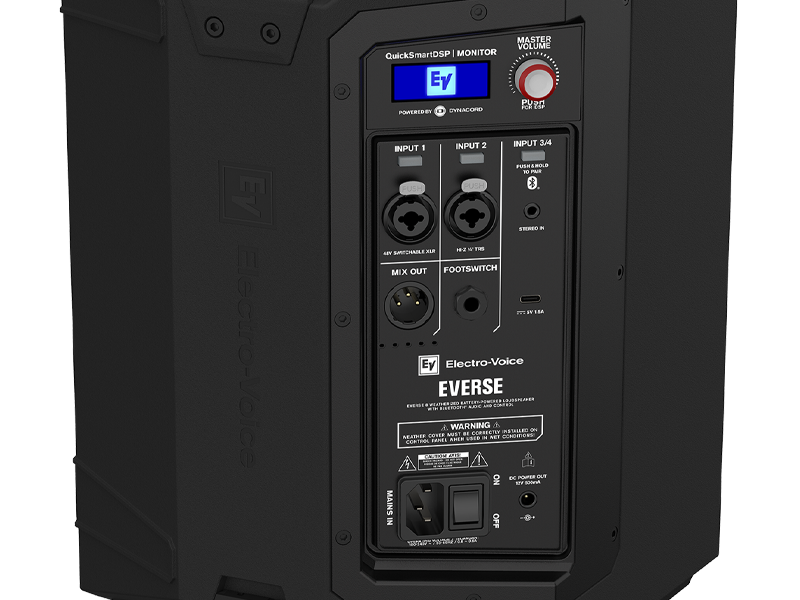
פיגורע 2.4: דעטאַילעד view of the EVERSE 8 control panel, showing inputs and Bluetooth pairing button.
3. אָפּערייטינג
3.1 QuickSmartDSP and Master Volume
The EVERSE 8 features an integrated QuickSmartDSP module, developed in collaboration with Dynacord, providing professional-grade audio processing. The Master Volume knob controls the overall output level of the loudspeaker. Push the knob to access and navigate the DSP menu for advanced settings.
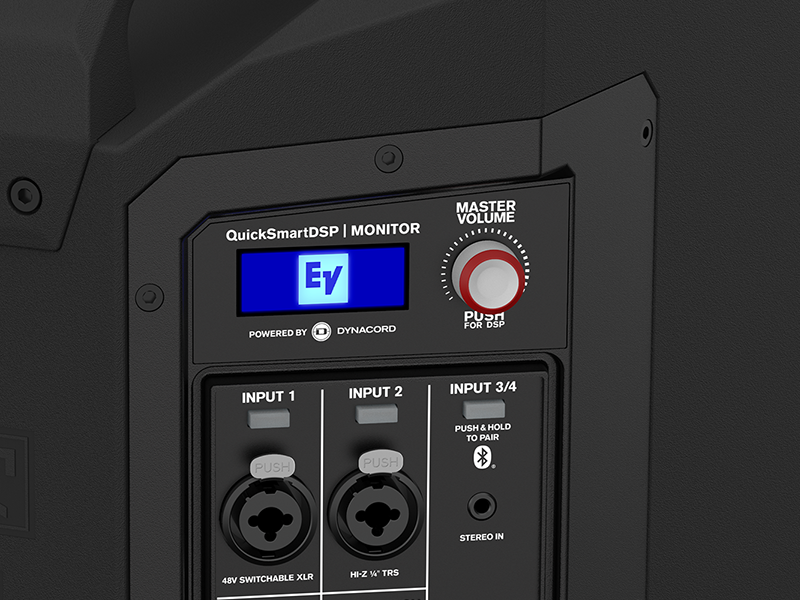
Figure 3.1: The QuickSmartDSP display and Master Volume knob for comprehensive control.
3.2 Input Controls and Features
- אַרייַנשרייַב געווינס: Adjust the gain for each input channel using the dedicated controls on the rear panel or via the QuickSmart Mobile app.
- מישן אָוט: An XLR output allows you to send the mixed audio signal to another EVERSE 8 unit or an external mixer.
- פאָאָטסוויטש: Connect an optional footswitch for remote control of certain DSP functions (e.g., effects mute).
- DC Power Out: A 12V DC port provides convenient power for wireless microphone systems, eliminating the need for separate power supplies.
- USB טשאַרדזשינג: A charging port is included for mobile devices, allowing you to top up your phone or tablet while streaming.
3.3 DSP Functions
The QuickSmartDSP offers a range of professional features:
- EQ: Built-in four-channel digital mixer with studio-quality effects and processing. Adjust equalization for each input to tailor the sound to your environment and source.
- עפעקטן: Access a variety of studio-quality effects to enhance vocals and instruments.
- Automatic Feedback Suppression (AFS): This feature automatically detects and eliminates feedback, ensuring clear and stable audio.
- Music Ducking: Automatically lowers the music volume when a microphone signal is detected, ideal for announcements or spoken word over background music.
3.4 QuickSmart Mobile App
For best-in-class control and streaming, download the QuickSmart Mobile app for iOS and Android devices. The app provides comprehensive control over all audio, effects, and mix functions of your EVERSE 8 from your smartphone or tablet.

Figure 3.2: Control your EVERSE 8 wirelessly using the QuickSmart Mobile app.
4. וישאַלט
4.1 באַטעריע זאָרג און סטאָרידזש
To maximize the lifespan of your Li-ion battery pack:
- פֿאַרמײַדט אָפֿט פֿולשטענדיק אויסצולאָדן די באַטעריע.
- For long-term storage, charge the battery to approximately 50% and store it in a cool, dry place.
- The battery pack is designed for easy removal with tool-free screws, allowing for convenient replacement if needed.
4.2 רייניקונג
The EVERSE 8 features an IP43-rated weatherized design, making it resistant to splashes and light rain. To clean the unit:
- ניצן אַ ווייך, דamp cloth to wipe down the polypropylene enclosure.
- דו זאלסט נישט נוצן אַברייסיוו קלינערז אָדער סאָלוואַנץ.
- Ensure the weatherized input cover is properly installed when using the unit in wet conditions to maintain its IP43 rating.

Figure 4.1: The EVERSE 8 is designed to withstand light rain and splashes.
5. טראָובלעשאָאָטינג
This section addresses common issues you might encounter with your EVERSE 8 loudspeaker. For more detailed troubleshooting, refer to the QuickSmart Mobile app or the comprehensive user manual available on the Electro-Voice webפּלאַץ.
5.1 קיין קלאַנג אַרויסגאַנג
- מאַכט: Ensure the unit is powered on and the battery is charged or connected to AC power.
- באַנד: Check the Master Volume knob and individual input gain controls.
- אַרייַנשרייַב קשר: Verify that audio sources are correctly connected to the appropriate inputs (XLR, TRS, 3.5mm, or Bluetooth).
- שטום: Check if any channels or the master output are muted via the DSP or QuickSmart Mobile app.
5.2 בלוטוט פֿאַרבינדונג פּראָבלעמען
- פּערינג מאָדע: Ensure the EVERSE 8 is in Bluetooth pairing mode (flashing indicator).
- מיטל זעבארקייט: Make sure your mobile device's Bluetooth is enabled and visible.
- דיסטאַנסע: Keep the Bluetooth device within range (typically up to 30 feet/10 meters).
- ינטערפיראַנס: מאַך אַוועק פון אנדערע וויירליס דעוויסעס וואָס קען פאַרשאַפן ינטערפיראַנס.
5.3 Feedback (Squealing Sound)
- מיקראָפאָן אָרט: Reposition microphones further away from the loudspeaker or behind it.
- געווינס רעדוקציע: Lower the gain of the input channel connected to the microphone.
- Automatic Feedback Suppression (AFS): Ensure the AFS feature is enabled and configured correctly via the DSP or QuickSmart Mobile app.
6. ספּעסאַפאַקיישאַנז
The following table outlines the key specifications for the Electro-Voice EVERSE 8 Loudspeaker:
| שטריך | באַשרייַבונג |
|---|---|
| סאָרט | עלעקטראָ-קול |
| מאָדעל נאָמען | F.01U.399.423 (ELE EVERSE8US) |
| רעדנער טיפּ | מאָניטאָר |
| ספּעציעלע שטריך | Portable, Weatherized (IP43) |
| רעקאָממענדעד ניצט | For Music Players, Live Sound, Events |
| קאַמפּאַטאַבאַל דעוויסעס | Smartphone, Microphones, Instruments |
| וואָאָפער דיאַמעטער | 8 אינטשעס |
| טוועעטער דיאַמעטער | 1 אינטשעס |
| יוניט גראף | 1.0 גראף |
| קאָנטראָללער טיפּ | App Control, Voice Control (via app) |
| אַרומרינגלען סאָונד קאַנאַל קאַנפיגיעריישאַן | 2.0 (Stereo via Bluetooth TWS) |
| קאָליר | שוואַרץ |
| באַטערי לעבן | אַרויף צו 12 שעה |
| אַרייַנגערעכנט קאַמפּאָונאַנץ | Power Cable, Battery Pack, Weatherized Input Cover, User Manual |
| פּראָדוקט דימענשאַנז | 19"ד רענטגענ 14"וו רענטגענ 15"ה |
| פּונקט וואָג | 10.5 קילאָגראַמס (23.1 פונט) |
| מאַטעריאַל | פּאָליפּראָפּילענע |
| מאַכט מקור | באַטאַרייע פּאַוערד |
| קאַנעקטיוויטי טעכנאָלאָגיע | בלועטאָאָטה |
| אַודיאָ רעזולטאַט מאָדע | Stereo (Bluetooth) |
| מאַונטינג טיפּ | Freestanding, Pole Mount |
| UPC | 800549612746 |

Figure 6.1: Physical dimensions of the EVERSE 8 loudspeaker.
7. וואָראַנטי אינפֿאָרמאַציע
The Electro-Voice EVERSE 8 Loudspeaker comes with a limited warranty. For specific terms, conditions, and registration details, please refer to the warranty card included with your product or visit the official Electro-Voice webזייטל. האַלט דיין קויפן באַווייַז פֿאַר וואָראַנטי קליימז.
8. שטיצן
For further assistance, technical support, or to download the latest version of the QuickSmart Mobile app, please visit the official Electro-Voice support website. You can also find additional resources, FAQs, and contact information for customer service there.
Electro-Voice Official Webפּלאַץ: www.electrovoice.com