
1. הקדמה
Thank you for choosing the DELLA Umbra Series 9000 BTU WiFi Mini Split AC with Heat Pump. This manual provides essential information for the safe and efficient operation, installation, and maintenance of your unit. Please read this manual thoroughly before installation and use, and retain it for future reference.
וויכטיק סאַפעטי אינפֿאָרמאַציע
This appliance is designed for professional installation only. Attempting DIY installation without proper qualifications may result in injury, property damage, or voiding the warranty. Always consult a qualified HVAC technician for installation and complex maintenance tasks.
- זיכער מאַכן אַז די מאַכט צושטעל שטימט מיט די ספּעסיפיקאַציעס פון דער אַפּאַראַט.
- דו זאלסט נישט פאַרשפּאַרן לופט ינלעץ אָדער אַוטלעץ.
- האַלט קינדער און חיות אַוועק פון דער דרויסנדיקער אַפּאַראַט.
- Turn off power before any maintenance or cleaning.
- Use only specified refrigerants (R32).
2. פּראָדוקט איבערview
The DELLA Umbra Series Mini Split AC is an energy-efficient system designed for cooling and heating spaces up to 450 sq.ft. It features WiFi connectivity, Alexa compatibility, and a heat pump for year-round comfort.
שליסל פֿעיִקייטן:
- ענערגיע עפעקטיוו: 19 SEER2 rating with DC Inverter technology for up to 30% power savings.
- סמאַרט פאַנגקשאַנז: 4D airflow (up-down, left-right), I Feel mode, 24-hour timer, sleep mode, eco energy-saving mode, multiple fan speeds, turbo function.
- קלוג סענסער: Remote control senses room temperature for optimal comfort and energy savings.
- שטיל אָפּעראַציע: ארבעט מיט אן אולטרא-שטילער 42 dBa.
- ברייט קאַווערידזש: Cools and heats up to 450 sq.ft, operating in temperatures as low as 19°F.
- R32 ריפרידזשעראַנט: ניצט ענווייראָנמענטאַלי פרייַנדלעך R32 קילמאַטעריאַל.
קאָמפּאָנענטן דיאַגראַמע:

Figure 2.1: Main components included with the DELLA Umbra Series Mini Split AC.
פּראָדוקט View:

Figure 2.2: DELLA Umbra Series 9000 BTU WiFi Mini Split AC.
3. סעטאַפּ און ייַנמאָנטירונג
Professional installation is mandatory for this system. This is not a DIY mini split AC. Line-set vacuuming is required during installation. Any alteration of line-set length requires adjusting freon levels. Please consult a qualified HVAC professional for proper installation to ensure safety and optimal performance.
ינסטאַלירונג איבערview ווידעא:
Video 3.1: General guidance on installing your DELLA Mini Split AC unit. This video is for informational purposes only; professional installation is required.
Key Installation Steps (Summary):
- מאַרקינג לאָוקיישאַנז: Use the provided template to mark the locations for the line set wall hole and the mini split bracket.
- מאָונטינג קלאַמער: Securely attach the mini split bracket to the wall using the provided screws. Ensure the bracket is properly leveled.
- Routing Lines: Route the line set, drain hose, and electrical wiring through the wall opening.
- Mounting Indoor Unit: Securely mount the indoor mini split unit onto the bracket.
- Taping Lines: Tape the drain hose and line sets together for a neat and organized installation.
- Securing Electrical Wires: Use zip ties to secure the electrical wires around the taped line sets and drain hose.
- Positioning Outdoor Condenser: Place the outdoor condenser unit in its designated location.
- Connecting Line Set: Connect the unit line set to the condenser line set and tighten down firmly. Use a digital torque wrench if available to ensure proper tightening according to specifications.
- עלעקטריקאַל קאַנעקשאַנז: Connect the electrical wires (red, black, green ground) to their corresponding terminals on the condenser unit. Each wire is designated with a specific letter and number.
- וואַקוום אויסרייניקן די סיסטעם: Connect a vacuum pump to the system via a gauge. Open the valves on the gauge and activate the vacuum. Monitor the micron reading closely and close the valves once it reaches 350 microns. Turn off the vacuum pump.
- צוריקשטעלן מאַכט: Restore power to the outdoor unit.
- Initiating Cooling: Turn on the mini split unit and set it to the lowest cold setting. Allow a few minutes for the outdoor condenser fan to initiate.
- Opening Valves: Gradually open the high side (top) valve using a service wrench. Monitor the gauge as readings will decrease into the negative range. After the high side valve is open, promptly open the low side (bottom) valve. Monitor the gauge closely as the readings will increase, which is expected.
Your DELLA mini split unit installation is complete once these steps are followed and the unit is operating correctly.
ייַנמאָנטירונג פּרעview ווידעא:
ווידעא 3.2: א קורצע הקדמהview of the DELLA Mini Split AC installation process, highlighting key steps.
4. אַפּערייטינג ינסטרוקטיאָנס
Your DELLA Umbra Series Mini Split AC can be controlled via the included remote control, the Della+ mobile app, or voice commands through Alexa.
ווייַט קאָנטראָל:

Figure 4.1: DELLA Mini Split AC Remote Control.
Use the remote control to adjust temperature, select operating modes, set fan speed, and activate special functions like Sleep Mode or Turbo. Refer to the remote control's specific instructions for detailed button functions.
Della+ Mobile App:
The Della+ app allows you to control your unit remotely, set schedules, and utilize smart features like Geo-Location.
Video 4.2: Learn how to set up and customize Geo-Location using the Della+ App for smart AC controls.
ווידעא 4.3: א קורצע הקדמהview demonstrating the features and interface of the Della+ App.

Figure 4.2: Della+ App Interface.
- אראפקאפיע: זוכן פֿאַר "Della+" in your mobile app store.
- פּאָרינג: Follow the in-app instructions to pair your device with the AC unit.
- מאָדעס: Select from Cool, Heat, Dry (dehumidify), Fan Only, or ECO mode.
- פאַן גיכקייַט: Adjust fan speed from Quiet, Low, Mid, High, to Turbo.
- לופט לויפן: Control vertical and horizontal oscillation for optimal air distribution.
- סקעדזשולינג און טיימער: Set weekly schedules or countdown timers for automatic operation.
- געא-לאקאציע: Configure automatic AC control based on your location.
שטימע קאנטראל (אלעקסא):
The unit seamlessly integrates with Amazon Alexa for convenient voice control. Ensure your Della+ app is linked to your Alexa account.

Figure 4.3: Voice Control Compatibility with Alexa.
5. וישאַלט
Regular maintenance ensures optimal performance and longevity of your DELLA Mini Split AC unit. Always disconnect power before performing any maintenance.
פילטער רייניקונג:
The indoor unit features washable air filters. Clean them every two weeks or more frequently depending on usage and air quality.
- עפענען די פראָנט טאַפליע פון די דרינענדיק אַפּאַראַט.
- אַראָפּנעמען די לופט פילטערס.
- וואַשט די פילטערס מיט לאַקע וואַסער און אַ מילד וואַשפּולווער.
- שווענקט גוט אויס און לאָזט זיי גאָר טרוקן ווערן אין דער לופט איידער איר לייגט זיי צוריק אַרײַן.
- נאָענט די פראָנט טאַפליע.
רייניקונג פון אינעווייניקסטע איינהייט:
ווישט די ייבערפלאַך פון דער אינעווייניקסטער אַפּאַראַט מיט אַ ווייכן, דamp cloth. Do not use harsh chemicals or abrasive cleaners. The unit also features PureClean tech to prevent dust buildup and defrost the indoor unit, contributing to cleaner air.
פיגורע 5.1: אינערלעכער view of the indoor unit highlighting PureClean technology.
רייניקונג פון די דרויסנדיקע איינהייט:
Periodically clean the outdoor unit's coils and fins to remove dirt, leaves, and debris. Use a soft brush or vacuum cleaner. Ensure the area around the outdoor unit is clear of obstructions for proper airflow.

Figure 5.2: Outdoor unit with gold-plated fins for corrosion prevention.
6. טראָובלעשאָאָטינג
איידער איר קאָנטאַקטירט קונה שטיצע, ביטע ווידערview די פאלגענדע געוויינטלעכע פראבלעמען און לייזונגען:
| פּראָבלעם | מעגלעך סיבה | לייזונג |
|---|---|---|
| אַפּאַראַט טוט נישט אָנהייבן. | קיין עלעקטרע, קרייז ברעיקער האט אויסגעלאשן, באַטעריעס פון ווײַט קאָנטראָל זענען נידעריק. | Check power supply, reset circuit breaker, replace remote batteries. |
| נישט גענוג קילן/הייצן. | Dirty air filters, blocked outdoor unit, incorrect mode setting, low refrigerant. | Clean air filters, clear obstructions from outdoor unit, select correct mode, contact professional for refrigerant check. |
| אומגעוויינטלעכער גערויש פון דער איינהייט. | לויזע טיילן, פארשטאפונג פון ווענטילאַטאָר, נאָרמאַלע אַרבעטס-גערוישן (למשל, קילשטאָף-פלוס). | Check for loose parts or obstructions. If noise persists or is unusual, contact support. |
| וואַסער ליקאַדזש פון דרינענדיק אַפּאַראַט. | Blocked drain hose, improper installation angle. | Check and clear drain hose. If issue persists, professional re-installation may be needed. |
| ווייַט קאָנטראָל נישט ארבעטן. | Batteries dead, remote out of range, signal obstruction. | Replace batteries, ensure clear line of sight to indoor unit, operate within range. |
For issues not listed here or if solutions do not resolve the problem, please contact DELLA customer support.
7. ספּעסאַפאַקיישאַנז
| שטריך | דעטאַל |
|---|---|
| מאָדעל נומער | 9K1VR-19S-JPB-I+O |
| גרייס | 9,000 BTU - 115V -- 19 SEER2 |
| קאָאָלינג קאַפּאַציטעט | 9000 BTU / ה |
| באַהיצונג קאַפּאַסיטי | 10000 BTU / ה |
| מאַכט צושטעלן | 115V~/60Hz/1PH |
| מאַקסימום אַרייַנשרייַב מאַכט | 1200 וו |
| לופט לויפן באנד | 560 מ³/ה |
| מאַקס. פוסע גרייס | 20 א |
| געזונט מדרגה | 42 דעציבעלן |
| פּראָדוקט דימענשאַנז | 31.18 X 7.91 X 11.5 אינטשעס |
| פּונקט וואָג | 58.6 פונט |
| ספּעציעלע פֿעיִקייטן | Alexa and WiFi Enabled, DeHumidifier, Fast Cooling and Heating, Remote Control |
| ריפרידזשעראַנט טיפּ | ר32 |

פיגור 7.1: פּראָדוקט דימענסיעס.
8. וואָראַנטי און שטיצן
DELLA is committed to providing high-quality products and excellent customer service.
לימיטעד לעבן וואָראַנטי:
Your DELLA Umbra Series Mini Split AC comes with a limited lifetime warranty, offering peace of mind against manufacturing defects. This warranty is designed to cover the product for its expected lifespan under normal use and service. Please refer to the warranty card included with your product for full terms and conditions.

Figure 8.1: DELLA Lifetime Coverage.
קונה שטיצן:
Our dedicated customer support team is available to assist you with any questions or concerns regarding your DELLA product.
- טעלעפאָן שטיצן: פֿאַראַן מאָנטיק - פֿרײַטיק, 6 אַזייגער אינדערפֿרי - 4 אַזייגער נאָכמיטאָג PST.
- לעבן שמועסן: 24/7 support for immediate assistance.
Please have your model number (9K1VR-19S-JPB-I+O) and purchase information ready when contacting support.
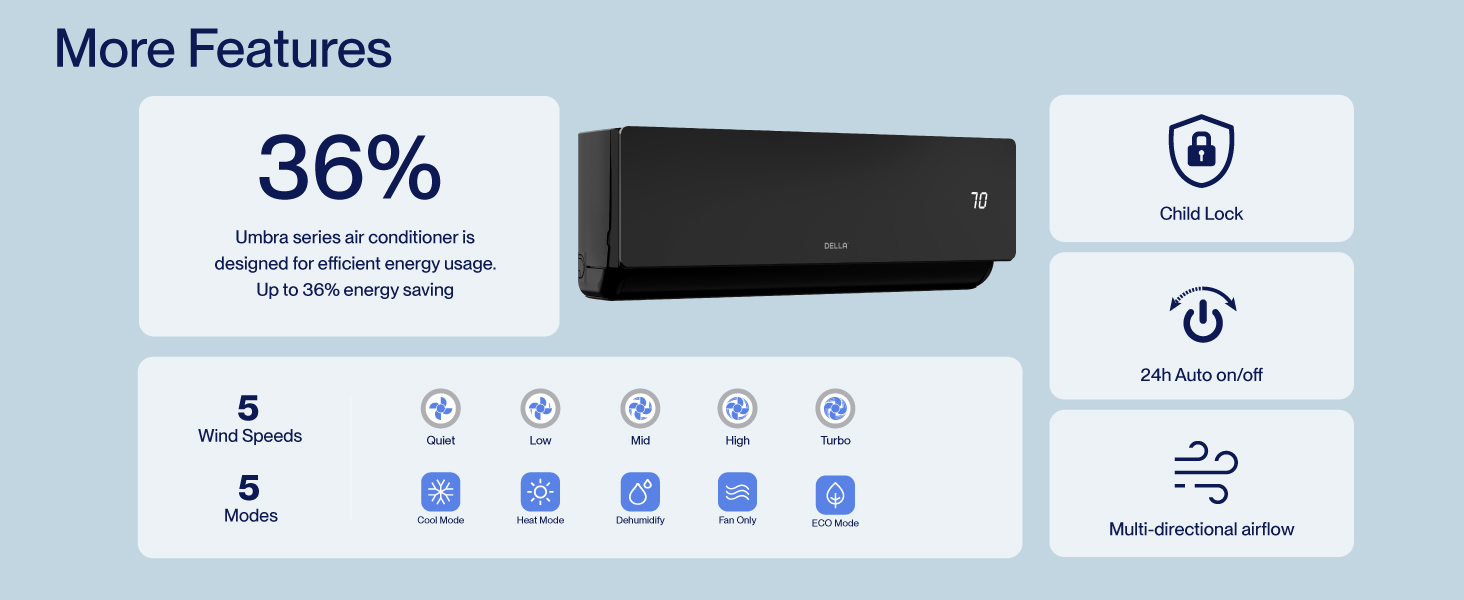
Figure 8.2: DELLA Customer Support Options.