
Provision ISR WP-919
Provision CAM-WiFi 2MP HD Security Camera User Manual
מאָדעל: וופּ-919
1. פּראָדוקט איבערview
The Provision CAM-WiFi 2MP HD Security Camera (Model WP-919) is a high-definition outdoor surveillance device designed for reliable monitoring. It features 2-megapixel resolution, infrared night vision up to 10 meters, and two-way audio communication with a built-in speaker and microphone. The camera supports Wi-Fi connectivity for easy integration into your network and can be managed via a mobile application on iOS and Android devices.

פיגורע 1.1: פראָנט און זייַט view of the Provision CAM-WiFi 2MP HD Security Camera, showing the lens, antenna, and mounting bracket.

Figure 1.2: Key features of the camera including 2MP resolution, Day & Night (ICR), 10m IR, SD card support, 2-Way Audio, WiFi connectivity, and mobile app compatibility.
2. זיכערקייַט אינפֿאָרמאַציע
- Ensure the power supply matches the camera's requirements to prevent damage.
- Do not expose the camera to extreme temperatures, humidity, or strong magnetic fields.
- Avoid direct exposure of the lens to strong light sources, as this may affect image quality or damage the sensor.
- באַהאַנדלט די קאַמעראַ מיט פֿאָרזיכט. לאָזט זי נישט אַראָפּ און לאָזט זי נישט אויסשטעלן צו שטאַרקע ווייבריישאַנז.
- Keep the camera away from children and pets.
- For outdoor installation, ensure proper waterproofing of all connections.
3. פּעקל אינהאַלט
ביטע טשעק די פּאַקעט פֿאַר די פאלגענדע זאכן:
- Provision CAM-WiFi 2MP HD Security Camera (WP-919)
- מאָנטירונג שרויפן און וואַנט פּלאַגז
- Power Adapter (may be sold separately in some regions)
- שנעל אָנהייב גייד
4. סעטאַפּ
4.1 גשמיות ינסטאַלירונג
- קלייַבן אַ אָרט: Select a suitable outdoor location for installation, ensuring a clear view and strong Wi-Fi signal.
- מאָונטינג:
- Mark the drilling points using the camera's mounting base as a template.
- באָערט לעכער און אַרײַנשטעקט וואַנט פּלאַגז אויב עס איז מאָנטירט אויף ציגל.
- Secure the camera's mounting base to the wall or ceiling using the provided screws.
- סטרויערן די אַפּאַראַט ווינקל ווי דארף.
- פאַרבינדן מאַכט: פֿאַרבינדט דעם מאַכט אַדאַפּטער צום קאַמעראַ'ס מאַכט אַרייַנגאַנג פּאָרט און שטעקט עס אין אַ מאַכט ווענטיל.
- SD Card Installation (Optional):

פיגורע 4.1: זייַט view of the camera showing the cover for the SD card slot and the integrated speaker.
- Locate the SD card slot cover on the side of the camera.
- פֿאָרזיכטיק עפֿנט דעם דעקל.
- Insert a compatible microSD card (up to 128GB, Class 10 recommended) into the slot with the contacts facing down.
- Close the cover securely to maintain weather resistance.
- דראָט פֿאַרבינדונג (אָפּציאָנעל): If a wired connection is preferred, connect an Ethernet cable to the camera's RJ45 port and to your router.

Figure 4.2: The camera's connection cables, including power input, Ethernet (RJ45), and a reset button.
4.2 מאָביל אַפּ סעטאַפּ
- אראפקאפיע די אַפּ: זוכן פֿאַר the "Provision Cam2" or "Provision PnV" app (refer to your Quick Start Guide for the exact app name) on the Apple App Store (for iOS) or Google Play Store (for Android).
- רעגיסטרירן אַ חשבון: Open the app and follow the on-screen instructions to register a new user account.
- צוגעבן אַפּאַראַט:
- צאַפּן די "+" בילדל אָדער "צולייגן מיטל" אָפּציע אין דער אַפּ.
- Select "Wi-Fi Camera" or scan the QR code on the camera (if available).
- Follow the in-app prompts to connect the camera to your Wi-Fi network. This usually involves entering your Wi-Fi password and allowing the camera to connect.
- Once connected, give your camera a name and set a password for security.
5. אַפּערייטינג די קאַמעראַ
5.1 לעבן View
After adding the camera, tap on its name in the app to access the live video feed. You can view פאַקטיש-צייט פאָאָtagפון דיין אַפּאַראַט.
5.2 צוויי-וועג אַודיאָ
The camera is equipped with a built-in speaker and microphone, enabling two-way audio communication.
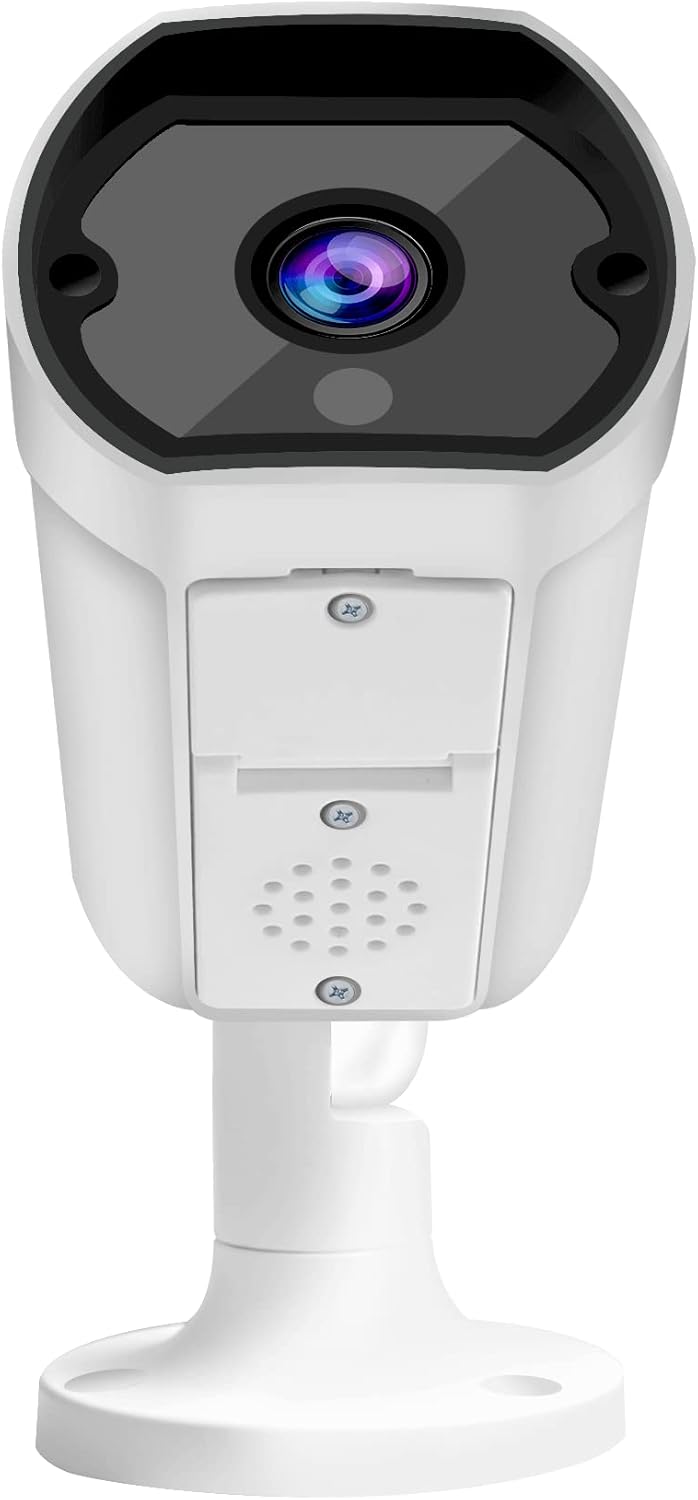
פיגורע 5.1: פראָנט view of the camera, highlighting the lens and the integrated speaker/microphone area below it.
- To Listen: Ensure the speaker icon in the app is enabled to hear audio from the camera's location.
- To Speak: Press and hold the microphone icon in the app to transmit your voice through the camera's speaker. Release to stop speaking.
5.3 נאַכט זעאונג
The camera automatically switches to infrared (IR) night vision mode in low-light conditions, providing clear black-and-white images up to 10 meters.
5.4 רעקאָרדינג און פּלייבאַק
- קעסיידערדיק רעקאָרדינג: If an SD card is installed and configured, the camera can record continuously.
- רעקאָרדינג פון באַוועגונג דעטעקטיאָן: Configure motion detection settings in the app to record only when movement is detected.
- פּלייבאַק: אַקסעס רעקאָרדעד פאָאָtage through the app's playback feature, typically found in the camera's settings or timeline view.
5.5 Mobile Notifications
Enable push notifications in the app settings to receive alerts on your mobile device when motion or other events are detected by the camera.
6. וישאַלט
- רייניקונג: Use a soft, dry cloth to clean the camera lens and body. Do not use harsh chemicals or abrasive cleaners.
- Firmware דערהייַנטיקונגען: Regularly check for and install firmware updates via the mobile app to ensure optimal performance and security.
- נעץ פעסטקייַט: Ensure your Wi-Fi network is stable and strong for uninterrupted camera operation.
- סטאָרידזש פאַרוואַלטונג: Periodically check the SD card storage status and format it if necessary (this will erase all recorded data).
7. טראָובלעשאָאָטינג
| פּראָבלעם | מעגלעך סיבה | לייזונג |
|---|---|---|
| די אַפּאַראַט איז נישט קאַנעקטינג צו Wi-Fi | Incorrect Wi-Fi password; Weak Wi-Fi signal; Camera too far from router; Router firewall settings. |
|
| קיין לייוו ווידעא פיד | Camera offline; Network issue; App glitch. |
|
| נעבעך בילד קוואַליטעט | Dirty lens; Low light conditions; Network bandwidth. |
|
| צוויי-וועג אַודיאָ איז נישט ארבעטן | Microphone/speaker blocked; App volume settings; Network delay. |
|
| SD קאַרטל רעקאָרדירט נישט | SD card full; SD card corrupted; Incorrect recording settings. |
|
8. ספּעסאַפאַקיישאַנז
| שטריך | דעטאַל |
|---|---|
| מאָדעל נומער | WP-919 |
| האַכלאָטע | 2MP (1080p video capture resolution) |
| קאַנעקטיוויטי | ווירעלעס (Wi-Fi), ווייערד (עטהערנעט) |
| נאַכט זעאונג | IR-10M (Infrared up to 10 meters), Day & Night (ICR) |
| אַודיאָ | Two-Way Audio with Built-in Speaker/Microphone |
| סטאָרידזש | Supports MicroSD card (details not specified, typically up to 128GB) |
| באַניץ סוויווע | דרויסנדיק |
| מאַכט מקור | עלעקטריק קאַבלע |
| מאַטעריאַל | מעטאַל |
| דימענסיעס (L X W X H) | 49.99 X 30 X 19 סענטימעטער |
| וואָג | 640 ג |
| מאָביל אַפּ קאַמפּאַטאַבילאַטי | iOS/Android Mobile App |
9. שטיצן
For technical assistance, warranty claims, or further inquiries, please contact Provision ISR customer support. Refer to the contact information provided with your product packaging or visit the official Provision ISR webפּלאַץ.
Note: This manual provides general instructions. Specific features and app interfaces may vary with firmware updates.