
1. הקדמה
The EVTSCAN Peakmeter PM8213C is a portable digital multimeter designed for various electrical measurements. This instrument offers stable performance, high precision, and low power consumption, making it a reliable tool for both professional and DIY users. Its compact appearance and comprehensive features ensure accurate readings for voltage, current, resistance, continuity, non-contact voltage (NCV), frequency, and duty cycle.
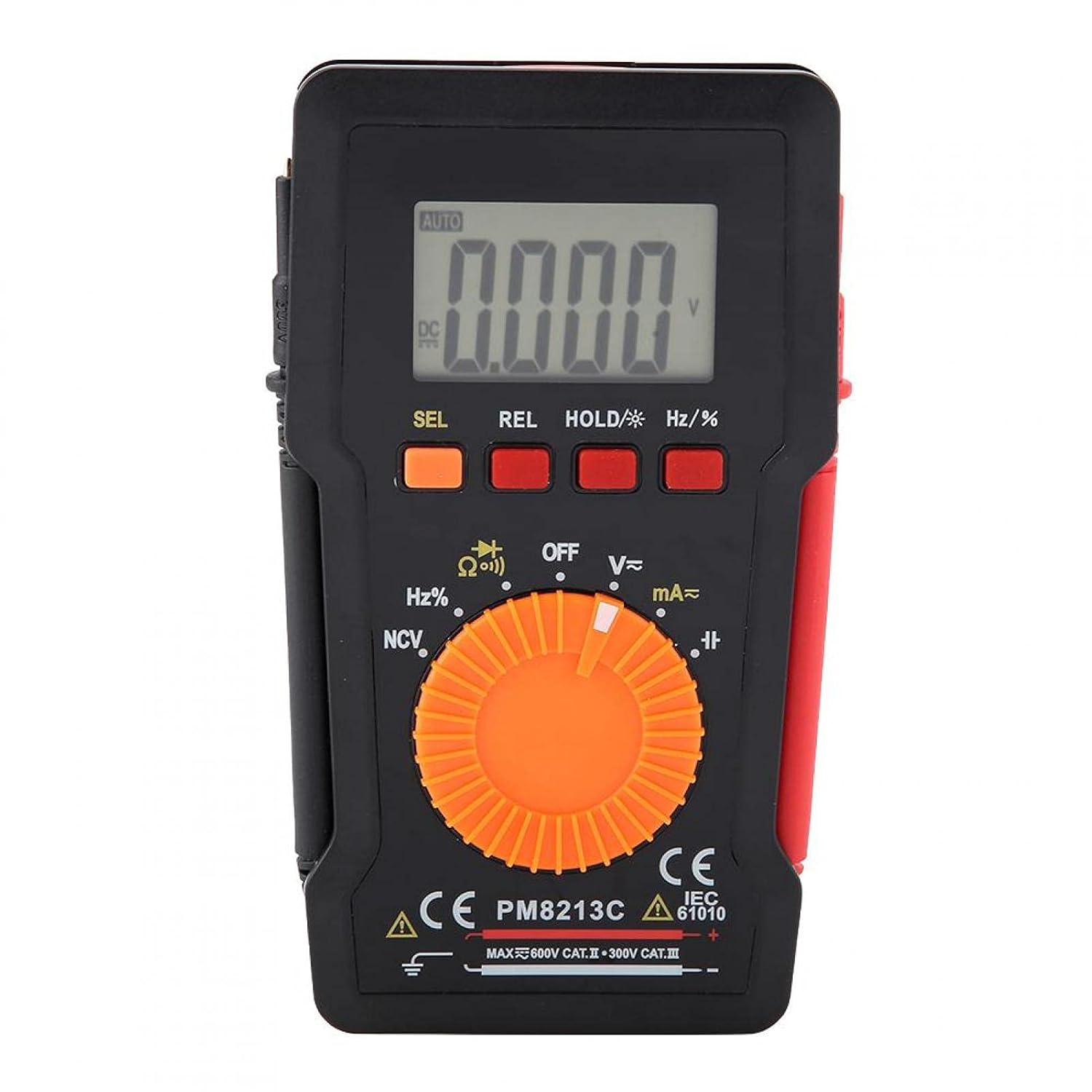
פיגורע 1: פראָנט view of the EVTSCAN Peakmeter PM8213C Digital Multimeter.
2. זיכערקייַט אינפֿאָרמאַציע
To ensure safe operation and service of the meter, please read this manual carefully before use. Failure to observe safety warnings can result in serious injury or death. Always adhere to local and national safety codes.
- נישט איבערשרייטן די מאקסימום אינפוט לימיטן פאר קיין פונקציע.
- ניצן וואָרענען ווען ארבעטן מיט וואָלtagהעכער 30V AC RMS, 42V שפּיץ, אדער 60V DC. די וואַליומעןtagדאָס איז אַ ריזיקירן פון קלאַפּ.
- Before measuring current, ensure the meter's test leads are connected to the correct input jacks and the function switch is set to the appropriate current range.
- שטענדיק אָפּשטעקן די טעסט דראָטן פֿון דער קרייַז איידער איר ענדערט די פּאָזיציע פֿון דער פֿונקציע סוויטש.
- טוישט די באַטעריע גלייך ווען דער נידעריק באַטעריע אינדיקאַטאָר דערשיינט צו ענשור גענויע מעסטונגען.
- Do not operate the meter if it appears damaged or if the protective casing is removed.
- האַלט הענט און פינגער הינטער די פּראָבע באַריערן בעת מעסטונגען.
3. פּראָדוקט איבערview
3.1. קאַמפּאָונאַנץ
The PM8213C multimeter consists of the following main components:
- LCD ווייַז: ווײַזט מעסטונג לייענונגען, איינסן און פונקציע אינדיקאַטאָרן.
- פונקציע קנעפּלעך: SEL (Select), REL (Relative), HOLD (Data Hold), Hz/% (Frequency/Duty Cycle).
- ראָטאַרי סוויטש: Used to select the desired measurement function (e.g., V~, V-, Ω, Continuity, NCV, Hz%, mA~, A~).
- אַרייַנשרייַב דזשאַקס: Terminals for connecting test leads (COM, VΩHz, mA, A).
- טעסט ליידז: Red and black leads for connecting to the circuit under test.
- פּראַטעקטיוו פאַל: Provides protection for the meter.

Figure 2: Key features of the PM8213C Multimeter, including LCD screen and compact design.
3.2. ווייַז סימבאָלס
Familiarize yourself with the symbols that may appear on the LCD display:
- אָטאַמאַטיק: Auto-ranging mode is active.
- גלייכשטראָם/אַק: Direct Current / Alternating Current.
- V: וואלטס (Voltagאון).
- Ω: Ohms (Resistance).
- הז: Hertz (Frequency).
- %: דוטי ציקל.
- NCV: נאַן-קאָנטאַקט חלקtagE דיטעקשאַן.
- האלט: Data Hold function is active.
- REL: Relative measurement mode.
- באַטעריע סימבאָל: ינדיקייץ נידעריק באַטאַרייע מאַכט.
- OOL: Over-range indication.
4. סעטאַפּ
4.1. באַטאַרייע ייַנמאָנטירונג
The PM8213C requires one CR2032 (3V) button cell battery for operation. The battery is typically not included in the package.
- זיכער מאַכן אַז דער מולטימעטער איז אויסגעלאָשן.
- געפינט די באַטעריע אָפּטייל אויף דער צוריקזייט פון דעם מעטער.
- Use a suitable tool (e.g., a small screwdriver) to open the battery compartment cover.
- Insert the CR2032 battery, observing the correct polarity (+ and - markings).
- פאַרבייַטן די דעקן פון די באַטאַרייע אָפּטייל און באַוואָרענען עס.
4.2. טעסט דראָט פֿאַרבינדונג
Connect the test leads to the appropriate input jacks before taking any measurements.
- פאַרבינדן די שוואַרץ טעסט פירן צו די COM (געמיינזאמע) אינפוט דזשעק.
- פֿאַר רובֿ מעסטונגען (וואָל.tage, resistance, frequency, duty cycle, continuity), connect the רויט טעסט פירן צו די VΩHz אַרייַנשרייַב דזשאַק.
- For current measurements (mA), connect the רויט טעסט פירן צו די mA אַרייַנשרייַב דזשאַק.
- For higher current measurements (A), connect the רויט טעסט פירן צו די A input jack (if available and distinct from mA). Note: The PM8213C typically uses a single current input for mA/A, check the dial for specific ranges.
5. אַפּערייטינג ינסטרוקטיאָנס
5.1. מאַכט אויף / אויסגעלאשן
To turn the multimeter ON, rotate the function switch from the OFF position to any desired measurement function. To turn the multimeter OFF, rotate the function switch to the OFF position. The meter features an automatic power-off function after approximately 30 minutes of inactivity to conserve battery life.
5.2. פונקציע סעלעקציע
Use the rotary switch to select the primary measurement function. For functions with multiple modes (e.g., AC/DC voltage, continuity/diode), press the SEL קנעפּל צו וועקסלען צווישן מאָדעס.
5.3. מעסטן גלייכשטראָם באַנדtagE (V-)
- פֿאַרבינדט דעם רויטן טעסט־דראָט צום VΩHz דזשעק און דעם שוואַרצן טעסט־דראָט צום COM דזשעק.
- Set the rotary switch to the V- position.
- פֿאַרבינדט די טעסט־לידער פּאַראַלעל צום גלייכשטראָם־וואָלוקטוםtagדי מקור אדער קאָמפּאָנענט וואָס איר ווילט מעסטן.
- לייענען דעם חלקtagE ווערט אויף די לקד אַרויסווייַזן.
5.4. מעאַסורינג אַק וואָלtagE (V~)
- פֿאַרבינדט דעם רויטן טעסט־דראָט צום VΩHz דזשעק און דעם שוואַרצן טעסט־דראָט צום COM דזשעק.
- Set the rotary switch to the V~ position.
- פֿאַרבינדט די טעסט דראָטן פּאַראַלעל צום AC וואָלומעןtagע מקור אדער קאָמפּאָנענט.
- לייענען דעם חלקtagE ווערט אויף די לקד אַרויסווייַזן.
5.5. מעסטן קעגנשטעל (Ω)
- זיכער מאַכן אַז די קרייַז איז דעענערדזשייזד איידער איר מעסט די קעגנשטעל.
- פֿאַרבינדט דעם רויטן טעסט־דראָט צום VΩHz דזשעק און דעם שוואַרצן טעסט־דראָט צום COM דזשעק.
- שטעלט דעם ראָטאַרי סוויטש צו דער Ω פּאָזיציע.
- פֿאַרבינדט די טעסט־לידער אַריבער דעם קאָמפּאָנענט וועמענס קעגנשטעל איר ווילט מעסטן.
- לייענט דעם ווערט פון דעם קעגנשטעל אויפן LCD דיספּלעי.
5.6. קאָנטינויִטעט טעסט (Ω))))
- זיכער מאַכן אַז די קרייַז איז דע-ענערדזשייזד.
- פֿאַרבינדט דעם רויטן טעסט־דראָט צום VΩHz דזשעק און דעם שוואַרצן טעסט־דראָט צום COM דזשעק.
- Set the rotary switch to the Continuity position (often shared with Resistance or Diode). Press SEL if needed to select continuity.
- פֿאַרבינדט די טעסט־לידער אַריבער דעם קאָמפּאָנענט אָדער דראָט.
- אויב עס עקזיסטירט קאָנטינויִטעט (נידעריק קעגנשטעל), וועט דער מעטער ארויסגעבן אַן הערבאַרן ביפּ.
5.7. ניט-קאָנטאַקט וואָלtagE (NCV) דעטעקשאַן
- Set the rotary switch to the NCV position.
- Move the top edge of the multimeter close to the conductor suspected of having AC voltage.
- דער מעטער וועט ווײַזן דעם בייַזײַן פֿון AC וואָלומעןtage through an audible beep and/or visual indicator (e.g., LED).
5.8. Measuring Frequency (Hz) and Duty Cycle (%)
- פֿאַרבינדט דעם רויטן טעסט־דראָט צום VΩHz דזשעק און דעם שוואַרצן טעסט־דראָט צום COM דזשעק.
- Set the rotary switch to the Hz/% position.
- פֿאַרבינדט די טעסט־לידער פּאַראַלעל צום סיגנאַל־מקור.
- דרוק די הז /% button to toggle between frequency and duty cycle measurements.
- לייענען די ווערט אויף די לקד אַרויסווייַזן.
5.9. Measuring Current (mA~, A~)
- ווארענונג: Never connect the meter in parallel to a voltage source when measuring current. This will blow the fuse and can damage the meter.
- זיכער מאַכן אַז די קרייַז איז דע-ענערדזשייזד.
- פאַרבינדן די שוואַרץ פּרובירן פירן צו די קאַם דזשאַק.
- פֿאַר מיליampere (mA) measurements, connect the red test lead to the mA jack. For ampere (A) measurements, connect the red test lead to the A jack (if separate).
- Set the rotary switch to the appropriate mA~ or A~ position.
- Open the circuit where you want to measure current and connect the meter in series with the load.
- Re-energize the circuit and read the current value on the LCD display.
6. וישאַלט
6.1. רייניקונג
ווישט אויס דעם מעטער'ס קעסטל מיט אדווערטייזמענטamp שטאָף און מילדן וואַשפּולווער. ניצט נישט קיין שוואַרצע מאַטעריאַלן אָדער סאָלווענטן. האַלט די אַרייַנגאַנג טערמינאַלן פריי פון שמוץ און נעץ.
6.2. באַטערי פאַרבייַט
When the low battery indicator appears on the display, replace the CR2032 battery promptly to ensure accurate measurements.
- Turn the multimeter OFF and disconnect all test leads.
- עפענען די באַטאַרייע אָפּטייל דעקן אויף די צוריק פון די מעטער.
- אַראָפּנעמען די אַלט CR2032 באַטאַרייע.
- Insert a new CR2032 (3V) button cell battery, ensuring correct polarity.
- נאָענט די דעקן פון די באַטאַרייע אָפּטייל סיקיורלי.
6.3. קאָריק פאַרבייַט
If the current measurement function stops working, the fuse may need replacement. The fuse specification is F 400mA/250V.
- Turn the multimeter OFF and disconnect all test leads.
- Open the meter's casing (refer to the battery replacement section for access, or consult the full service manual if necessary).
- Locate the blown fuse.
- Carefully remove the old fuse and replace it with a new fuse of the exact same type and rating (F 400mA/250V).
- Reassemble the meter's casinג זיכער.
7. טראָובלעשאָאָטינג
If the meter does not function correctly, check the following points before seeking service:
- קיין דיספּלעי אָדער שוואַך דיספּלעי: קאָנטראָלירן די ייַנמאָנטירונג פון די באַטאַרייע און פאַרבייַטן אויב נייטיק.
- אומרעכטע לייענונגען: Ensure test leads are correctly connected to the appropriate input jacks and the rotary switch is set to the correct function and range. Check battery level.
- קראַנט מעסטונג אַרבעט נישט: Check and replace the fuse if blown. Ensure test leads are connected in series with the circuit.
- "OOL" displayed: דער געמאסטענער ווערט איז העכער ווי דער אויסגעקליבענער ראַנג. טוישט צו אַ העכערן ראַנג אָדער זאָרגט אַז דער אַרייַנגאַנג איז אין די מעגלעכקייטן פון דעם מעטער.
8. ספּעסאַפאַקיישאַנז
| הייך | ווייניקער ווי 2000 עם |
| אַפּערייטינג טעמפּעראַטור | 0 ~ 40 °C |
| אַפּערייטינג הומידיטי | <80% RH (not considered at <10 °C) |
| סטאָרידזש טעמפּעראַטור | -10 ~ 60 °C |
| סטאָרידזש הומידיטי | <70% RH (remove batteries) |
| טעמפּעראַטור קאָואַפישאַנט | 0.1 precision/°C |
| מאַקס אַלאַואַבאַל וואָלtage (Input to Ground) | 600 וו דק אָדער אַק רמס |
| קאָריק פּראַטעקשאַן | F 400מאַ/250וו |
| Sampלינג קורס | Approximately 3 times/second |
| אַוטאָ מאַכט אויסגעלאשן | בעערעך 30 מינוט |
| ווייַז | Maximum 3999 counts |
| איבער-קייט אַרויסווייַז | "OOL" |
| מאַכט צושטעלן | CR2032 (3V) button cell battery |
| וואָג | Approximately 120 - 142 g |
| דימענסיעס (L X W X H) | 127 x 70 x 12.5 מ״מ (אומגעפער 12.8 x 7.5 x 1.3 ס״מ) |
8.1. דק חלקtage (PM8213C)
| קייט | האַכלאָטע | אַקיעראַסי |
|---|---|---|
| 4 V | 0.001 V | ± (0.1% + 3 דידזשאַץ) |
| 40 V | 0.01 V | ± (0.1% + 3 דידזשאַץ) |
| 400 V | 0.1 V | ± (0.1% + 3 דידזשאַץ) |
| 600 V | 1 V | ± (0.1% + 3 דידזשאַץ) |
8.2. פּעקל אינהאַלט
- 1 x Digital Multimeter (PM8213C)
- 2 רענטגענ טעסט לידז
- קסנומקס רענטגענ פּראַטעקטיוו קאַסע
9. וואָראַנטי און שטיצן
פֿאַר וואָראַנטי אינפֿאָרמאַציע אָדער טעכנישע שטיצע, ביטע קאָנטאַקטירן דעם פֿאַרקויפֿער אָדער פאַבריקאַנט גלייך. האַלט דיין קויף קוויטל ווי אַ באַווייַז פֿון קויף.