
1. הקדמה
Welcome to the user manual for your Infinix XE21 Wireless Earbuds. This guide provides essential information on how to set up, operate, maintain, and troubleshoot your earbuds to ensure an optimal audio experience. Please read this manual thoroughly before using your device.
2. פּראָדוקט איבערview
The Infinix XE21 earbuds are designed to deliver a powerful and unique audio experience, especially for gaming. They feature a long-lasting battery, Bluetooth connectivity, and intuitive touch controls.

Image 2.1: Infinix XE21 Earbuds and Charging Case. The image highlights 'XE21' and '1 CHARGE FOR 35 HOURS MUSIC PLAYBACK'.
שליסל פֿעיִקייטן:
- עקסטענדעד באַטאַרייע לעבן: Up to 35 hours of continuous playback with the charging case.
- הויך-קוואַליטעט אַודיאָ: Equipped with Graphene Speakers for great bass.
- נידעריק לייטאַנס: 60ms Super-low Latency for an optimized gaming experience.
- סטאַביל קאַנעקטיוויטי: Steady Bluetooth connection.
- USB-C טשאַרדזשינג: Fast and convenient charging.
- ריר קאָנטראָלס: Intuitive gesture controls for music and calls.

Image 2.2: Visual representation of Infinix XE21 key features including 35 hours battery life, Graphene Speaker, 60ms Super-low Latency, and Steady Bluetooth Connection.
3. סעטאַפּ
3.1 אויפלאָדן די אויערקנעפּלעך און קעסטל
Before first use, fully charge the earbuds and the charging case. Connect the provided USB-C cable to the charging port on the case and to a power source. The indicator lights on the case will show the charging status.
3.2 ערשטע פּאָרינג
- עפֿנט דעם טשאַרדזשינג קעסטל. די אויערקנעפּלעך וועלן אויטאָמאַטיש אַרײַן אין פּערינג מאָדע.
- אויף אייער דעווייס (סמאַרטפאָן, טאַבלעט, לאַפּטאָפּ), אַקטיווירט בלועטוט.
- זוכן פֿאַר available Bluetooth devices and select "Infinix XE21" from the list.
- אַמאָל פארבונדן, וועט איר הערן אַ באַשטעטיקונג טאָן, און די אויערקנעפּלעך וועלן זיין גרייט פֿאַר נוצן.
The Infinix XE21 is designed for automatic pairing after the initial setup, saving time and allowing for easy power consumption checks.

Image 3.1: Illustration of the automatic pairing process for Infinix XE21 earbuds with a smartphone, showing a 'Wireless device detected' prompt.
4. אַפּערייטינג ינסטרוקטיאָנס
4.1 מאַכט אויף / אַוועק
- מאַכט אויף: Open the charging case, or long-press the touch area on both earbuds for 3 seconds if they are out of the case and off.
- מאַכט אַוועק: לייגט די אויערן-קנעפּלעך צוריק אין דעם טשאַרדזשינג קעסטל און מאַכט צו דעם דעקל, אָדער דריקט לאַנג דעם ריר-געגנט אויף ביידע אויערן-קנעפּלעך פֿאַר 5 סעקונדעס.
4.2 ריר קאָנטראָלס
The Infinix XE21 earbuds feature intuitive touch controls for various functions:
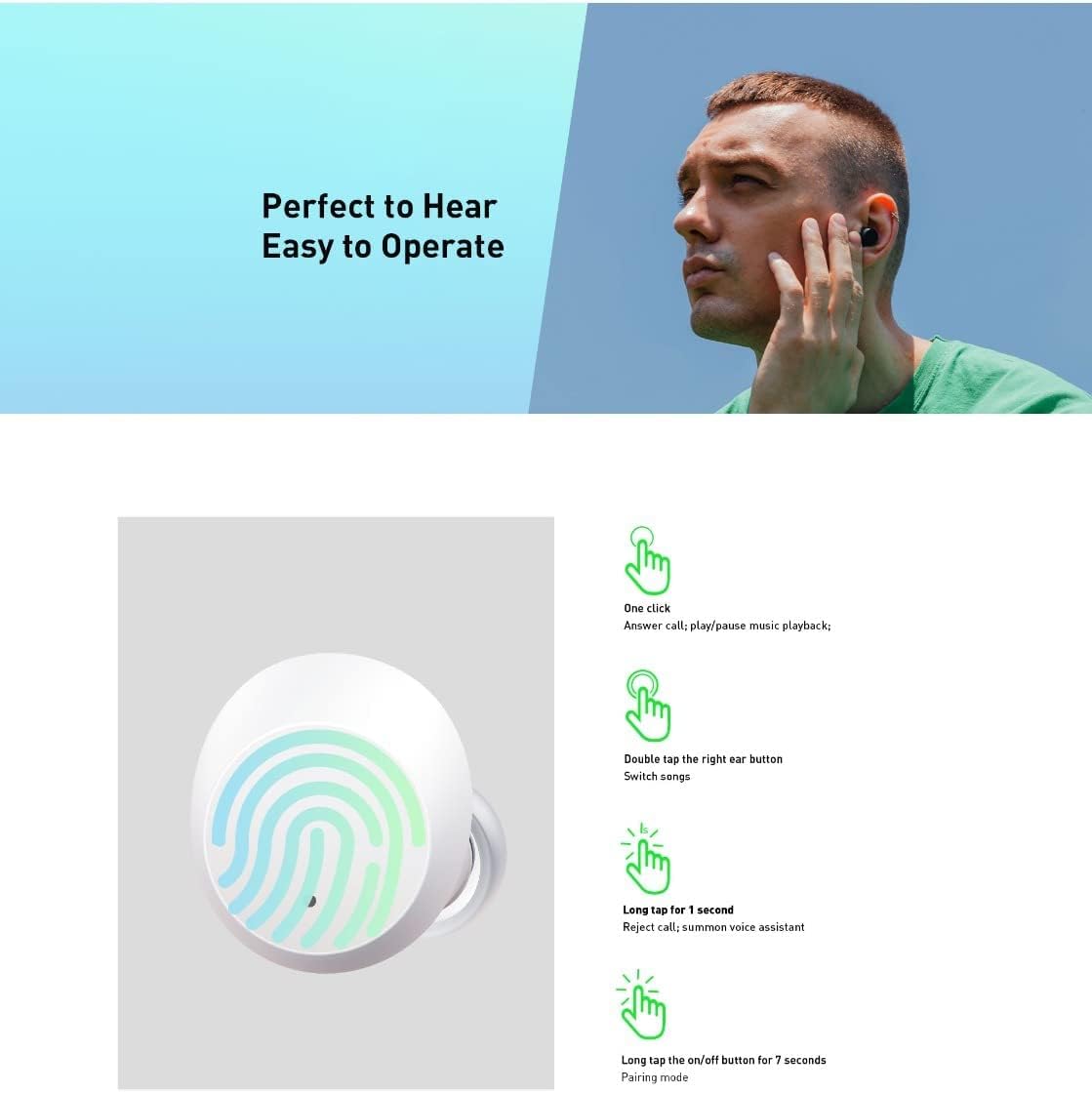
Image 4.1: Detailed guide to Infinix XE21 touch controls, showing different gestures and their corresponding functions.
- איין קליק: Answer call / Play / Pause music playback.
- טאָפּל צאַפּן (רעכט עאַרבוד): Switch songs (next track).
- Long Tap for 1 Second: Reject call / Summon voice assistant.
- Long Tap for 7 Seconds: Enter pairing mode (useful for re-pairing or connecting to a new device).
4.3 גיימינג מאָדע (נידעריק לעיטענסי)
The XE21 earbuds offer a 60ms super-low latency mode, ideal for gaming and video playback, ensuring synchronized audio and visuals for a more immersive experience.

Image 4.2: A user enjoying a seamless gaming experience with Infinix XE21 earbuds, highlighting the 'Full Connection' and 'Almost No Latency' features.
5. וישאַלט
5.1 רייניקונג
- רייניקט רעגולער די אויערקנעפּלעך און די טשאַרדזשינג קעסטל מיט אַ ווייכן, טרוקענעם, לינט-פֿרייע שטאָף.
- ניצט נישט קיין שרײַבענדיקע רייניגער, סאָלווענטן אדער אַעראָסאָל ספּרײַ.
- אַראָפּנעמען פֿאָרזיכטיק יעדן אויערוואַקס אָדער שמוץ פֿון די אויער שפּיץ און רעדנער מעש מיט אַ קליינעם, ווייכן באַרשט אָדער וואַטע שטעכל.
5.2 סטאָרידזש
When not in use, store the earbuds in their charging case to protect them from dust, damage, and to keep them charged. Store in a cool, dry place away from extreme temperatures.
5.3 וואַסער קעגנשטעל
The Infinix XE21 earbuds are water-resistant. However, they are not waterproof. Avoid submerging them in water or exposing them to heavy rain. Dry them thoroughly if they get wet before placing them back in the charging case.
6. טראָובלעשאָאָטינג
If you encounter any issues with your Infinix XE21 earbuds, please refer to the following common solutions:
| פּראָבלעם | לייזונג |
|---|---|
| עאַרבודס נישט פּערינג | Ensure earbuds are charged. Turn off and on your device's Bluetooth. Try long-tapping an earbud for 7 seconds to enter pairing mode. |
| קיין געזונט פון איין עאַרבוד | Check battery levels. Try re-pairing both earbuds. Clean the earbud's speaker mesh. |
| טשאַרדזשינג ישוז | Ensure the charging cable is securely connected. Clean the charging contacts on both earbuds and the case. Try a different USB-C cable or power adapter. |
| קול אַססיסטאַנט ריספּאַנד נישט | Ensure your device's voice assistant is enabled. Check the touch control settings. |
6.1 איבערשטעלן די אויערקנעפּלעך
If issues persist, you may need to reset your earbuds. Refer to the product's specific reset procedure, which typically involves placing both earbuds in the case, then pressing and holding a button on the case or earbuds for an extended period (e.g., 10-15 seconds) until indicator lights flash.
7. ספּעסאַפאַקיישאַנז
Below are the technical specifications for the Infinix XE21 Wireless Earbuds:
| שטריך | דעטאַל |
|---|---|
| סאָרט | Infinix |
| מאָדעל נומער | XE21 |
| קאָליר | שוואַרץ (אנדערע פארבן קען זיין בנימצא) |
| אויער פּלייסמאַנט | אין אויער |
| פאָרם פאַקטאָר | אין אויער |
| קאַנעקטיוויטי טעכנאָלאָגיע | ווירעלעסס (בלועטאָאָטה) |
| ווירעלעסס קאָמוניקאַציע טעכנאָלאָגיע | בלועטאָאָטה |
| באַטערי לעבן | אַרויף צו 35 שעה (מיט טשאַרדזשינג פאַל) |
| קאָנטראָל מעטאָד | ריר |
| אַודיאָ דרייווער טיפּ | דינאַמיש דרייווער |
| מאַטעריאַל | פּלאַסטיק |
| רעקאָממענדעד ניצט | גיימינג, מוזיק |
| קאַמפּאַטאַבאַל דעוויסעס | Smartphones, Tablets, Laptops, Desktop Computers, Digital Video Game Consoles |
| וואַסער קעגנשטעל מדרגה | וואַסער קעגנשטעליק |
| ספּעציעלע פֿעיִקייטן | לייטווייט |
| אַרייַנגערעכנט קאַמפּאָונאַנץ | אויער קישן |

Image 7.1: Visualizing the 35 hours of battery life with the charging case and 7 hours of listening time on a single charge.

Image 7.2: Highlighting the AAC Codec Embedded technology for enhanced audio quality.
8. וואָראַנטי און שטיצן
8.1 וואָראַנטי אינפֿאָרמאַציע
Your Infinix XE21 Wireless Earbuds come with a standard manufacturer's warranty. Please refer to the warranty card included in your product packaging or visit the official Infinix webזייטל פֿאַר דעטאַלירטע וואָראַנטי טערמינען און באַדינגונגען. האַלט דיין באַווייַז פון קויפן פֿאַר וואָראַנטי קליימז.
8.2 קונה שטיצן
For further assistance, technical support, or service inquiries, please contact Infinix customer support through their official webזייטל אדער די קאנטאקט אינפארמאציע וואס איז צוגעשטעלט אין אייער פראדוקט דאקומענטאציע. איר קענט אויך באזוכן די Infinix Brand Store on Amazon פֿאַר מער פּראָדוקט אינפֿאָרמאַציע.