
הקדמה
The E Gate K9 Pro-Max is an advanced automatic Android projector designed to deliver a superior home theater experience. It features Full HD 1080p native resolution with 4K support, ultra-bright 600 ISO Lumens, and intelligent automatic focus and keystone correction for effortless setup. With built-in Android 9, dual-band Wi-Fi, Bluetooth, and multiple connectivity options, this projector offers seamless access to entertainment and versatile usage.

פיגורע 1: פראָנט view of the E Gate K9 Pro-Max Projector, showcasing its lens and sleek design.
וואָס איז אין די קעסטל
Upon unboxing your E Gate K9 Pro-Max projector, please ensure all the following items are present:
- 1 x E Gate K9 Pro-Max Projector
- 1 x רימאָוט קאָנטראָל
- קסנומקס X מאַכט קאָרד
- 1 x AV Connector
- 1 x באַניצער מאַנואַל מיט וואָראַנטי קאַרטל
פּראָדוקט פֿעיִקייטן
The E Gate K9 Pro-Max projector is equipped with a range of features designed for optimal performance and user convenience.
אַרויסווייַזונג און וויזשוואַלז
- Native Full HD 1080p Resolution: Delivers crisp and clear images.
- 4K שטיצע: Compatible with 4K content for enhanced detail.
- 600 ISO Lumens Brightness: Provides vibrant and bright projections, suitable for various lighting conditions.
- Max Screen Size 300 inches: Capable of projecting a large, immersive display.
- 6000:1 קאַנטראַסט פאַרהעלטעניש: Ensures deep blacks and bright whites for dynamic visuals.
- 100% NTSC Wide Color Gamut: Offers accurate and rich color reproduction.
- HDR+ Support: Enhances image quality with improved contrast and color.

Figure 2: Comparison illustrating the K9 Pro-Max's superior color reproduction and detail.

Figure 3: Visual representation of the projector's capability to produce large screen sizes up to 300 inches.
קלוגע פֿעיִטשערס און קאָנעקטיוויטי
- אַנדרויד 9.0 אָפּערייטינג סיסטעם: Access to pre-installed apps like Netflix, Prime Video, Hotstar, SonyLiv, and more.
- Automatic Focus and Keystone Correction: Ensures a perfectly clear and rectangular image without manual adjustments. Supports 4P & 6D Digital correction.
- Dual-Band Wi-Fi (2.4GHz + 5GHz): Provides stable and fast wireless connectivity for streaming and online content.
- בלועטאָאָטה: Connect external audio devices like speakers or soundbars wirelessly.
- ווירעלעסס פאַרשטעלן מירערינג: Easily cast content from Android, iOS, and Windows devices.
- קייפל פּאָרץ: Includes 2 x HDMI, 2 x USB, AV, and Audio Out for diverse device connections.

Figure 4: The projector's automatic focus and keystone correction in action, ensuring a perfectly aligned image.

Figure 5: The built-in Android 9 interface with access to popular streaming applications.

Figure 6: Demonstrating wireless casting capabilities from mobile devices to the projector.
אַודיאָ
- 7 Watt Hi-Fi Stereo Speaker: Integrated speaker with passive bass radiator for immersive sound.
- בלועטאָאָטה אַודיאָ רעזולטאַט: Connect to external speakers or soundbars for enhanced audio.
סעטאַפּ גייד
Follow these steps for initial setup of your E Gate K9 Pro-Max projector:
- אָרט: Position the projector on a stable, flat surface. Ensure there is adequate ventilation around the unit. For optimal projection, place it directly in front of your screen or wall.
- מאַכט קשר: פֿאַרבינדט דעם עלעקטרישן שנור צום פּראָיעקטאָר'ס עלעקטרישן אַרײַנגאַנג און דערנאָך צו אַ עלעקטרישן ווענטיל.
- מאַכט אויף: דרוק די מאַכט קנעפּל אויף די פּראַדזשעקטער אָדער די ווייַט קאָנטראָל צו קער אויף די מיטל.
- אָטאַמאַטיק אַדזשאַסטמאַנט: The projector will automatically perform focus and keystone correction upon startup or when moved, ensuring a clear and rectangular image. Allow a few seconds for this process to complete.
- Initial Setup (Android): If this is your first time using the projector, you may be prompted to complete the initial Android setup, including Wi-Fi connection and Google account login. Follow the on-screen instructions.
- פֿאַרבינדן דעוויסעס (אָפּציאָנאַל): If connecting external devices (e.g., set-top box, gaming console), use the appropriate HDMI or USB ports.
אַפּערייטינג ינסטראַקשאַנז
This section provides instructions for operating your E Gate K9 Pro-Max projector.
יקערדיק אָפּעראַציע
- מאַכט אויף / אַוועק: דריק דעם מאַכט קנעפּל אויף דער ווייַטקאָנטראָל אָדער פּראָיעקטאָר.
- נאַוויגאַציע: Use the directional buttons on the remote to navigate the Android interface. The "OK" button confirms selections.
- באַנד קאָנטראָל: Use the volume buttons on the remote to adjust audio output.
- מקור סעלעקציע: Press the "Source" button on the remote to switch between HDMI, AV, and Android inputs.
אַוואַנסירטע פֿעיִקייטן
- דיגיטאַל פארגרעסער: Adjust the screen size digitally without moving the projector. Access this feature through the projector's settings menu.
- סקרין שפּיגל:
- זיכער מאַכן אַז אייער פּראָיעקטאָר און מאָביל מיטל זענען פארבונדן צו דער זעלבער Wi-Fi נעץ.
- Select the "Screen Mirroring" or "Wireless Display" option on the projector's home screen.
- On your mobile device (Android, iOS) or PC (Windows), enable screen mirroring/casting and select the projector from the list of available devices.
- בלועטאָאָטה אַודיאָ:
- Go to Bluetooth settings in the Android interface.
- געבן בלועטאָאָטה און זוכן פֿאַר בנימצא דעוויסעס.
- Select your Bluetooth speaker or soundbar to pair.
קאַנעקטיוויטי
The E Gate K9 Pro-Max offers a variety of connectivity options to integrate with your existing devices.
| פּאָרט טיפּ | קוואַנטיטי | פֿונקציע |
|---|---|---|
| HDMI | 2 | Connect set-top boxes, gaming consoles, laptops, Fire TV Stick, etc. |
| וסב | 2 | Connect USB drives for media playback or external peripherals. |
| AV | 1 | Connect older devices with composite video and stereo audio output. |
| אַודיאָ אַרויס (3.5 מ״מ דזשעק) | 1 | פֿאַרבינדט דראָטיקע כעדפאָונז אָדער עקסטערנע רעדנערס. |
| לאַן | 1 | Wired internet connection for stable network access. |
| ווי-פי | Dual-Band (2.4GHz + 5GHz) | Wireless internet connectivity for streaming and online features. |
| בלועטאָאָטה | יא | Wireless connection for audio devices (speakers, headphones). |
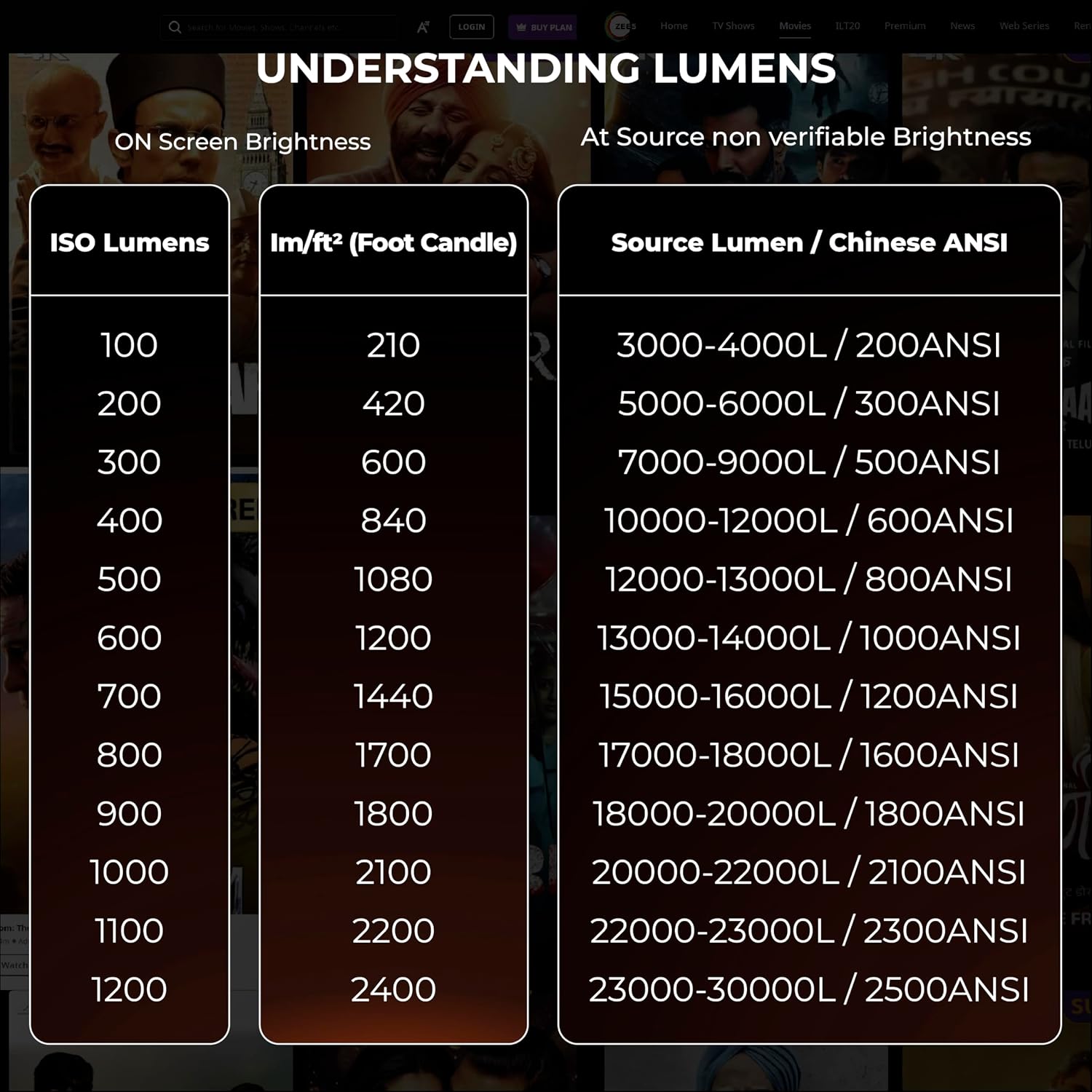
Figure 7: The projector's support for latest 2.4GHz + 5GHz Wi-Fi for faster and smoother connectivity.
וישאַלט
געהעריגע אויפהאלטונג גאראנטירט די לאנגעוויטי און אפטימאלע פערפארמאנס פון אייער פראיעקטאר.
- רייניקונג די לענס: ניצט אַ ווייכע, לינט-פֿרייע שטאָף ספּעציעל דיזיינד פֿאַר אָפּטישע לענסעס. ווישט אָפּ די לענס פֿאָרזיכטיק צו באַזײַטיקן שטויב אָדער פֿלעקן. פֿאַרמײַדט אַברייסיוו מאַטעריאַלן אָדער שאַרפֿע כעמיקאַלן.
- רייניקונג די יקסטיריער: ווישט אָפּ דעם פּראָיעקטאָר'ס אויסערלעכן טייל מיט אַ ווייכן, טרוקענעם שטאָף. פֿאַר שווערע פֿלעקן, ניצט אַ ביסל טרוקן שטאָף.amp מען קען ניצן אַ שטאָף, און דערנאָך אַ טרוקענעם.
- ווענטילאַטיאָן: Ensure the projector's ventilation openings are clear and not obstructed. This prevents overheating and maintains performance.
- שטויב אקומולאציע: Over time, dust may accumulate inside the projector, particularly on the LCD panel, which can affect image clarity. If you notice dark spots or reduced clarity, professional cleaning may be required. For advanced users, the LCD panel can be cleaned with care, but it is recommended to consult support or a qualified technician if unsure.
- Lamp לעבן: The projector features a "Life Long Lamp" with an estimated lifespan of 60,000 hours, minimizing the need for frequent lamp פאַרבייַט.
- סטאָרידזש: When not in use for extended periods, store the projector in a cool, dry place, ideally covered to protect it from dust.
טראָובלעשאָאָטינג
די סעקציע באהאנדלט אלגעמיינע פראבלעמען וואס איר קענט באגעגענען מיט אייער פראיעקטאר.
| פּראָבלעם | מעגלעך סיבה | לייזונג |
|---|---|---|
| דאָס בילד איז פֿאַרשוואָמען אָדער נישט אין פֿאָקוס. | Projector not focused, or keystone correction issues. | The projector has automatic focus and keystone. Ensure the projector is stable and allow it to auto-adjust. If issues persist, check for obstructions or try restarting the projector. Avoid manual keystone adjustments if possible, as they can sometimes cause blurriness at edges. |
| קיין בילד געוויזן. | Incorrect input source, loose cable connection, or device not powered on. | Verify the input source (HDMI, AV) is correctly selected. Check all cable connections (HDMI, power) are secure. Ensure the connected source device is powered on. |
| קיין געזונט. | Volume too low, muted, or incorrect audio output setting. | Increase projector volume. Check if the projector or source device is muted. If using external speakers, ensure they are connected correctly via Bluetooth or 3.5mm jack and are powered on. |
| Dark spots or dust on screen. | Dust accumulation on the internal LCD panel. | This can occur over time. For minor dust, try gently tapping the projector. For persistent or significant dust, professional cleaning is recommended. Avoid opening the projector yourself unless you have technical expertise. |
| ווייַט קאָנטראָל נישט ארבעטן. | Dead batteries, obstruction, or remote not paired. | Replace batteries in the remote. Ensure no obstructions between the remote and the projector's IR receiver. |
ספּעסאַפאַקיישאַנז
Detailed technical specifications for the E Gate K9 Pro-Max projector:
| אַטריביוט | דעטאַל |
|---|---|
| סאָרט | E GATE |
| מאָדעל נאָמען | K9 Pro-Max |
| מאָדעל נומער | E08i33 |
| אָפּערייטינג סיסטעם | אַנדרויד 9.0 |
| האַכלאָטע | Native 1920 x 1080 (Full HD), 4K Support |
| בילד ברייטנאַס | 600 ISO Lumens (equivalent to 6600 ANSI Lumens) |
| בילד קאַנטראַסט פאַרהעלטעניש | 6000:1 |
| ווייַז טעכנאָלאָגיע | געפירט |
| שטייענדיק פאַרשטעלן ווייַז גרייס | Up to 300 Inches (762 cm) |
| אַספּעקט פאַרהעלטעניש | 16:9 |
| ייַזנוואַרג צובינד | Bluetooth, USB, HDMI, LAN, AV |
| ווירעלעסס קאַנעקטיוויטי | Dual-band Wi-Fi (2.4GHz + 5GHz), Bluetooth |
| ספּעציעלע פֿעיִקייטן | Automatic Focus, Automatic Keystone (4P & 6D Digital), Digital Zoom, Wireless Screen Mirroring, HDR+ Support |
| אַודיאָ רעזולטאַט מאָדע | Stereo (7 Watt Hi-Fi Speaker) |
| Lamp לעבן | 60,000 שעה |
| פּראָדוקט דימענשאַנז | 29.21 X 17.5 X 6.5 סענטימעטער |
| פּונקט וואָג | 1.8 קג |
| מאַכט קאַנסאַמשאַן | 90 וואטס |
| מאַונטינג טיפּ | Ceiling Mount, Tabletop |
וואָראַנטי און שטיצן
E GATE is committed to providing excellent customer service and support for your product.
- וואָראַנטי פּעריאָד: Your E Gate K9 Pro-Max projector comes with a 1-year warranty from the date of purchase.
- וואָראַנטי רעגיסטראַציע: It is mandatory to register your product to avail full warranty benefits. Please refer to the warranty card included in the box or visit the official E GATE webפּלאַץ פֿאַר רעגיסטראַציע דעטאַילס.
- סערוויס: During the warranty period, E GATE provides free home pickup and drop service for repairs.
- קאָנטאַקט שטיצן: For any technical assistance, troubleshooting not covered in this manual, or warranty claims, please visit the official E GATE webפּלאַץ אָדער קאָנטאַקט זייער קונה שטיצן.