
1. הקדמה
This manual provides comprehensive instructions for the installation, operation, and maintenance of your zemismart Tuya Zigbee Rechargeable Roller Blind Motor (Model ZM25EL). This motor is designed to automate roller blinds with 38mm tubes, offering smart control via the Tuya Smart Life app, remote control, and voice assistants. Please read this manual carefully before installation and use to ensure proper function and safety.
2. פּראָדוקט פֿעיִקייטן
- Integrated Tuya Zigbee Receiver: Converts normal blinds into smart, controllable devices.
- קאַמפּאַטאַבילאַטי: Designed for 38mm (1-1/2 inch) roller blind tubes.
- קריקאָנלאָדלעך באַטערי: Features a built-in 3000mAh lithium battery for cordless operation.
- עטלעכע קאָנטראָל אָפּציעס: Supports Tuya Smart / Smart Life app control, RF433 remote control, and voice control via Alexa, Google Home, and Siri.
- USB טשאַרדזשינג: באַקוועם טשאַרדזשינג דורך אַ נאָרמאַל USB קאַבל.
- Optional Solar Panel: Can be charged directly using an optional solar panel (sold separately).
- טייַמער פאַנגקשאַנאַליטי: Set schedules for automatic opening and closing of blinds.
3. סעטאַפּ און ייַנמאָנטירונג
3.1 פּעקל אינהאַלט
איידער איר הייבט אן, זיכערט זיך אז אלע קאמפאנענטן זענען פאראן:
- zemismart Tuya Zigbee Roller Blind Motor (ZM25EL)
- קרוין און דרייוו שטעלן
- ינסטאַלירונג בראַקאַץ
- RF433 רימאָוט קאָנטראָל
- וסב טשאַרדזשינג קאַבלע
- באַניצער מאַנואַל (דעם דאָקומענט)
3.2 Motor Components Overview

בילד: דעטאַלירט view of the motor components, highlighting the motor set key, battery power switch, and USB charging port.
3.3 גשמיות ינסטאַלירונג
- Prepare the Roller Blind Tube: Ensure your roller blind tube has an inner diameter of 38mm. The motor is designed to fit snugly inside.
- Attach Crown and Drive Set: Slide the crown and drive set onto the motor shaft. These components ensure the motor properly engages with the blind tube.
- Insert Motor into Tube: Carefully insert the motor assembly into the roller blind tube. Ensure it is fully seated and secure.
- באַרג דעם בלינדן: Install the roller blind assembly, including the motor, into your window frame using the provided mounting brackets. This motor supports interior mounting. The maximum recommended blind width for installation is 3 meters, and the maximum weight is 4kg.

Image: Illustration of the motor's dimensions and its fit within a 38mm tube, alongside mounting accessories.
3.4 ערשט טשאַרדזשינג
Before first use, fully charge the motor's built-in 3000mAh lithium battery. Connect the provided USB charging cable to the motor's USB charging port and to a standard USB power adapter (not included). A full charge typically takes several hours.
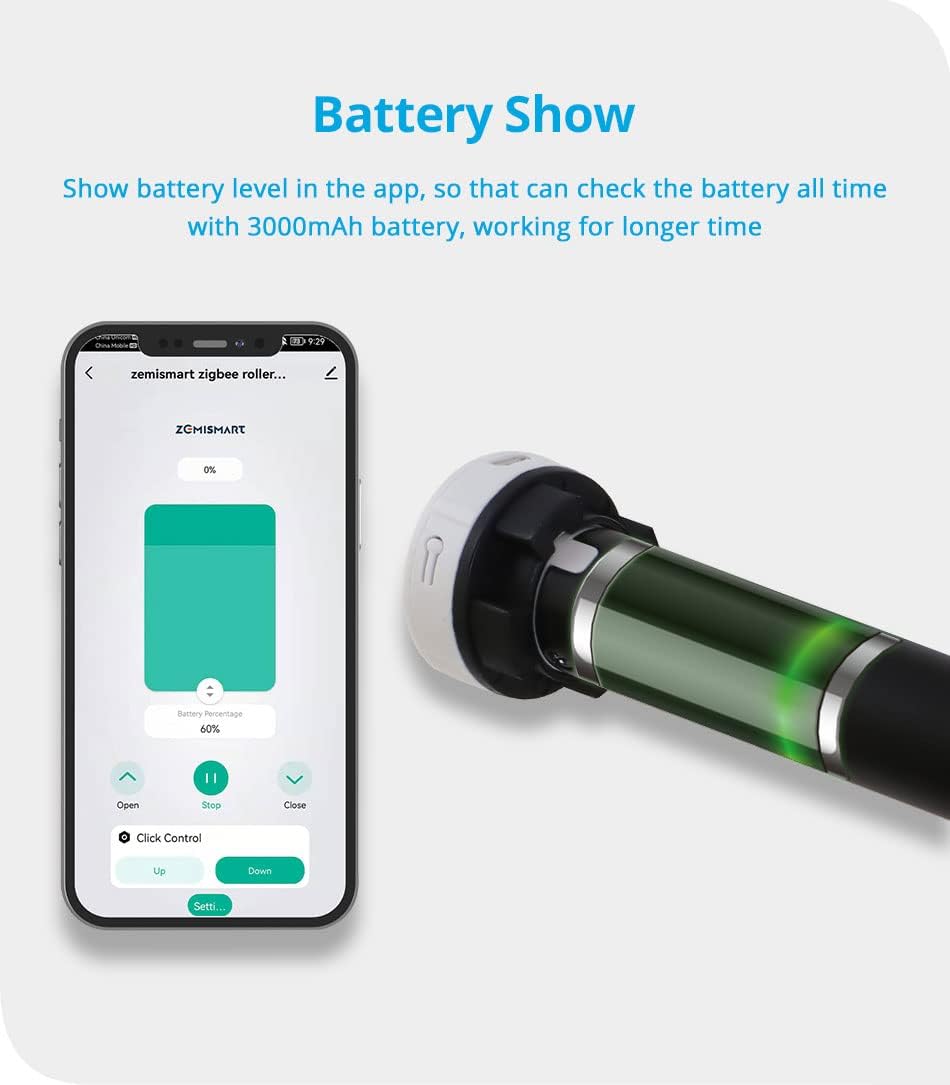
Image: The motor's battery level can be monitored via the app. The motor features a USB charging port for convenience.
An optional solar panel can be connected for continuous charging, reducing the need for manual USB charging.
4. אַפּערייטינג ינסטרוקטיאָנס
4.1 Tuya Zigbee Hub Requirement
This motor requires a Tuya Zigbee Gateway (hub) to function with the Tuya Smart / Smart Life app and for voice control integration. Ensure your Zigbee hub is set up and connected to your home network.

Image: A visual reminder that a Tuya Zigbee Hub is essential for smart functionality.
4.2 אַפּ קאָנטראָל (Tuya Smart / Smart Life)
- אראפקאפיע אַפּ: דאַונלאָוד די 'Tuya Smart' אדער 'Smart Life' אַפּ פֿון דיין סמאַרטפֿאָן'ס אַפּ סטאָר.
- לייג דיווייס: Open the app, log in, and follow the instructions to add a new device. Select 'Curtain Motor' or similar, and ensure your Zigbee hub is detected.
- פּאָרינג: Follow the app's instructions to put the motor into pairing mode (usually by pressing a button on the motor or remote).
- יקערדיק אָפּעראַציע: Once paired, you can use the app to open, close, or stop the blinds at any position.
- באַשטעטיקן לימאַץ: Use the app's settings to define the upper and lower limits for your blinds. This ensures the motor stops precisely at the desired open and closed positions.
- סקעדזשולינג: Create schedules within the app to automate the opening and closing of your blinds at specific times.

Image: The Tuya Smart Life app interface demonstrating control over the roller blind, including open, stop, and close functions.

בילד: עקסample of setting schedules in the app for automatic blind operation at specific times, such as 7:00 AM and 4:00 PM.
4.3 RF433 ווײַטקאָנטראָל
The included RF433 remote control provides direct and convenient operation of your blinds.
- פּערינג רימאָוט: Refer to the motor's specific pairing instructions (usually a combination of button presses on the motor and remote) to link the remote control.
- קנעפּלעך: The remote typically features 'Up', 'Down', and 'Stop' buttons for basic control.
- מולטי-קאַנאַל קאָנטראָל: Some remotes support multiple channels, allowing control of several motors individually or in groups. One remote can control up to 50 motors.

Image: A user operating roller blinds with the RF remote control, showing simple and direct control.
4.4 Voice Control (Alexa, Google Home, Siri)
Once the motor is integrated with your Tuya Zigbee hub and linked to your smart home platform (Alexa, Google Home, or Apple HomeKit via Siri), you can use voice commands.
- פֿאַרבינדן אַקאַונטס: In the Alexa, Google Home, or Apple Home app, link your Tuya Smart / Smart Life account.
- אַנטדעקן דעוויסעס: בעט אייער שטימע אַסיסטאַנט צו אַנטדעקן נייע דעוויסעס.
- קול קאַמאַנדז: ניצט קאמאנדעס ווי למשל:
- "Alexa, open the blinds."
- "Hey Google, close the living room blinds."
- "Hey Siri, set the bedroom blinds to 50%."

Image: Diagram illustrating the connectivity for voice control, showing the motor, Zigbee hub, router, and smart speakers (Amazon Echo, Google Home).

Image: An integrated smart home environment where blinds are controlled via voice assistants and a smartphone app.
5. וישאַלט
5.1 באַטערי טשאַרדזשינג
Regularly check the battery level via the Tuya Smart / Smart Life app. Recharge the motor using the USB cable when the battery is low. If using an optional solar panel, ensure it is clean and positioned to receive adequate sunlight for optimal charging.
5.2 רייניקונג
The motor itself requires minimal cleaning. If necessary, use a soft, dry cloth to wipe the exterior. For the roller blind fabric, follow the manufacturer's instructions, typically involving spot cleaning.
6. טראָובלעשאָאָטינג
- מאָטאָר רעאַגירט נישט:
- קאָנטראָלירן די באַטאַרייע מדרגה און ריטשאַרדזש אויב נייטיק.
- Ensure the RF remote control has working batteries.
- Verify the motor is properly paired with the remote and the Zigbee hub.
- אַפּ קאַנעקטיוויטי ישוז:
- Ensure your Tuya Zigbee hub is powered on and connected to your home Wi-Fi network.
- קוק דיין אינטערנעט פֿאַרבינדונג.
- Restart the Tuya Smart / Smart Life app.
- If issues persist, try re-pairing the motor with the Zigbee hub.
- שטימע קאנטראל ארבעט נישט:
- Confirm that your Tuya Smart / Smart Life account is correctly linked to Alexa, Google Home, or Apple Home.
- Ensure your voice assistant device is online and functioning.
- פרובירט ווידער צו אַנטדעקן דעוויסעס דורך אייער שטימע אַסיסטאַנט אַפּ.
- Limits Not Set Correctly:
- Access the motor settings in the Tuya Smart / Smart Life app and re-calibrate the upper and lower limits.
7. ספּעסאַפאַקיישאַנז
| שטריך | באַשרייַבונג |
|---|---|
| מאָדעל נומער | ZM25EL |
| סאָרט | זעמיסמאַרט |
| מאַטעריאַל | אַלומינום |
| אַרייַנשרייַב וואָלtage | DC7.4V |
| רייטאַד מאַכט | 8W |
| מאַקס קראַנט | 1A |
| באַטאַרייע קאַפּאַציטעט | 3000 מאַה |
| טאָרק | 0.8 נם |
| רייטאַד רפּם | 25PRM |
| פליסנדיק ראַש | 35-40dB |
| רער קאַמפּאַטאַבילאַטי | 38mm (1-1/2 inch) |
| Max Supported Blind Width | 3 מעטער |
| Max Supported Blind Weight | 4 קג |
| מאַונטינג טיפּ | Interior Mount |
| רעקאַמענדיד נוצן | Doors, Windows |

Image: Detailed product parameters including physical dimensions and technical specifications of the motor and accessories.
8. וואָראַנטי און שטיצן
For warranty information and technical support, please refer to the zemismart official webזייטל אדער קאָנטאַקט אייער הענדלער. האַלט אייער קויף קוויטל ווי אַ באַווייַז פון קויפן פֿאַר קיין וואָראַנטי קליימז.