
הקדמה
This manual provides comprehensive instructions for the use and care of your new Remote brand compatible remote control. This remote is specifically designed to function seamlessly with Nordmende ND40S3000J SMART televisions, offering full functionality without the need for complex programming.
Please read this manual carefully to ensure proper setup and operation of your remote control.
סעטאַפּ
1. באַטאַרייע ייַנמאָנטירונג
The remote control requires alkaline batteries (not included). Follow these steps to install them:
- געפֿינען די דעקן פון די באַטאַרייע אָפּטייל אויף די צוריק פון די ווייַט קאָנטראָל.
- שלעפּט דעם דעקל אַראָפּ אָדער דריק דעם לאַטש צו עס עפֿענען.
- Insert two new alkaline batteries, ensuring the positive (+) and negative (-) terminals match the diagrams inside the compartment.
- לייגט צוריק דעם דעקל פונעם באַטעריע־אָפּטייל, און שטופּט עס צוריק אין פּלאַץ ביז עס קליקט זיכער.
וויכטיק: Always use new alkaline batteries for optimal performance. Do not mix old and new batteries, or different types of batteries.
2. Initial Use (No Programming Required)
This compatible remote control is pre-programmed for the Nordmende ND40S3000J SMART TV model. No additional programming or setup steps are required. Once batteries are installed, the remote is ready for immediate use with your television.
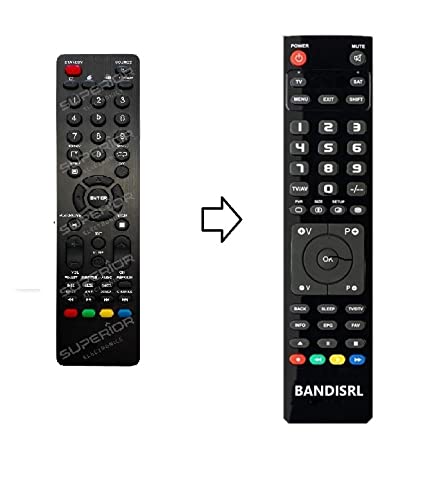
פיגורע 1: The Remote compatible remote control. This image displays the layout of the buttons and the overall design of the remote, ready for use with your Nordmende TV.
אַפּערייטינג ינסטראַקשאַנז
To operate your Nordmende ND40S3000J SMART TV with this remote control, point the remote directly at the television's infrared receiver. Ensure there are no obstructions between the remote and the TV.
- מאַכט קנעפּל: פּרעסע צו דרייען די טעלעוויזיע אויף אָדער אַוועק.
- באַנד אַרויף / אַראָפּ: אַדזשאַסץ די אַודיאָ באַנד.
- קאַנאַל אַרויף / אַראָפּ: טוישט טעלעוויזיע קאַנאַלן סיקווענשעל.
- נומער קנעפּלעך (0-9): Directly select TV channels.
- נאַוויגאַציע קנעפּלעך (פייַל קנעפּלעך, OK): נאַוויגירן דורך מעניוז און סעלעקטירן אָפּציעס.
- סמאַרט טעלעוויזיע קנעפּלעך: Access specific Smart TV functions or applications (e.g., Home, Apps, Netflix, YouTube, etc., depending on the remote's layout and TV's features).
- שטיל קנעפּל: שטילט דעם טעלעוויזיע אַודיאָ.
- מקור / אַרייַנשרייַב קנעפּל: גייט דורך די פארהאן אינפוט קוועלער (HDMI, AV, אא"וו).
Refer to your Nordmende TV's original user manual for specific details on its menu structure and Smart TV functionalities.
וישאַלט
רייניקונג די רימאָוט קאָנטראָל
צו רייניקן אייער ווײַטקאָנטראָל, ניצט אַ ווייכע, טרוקענע שטאָף. פֿאַר שווערע שמוץ, אַ ביסל טרוקענעםampen the cloth with water. Do not use abrasive cleaners, alcohol, or solvents, as these can damage the remote's surface and internal components.
באַטערי פאַרבייַט
Replace batteries when the remote control's response becomes sluggish or stops working. Always replace both batteries simultaneously with new alkaline batteries. Dispose of used batteries according to local regulations.
סטאָרידזש
האַלט די ווײַטקאָנטראָל אין אַ קיל, טרוקן אָרט אַוועק פון דירעקט זונשייַן און עקסטרעמע טעמפּעראַטורן. אויב די ווײַטקאָנטראָל וועט נישט ווערן גענוצט פֿאַר אַ לענגערע צײַט, איז ראַטזאַם צו אַרויסנעמען די באַטעריעס צו פאַרמייַדן ליקאַדזש.
טראָובלעשאָאָטינג
- די ווײַטקאָנטראָל אַרבעט נישט:
- קאָנטראָלירט צי די באַטעריעס זענען ריכטיק אַרײַנגעשטעלט מיט דער ריכטיקער פּאָלאַריטעט (+/-).
- Replace the batteries with new alkaline batteries.
- זיכער מאַכן אַז עס זענען נישטאָ קיין שטערונגען צווישן דער ווײַטקאָנטראָל און דעם טעלעוויזיע'ס אינפֿראַרוד ופנעמער.
- זייט זיכער אז איר ריכטעט די ווײַטקאָנטראָל גלייך אויפן טעלעוויזיע.
- Verify that the TV is powered on.
- Some buttons are not responding:
- This remote is designed for the Nordmende ND40S3000J SMART TV. If you are using it with a different model, some advanced functions may not be compatible.
- Ensure the buttons are clean and free from debris.
- TV responds intermittently:
- באַטעריעס קענען זיין שוואַך; פאַרבייַטן זיי.
- Ensure a clear line of sight to the TV's infrared sensor.
- Avoid strong light sources (like direct sunlight) that might interfere with the infrared signal.
If troubleshooting steps do not resolve the issue, please refer to the Support section.
ספּעסאַפאַקיישאַנז
| סאָרט: | Remote (Manufacturer: Bandisrl) |
| קאַמפּאַטאַבאַל דעוויסעס: | Nordmende ND40S3000J SMART Television |
| קאַנעקטיוויטי טעכנאָלאָגיע: | ינפרערעד (IR) |
| ספּעציעלע שטריך: | קיין פּראָגראַממינג פארלאנגט |
| באַטערי טיפּ: | אַלקאַליין |
| באַטעריז אַרייַנגערעכנט: | ניין |
| קאָליר: | שוואַרץ |
| נומער פון קנעפּלעך: | 25 |
| קאָנטראָללער טיפּ: | קנעפּל קאָנטראָל |
וואָראַנטי און שטיצן
וואָראַנטי אינפֿאָרמאַציע
Specific warranty details for this compatible remote control are not provided in this manual. Please refer to the purchase documentation or contact the seller/manufacturer (Bandisrl) for information regarding warranty coverage and terms.
קונה שטיצן
For further assistance, technical support, or inquiries regarding compatibility with other TV models, please contact the manufacturer, Bandisrl. Contact information can typically be found on the product packaging or the seller's webפּלאַץ.
If you own a different TV model than the Nordmende ND40S3000J SMART, it is recommended to contact Bandisrl to confirm compatibility before purchase or use.