
1. הקדמה
Thank you for choosing the LEICKE DJ Roxxx Portable Bluetooth Speaker. This manual provides essential information for setting up, operating, and maintaining your speaker. Please read it carefully before use to ensure optimal performance and longevity of your device.
2. זיכערקייַט אינסטרוקציעס
- שטעלט נישט אויס דעם רעדנער צו עקסטרעמע טעמפּעראַטורן, דירעקטע זונשייַן, אדער הויכע פֿײַכטקייט.
- ויסמיידן דראַפּינג אָדער ונטערטעניק די רעדנער צו שטאַרק ימפּאַקץ.
- Do not disassemble or attempt to repair the speaker yourself. This will void the warranty.
- Keep the speaker away from water and liquids. While splashproof, it is not waterproof and should not be submerged.
- ניצט נאָר דעם צוגעשטעלטן טשאַרדזשינג קאַבל אָדער אַ סערטיפיצירטן עקוויוואַלענט.
3. פּעקל אינהאַלט
ביטע טשעק די פּאַקעט פֿאַר די פאלגענדע זאכן:
- LEICKE DJ Roxxx Portable Bluetooth Speaker
- וסב טשאַרדזשינג קאַבלע
- Auxiliary Audio Cable (3.5mm Stereo Plug)
- קאַראַבינער
- ינסטראַקשאַנז מאַנואַל
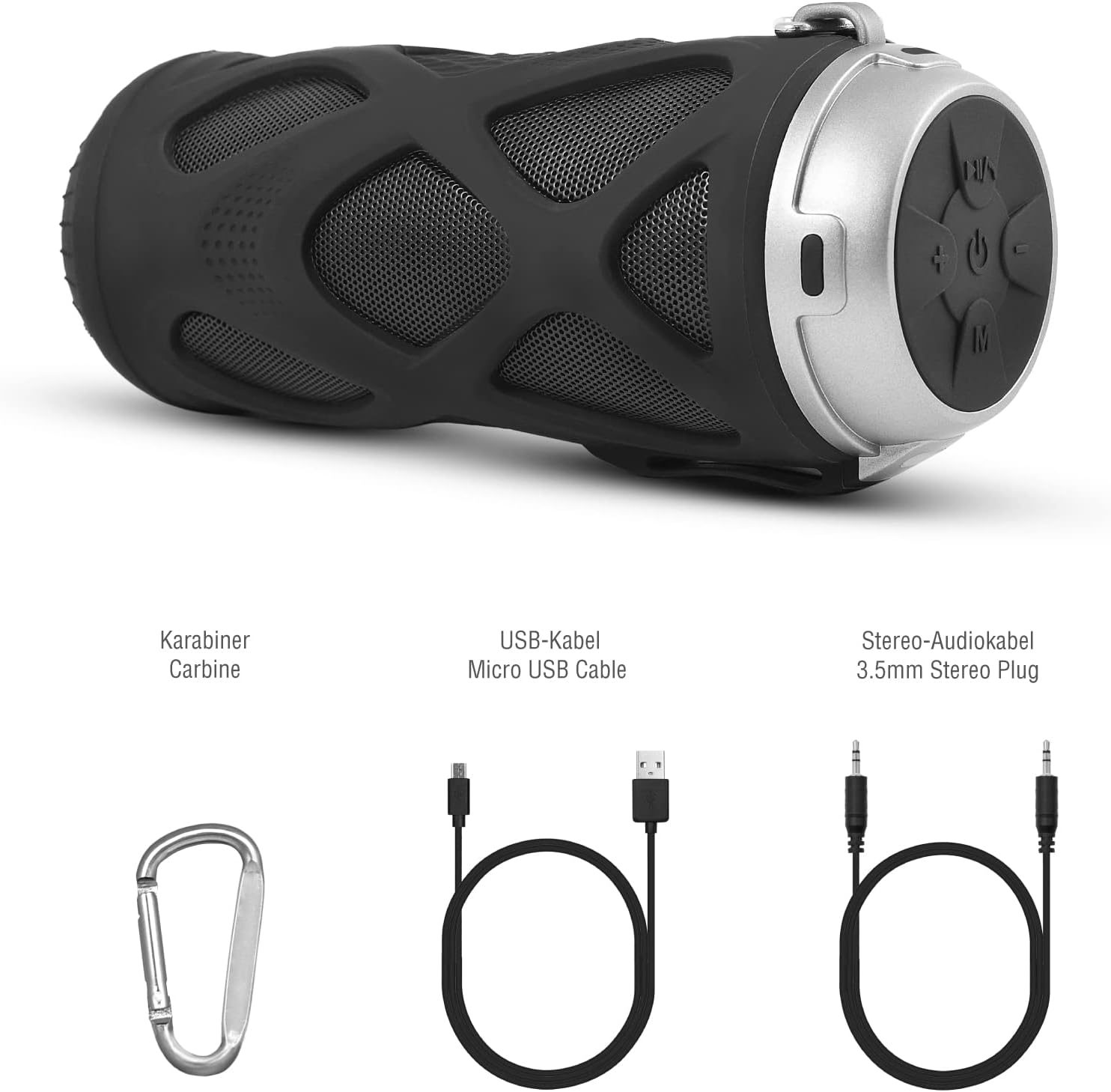
פיגורע 3.1: אַרייַנגערעכנט אַקסעסעריז
4. פּראָדוקט איבערview
4.1 קאָנטראָל פּאַנעל

פיגורע 4.1: קאָנטראָל פּאַנעל אויסלייג
- אויף / אַוועק קנעפּל: מאַכט אָן אָדער אויס דעם רעדנער.
- Play/Pause/Call/Voice Assistant Button: Controls music playback, answers/ends calls, and activates voice assistant (Siri/Google Assistant).
- באַנד אַראָפּ / פריערדיקע ליד קנעפּל: פֿאַרקלענערט דאָס וואָלומען אָדער שפּרינגט צום פֿריִערדיקן ליד.
- באַנד אַרויף / ווייַטער ליד קנעפּל: פאַרגרעסערט די באַנד אָדער שפּרינגט צום נעקסטן ליד.
- מאָדע קנעפּל: Switches between Bluetooth, MicroSD/TF, Aux, and FM Radio modes.
4.2 פּאָרץ און ינדיקאַטאָרס
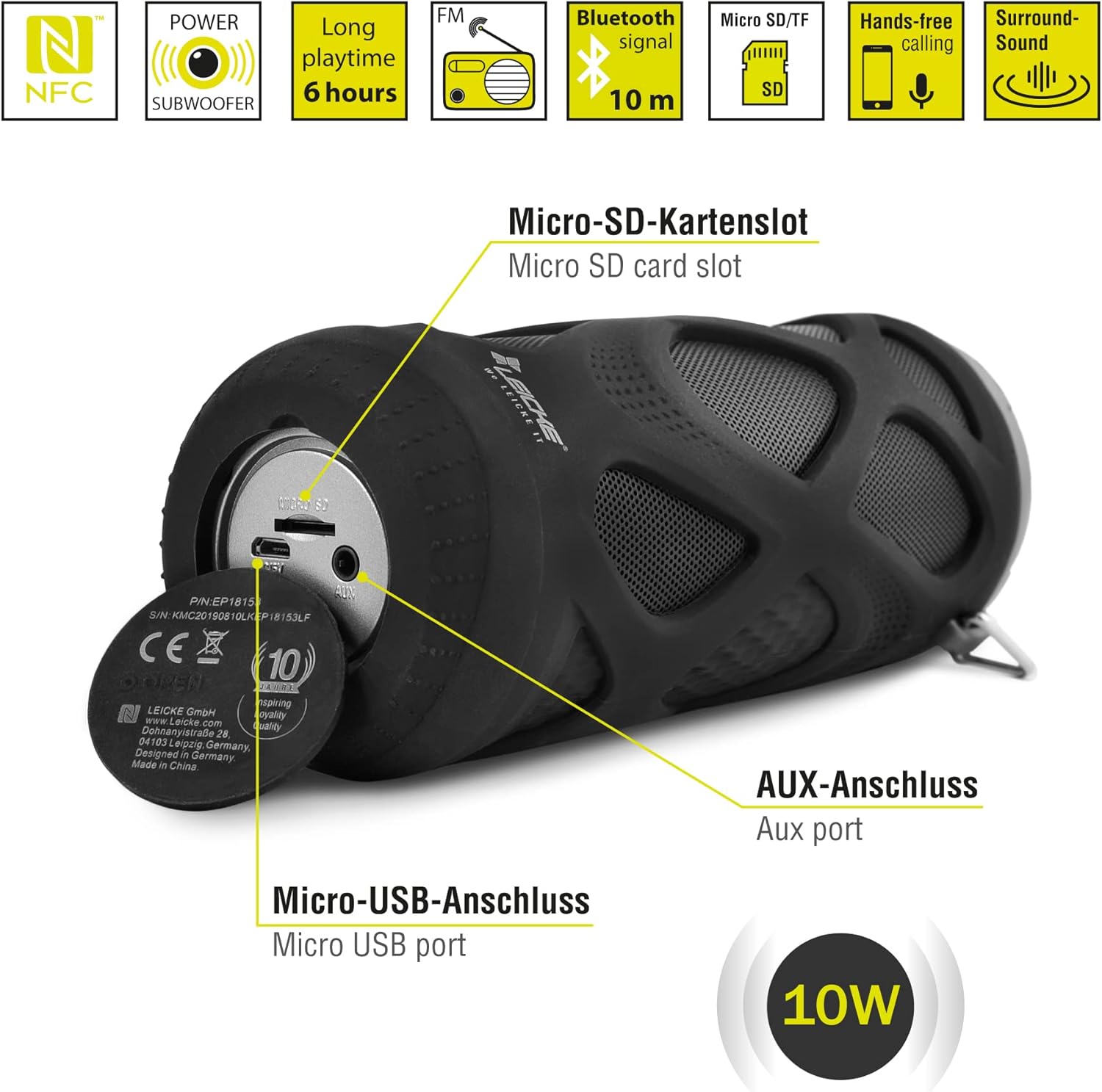
פיגורע 4.2: פּאָרץ איבערview
- Micro SD/TF Card Slot: Insert a Micro SD or TF card for MP3 playback.
- AUX פּאָרט: Connect external audio devices using the 3.5mm auxiliary cable.
- מיקראָ וסב פּאָרט: געניצט פֿאַר טשאַרדזשינג די רעדנער.
- LED ינדיקאַטאָר: (Typically near the charging port or control panel) Indicates power status, charging status, and Bluetooth pairing status.
5. סעטאַפּ און אָפּעראַציע
5.1 אויפלאָדן דעם רעדנער
- Connect the Micro USB end of the charging cable to the speaker's Micro USB port.
- Connect the USB-A end to a USB power adapter (not included) or a computer's USB port.
- The LED indicator will typically show red while charging and turn off or change color when fully charged.
- A full charge takes approximately 2-3 hours and provides up to 6 hours of playtime.
5.2 פּאַוערינג אויף / אַוועק
- צו מאַכט אויף: דריקן און האַלטן די אויף / אַוועק קנעפּל for a few seconds until you hear an audible prompt and the LED indicator lights up.
- צו מאַכט אַוועק: דריקן און האַלטן די אויף / אַוועק קנעפּל again for a few seconds until you hear an audible prompt and the LED indicator turns off.
5.3 בלועטאָאָטה פּערינג
- Ensure the speaker is powered on and in Bluetooth mode (the LED indicator will typically flash blue). If not, press the מאָדע קנעפּל צו באַשטימען צו בלועטאָאָטה מאָדע.
- אויף אייער סמאַרטפאָון, טאַבלעט, אָדער אַנדער בלוטוט-ענייבאַלד מיטל, גייט צו די בלוטוט סעטטינגס.
- זוכן פֿאַר available devices and select "LEICKE DJ Roxxx" from the list.
- Once paired, the LED indicator will stop flashing and remain solid blue, and you will hear a confirmation sound.
- דער רעדנער וועט זיך אויטאָמאַטיש צוריקבינדן צום לעצטן פארבונדענעם אפאראט ווען עס ווערט אנגעצינדן, אויב דער אפאראט איז אין דער געגנט און בלועטוט איז איינגעשטעלט.
5.4 MicroSD/TF Card Playback
- Insert a Micro SD or TF card (pre-loaded with MP3 audio files) into the Micro SD/TF card slot.
- The speaker will automatically switch to MicroSD/TF mode and begin playing music. If not, press the מאָדע קנעפּל to select MicroSD/TF mode.
- ניצן די שפּיל / פּויזע, באנד אַרויף/ווייַטער שפּירט, און באַנד אַראָפּ/פרייַערדיק שפּירט קנעפּלעך צו קאָנטראָלירן פּלייבאַק.
5.5 AUX אַרייַנשרייַב
- Connect one end of the 3.5mm auxiliary cable to the speaker's AUX port.
- Connect the other end to the headphone jack of your audio device (e.g., MP3 player, laptop).
- דער רעדנער וועט זיך אויטאָמאַטיש איבערקערן צו AUX מאָדע. אויב נישט, דריק די מאָדע קנעפּל צו אויסקלייַבן AUX מאָדע.
- Volume can be controlled via the speaker or your connected device. Track control must be done from the connected device.
5.6 FM ראַדיאָ אָפּעראַציע
- דרוק די מאָדע קנעפּל repeatedly until you enter FM Radio mode.
- אין FM מאָדע, דריקן די שפּיל / פּויזע קנעפּל once to automatically scan and save available FM stations. The speaker will then play the first saved station.
- ניצן די באנד אַרויף/ווייַטער שפּירט און באַנד אַראָפּ/פרייַערדיק שפּירט קנעפּלעך צו באַשטימען צווישן געראַטעוועטע סטאַנציעס.
5.7 אמתע ווירעלעס סטערעאָ (TWS) פונקציע
The LEICKE DJ Roxxx speaker supports TWS pairing, allowing you to connect two DJ Roxxx speakers for a stereo sound experience (20W total output).

פיגורע 5.1: טרו ווירעלעסס סטערעאָ (טווס) פּערינג
- Ensure both DJ Roxxx speakers are powered on and in Bluetooth pairing mode (LED flashing blue).
- אויף איינעם פון די רעדנער, דריק און האלט די מאָדע קנעפּל for a few seconds until you hear a pairing tone. The speakers will attempt to connect to each other.
- Once successfully paired, you will hear a confirmation sound, and the LED indicator on one speaker will flash blue (master), while the other will be solid blue (slave).
- Now, connect your device to the master speaker via Bluetooth as described in section 5.3. Both speakers will play audio in stereo.
6. אַפּערייטינג ינסטרוקטיאָנס
6.1 מוזיק פּלייבאַק
- שפּיל / פּויזע: דרוק די שפּיל / פּויזע קנעפּל אַמאָל.
- ווייַטער שפּור: דריקן און האַלטן די באַנד אַרויף / ווייַטער שפּור קנעפּל.
- פֿריִערדיקע שפּור: דריקן און האַלטן די באַנד אַראָפּ / פרייַערדיק שפּור קנעפּל.
- באַנד אַרויף: דרוק די באַנד אַרויף / ווייַטער שפּור קנעפּל בעקיצער.
- באַנד אַראָפּ: דרוק די באַנד אַראָפּ / פרייַערדיק שפּור קנעפּל בעקיצער.
6.2 הענט-פריי רופן
- ענטפער רופן: ווען אַ רופן קומט אין, דריקן די שפּיל / פּויזע / רופן קנעפּל אַמאָל.
- סוף רופן: דריקן די בעשאַס אַ רוף שפּיל / פּויזע / רופן קנעפּל אַמאָל.
- אָפּוואַרפן רופן: When a call comes in, press and hold the שפּיל / פּויזע / רופן קנעפּל פֿאַר 2 סעקונדעס.
- ריאַל די לעצטע נומער: אין סטענדביי מאָדע, דריקט צוויי מאָל אויף די שפּיל / פּויזע / רופן קנעפּל.
6.3 שטימע אַסיסטאַנט אַקטיוואַציע
- With one click, you can activate Siri (iOS) or Google Assistant (Android) on your connected smartphone. Press the Play/Pause/Call/Voice Assistant button אַמאָל צו אַקטאַווייט.
7. וישאַלט
7.1 רייניקונג
- Wipe the speaker with a soft, dry, or slightly damp שטאָף.
- ניצט נישט קיין שרײַבנדיקע רייניגער, אַלקאָהאָל אדער כעמישע סאָלווענטן, ווײַל די קענען שאַטן די ייבערפֿלאַך.
- זיכער מאַכן אַז אַלע פּאָרץ זענען טרוקן איידער איר לאָדן אָדער קאַנעקטינג אנדערע דעוויסעס.
7.2 סטאָרידזש
- האַלט דעם רעדנער אין אַ קיל, טרוקן אָרט אַוועק פון דירעקט זונשייַן און עקסטרעמע טעמפּעראַטורן.
- If storing for an extended period, charge the battery to about 50% every few months to maintain battery health.
7.3 וואַסער קעגנשטעל
The LEICKE DJ Roxxx speaker is designed to be splashproof, offering protection against light rain or splashes. It is ניט וואָטערפּרוף and should not be submerged in water or exposed to heavy rain. Ensure the port cover is securely closed to maintain splash resistance.

פיגורע 7.1: Splashproof Design for Outdoor Use
8. טראָובלעשאָאָטינג
| פּראָבלעם | מעגלעך סיבה | לייזונג |
|---|---|---|
| דער רעדנער לאָזט זיך נישט אָנ. | נידעריק באַטאַרייע. | לאָדט אויף דעם רעדנער פֿאַר מינדעסטנס 30 מינוט. |
| קען נישט פארבינדן דורך בלוטוט. | רעדנער נישט אין פּערינג מאָדע; מיטל בלועטוט אויסגעלאָשן; צו ווייט פון מיטל. | Ensure speaker is in Bluetooth mode (flashing blue LED). Turn on Bluetooth on your device. Move speaker closer to device (within 10m). Forget previous pairings on your device and try again. |
| קיין געזונט. | קול צו נידעריג; אומרעכטער מאָדע; אַפּאַראַט שפּילט נישט. | Increase speaker and device volume. Ensure correct mode (Bluetooth, AUX, MicroSD). Check if audio is playing on your source device. |
| שלעכטע FM ראַדיאָ אָפּנאַם. | שוואַך סיגנאַל; שטערונג. | Move the speaker to a different location. Re-scan for stations. |
| מיקראָסד קאַרטל נישט דערקענט. | Card not inserted correctly; unsupported format; corrupted files. | Reinsert the card. Ensure files are in MP3 format. Try a different MicroSD card. |
9. ספּעסאַפאַקיישאַנז
| מאָדעל נאָמען | דדזש ראָקסקס |
| מאָדעל נומער | B09P4Z5MN5 |
| סאָרט | LEICKE |
| קאַנעקטיוויטי טעכנאָלאָגיע | בלועטאָאָטה |
| ווירעלעסס קאָמוניקאַציע טעכנאָלאָגיע | בלועטאָאָטה |
| רעדנער טיפּ | פּאָרטאַטיוו בלועטאָאָטה רעדנער |
| מאַקסימום רעדנער אַרויסגאַנג מאַכט | 10 וואטס |
| קאָנטראָל מעטאָד | Tactile Buttons |
| ספּעציעלע פֿעיִקייטן | Integrated Microphone, Portable Wireless, MicroSD/TF Player, Aux Input, FM Radio, Hands-Free Calling, Voice Assistant Support, TWS Function, Splashproof |
| מאַכט מקור | קאַבל עלעקטריק (ריטשאַרדזשאַבאַל באַטאַרייע) |
| פּראָדוקט דימענשאַנז (L x W x H) | 7 X 7 X 18 סענטימעטער |
| פּונקט וואָג | 400 גראַמז |
| רעקאָממענדעד ניצט | פֿאַר סמאַרטפאָון אָדער טאַבלעט |
| קאַמפּאַטאַבאַל דעוויסעס | לאַפּטאַפּ, סמאַרטפאָנע |
| איז וואָטערפּרוף | False (Splashproof only) |
10. וואָראַנטי און שטיצן
LEICKE products come with a standard manufacturer's warranty. For detailed warranty information, please refer to the warranty card included in your package or visit the official LEICKE webפּלאַץ.
If you encounter any issues or have questions regarding your LEICKE DJ Roxxx speaker, please contact LEICKE customer support:
- פאַבריקאַנט: LEICKE
- פארקויפער : LEICKE - Leipzig (as per Amazon listing)
- שטיצן: Refer to the official LEICKE website or contact information provided with your purchase for the most up-to-date support channels.