
1. הקדמה
The ALONEFIRE X37 Tactical 4-in-1 LED Flashlight is a versatile and durable lighting tool designed for various outdoor activities and emergency situations. It features multiple light colors, adjustable focus, and a power bank function for charging other devices. This manual provides detailed instructions for its setup, operation, and maintenance to ensure optimal performance and longevity.

Figure 1: ALONEFIRE X37 Tactical 4-in-1 LED Flashlight
2. פּראָדוקט פֿעיִקייטן
- 4-in-1 Multicolor LED: Equipped with individual Red, Green, Blue, and White LED light sources, offering high brightness and a beam distance of 100-200 meters.
- Adjustable Focus (Zoomable): Allows users to switch between a focused spotlight for long-range illumination and a wide floodlight for broader area coverage.
- דוראַבאַל אַלומינום צומיש שאָל: Constructed from high-quality aluminum alloy for enhanced heat dissipation, reliability, and durability.
- USB קריקאָנלאָדלעך: Features a high-capacity rechargeable battery with USB charging support and overcharge protection. A charging indicator displays the power status.
- Reverse Charging (Power Bank Function): Can be used as an improvised power bank via its USB-A output port to charge other devices.
- 1/4 Inch Threaded Hole: Designed for mounting the flashlight on a stand, providing stable illumination for photography or other activities.

Figure 2: Key components of the X37 Flashlight, including the Micro USB Charging Port, USB A Reverse Charging Port, Lamp Head, Power Switch/Charging Indicator, RGBW 4PCS Individual LED, Brass Contactor, and Non-slip Handle.
3. פּעקל אינהאַלט
באַשטעטיקן אַז אַלע זאכן זענען פאַראַן אין פּעקל:
- ALONEFIRE X37 Flashlight Unit
- High-Capacity Rechargeable Battery (Nonstandard Battery)
- וסב טשאַרדזשינג קאַבלע (וסב- א צו וסב- C)
- לאַניאַרד
- באַניצער מאַנואַל (דעם דאָקומענט)

Figure 3: Included accessories: flashlight, lanyard, USB charging cable, and battery.
4. סעטאַפּ און ייַנמאָנטירונג
4.1 באַטאַרייע ייַנמאָנטירונג
- ונסקרעוו די עק היטל פון די פלאַשליגהט.
- Insert the provided rechargeable battery with the positive (+) pole facing towards the flashlight head (lamp קאָפּ).
- Securely screw the tail cap back onto the flashlight.
4.2 ערשט טשאַרדזשינג
Before first use, fully charge the flashlight battery. Refer to Section 6 for detailed charging instructions.
5. אַפּערייטינג ינסטרוקטיאָנס
5.1 Power On/Off and White Light Modes
- Press the power switch button once to turn on the flashlight in White Light mode.
- Subsequent presses of the power switch button will cycle through the White Light modes: High → Medium → Low → Strobe → SOS.
- To turn off the flashlight, press and hold the power switch button for approximately 2 seconds in any mode.
5.2 Multicolor Light Modes (Red, Green, Blue)
- From the OFF state, double-press the power switch button to activate the Multicolor Light mode.
- Each subsequent press of the power switch button will cycle through the colors: Red → Green → Blue.
- To turn off the flashlight, press and hold the power switch button for approximately 2 seconds in any mode.
Video 1: Demonstration of the ALONEFIRE X004 Multicolor Flashlight, showcasing Red, Green, and Blue light modes. Note: This video features a similar model (X004) and demonstrates the multi-color functionality.
Video 2: ALONEFIRE SV96 RGB Flashlight showcasing White, Green, and Blue light modes. This video demonstrates the color output of a similar ALONEFIRE RGB flashlight.
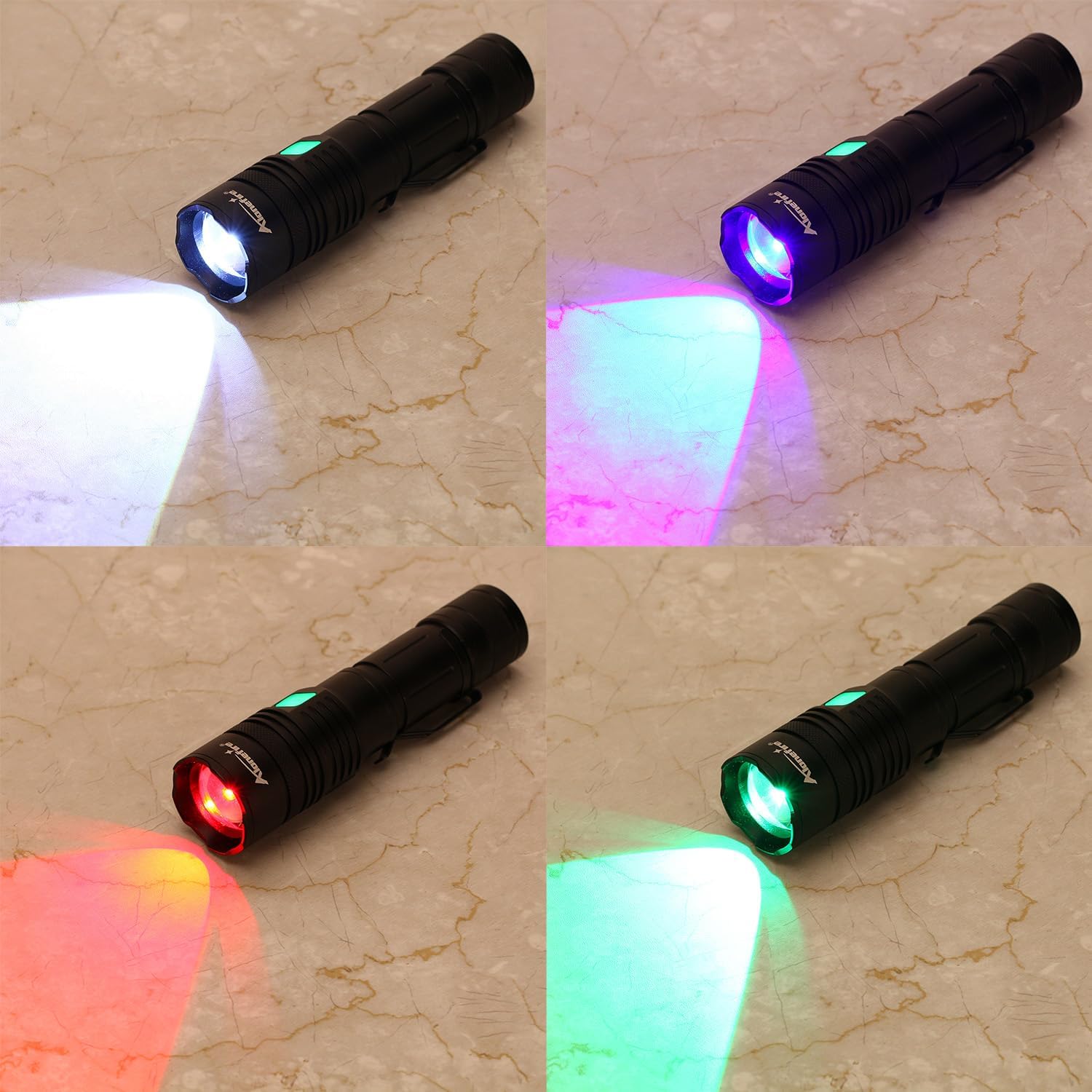
Figure 4: The X37 Flashlight demonstrating its four distinct light colors: White, Blue, Green, and Red.
5.3 Adjustable Focus (Zoom)
To adjust the focus of the light beam, gently slide the head of the flashlight forward or backward. Sliding forward will narrow the beam into a spotlight, while sliding backward will widen it into a floodlight.

Figure 5: The zoomable feature allows adjustment from a focused beam (zoom in) to a wide floodlight (zoom out).
5.4 זייט ליכט אָפּעראַציע
Some versions of this flashlight may include a side COB light. If present, typically a quick double-press or a long press of the power button (depending on the specific model variant) will activate the side light. Cycle through its modes (e.g., White High, White Low, Red, Red Strobe) with single presses.
Video 3: A seller video demonstrating the basic usage and mode switching of a similar flashlight model, including the side light function.
6. טשאַרדזשינג און פּאַוער באַנק פונקציע
6.1 אויפלאָדן די פלאַשליכט
- Locate the Micro USB charging port on the flashlight body, usually protected by a rubber cover.
- Connect the provided USB charging cable to the flashlight's charging port and to a compatible USB power source (e.g., wall adapter, computer USB port).
- The charging indicator will typically show red during charging and turn green when fully charged.
- די טשאַרדזשינג צייט איז בערך 3-5 שעה פֿאַר אַ פולע טשאַרדזשינג.

Figure 6: The flashlight being charged via USB. The indicator light shows red for charging and green for fully charged.
6.2 Using as a Power Bank (Reverse Charging)
The flashlight supports reverse charging, allowing it to act as a power bank for other devices.
- Locate the USB-A output port on the flashlight body, usually next to the charging port.
- פֿאַרבינדט אייער דעווייס'ס טשאַרדזשינג קאַבל צום פלאַשליכט'ס USB-A אַרויסגאַנג פּאָרט.
- The flashlight will begin charging your device. This feature is useful for emergencies or when away from a power source.

Figure 7: The flashlight's reverse charging function in use, providing power to a smartphone.
Video 4: A seller video demonstrating the charging capabilities of a rechargeable flashlight, including its use as a power bank.
7. וישאַלט
- רייניקונג: ווישט אָפּ דעם קערפּער פֿון דער פֿלאַשליכט מיט אַ ווייכן, טרוקענעם שטאָף.amp שטאָף. דו זאלסט נישט נוצן אַברייסיוו קלינערז אָדער סאָלוואַנץ.
- באַטערי זאָרגן: For optimal battery life, avoid fully discharging the battery frequently. Recharge it regularly, especially if stored for extended periods.
- סטאָרידזש: Store the flashlight in a cool, dry place away from direct sunlight and extreme temperatures. If storing for a long time, remove the battery.
- וואַסער קעגנשטעל: The flashlight has a waterproof rating (refer to specifications). Ensure all caps and covers are securely closed before exposure to water.
8. טראָובלעשאָאָטינג
- פלאַשליגהט נישט קער אויף:
- זיכער מאַכן אַז די באַטאַרייע איז ריכטיק אינסטאַלירט מיט דער ריכטיקער פּאָלאַריטעט.
- קאָנטראָלירט צי די באַטאַרייע איז אויפגעלאָדן. לאָזט עס ווידער אויף אויב נייטיק.
- ענשור די עק היטל איז גאָר טייטאַנד.
- Flashlight not charging:
- Verify the USB cable is securely connected to both the flashlight and the power source.
- פּרוּווט אַ אַנדערש וסב קאַבלע אָדער מאַכט מקור.
- קוק דעם טשאַרדזשינג אינדיקאַטאָר פֿאַר סטאַטוס.
- ליכט ארויסגאַנג איז שוואַך:
- די באַטעריע קען זיין שוואַך. לאָדט אויף די לאָמפּ.
- זיכער מאַכן אַז די לענס איז ריין און פריי פון שטערונגען.
9. ספּעסאַפאַקיישאַנז
| שטריך | באַשרייַבונג |
|---|---|
| ליכט מקור טיפּ | LED (Red, Green, Blue, White) |
| מאַכט מקור | באַטאַרייע פּאַוערד |
| באַטערי טיפּ | 1 נישט-סטאַנדאַרט באַטאַרייע (אַרייַנגערעכנט) |
| באַטאַרייע צעל זאַץ | ליטהיום יאָן |
| Voltage | 5 וואלטס |
| מאַטעריאַל | אַלומינום צומיש |
| וואַסער קעגנשטעל מדרגה | וואָטערפּרוף |
| אַרייַנגערעכנט קאַמפּאָונאַנץ | טשאַרדזשער |
| פאַבריקאַנט | Alonefire |
| לאַנד פון אָריגין | כינע |
10. וואָראַנטי און שטיצן
For warranty information or technical support, please refer to the documentation included with your purchase or contact the seller directly. Keep your purchase receipt as proof of purchase.