
1. הקדמה
This manual provides detailed instructions for the BoxWave SlimKeys Bluetooth Keyboard with Trackpad, designed for use with the Apple iPhone 13 mini. Please read this manual thoroughly before using the product to ensure proper operation and to maximize its lifespan.
The SlimKeys Bluetooth Keyboard integrates responsive chiclet-style keys and a full-functioning trackpad, transforming your iPhone 13 mini into a portable workstation. Its ultra-thin and lightweight design makes it an ideal travel companion.
2. פּעקל אינהאַלט
- BoxWave SlimKeys Bluetooth Keyboard with Trackpad
- וסב טשאַרדזשינג קאַבלע
- באַניצער מאַנואַל
3. פּראָדוקט פֿעיִקייטן
- Integrated Keyboard and Trackpad: Combines a full QWERTY keyboard with a responsive trackpad for enhanced navigation.
- שלאַנק און לייטווייט פּלאַן: At approximately 3/16 inch thick, it is highly portable without compromising key size for comfortable typing.
- Bluetooth Version 3.0: Ensures fast pairing and seamless wireless communication with your device.
- באַטערי קאַנסערוויישאַן: Features an on/off switch to extend battery life when not in use.
- פּאָרטאַטיוו: Designed for easy transport in bags or luggage.

פיגור 3.1: פון אויבן אַראָפּ view of the SlimKeys Bluetooth Keyboard, showing the full keyboard layout and integrated trackpad.
4. סעטאַפּ
4.1 אויפלאָדן די קלאַוויאַטור
- געפינט דעם טשאַרדזשינג פּאָרט אויף דער זייט פון דער קלאַוויאַטור.
- פֿאַרבינדט דעם קליינעם עק פֿון דעם צוגעשטעלטן USB טשאַרדזשינג קאַבל צום טשאַרדזשינג פּאָרט פֿון דער קלאַוויאַטור.
- Connect the larger end of the USB cable to a USB power source (e.g., computer USB port, USB wall adapter).
- The charging indicator light will illuminate. Once fully charged, the light will typically change color or turn off.
4.2 פּאַוערינג אויף / אַוועק
- To power on the keyboard, slide the 'ON/OFF' switch, usually located on the side or back, to the 'ON' position. A power indicator light will briefly illuminate.
- To power off the keyboard, slide the 'ON/OFF' switch to the 'OFF' position. This conserves battery life when the keyboard is not in use.
4.3 בלועטאָאָטה פּערינג
Follow these steps to pair your BoxWave SlimKeys Bluetooth Keyboard with your Apple iPhone 13 mini:
- זייט זיכער אַז די קלאַוויאַטור איז גאָר אָנגעלאָדן און אנגעצונדן.
- On your iPhone 13 mini, go to סעטטינגס> בלועטאָאָטה.
- Turn on Bluetooth. Your iPhone will begin searching for nearby Bluetooth devices.
- On the keyboard, press the Bluetooth pairing button (often labeled 'Connect' or with a Bluetooth symbol). The Bluetooth indicator light on the keyboard will start blinking, indicating it is in pairing mode.
- On your iPhone, locate 'BoxWave Keyboard' or a similar name in the list of 'Other Devices' and tap on it.
- If prompted, enter the pairing code displayed on your iPhone screen using the keyboard, then press Enter.
- Once paired, the Bluetooth indicator light on the keyboard will stop blinking and remain solid or turn off, and your iPhone will show the keyboard as 'Connected'.

Figure 4.1: Keyboard with highlighted power switch and Bluetooth pairing button locations.
5. אַפּערייטינג ינסטרוקטיאָנס
5.1 קלאַוויאַטור באַניץ
Once paired, the keyboard functions like a standard computer keyboard. Simply open any application on your iPhone that requires text input (e.g., Messages, Notes, Safari) and begin typing. The on-screen keyboard will automatically disappear, allowing you to use the physical keyboard.
5.2 באַניץ פון טראַקפּאַד
The integrated trackpad allows for precise cursor control and navigation on your iPhone 13 mini. Basic gestures include:
- איין פינגער טאַפּ: Functions as a left-click to select items or activate buttons.
- צוויי פינגער סקראל: Drag two fingers up or down on the trackpad to scroll through content.
- לויפֿער באַוועגונג: Move a single finger across the trackpad to move the cursor on your iPhone screen.
5.3 ספּעציעלע פֿונקציע קנעפּלעך
The keyboard may include function keys (F1-F12) or dedicated media control keys. These keys often require pressing the 'Fn' key simultaneously with the desired function key to activate their secondary functions (e.g., volume control, play/pause, screen lock).
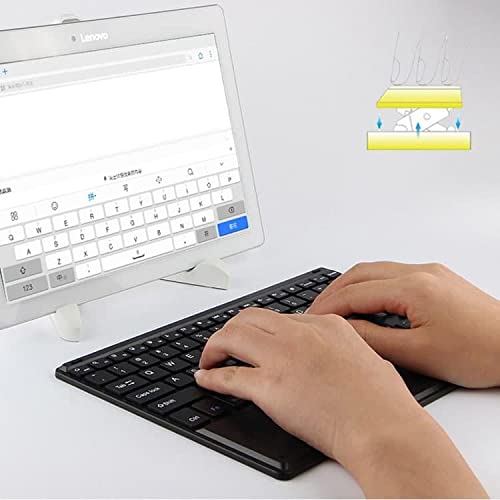
Figure 5.1: User demonstrating typing on the SlimKeys Bluetooth Keyboard.
6. וישאַלט
6.1 רייניקונג
- זיכער מאַכן אַז די קלאַוויאַטור איז אויסגעלאָשן איידער רייניקונג.
- ניצן אַ ווייך, לינט-פֿרייַ שטאָף אַ ביסל דampened with water or a mild electronics cleaner to wipe the surface.
- פֿאַרמײַדט די נוצן פֿון שאַרפֿע כעמיקאַלן, אַברייזיווע רייניגער, צי איבעריקע פֿײַכטקייט, ווײַל די קענען שאַטן די קלאַוויאַטור.
- For dust or debris between keys, use compressed air.
6.2 באַטערי קער
- To prolong battery life, power off the keyboard when not in use.
- Avoid fully discharging the battery frequently. Recharge when the low battery indicator appears.
- האַלט די קלאַוויאַטור אין אַ קיל, טרוקן אָרט אויב עס ווערט נישט גענוצט פֿאַר לענגערע צייטן.
7. טראָובלעשאָאָטינג
If you encounter issues with your BoxWave SlimKeys Bluetooth Keyboard, refer to the following common solutions:
- קלאַוויאַטור גייט נישט אָן: זיכער מאַכן אַז די באַטאַרייע איז אויפגעלאָדן. פֿאַרבינדט דעם טשאַרדזשינג קאַבל און לאָזט עס זיך אויפלאָדן פֿאַר לפּחות 30 מינוט איידער איר פּרוּווט עס ווידער אָנצוצינדן.
- קלאַוויאַטור נישט פּערינג:
- Ensure the keyboard is in pairing mode (Bluetooth indicator blinking).
- Make sure Bluetooth is enabled on your iPhone 13 mini.
- Move the keyboard closer to your iPhone.
- Forget the device from your iPhone's Bluetooth settings and attempt to pair again.
- Restart both the keyboard and your iPhone.
- קנעפּלעך רעאַגירן נישט:
- Check if the keyboard is still connected via Bluetooth.
- זייט זיכער אז די באַטעריע איז נישט קריטיש נידעריק.
- Try reconnecting the keyboard by turning it off and on, or by re-pairing.
- טרעקפּאַד אַרבעט נישט:
- זיכער מאַכן אַז די קלאַוויאַטור איז פארבונדן.
- Check for any settings on your iPhone that might disable external trackpads.
- Clean the trackpad surface to remove any debris.
8. ספּעסאַפאַקיישאַנז
| שטריך | באַשרייַבונג |
|---|---|
| סאָרט | BoxWave |
| מאָדעל נומער | bw-1977-29861-11782 |
| ייַזנוואַרג צובינד | בלועטאָאָטה |
| בלועטאָאָטה ווערסיע | 3.0 |
| קאַמפּאַטאַבאַל דעוויסעס | Apple iPhone 13 mini, Smartphones, Laptops |
| קלאַוויאַטור באַשרייַבונג | ווירעלעסס |
| ספּעציעלע פֿעיִקייטן | Portable, Integrated Trackpad |
| מאַכט מקור | באַטאַרייע פּאַוערד |
| דימענסיעס (בעערעך) | 257 מם X 172 מם X 5 מם |

Figure 8.1: Dimensions and operating system compatibility of the SlimKeys Bluetooth Keyboard.
9. וואָראַנטי און שטיצן
9.1 וואָראַנטי אינפֿאָרמאַציע
For specific warranty details, please refer to the warranty card included with your product or visit the official BoxWave webזייטל. האַלט דיין קויפן באַווייַז פֿאַר קיין וואָראַנטי קליימז.
9.2 קונה שטיצן
If you require further assistance or have questions not covered in this manual, please contact BoxWave customer support through their official webוועבזייטל אדער די קאָנטאַקט אינפֿאָרמאַציע וואָס איז צוגעשטעלט געוואָרן מיט אייערע קויף דאָקומענטאַציע.