
BTMETER BT-570T-APP
BT-מעטער BT-570T-APP Clamp מולטימעטער באַניצער מאַנואַל
קאָמפּרעהענסיוו גייד פֿאַר אָפּעראַציע און וישאַלט
1. הקדמה
The BTMETER BT-570T-APP is a versatile AC/DC 1000A Clamp Multimeter designed for accurate electrical measurements. It features 4000 counts digital display, data logging capabilities, and Bluetooth connectivity for remote monitoring via a smartphone or tablet application. This manual provides detailed instructions for the safe and effective use of your device.
Key functionalities include measuring AC/DC current, AC/DC voltage, resistance, capacitance, frequency, temperature, and continuity. It is suitable for various applications including HVAC, household electrical work, and commercial troubleshooting.
2. זיכערקייַט אינפֿאָרמאַציע
שטענדיק האַלטן זיך צו די פאלגענדע זיכערהייט מיטלען צו פאַרמייַדן פערזענלעכע שאָדן אָדער שעדיקן צו די מעטער:
- Do not exceed the maximum input limits for any measurement range.
- זייט זייער פארזיכטיג ווען איר ארבעט מיט לעבעדיגע קרייזן.
- זיכער מאַכן אַז דער מעטער איז געשטעלט צו דער ריכטיקער פונקציע און קייט איידער איר מאַכט מעסטונגען.
- קאָנטראָלירט די טעסט דראָטן פֿאַר שאָדן איידער יעדן באַנוץ. פאַרבייטן אויב די איזאָלאַציע איז צעבראָכן.
- ניצט נישט דעם מעטער אויב ער קוקט אויס צעבראכן אדער ארבעט נישט ריכטיג.
- Adhere to IEC 61010-1, CAT IV 600V, CAT III 1000V safety standards.
- When measuring current, ensure only the LIVE conductor is clamped for accurate readings. Clamping both hot and neutral conductors will result in a zero reading.
3. פּראָדוקט איבערview
The BTMETER BT-570T-APP is designed for ease of use and durability. Familiarize yourself with its components:

Figure 3.1: Key Components of the BT-570T-APP
- אַק/דק קלamp: For non-contact current measurement. Jaw caliber size is 1.77 inches (45mm).
- טריגער: עפנט און פארמאכט די קלamp קין.
- פונקציע רעדל: Selects measurement modes (Voltagע. שטראָם, קעגנשטעל, א.א.וו.).
- באַקלייט לקד ווייַז: Shows measurement readings clearly, even in low light.
- אַרייַנשרייַב דזשאַקס: For connecting test leads and temperature probe.
- קנעפּלעך: HOLD, SELECT RANGE, REL/Duty, Max/Min/Average.
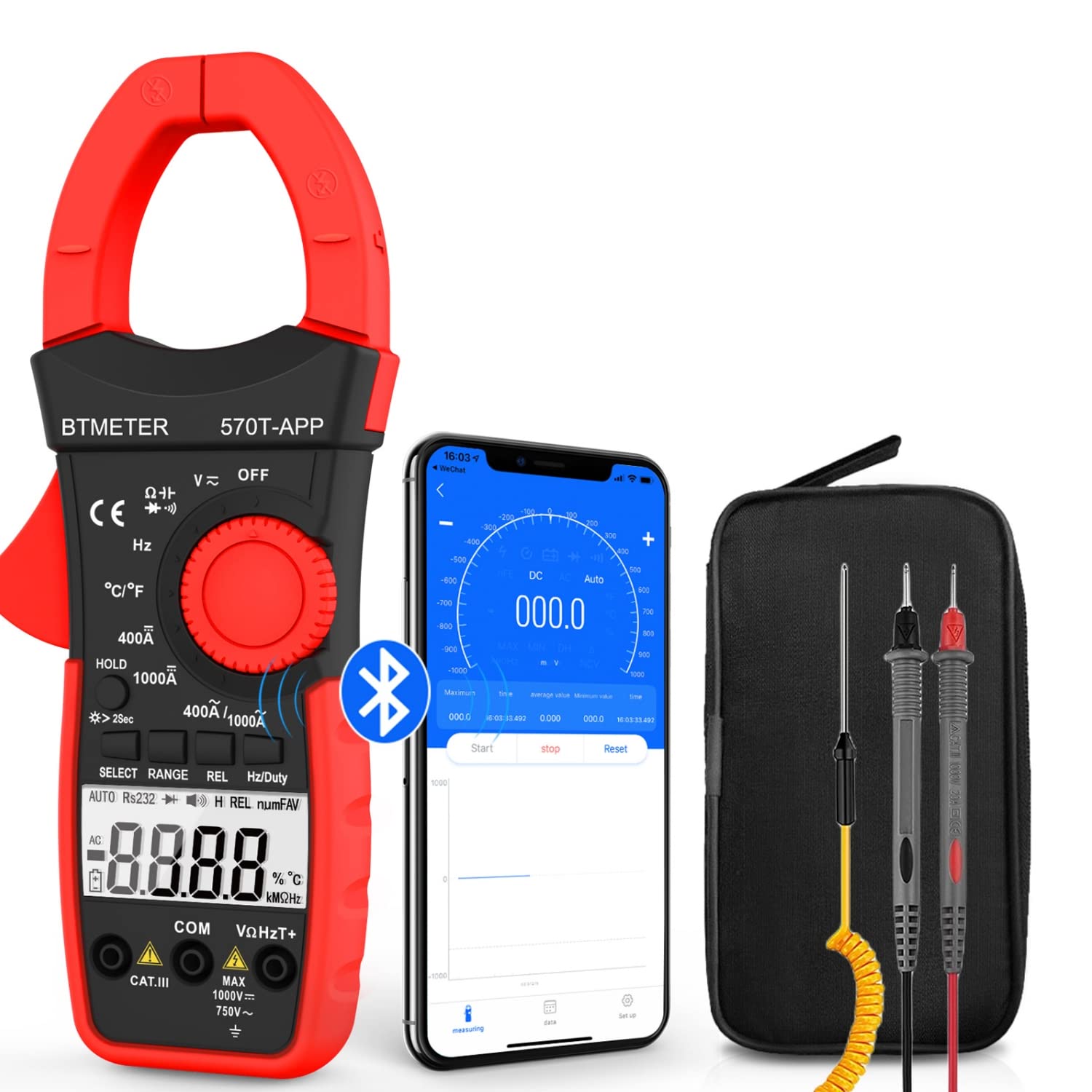
Figure 3.2: Product Contents and Bluetooth Connectivity
The package includes the BT-570T-APP clamp multimeter, test leads, a thermocouple probe, and a carrying case for convenient storage and transport.
4. סעטאַפּ
4.1 באַטאַרייע ייַנמאָנטירונג
The meter requires batteries for operation. Open the battery compartment on the back of the device, insert the batteries according to the polarity indicators, and secure the cover.
4.2 אַפּ אינסטאַלאַציע און בלועטוט פֿאַרבינדונג
The BT-570T-APP supports remote control and data logging via a mobile application. Follow these steps to connect:
- Download the "Intelligent Clamp Meter" app from the App Store (iOS) or Google Play (Android).
- זיכער מאַכן אַז בלועטוט איז ענייבאַלד אויף דיין סמאַרטפאָון אָדער טאַבלעט.
- Turn on the BT-570T-APP multimeter.
- Open the app on your device. It should automatically detect and connect to the multimeter.
- אַמאָל קאָננעקטעד, איר קענען view measurements, graph data, and save readings in Excel or TXT format.
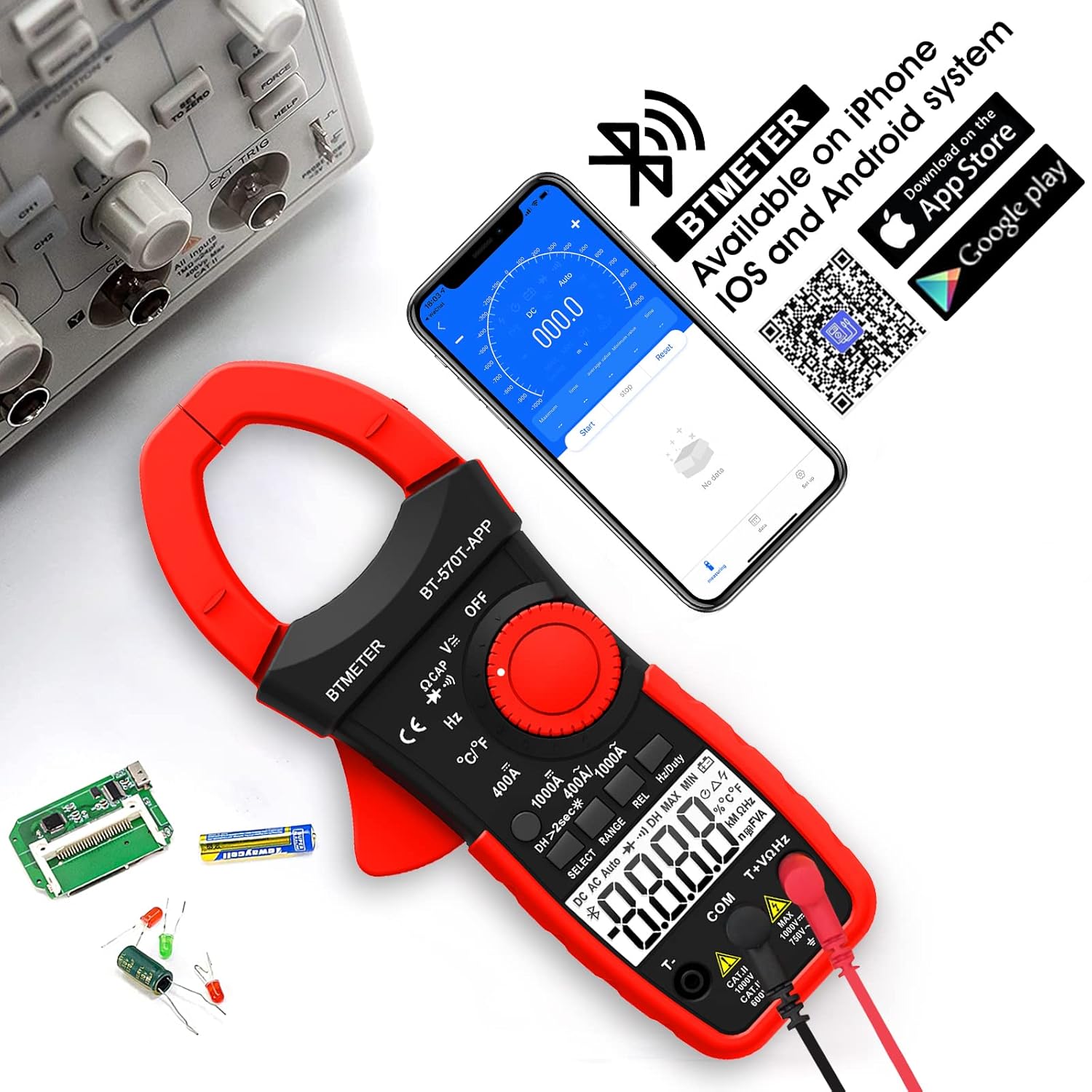
Figure 4.1: App Download and Bluetooth Pairing
5. אַפּערייטינג ינסטרוקטיאָנס
5.1 AC/DC קראַנט מעסטונג (Clamp)
To measure AC or DC current up to 1000A:
- Turn the function dial to the "400A" or "1000A" AC/DC current range.
- Press the SELECT button to toggle between AC and DC current if necessary.
- עפענען די קלamp jaw using the trigger.
- Enclose only one conductor (e.g., the live wire) within the clamp. צי ניט קלamp multiple wires as this will result in inaccurate readings.
- לייענען די קראַנט ווערט אויף די לקד אַרויסווייַזן.

Figure 5.1: Measuring AC/DC Current with the Clamp
5.2 חלקtagמעסטונג (AC/DC)
צו מעסטן AC אָדער DC וואָלtagביז 1000V:
- Insert the red test lead into the VΩHzT+ jack and the black test lead into the COM jack.
- Turn the function dial to the "V~" (AC Voltage) or "V-" (DC Voltagה) קייט.
- פֿאַרבינדט די טעסט־לידער פּאַראַלעל צום קרייז אָדער קאָמפּאָנענט וואָס ווערט געטעסט.
- לייענען דעם חלקtagE ווערט אויף די לקד אַרויסווייַזן.
5.3 קעגנשטעל מעזשערמאַנט
To measure resistance up to 60M ohms:
- Insert the red test lead into the VΩHzT+ jack and the black test lead into the COM jack.
- Turn the function dial to the "Ω" (Resistance) range.
- Ensure the circuit is de-energized before connecting the test leads across the component.
- לייענט דעם ווערט פון דעם קעגנשטעל אויפן LCD דיספּלעי.
5.4 מעאַסורעמענט קאַפּאַציטעט
To measure capacitance up to 200µF:
- Insert the red test lead into the VΩHzT+ jack and the black test lead into the COM jack.
- Turn the function dial to the "CAP" (Capacitance) range.
- Discharge the capacitor completely before connecting the test leads.
- פֿאַרבינדט די טעסט דראָטן אַריבער די קאַפּאַסיטאָר טערמינאַלן.
- לייענען די קאַפּאַסאַטאַנס ווערט אויף די לקד אַרויסווייַזן.
5.5 אָפטקייַט מעזשערמאַנט
To measure frequency up to 9.999MHz:
- Insert the red test lead into the VΩHzT+ jack and the black test lead into the COM jack.
- Turn the function dial to the "Hz" (Frequency) range.
- פֿאַרבינדט די טעסט־לידלעך צום סיגנאַל־מקור.
- לייענען די אָפטקייַט ווערט אויף די לקד אַרויסווייַזן.
5.6 טעמפּעראַטור מעזשערמאַנט
To measure temperature from -4°F to 1832°F (-20°C to 1000°C):
- Insert the thermocouple probe into the T+ and COM jacks, observing polarity.
- Turn the function dial to the "°C/°F" (Temperature) range.
- Press the SELECT button to switch between Celsius and Fahrenheit.
- Place the tip of the thermocouple probe on or in the object whose temperature is to be measured.
- לייענט די טעמפּעראַטור ווערט אויף די LCD דיספּליי.

Figure 5.2: Temperature Measurement
5.7 קאָנטינויטי טעסט
To test for circuit continuity:
- Insert the red test lead into the VΩHzT+ jack and the black test lead into the COM jack.
- Turn the function dial to the "Diode/Continuity" range.
- פֿאַרבינדט די טעסט־לידער אַריבער דעם קרייַז אָדער קאָמפּאָנענט.
- The buzzer will sound if the resistance is less than 50Ω, indicating continuity.

Figure 5.3: Auditory Continuity Test
5.8 Data Logging and Bluetooth Features
The BT-570T-APP offers advanced data logging capabilities via its mobile application:
- ווייַט מאָניטאָרינג: View real-time measurements on your phone or tablet from a distance.
- Trend Chart: The app automatically graphs measurement trends over time.
- דאַטאַ עקספּאָרט: Export logged data in Excel (.xlsx) or TXT (.txt) formats for analysis.
- דאַטן האַלטן: דריק דעם "האָלד" קנעפּל צו פֿאַרפֿרירן די איצטיקע לייענונג אויף דער עקראַן.
- REL (רעלאַטיווע מעסטונג): Press "REL" to zero out the current reading, useful for measuring changes relative to a reference point.
- מאַקס / מין / דורכשניטלעך: Record the maximum, minimum, and average values during a measurement session.

Figure 5.4: Remote Control and Data Download via App
6. וישאַלט
- רייניקונג: ווישט אויס דעם מעטער מיט א טרוקענעם, ריינעם שטאָף. ניצט נישט קיין שרײַבנדיקע רייניגערס אדער סאָלווענטן.
- באַטערי פאַרבייַט: Replace batteries when the low battery indicator appears on the display. Ensure proper polarity.
- סטאָרידזש: If storing for extended periods, remove the batteries to prevent leakage. Store in a cool, dry place away from direct sunlight.
- קאליבראציע: פֿאַר פּראָפעסיאָנעלן באַנוץ, איז רעקאָמענדירט פּעריִאָדישע קאַליבראַציע דורך אַ קוואַליפֿיצירטן טעכניקער צו האַלטן די אַקיעראַסי.
7. טראָובלעשאָאָטינג
| פּראָבלעם | מעגלעך סיבה | לייזונג |
|---|---|---|
| דער מעטער גייט נישט אן. | טויטע אדער נישט ריכטיק אינסטאלירטע באַטעריעס. | פאַרבייַטן באַטעריעס, זיכער מאַכן אַז די פּאָלאַריטעט איז ריכטיק. |
| Inaccurate current reading (e.g., zero reading). | Clamping multiple conductors (hot and neutral). | Ensure only a single live conductor is clampעד. |
| בלועטאָאָטה קשר פיילז. | Bluetooth disabled on phone/tablet; app issue; meter too far. | Ensure Bluetooth is on, restart app/meter, move closer, check app permissions. |
| Data not saving/exporting from app. | App bug; insufficient storage; incorrect save location. | Ensure app is updated. Check phone storage. Refer to app's help section for data export paths. Some users report issues with iOS data saving, try Android if available. |
| דער דיספלעי ווייזט "OL" (איבערלאָד). | די מעסטונג איז גרעסער ווי די אויסגעקליבענע ריינדזש. | אויסקלייבן אַ העכערע קייט אָדער זיכער מאַכן אַז די אַרייַנשרייַב איז אין די מעגלעכקייטן פון די מעטער. |
8. ספּעסאַפאַקיישאַנז
| פּאַראַמעטער | ווערט |
|---|---|
| מאָדעל נומער | BT-570T-APP |
| AC/DC קראַנט קייט | 400A / 1000A (100mA / 1A resolution) |
| אַק/דק חלקtagE ראַנגע | אַרויף צו 1000 וו |
| קעגנשטעל ראַנגע | ביז 60MΩ |
| קאַפּאַסיטאַנס ראַנגע | Up to 200µF |
| אָפטקייַט ראַנגע | אַרויף צו 9.999MHz |
| טעמפּעראַטור ראַנגע | -4°F צו 1832°F (-20°C צו 1000°C) |
| ווייַז קאַונץ | 4000 קאַונץ |
| קין קאַליבער גרייס | 1.77 אינטשעס (45 מם) |
| זיכערקייַט רייטינג | IEC 61010-1, CAT IV 600V, CAT III 1000V, Class 2, Double insulation |
| מאַכט מקור | באַטאַרייע פּאַוערד |
| פּונקט וואָג | 11.68 אונסעס |
| פּעקל דימענשאַנז | 10.2 X 5 X 2.28 אינטשעס |
9. וואָראַנטי און שטיצן
BTMETER provides a 12-month quality warranty for the BT-570T-APP Clamp מולטימעטער. לעבנס-לאנג טעכנישע שטיצע איז אויך פאראן.
For technical assistance, warranty claims, or any inquiries, please contact BTMETER customer support through their official webפּלאַץ אָדער די קאָנטאַקט אינפֿאָרמאַציע צוגעשטעלט מיט דיין קויפן.
אָפּציאָנעלע שוץ פּלענער זענען בנימצא פֿאַר עקסטענדעד קאַווערידזש:
- 3-יאָר שוץ פּלאַן
- 4-יאָר שוץ פּלאַן
- Complete Protect Plan (monthly billing)
Please refer to the specific terms and conditions of these protection plans for full details.
פֿאַרבונדענע דאָקומענטן - BT-570T-APP
 |
Intelligent Digital AC/DC Clamp מולטימעטער אָפּעראַציע מאַנואַל Operation manual for the 4000 Counts Auto Range Intelligent Digital AC/DC Clamp Multimeter. Covers overview, panel layout, safety information, operating instructions for various measurements (DC/AC voltage, current, resistance, capacitance, frequency, duty cycle, temperature, diode, continuity), general specifications, testing specifications, battery replacement, maintenance, and accessories. Includes information on connecting to a mobile phone APP for remote monitoring and data logging. |
 |
6000 ציפֿערן Clamp מולטימעטער אָפּעראַציע מאַנואַל אָפּעראַציע מאַנואַל פֿאַר די 6000 דידזשיטס AC/DC אַוטאָ קאַל Clamp מולטימעטער, מיט דעטאַלן וועגן זיכערהייט אינפֿאָרמאַציע, ספּעציפֿיקאַציעס, מעסטונג אינסטרוקציעס און וישאַלט. |
 |
AOPUTTRIVER AP-570T-APP Intelligent Digital AC/DC Clamp מולטימעטער אָפּעראַציע מאַנואַל Operation manual for the AOPUTTRIVER AP-570T-APP 4000 Counts Auto Range Intelligent Digital AC/DC Clamp Multimeter with Bluetooth connectivity. Details safety, specifications, measurement instructions, and maintenance. |
 |
BTMETER BT-570CAPP בלועטוט קאַנעקשאַן גייד שריט-ביי-שריט אינסטרוקציעס פארן פארבינדן דעם BTMETER BT-570CAPP clamp מעטער צו דיין סמאַרטפאָון דורך בלועטוט. |
 |
ANENG ST180 דיגיטאַל קלamp-אויף מולטימעטער אַפּערייטינג מאַנואַל די דאזיגע אויספירלעכע אפערירן מאנואל גיט דעטאלן וועגן די ANENG ST180 דידזשיטאל Clamp-אויף מולטימעטער. עס דעקט וויכטיגע זיכערהייט אינפארמאציע, שריט-ביי-שריט אפערירן אינסטרוקציעס פאר פארשידענע מעסטונגען (AC/DC וואל.tagע.ש., קראַנט, קעגנשטעל, אָפטקייט, קאַפּאַסיטאַנס, טעמפּעראַטור, NCV), אַלגעמיינע קעראַקטעריסטיקס, און דעטאַלירטע ספּעסיפיקאַציעס. וויכטיק פֿאַר זיכער און עפעקטיוו נוצן פון דעם מיטל. |
 |
AstroAI CM600 Digital Clamp Meter: User Manual and Guide This user manual provides comprehensive instructions, safety information, and specifications for the AstroAI CM600 Digital Clamp Meter, a TRUE RMS auto-ranging instrument for professionals and DIYers, capable of measuring AC/DC voltagE, קראַנט, קעגנשטעל, און מער. |
Ask a question about this manual
Ask about setup, troubleshooting, compatibility, parts, safety, or missing instructions. Manuals+ will review the question and use this page’s manual context to help answer it.