
הקדמה
Thank you for choosing the Krisons Sound Blaster Tower Speaker. This manual provides essential information for the safe and efficient operation of your speaker system. Please read it thoroughly before use and retain it for future reference.
פּראָדוקט איבערview
The Krisons Sound Blaster Tower Speaker is designed to deliver clear and balanced audio with an 8-inch woofer. It features multiple connectivity options including Bluetooth, USB, AUX, and FM radio, along with an LCD display for mode information. The speaker includes controls for volume, bass, and mode selection.

פיגורע 1: פראָנט און זייַט view of the Krisons Sound Blaster Tower Speaker, highlighting the display, USB port, mode button, play/pause, previous/next controls, bass, treble, volume knobs, 4-inch speakers, and 8-inch woofer.
סעטאַפּ
1. ונפּאַקקינג
נעמט פֿאָרזיכטיק אַרויס אַלע קאָמפּאָנענטן פֿון דער פּאַקעט. מאַכט זיכער אַז די פֿאָלגנדיקע זאַכן זענען פֿאַראַן:
- 1 x Krisons Sound Blaster Tower Speaker
- 1 x רימאָוט קאָנטראָל
- 1 x באַניצער מאַנואַל (דאָס דאָקומענט)
- 1 רענטגענ וואָראַנטי קאַרד
קסנומקס. פּלאַסעמענט
Position the tower speaker on a flat, stable surface. For optimal sound performance, place the speaker in a location that allows for clear sound dispersion. The compact design allows for flexible placement in various room sizes.
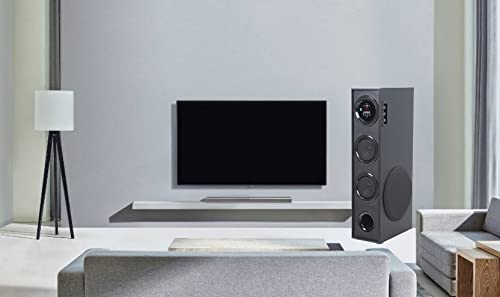
פיגורע 2: עקסample of speaker placement in a home environment.

Figure 3: Speaker dimensions for placement planning.
3. מאַכט קאַנעקשאַן
Connect the speaker's power cable to a standard AC power outlet. Ensure the power switch on the speaker is in the OFF position before connecting to power.
4. אַודיאָ קאַנעקשאַנז
The speaker supports multiple audio input methods:
- בלועטאָאָטה: פֿאַר דראָטלאָזע פֿאַרבינדונג צו סמאַרטפאָונז, טאַבלעטן און אַנדערע בלועטוט-ענייבאַלד דעוויסעס.
- וסב: פֿאַר שפּילן אַודיאָ files גלייַך פֿון אַ וסב פאָר.
- AUX אין: For wired connection to devices using a 3.5mm audio cable.
- עפעם ראַדיאָ: Built-in FM tuner for radio broadcasts.

Figure 4: Available connectivity options.

Figure 5: Connecting to an external device via AUX cable.
אַפּערייטינג ינסטראַקשאַנז
1. מאַכט אויף / אויסגעלאשן
Locate the power switch on the rear panel of the speaker. Flip the switch to the "ON" position to power on the speaker. The LCD display will illuminate. Flip to "OFF" to power down.
2. קאָנטראָל מעטאָדן
The speaker can be controlled using the physical buttons and knobs on the side panel or via the included remote control.
- זייט פּאַנעל קאָנטראָלס: Includes buttons for mode change, play/pause, previous/next track, and knobs for volume and bass adjustment.
- ווייַט קאָנטראָל: Provides full functionality for convenient operation from a distance.
3. מאָדע סעלעקציע
Press the "MODE" button on the speaker's control panel or the remote control to cycle through available input modes: Bluetooth, USB, AUX, and FM Radio. The selected mode will be indicated on the LCD display.
4. בלועטאָאָטה אָפּעראַציע
- Switch the speaker to Bluetooth mode. The LCD display will show "BT" or a similar indicator, and the speaker will enter pairing mode.
- אויף אייער דעווייס (סמאַרטפאָן, טאַבלעט), אַקטיווירט בלועטוט און זוכט פֿאַר פֿאַראַן דעווייסעס.
- Select "Krisons Sound Blaster" (or similar name) from the list of devices.
- Once paired, the speaker will confirm the connection, and you can play audio from your device.
5. וסב פּלייַבאַקק
- אַרײַנשטעלן אַ USB דרייוו מיט MP3 אַודיאָ fileאַרײַן אין דעם USB פּאָרט אויף דעם רעדנער.
- Switch the speaker to USB mode. The speaker will automatically detect and begin playing audio fileס פון די USB דרייוו.
- Use the previous/next buttons to navigate tracks and the play/pause button to control playback.
6. AUX-אין פֿאַרבינדונג
- Connect one end of a 3.5mm audio cable to the AUX-in port on the speaker.
- Connect the other end of the 3.5mm audio cable to the audio output jack of your external device (e.g., TV, computer, MP3 player).
- Switch the speaker to AUX mode. Audio from your connected device will now play through the speaker.
7. עפעם ראַדיאָ
- שטעלט דעם רעדנער אויף FM ראַדיאָ מאָדע.
- The speaker will automatically scan and store available FM stations.
- Use the previous/next buttons to cycle through the stored stations.
8. באַנד און טאָן אַדזשאַסטמאַנט
Use the "Volume" knob to adjust the overall sound level. Use the "Bass" knob to increase or decrease the low-frequency output. The speaker is designed to provide a balanced sound across treble, midrange, and bass frequencies.
וישאַלט
To ensure the longevity and optimal performance of your Krisons Sound Blaster Tower Speaker, follow these maintenance guidelines:
- רייניקונג: Use a soft, dry cloth to wipe the exterior surfaces of the speaker. Do not use abrasive cleaners, waxes, or solvents, as these can damage the finish.
- שטויב: Regularly dust the speaker grilles and vents to prevent accumulation, which can affect sound quality and internal components.
- פליסיק ויסשטעלן: Keep the speaker away from water and other liquids. Do not place liquid-filled containers on or near the speaker.
- סטאָרידזש: If storing the speaker for an extended period, disconnect it from power and store it in a cool, dry place, away from direct sunlight and extreme temperatures.
טראָובלעשאָאָטינג
אויב איר טרעפט פּראָבלעמען מיט אייער רעדנער, זעט די פאלגענדע געוויינטלעכע פּראָבלעמען און לייזונגען:
| פּראָבלעם | מעגלעך לייזונג |
|---|---|
| קיין מאַכט |
|
| קיין געזונט |
|
| בלועטאָאָטה איז נישט קאַנעקטינג |
|
| ווייַט קאָנטראָל נישט ארבעטן |
|
| Sound during power on/off | A brief sound or pop during power on/off is normal for this type of audio equipment and does not indicate a malfunction. |
ספּעסאַפאַקיישאַנז
| שטריך | דעטאַל |
|---|---|
| סאָרט | Krisons |
| מאָדעל נאָמען | סאָונד בלאַסטער |
| רעדנער מאַקסימום רעזולטאַט מאַכט | 80 וואטס |
| קאַנעקטיוויטי טעכנאָלאָגיע | Auxiliary, Bluetooth, USB, Wireless |
| אַודיאָ רעזולטאַט מאָדע | אַרומרינגלען |
| מאַונטינג טיפּ | שטאָק שטייענדיק |
| אָפּצוימונג מאַטעריאַל | קריסטאַל |
| רעדנער טיפּ | Subwoofer/Bookshelf/Woofer/Tower |
| קאָליר | שוואַרץ |
| קאָנטראָל מעטאָד | ריר, רימאָוט קאָנטראָל |
| Woofer Driver Diameter | 8 אינטשעס |
| Tweeter Driver Diameter | 1 אינטשעס |
| Total USB 2.0 Ports | 1 |
| נומער פון אַודיאָ טשאַנאַלז | 2.1 |
| נומער דימענשאַנז (ד רענטגענ וו רענטגענ ה) | 39D x 24W x 57H סענטימעטער |
| פּונקט וואָג | 8900 גראַמז |
| קאַמפּאַטאַבאַל דעוויסעס | סמאַרטפאָנע, טאַבלעט |
| מאַכט מקור | AC |
וואָראַנטי אינפֿאָרמאַציע
This Krisons Sound Blaster Tower Speaker comes with a 6-חודש וואָראַנטי on manufacturing defects. Please refer to the included Warranty Card for detailed terms and conditions. Retain your purchase receipt as proof of purchase for warranty claims.
קונה שטיצן
For any questions, assistance, or support regarding your Krisons Sound Blaster Tower Speaker, please contact Krisons Customer Care:

Figure 6: Krisons Customer Support contact details.
- בליצפּאָסט: service@krisons.com
- טעלעפֿאָן: +91-8287124581 / +91-9910016757
- אַפּערייטינג שעה: 10:6 צו XNUMX:XNUMX
- פאַבריקאַנט: Krisons Electronic Systems Limited, ZYTEL ENTERPRISES PVT


