
SCTEWELL GF22
GF22 Magnetic Mini Car Tracker GPS Locator User Manual
Brand: SCTEWELL | Model: GF22
1. הקדמה
The SCTEWELL GF22 Magnetic Mini Car Tracker GPS Locator is a versatile and compact device designed for real-time tracking and security. It offers multiple positioning modes (GPS, WiFi, LBS) to ensure accurate location information for various applications, including vehicle tracking, personal safety for the elderly and children, and anti-lost luggage. Its strong magnetic design allows for easy and discreet placement. This manual provides essential information for setting up, operating, and maintaining your GF22 locator.
2. פּראָדוקט איבערview

The compact GF22 GPS tracker held in hand, demonstrating its small size relative to a smartphone displaying a map and a car in the background, highlighting its primary use for vehicle tracking.
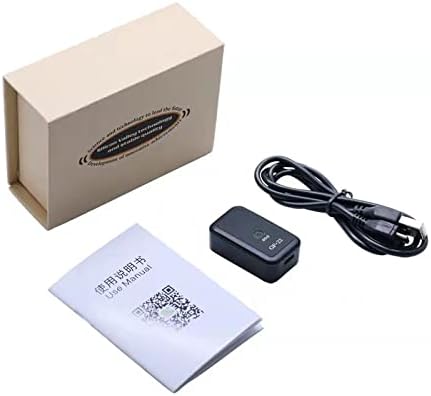
The contents of the GF22 product box, including the GF22 tracker, a charging cable, and the user manual.

נאָענט-אַרויף views of the GF22 tracker, highlighting specific product details such as the power button, charging port, and internal SIM card slot.
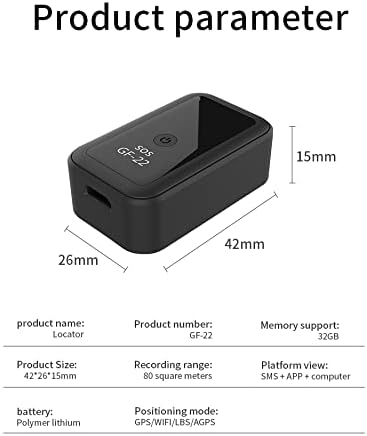
A table detailing the product parameters of the GF22 tracker, including product name, number, size, memory support, recording range, platform view, battery type, and positioning mode.
3. סעטאַפּ גייד
3.1 טשאַרדזשינג די מיטל
Before first use, fully charge the GF22 tracker using the provided USB cable. Connect the cable to the device's charging port and a standard USB power adapter. The indicator light will show charging status.
3.2 ינסטאַלירונג פון סים קאַרד
The GF22 requires a mobile phone SIM card for full functionality. Ensure the SIM card is active and has data, call, and SMS capabilities. Follow these steps:
- Carefully open the SIM card slot cover on the device.
- Insert the SIM card into the designated slot, ensuring correct orientation as shown in the diagram or video.
- פֿאַרמאַכט דעם דעקל פֿון דער סים קאַרטל שפּאַלט זיכער.

An illustration showing the GF22 tracker alongside a SIM card, indicating that the device requires a mobile phone card for operation.
3.3 אַפּ דאַונלאָוד און פֿאַרבינדונג
To utilize the full features of your GF22 tracker, download the official mobile application. Scan the QR code provided in the manual or product packaging, or search for the app in your device's app store. Follow the in-app instructions to register and bind your GF22 device using its unique ID (usually found on the device or packaging).
This video demonstrates the step-by-step installation method for the GF22 GPS locator, including opening the device, inserting the SIM card, and connecting it for initial setup.
4. אַפּערייטינג ינסטרוקטיאָנס
4.1 Real-Time Tracking and Positioning
The GF22 supports multiple positioning technologies for accurate real-time tracking:
- גפּס פּאַזישאַנינג: Provides highly accurate outdoor location data.
- WiFi Positioning: Enhances accuracy in indoor environments or areas with limited GPS signal.
- LBS Positioning: Utilizes cellular tower signals for location when GPS or WiFi are unavailable.
View the device's current location and historical tracks directly through the mobile application.

A visual representation of multiple precise positioning methods, including GPS, WiFi, LBS, and AGPS, with a satellite and city skyline, highlighting the GF22's advanced tracking capabilities.

The GF22 tracker next to a smartphone, illustrating its WiFi positioning capability with a WiFi signal icon, indicating enhanced accuracy in various environments.
4.2 SOS נויטפאַל פונקציע
In an emergency, press and hold the SOS button on the GF22 device for 3 seconds. The device will automatically send an alert to pre-set emergency contacts and initiate a call for help. Ensure emergency contacts are configured in the mobile application.

An image depicting an elderly person and a child, emphasizing the SOS emergency feature of the GF22 tracker for personal safety and quick assistance.

An image showing an elderly person and a child, reinforcing the 'SOS One Click for Help' feature of the GF22 tracker, designed for immediate assistance in emergencies.
4.3 Geo-Fence Protection
Set up virtual boundaries (geo-fences) in the mobile application. When the GF22 device enters or exits a defined area, you will receive an immediate smart alarm notification on your smartphone, providing timely alerts for monitored assets or individuals.
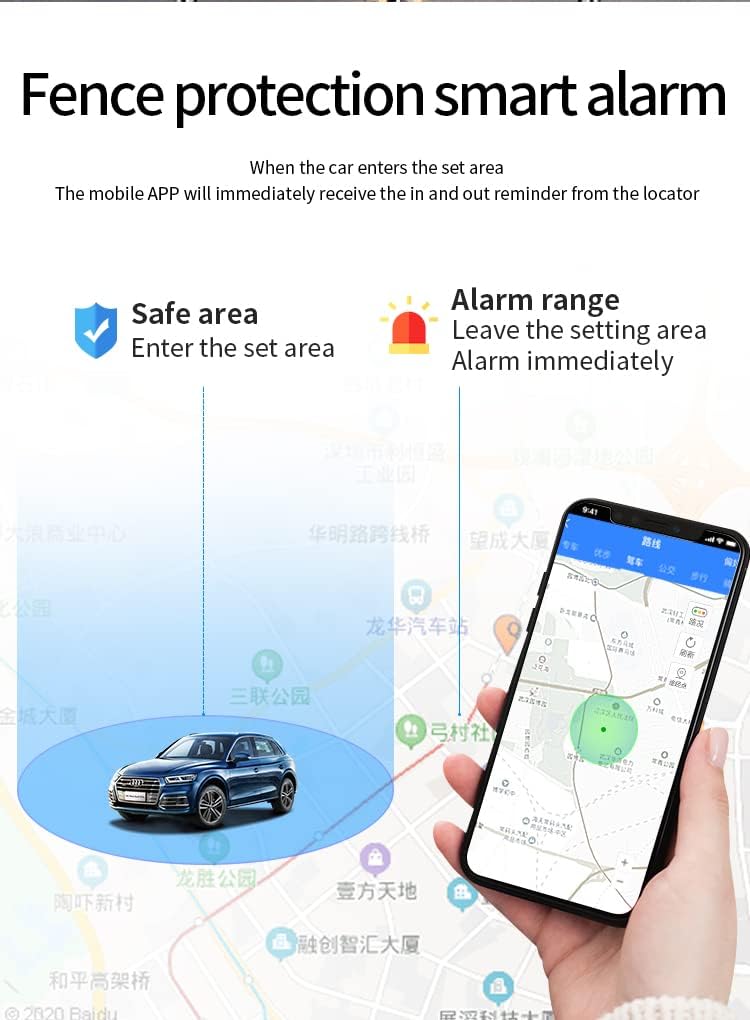
A map interface on a smartphone showing a 'Safe area' and an 'Alarm range' around a car icon, explaining the fence protection and smart alarm features of the GF22 tracker.
4.4 Magnetic Adsorption and Application
The GF22 features strong magnetic adsorption, allowing it to be easily attached to metallic surfaces without the need for complex installation. This makes it ideal for discreet placement in vehicles or on other metal objects.

A diagram showing a car with various points highlighted (under passenger seat, armrest inward, trunk, rear bumper, chassis, door glove box, sub-seat position trash box, front bumper), demonstrating the strong magnetic adsorption feature of the GF22 tracker for versatile and discreet placement.

א בילד ווייַזונגasing various applicable models for the GF22 tracker, including a truck, bus, car, and motorcycle, illustrating its versatility for different vehicle types.

The GF22 vehicle locator device positioned prominently with illustrations of a truck, car, and motorcycle in the background, emphasizing its primary function as a vehicle tracking device.
דאס ווידעא גיט א קורצע איבערבליקview of the GF22 car and object locator, showcasing its compact design and highlighting its real-time tracking capabilities.
5. וישאַלט
- Keep the device dry. Avoid exposure to water or moisture.
- רייניקט דעם אַפּאַראַט מיט אַ ווייכן, טרוקענעם שטאָף. ניצט נישט קיין שאַרפע כעמיקאַלן אָדער אַברייסיוו רייניגער.
- סטאָר די מיטל אין אַ קיל, טרוקן אָרט ווען ניט אין נוצן.
- לאָדט דאָס אַפּאַראַט רעגולער אויף, אפילו אויב עס איז נישט אין אַקטיוון באַניץ, כּדי צו האַלטן די באַטאַריע געזונט.
- Avoid extreme temperatures, as they can affect battery life and device performance.
6. טראָובלעשאָאָטינג
| פּראָבלעם | מעגלעך סיבה | לייזונג |
|---|---|---|
| די מיטל איז נישט פּאַוערינג | Low battery; incorrect SIM card insertion. | Charge the device fully. Re-insert the SIM card correctly. |
| Inaccurate or no positioning | Poor GPS/WiFi/LBS signal; SIM card issues; device placed in a signal-blocking area. | Move the device to an open area. Check SIM card balance and data plan. Ensure proper SIM card installation. |
| אַפּ איז נישט קאַנעקטינג צו מיטל | Incorrect device ID; network issues; app not updated. | Verify device ID. Check internet connection on your phone. Update the app to the latest version. Restart both device and app. |
| קורץ באַטאַרייע לעבן | Frequent tracking updates; continuous use in low signal areas; aging battery. | Adjust tracking frequency in app settings. Ensure device is in an area with good signal. Battery life naturally degrades over time. |
| די SOS פונקציע ארבעט נישט | No emergency contacts set; SIM card issues; insufficient balance. | Set up emergency contacts in the app. Check SIM card functionality and balance. |
7. ספּעסאַפאַקיישאַנז
| שטריך | דעטאַל |
|---|---|
| פּראָדוקט דימענשאַנז | 1.77 X 0.59 X 0.98 אינטשעס |
| פּונקט וואָג | 4.2 אונסעס |
| ASIN | B09MLQPZF7 |
| קאַנעקטיוויטי טעכנאָלאָגיע | ווי-פי |
| ספּעציעלע פֿעיִקייטן | מאַגנעטיק |
| אנדערע ווייַז פֿעיִקייטן | ווירעלעסס |
| וואָס איז אין די קעסטל | Battery (built-in), Charging Cable, User Manual |
| פאַבריקאַנט | sctewell.lt |
| ערשטער דאַטע בנימצא | 26 נאוועמבער 2021 |
| סאָרט | SCTEWELL |
| קאַנעקטיוויטי טעכנאָלאָגיע | ווי-פי |
| שטיצט אַפּפּליקאַטיאָן | שרעק, גפּס |
| ספּעציפיש ניצט פֿאַר פּראָדוקט | Elderly monitoring, Children monitoring, Vehicle tracking, Anti-lost luggage |
8. וואָראַנטי און שטיצן
For warranty information and technical support, please refer to the contact details provided on the product packaging or the official SCTEWELL webזייטל. האַלט אייער קויף קוויטל ווי אַ באַווייַז פון קויפן פֿאַר קיין וואָראַנטי קליימז.
Ask a question about this manual
Ask about setup, troubleshooting, compatibility, parts, safety, or missing instructions. Manuals+ will review the question and use this page’s manual context to help answer it.