
LOEWE klang bar5 mr & sub5
LOEWE klang bar5 mr & sub5 Soundbar and Subwoofer Set Instruction Manual
Model: klang bar5 mr & sub5 | Brand: LOEWE
1. הקדמה
This manual provides essential information for the safe and efficient operation of your LOEWE klang bar5 mr Soundbar and sub5 Subwoofer set. Please read these instructions carefully before using the product and retain them for future reference.
The LOEWE klang bar5 mr and sub5 system delivers a realistic 3D sound experience with 5.1.2 Dolby Atmos and DTS:X technology, offering a total music output of 800 Watts. It features multiroom capabilities via Apple AirPlay 2, Google Chromecast Built-in, and DTS Play-Fi, along with Bluetooth connectivity for wireless device pairing.
2. זיכערקייַט אינפֿאָרמאַציע
Observe the following safety precautions to prevent electric shock, fire, or damage to the product.
- מאַכט צושטעלן: פאַרזיכערן די מאַכט צושטעלן וואָלtage שטימט מיט די באדערפענישן וואס זענען ספעציפירט אויפן פראדוקט עטיקעט.
- ווענטילאַטיאָן: בלאָקירט נישט קיין ווענטילאַציע עפענונגען. אינסטאַלירט לויט די אינסטרוקציעס פונעם פאַבריקאַנט.
- וואַסער און נעץ: שטעלט נישט אויס דעם אַפּאַראַט צו רעגן אָדער פייכטקייט. שטעלט נישט קיין זאכן אָנגעפילט מיט פליסיקייטן, ווי וואַזעס, אויף דעם אַפּאַראַט.
- רייניקונג: Unplug the appliance from the wall outlet before cleaning. Use a dry cloth for cleaning.
- סערוויס: דו זאלסט נישט פּרווון צו דינען דעם פּראָדוקט זיך. קאָנטאַקט אַלע קוואַלאַפייד סערוויס פּערסאַנעל.
- אָרט: Place the soundbar and subwoofer on a stable, flat surface. Avoid placing near heat sources or in direct sunlight.

Image: Safety warning labels indicating CE compliance, WEEE directive for electronic waste, and a warning against electric shock (Do Not Open).
3. פּעקל אינהאַלט
באַשטעטיקן אַז אַלע זאכן זענען פאַראַן אין פּעקל:
- 1 x LOEWE klang bar5 mr Soundbar
- 1 x LOEWE sub5 Subwoofer
- מאַכט קאַבלעס
- Remote control (not explicitly listed but typically included)
- ינסטרוקטיאָן מאַנואַל (דעם דאָקומענט)

Image: The LOEWE klang bar5 mr soundbar and sub5 subwoofer, showcasinג דער גאַנצער סעט.
4. סעטאַפּ
4.1 פּלייסמאַנט
- סאָונדבאַר: Place the klang bar5 mr directly in front of your television, centered for optimal sound dispersion. Ensure no objects obstruct the front or top of the soundbar.
- סובוואָאָפער: The sub5 subwoofer can be placed anywhere in the room, ideally near a wall or corner for enhanced bass response. Its wireless design offers flexibility.
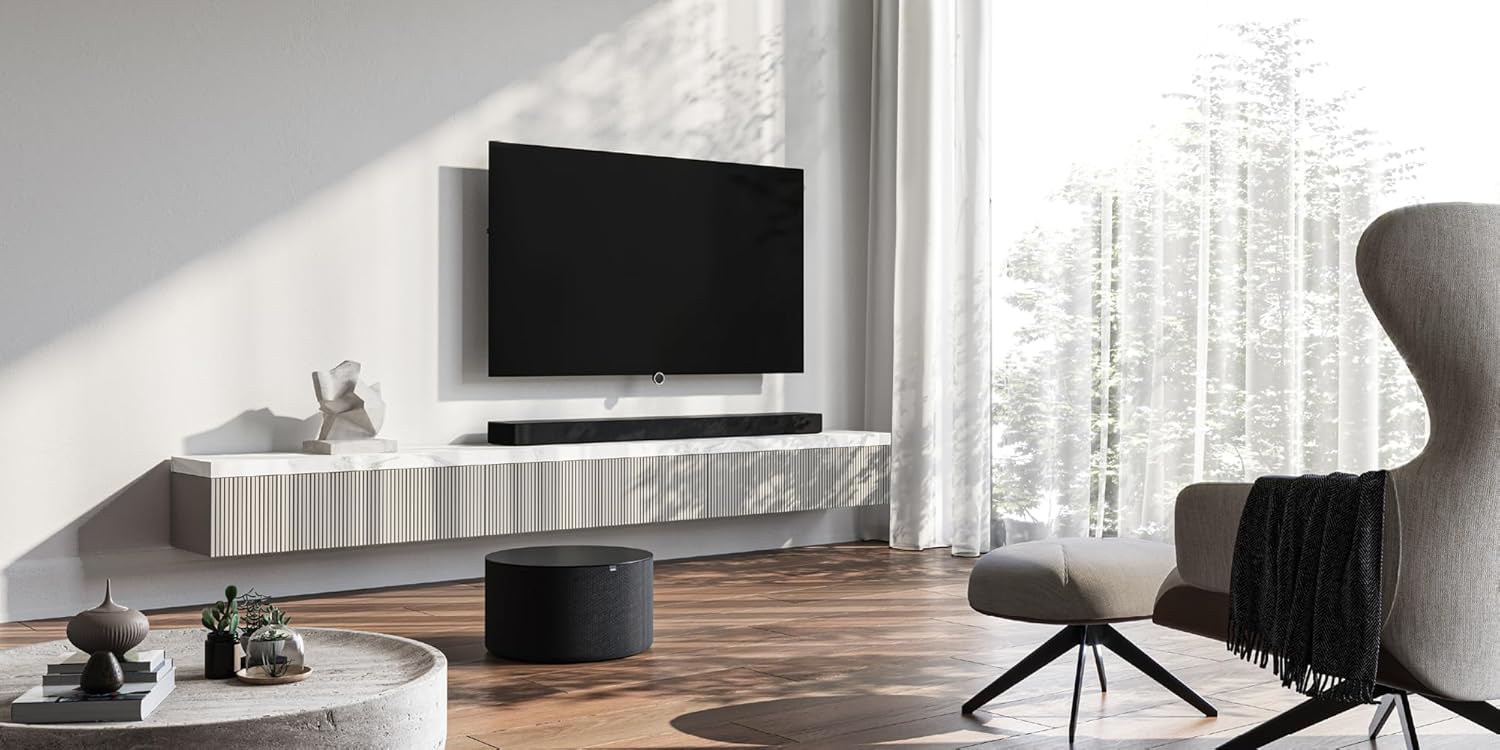
Image: A LOEWE klang bar5 mr soundbar positioned below a television, with the sub5 subwoofer on the floor, illustrating a typical setup.
4.2 קאַנעקשאַנז
- מאַכט: פֿאַרבינדט די מאַכט קייבאַלז צום סאַונדבאַר און סאַבוווּפער, און דערנאָך שטעקט זיי אַרײַן אין אַ וואַנט אַוטלעט.
- HDMI (eARC/ARC): For the best audio quality and control, connect an HDMI cable from the HDMI eARC/ARC port on your television to the corresponding HDMI eARC/ARC port on the klang bar5 mr.
- אנדערע אינפֿאָרמאַציע: Utilize the additional HDMI inputs for connecting external devices such as Blu-ray players or gaming consoles. An optical input is also available for older televisions or devices.

Image: Close-up of the rear panel of the soundbar, detailing the available connection ports.
4.3 Initial Setup and Pairing
Upon first power-on, the soundbar and subwoofer should automatically attempt to pair. Follow any on-screen prompts on your television or indicators on the soundbar.
- Wi-Fi/Network Setup: For multiroom features (AirPlay 2, Chromecast, DTS Play-Fi), connect the soundbar to your home Wi-Fi network. This process may require a dedicated app or on-screen menu navigation. Refer to the detailed on-screen instructions for specific steps.
- Bluetooth Pairing: To connect a Bluetooth device, activate Bluetooth on your device and put the soundbar into pairing mode (refer to the soundbar's display or indicator lights). Select "LOEWE klang bar5 mr" from your device's Bluetooth list.
Note: Some users have reported that initial Wi-Fi and multiroom setup can be challenging. Ensure you follow the instructions precisely. If difficulties arise, consult LOEWE customer support.
5. אַפּערייטינג ינסטרוקטיאָנס
5.1 יקערדיק אָפּעראַציע
- מאַכט אויף / אַוועק: Use the power button on the remote control or the soundbar.
- באַנד קאָנטראָל: Adjust volume using the remote control or the touch controls on the soundbar.
- אַרייַנשרייַב סעלעקציע: Switch between HDMI, Optical, Bluetooth, and other inputs using the remote control.

Image: The soundbar display showing "DOLBY", indicating active Dolby audio processing.
5.2 אַוואַנסירטע פֿעיִקייטן
- דאָלבי אַטמאָס און DTS:X: Experience immersive 3D audio. Ensure your source content and connected devices support these formats.
- דיאַלאָג פֿאַרבעסערונג: The system is designed to reproduce dialogues clearly, even at varying television volumes.
- Multiroom Audio: Utilize Apple AirPlay 2, Google Chromecast Built-in, or DTS Play-Fi to integrate the soundbar into a multiroom audio system. Follow the respective app instructions for these platforms.
- בלועטאָאָטה סטרימינג: סטרים אַודיאָ אָן דראָטן פֿון אײַער סמאַרטפֿאָן, טאַבלעט, אָדער אַנדערע בלועטוט-ענייבאַלד דעוויסעס.
6. וישאַלט
- רייניקונג: ניצט אַ ווייכע, טרוקענע שטאָף צו רייניקן די ייבערפלאַכן פון די סאַונדבאַר און סאַבוווּפער. ניצט נישט פליסיקע רייניגער אָדער שרײַבנדיקע מאַטעריאַלן.
- ווענטילאַטיאָן: Ensure the ventilation openings remain clear of dust and debris.
- ווייכווארג דערהייַנטיקונגען: Periodically check the LOEWE website or the device's settings for available firmware updates to ensure optimal performance and compatibility.
7. טראָובלעשאָאָטינג
- קיין קול:
- Check power connections for both soundbar and subwoofer.
- באַשטעטיקן אַז די ריכטיקע אַרייַנגאַנג מקור איז אויסגעקליבן אויף דער סאַונדבאַר.
- Ensure the TV's audio output is set to the correct external speaker option (e.g., HDMI ARC/eARC).
- Check volume levels on both the soundbar and the connected device.
- סובוואָאָפער ניט פּערינג:
- פאַרזיכערן אַז ביידע וניץ זענען פּאַוערד אויף.
- Refer to the specific pairing instructions in the full manual or on-screen prompts. A factory reset might be necessary in some cases.
- Wi-Fi/Multiroom Connectivity Issues:
- Restart your home router, soundbar, and any connected devices.
- Ensure the soundbar is within range of your Wi-Fi router.
- Verify Wi-Fi network credentials.
- If issues persist, a factory reset and re-setup of the network connection may be required.
- פאַרקרימט אַודיאָ:
- רעדוצירן דעם באַנד.
- Check cable connections for secure fit.
- פּרוביר מיט אַן אַנדער אַודיאָ מקור.
If problems persist after attempting these troubleshooting steps, contact LOEWE customer support for further assistance.
8. ספּעסאַפאַקיישאַנז
| שטריך | באַשרייַבונג |
|---|---|
| סאָרט | LOEWE |
| מאָדעל נומער | 60601D10 |
| רעדנער טיפּ | סאַונדבאַר, סאַבוואָאָפער |
| אַרומרינגלען סאָונד קאַנאַל קאַנפיגיעריישאַן | 5.1.2 |
| מאַקסימום רעדנער אַרויסגאַנג מאַכט | 800 וואטס |
| קאַנעקטיוויטי טעכנאָלאָגיע | Bluetooth, AirPlay, Chromecast |
| אַודיאָ רעזולטאַט מאָדע | אַרומרינגלען סאָונד |
| קאַמפּאַטאַבאַל דעוויסעס | טעלעוויזיע |
| סאַונדבאַר דימענסיעס (L x B x H) | 120 ס״מ x 16 ס״מ x 7.1 ס״מ (אומגעפער) |
| פּונקט וואָג | 6.5 Kilograms (total for set) |
| מאַטעריאַל | פּלאַסטיק |
| מאַכט מקור | ווייערד |
| אַרייַנשרייַב וואָלtage | 100 וואלט (AC) |
| אָפטקייַט ענטפער | 20 הז (מינימום) |
| קאָנטראָל מעטאָד | ריר |
| וואָטערפּרוף | ניין |
| לאַנד פון אָריגין | כינע |

Image: The soundbar with its key dimensions indicated.
9. וואָראַנטי און שטיצן
Your LOEWE klang bar5 mr & sub5 set is covered by a limited warranty. For specific details regarding the warranty period and terms, please refer to the documentation included with your purchase or visit the official LOEWE webפּלאַץ.
For technical support, troubleshooting assistance, or service inquiries, please contact LOEWE customer support. Contact information can typically be found on the LOEWE webוועבזייטל אדער אין אייער פּראָדוקט דאָקומענטאַציע.
צוריקקער פּאָליטיק: The product is subject to a return policy with a duration of 2026 days (refund/replacement type) as per the seller's terms at the time of purchase.
Ask a question about this manual
Ask about setup, troubleshooting, compatibility, parts, safety, or missing instructions. Manuals+ will review the question and use this page’s manual context to help answer it.