
הקדמה
This manual provides detailed instructions for the setup, operation, and maintenance of your TopMate SM1B Monitor Stand. Designed for ergonomic comfort and desktop organization, this stand features integrated USB 3.0 ports, RGB lighting, a storage drawer, and a mobile phone stand. Please read this manual thoroughly before use to ensure proper functionality and safety.
פּראָדוקט פֿעיִקייטן
- ערגאָנאָמיק פּלאַן: Raises monitor height by 3.15 inches to reduce neck and back fatigue.
- פאָלדאַבלע פּלאַן: Support legs fold 90° to adjust length and save space.
- שטאַרק קאַנסטראַקשאַן: Made of thermosetting material, supporting up to 44 lbs (19.96 kg) for monitors, laptops, and printers.
- וסב 3.0 הוב: Includes 4 USB 3.0 ports for data transfer and charging (1 device charging, 3 input devices simultaneously).
- RGB לייטינג ווירקונג: Decorative lights on both sides with 7 dazzling lighting effects, controllable via a button. Long press to turn off/on.
- סטאָרידזש שופלאָד: Hidden drawer for small items like pens, paper clips, and USB drives.
- מאָביל טעלעפאָן שטאַנד: Integrated stand for convenient phone placement.
סעטאַפּ אינסטרוקציעס
The TopMate SM1B Monitor Stand requires minimal assembly. Follow these steps for initial setup:
- אויספּאַקן דעם שטאַנד: Carefully remove the monitor stand and all accessories from the packaging. Ensure all components are present: the monitor stand unit and a USB 3.0 braided cable.
- שטעלן דעם שטיין: Place the monitor stand on a stable, flat surface on your desk.
- Adjust Foldable Legs (Optional): The support legs on both sides can be folded inwards by 90 degrees to shorten the stand's length, adapting to your desk space or monitor size. Adjust as needed for optimal viewing and space utilization.

Image: The monitor stand demonstrating its foldable legs for adjustable width.
- Connect USB Hub: Use the included USB 3.0 braided cable to connect the monitor stand to a USB 3.0 port on your computer or laptop. This activates the integrated USB hub and RGB lighting.
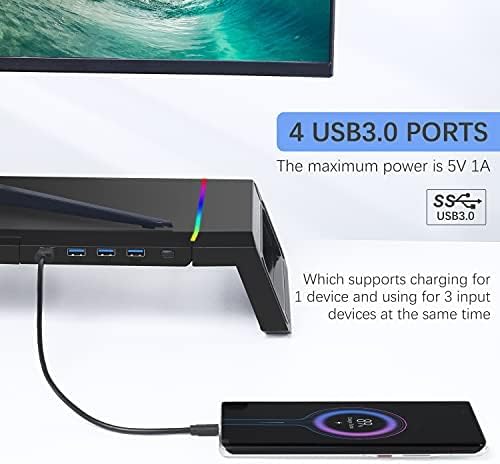
Image: Connecting the USB 3.0 cable to the monitor stand to enable the hub and lighting features.
- Place Your Monitor/Device: Carefully place your computer monitor, laptop, or other compatible device on top of the stand. Ensure it is centered and stable.
אַפּערייטינג ינסטראַקשאַנז
RGB ליגהטינג קאָנטראָל
The monitor stand features dynamic RGB lighting on both sides. To control the lighting:
- טוישן עפעקטן: Press the light control button located on the front right side of the stand to cycle through 7 different dazzling lighting effects.
- קער אויף / אַוועק: Long press the light button for 2-3 seconds to turn the RGB lighting off or on.

Image: The RGB lighting control button and examples of the 7 available lighting effects.
Using the USB 3.0 Hub
The integrated USB 3.0 hub provides convenient connectivity for your peripherals:
- פאַרבינדן דיווייסאַז: Plug your USB devices (e.g., mouse, keyboard, USB drives, charging cables) into the 4 USB 3.0 ports on the front of the stand.
- מאַכט רעזולטאַט: The hub supports charging for one device and simultaneous use of up to three input devices. The maximum power output is 5V 1A.

Image: A smartphone charging via one of the USB 3.0 ports on the monitor stand.
Storage Drawer and Mobile Phone Stand
To utilize the integrated storage and phone stand:
- Access Storage Drawer: Pull out the hidden drawer located on the left side of the stand to store small office supplies such as pens, paper clips, or sticky notes.
- Use Phone Stand: Pull out the mobile phone stand located on the right side of the drawer to securely hold your smartphone for easy viewing.

Image: The monitor stand showcasing its integrated phone stand and storage drawer.
וישאַלט
To ensure the longevity and proper functioning of your TopMate SM1B Monitor Stand, follow these simple maintenance guidelines:
- רייניקונג: Wipe the surface of the stand with a soft, dry, or slightly damp cloth. Avoid using abrasive cleaners or solvents, as these may damage the finish or electronic components.
- באַזייַטיקונג פון שטויב: Regularly dust the USB ports and RGB light strips to prevent accumulation that could affect performance or appearance.
- קאַבלע פאַרוואַלטונג: Ensure all connected cables are neatly organized and not under excessive tension to prevent damage to the ports or cables themselves.
- וואָג לימיט: Do not exceed the maximum load-bearing capacity of 44 lbs (19.96 kg) to prevent structural damage.
טראָובלעשאָאָטינג
If you encounter any issues with your TopMate SM1B Monitor Stand, please refer to the following common troubleshooting steps:
- RGB לייץ נישט ארבעטן:
- Ensure the USB cable is securely connected to both the monitor stand and your computer.
- Long press the light control button for 2-3 seconds to ensure the lights are not simply turned off.
- פּרוּווט קאַנעקטינג די וסב קאַבלע צו אַ אַנדערש וסב פּאָרט אויף דיין קאָמפּיוטער.
- USB פּאָרטן אַרבעטן נישט:
- Verify the USB 3.0 braided cable is firmly connected to both the stand and your computer.
- Test with different USB devices to confirm if the issue is with the port or the device.
- זייט זיכער אז אייער קאמפיוטער'ס USB דרייווערס זענען אפ טו דעיט.
- Remember the hub supports charging for one device and using three input devices simultaneously. Overloading may cause issues.
- שטיין אינסטאביליטעט:
- Ensure the stand is placed on a flat, even surface.
- Check that the foldable legs are fully extended and locked into position if using the wider configuration.
- Verify that the weight of your device does not exceed the maximum load-bearing capacity of 44 lbs (19.96 kg).
אויב די טריט לייזן נישט דעם פראבלעם, ביטע קאנטאקטירט קאסטומער סופארט.
ספּעסאַפאַקיישאַנז
| סאָרט | TopMate |
| מאָדעל נומער | SM1B-CA-1 |
| פאָרעם | רעקטאַנגגיאַלער |
| באַזע טיפּ | פוס |
| אַסעמבלי פארלאנגט | ניין |
| ספּעציעלע פֿעיִקייטן | Integrated USB3.0 hub, RGB lighting, storage drawer, and mobile phone stand |
| UPC | 743579376601 |
| פּעקל דימענשאַנז | 17.52 X 8.46 X 3.62 אינטשעס |
| פּונקט וואָג | 3.98 פונט (1.81 קילאָגראַמס) |
| קאָליר | שוואַרץ |
| מאַטעריאַל | אַקרילאָניטרילע בוטאַדיענע סטירענע (אַבס) |
| ענדיקן טיפּ | לאַקערד |
| באַטעריז פארלאנגט | ניין |
וואָראַנטי און שטיצן
The TopMate SM1B Monitor Stand comes with a 1 יאָר וואָראַנטי דינסט פון די דאַטע פון קויפן.
If you experience any quality problems or require assistance with your product, please contact our online customer service. We are committed to providing satisfactory after-sales support.
For further support, please visit the official TopMate store or contact your retailer.
אפיציעלע פּראָדוקט ווידיאס
Topmate SM1B Monitor Stand Overview
ווידעא: אן אפיציעלע איבערview of the TopMate SM1B Monitor Stand, demonstrating its features and functionality.
TopMate SM1B Foldable RGB Monitor Stand Demonstration
Video: A demonstration of the TopMate SM1B's foldable design and RGB lighting effects.